Compare commits
31 Commits
| Author | SHA1 | Date | |
|---|---|---|---|
 fracapuano fracapuano
|
1c8f922379 | ||
|
fracapuano
|
2b2ff19366 | ||
|
fracapuano
|
c912b1dd03 | ||
|
fracapuano
|
ca1841f5fc | ||
|
fracapuano
|
f6755dbf20 | ||
|
fracapuano
|
0846b5704c | ||
|
fracapuano
|
f386591be7 | ||
|
fracapuano
|
f875566e1d | ||
|
fracapuano
|
eaea3806e8 | ||
|
fracapuano
|
1ef0f0bb86 | ||
|
fracapuano
|
e70dd620f3 | ||
|
fracapuano
|
31274975f0 | ||
|
fracapuano
|
edbfa3d3e6 | ||
|
fracapuano
|
09e2a55901 | ||
|
fracapuano
|
413c5e01be | ||
|
fracapuano
|
91a0a4fe7a | ||
|
fracapuano
|
7710411d3a | ||
|
fracapuano
|
4a153825ee | ||
|
fracapuano
|
46606359fc | ||
|
fracapuano
|
1d0eb922bd | ||
|
fracapuano
|
1612aa7ac7 | ||
|
Francesco Capuano
|
c1f5d8f48f | ||
|
Michel Aractingi
|
14743b896e | ||
|
Jade Choghari
|
624939c71c | ||
|
Jade Choghari
|
a276f5b8ac | ||
|
Jade Choghari
|
33ff386dbc | ||
|
Jade Choghari
|
50f8cbc392 | ||
|
Jade Choghari
|
23999ba40d | ||
|
Jade Choghari
|
dd4837f06e | ||
|
Michel Aractingi
|
9f00d2c3a2 | ||
|
Michel Aractingi
|
950a6fb83d |
@@ -12,83 +12,57 @@
|
||||
# See the License for the specific language governing permissions and
|
||||
# limitations under the License.
|
||||
|
||||
name: "🚀 Issue / Bug / Request"
|
||||
description: Report a bug, suggest an improvement, or ask a technical question.
|
||||
name: "\U0001F41B Bug Report"
|
||||
description: Submit a bug report to help us improve LeRobot
|
||||
body:
|
||||
- type: markdown
|
||||
attributes:
|
||||
value: |
|
||||
### Thanks for contributing to LeRobot! 🙌
|
||||
Please choose the most relevant sections below. If this is a general "how-to" question, consider our [Discord](https://discord.gg/s3KuuzsPFb) for faster community support.
|
||||
|
||||
- type: dropdown
|
||||
id: issue-type
|
||||
attributes:
|
||||
label: Ticket Type
|
||||
description: What kind of ticket are you opening?
|
||||
options:
|
||||
- "🐛 Bug Report (Something isn't working)"
|
||||
- "💡 Feature Request / Improvement"
|
||||
- "❓ Technical Question"
|
||||
- "🧹 Maintenance / Documentation"
|
||||
validations:
|
||||
required: true
|
||||
Thanks for taking the time to submit a bug report! 🐛
|
||||
If this is not a bug related to the LeRobot library directly, but instead a general question about your code or the library specifically please use our [discord](https://discord.gg/s3KuuzsPFb).
|
||||
|
||||
- type: textarea
|
||||
id: system-info
|
||||
attributes:
|
||||
label: Environment & System Info
|
||||
description: |
|
||||
For bugs or technical questions, please run `lerobot-info` and paste the output.
|
||||
(Optional for feature requests).
|
||||
label: System Info
|
||||
description: Please share your LeRobot configuration by running `lerobot-info` (if installed) or `python -m lerobot.scripts.display_sys_info` (if not installed) and pasting the output below.
|
||||
render: Shell
|
||||
placeholder: lerobot version, OS, python version, etc.
|
||||
placeholder: lerobot version, OS, python version, numpy version, torch version, and lerobot's configuration
|
||||
validations:
|
||||
required: true
|
||||
|
||||
- type: checkboxes
|
||||
id: information-scripts-examples
|
||||
attributes:
|
||||
label: Information
|
||||
description: 'The problem arises when using:'
|
||||
options:
|
||||
- label: "One of the scripts in the examples/ folder of LeRobot"
|
||||
- label: "My own task or dataset (give details below)"
|
||||
|
||||
- type: textarea
|
||||
id: description
|
||||
id: reproduction
|
||||
validations:
|
||||
required: true
|
||||
attributes:
|
||||
label: Description
|
||||
label: Reproduction
|
||||
description: |
|
||||
Provide a clear summary of the issue or your proposal.
|
||||
- **Bugs:** What is happening?
|
||||
- **Features:** What is the goal/use case?
|
||||
- **Questions:** What are you trying to achieve?
|
||||
If needed, provide a simple code sample that reproduces the problem you ran into. It can be a Colab link or just a code snippet.
|
||||
Sharing error messages or stack traces could be useful as well!
|
||||
Important! Use code tags to correctly format your code. See https://help.github.com/en/github/writing-on-github/creating-and-highlighting-code-blocks#syntax-highlighting
|
||||
Try to avoid screenshots, as they are hard to read and don't allow copy-and-pasting.
|
||||
|
||||
placeholder: |
|
||||
A clear and concise description of the issue or suggestion.
|
||||
Steps to reproduce the behavior:
|
||||
|
||||
1.
|
||||
2.
|
||||
3.
|
||||
|
||||
- type: textarea
|
||||
id: context-repro
|
||||
id: expected-behavior
|
||||
validations:
|
||||
required: true
|
||||
attributes:
|
||||
label: Context & Reproduction
|
||||
description: |
|
||||
Provide a code snippet, steps to reproduce a bug, or technical details about your proposal.
|
||||
Please use code blocks for scripts and CLI commands.
|
||||
placeholder: |
|
||||
Steps to reproduce / Usage example:
|
||||
1.
|
||||
2.
|
||||
3.
|
||||
|
||||
- type: textarea
|
||||
id: logs
|
||||
attributes:
|
||||
label: Relevant logs or stack trace
|
||||
description: If applicable, paste relevant error logs here.
|
||||
render: Shell
|
||||
|
||||
- type: checkboxes
|
||||
id: extras
|
||||
attributes:
|
||||
label: Checklist
|
||||
options:
|
||||
- label: I have searched existing tickets to ensure this isn't a duplicate.
|
||||
- label: I am using the latest version of the `main` branch.
|
||||
- label: I have verified this is not an environment-specific problem.
|
||||
|
||||
- type: textarea
|
||||
id: workaround
|
||||
attributes:
|
||||
label: Additional Info / Workarounds
|
||||
description: Anything else we should know? If you have a workaround, please share it!
|
||||
label: Expected behavior
|
||||
description: "A clear and concise description of what you would expect to happen."
|
||||
|
||||
@@ -1,54 +1,41 @@
|
||||
## Title
|
||||
## What this does
|
||||
|
||||
Short, imperative summary (e.g., "fix(robots): handle None in sensor parser"). See [CONTRIBUTING.md](../CONTRIBUTING.md) for PR conventions.
|
||||
Explain what this PR does. Feel free to tag your PR with the appropriate label(s).
|
||||
|
||||
## Type / Scope
|
||||
Examples:
|
||||
| Title | Label |
|
||||
|----------------------|-----------------|
|
||||
| Fixes #[issue] | (🐛 Bug) |
|
||||
| Adds new dataset | (🗃️ Dataset) |
|
||||
| Optimizes something | (⚡️ Performance) |
|
||||
|
||||
- **Type**: (Bug | Feature | Docs | Performance | Test | CI | Chore)
|
||||
- **Scope**: (optional — name of module or package affected)
|
||||
## How it was tested
|
||||
|
||||
## Summary / Motivation
|
||||
Explain/show how you tested your changes.
|
||||
|
||||
- One-paragraph description of what changes and why.
|
||||
- Why this change is needed and any trade-offs or design notes.
|
||||
Examples:
|
||||
|
||||
## Related issues
|
||||
- Added `test_something` in `tests/test_stuff.py`.
|
||||
- Added `new_feature` and checked that training converges with policy X on dataset/environment Y.
|
||||
- Optimized `some_function`, it now runs X times faster than previously.
|
||||
|
||||
- Fixes / Closes: # (if any)
|
||||
- Related: # (if any)
|
||||
## How to checkout & try? (for the reviewer)
|
||||
|
||||
## What changed
|
||||
Provide a simple way for the reviewer to try out your changes.
|
||||
|
||||
- Short, concrete bullets of the modifications (files/behaviour).
|
||||
- Short note if this introduces breaking changes and migration steps.
|
||||
Examples:
|
||||
|
||||
## How was this tested
|
||||
```bash
|
||||
pytest -sx tests/test_stuff.py::test_something
|
||||
```
|
||||
|
||||
- Tests added: list new tests or test files.
|
||||
- Manual checks / dataset runs performed.
|
||||
```bash
|
||||
lerobot-train --some.option=true
|
||||
```
|
||||
|
||||
## How to run locally (reviewer)
|
||||
## SECTION TO REMOVE BEFORE SUBMITTING YOUR PR
|
||||
|
||||
- Run the relevant tests:
|
||||
**Note**: Anyone in the community is free to review the PR once the tests have passed. Feel free to tag
|
||||
members/contributors who may be interested in your PR. Try to avoid tagging more than 3 people.
|
||||
|
||||
```bash
|
||||
pytest -q tests/ -k <keyword>
|
||||
```
|
||||
|
||||
- Run a quick example or CLI (if applicable):
|
||||
|
||||
```bash
|
||||
lerobot-train --some.option=true
|
||||
```
|
||||
|
||||
## Checklist (required before merge)
|
||||
|
||||
- [ ] Linting/formatting run (`pre-commit run -a`)
|
||||
- [ ] All tests pass locally (`pytest`)
|
||||
- [ ] Documentation updated
|
||||
- [ ] CI is green
|
||||
|
||||
## Reviewer notes
|
||||
|
||||
- Anything the reviewer should focus on (performance, edge-cases, specific files) or general notes.
|
||||
- Anyone in the community is free to review the PR.
|
||||
**Note**: Before submitting this PR, please read the [contributor guideline](https://github.com/huggingface/lerobot/blob/main/CONTRIBUTING.md#submitting-a-pull-request-pr).
|
||||
|
||||
@@ -1,69 +0,0 @@
|
||||
# Copyright 2025 The HuggingFace Inc. team. All rights reserved.
|
||||
#
|
||||
# Licensed under the Apache License, Version 2.0 (the "License");
|
||||
# you may not use this file except in compliance with the License.
|
||||
# You may obtain a copy of the License at
|
||||
#
|
||||
# http://www.apache.org/licenses/LICENSE-2.0
|
||||
#
|
||||
# Unless required by applicable law or agreed to in writing, software
|
||||
# distributed under the License is distributed on an "AS IS" BASIS,
|
||||
# WITHOUT WARRANTIES OR CONDITIONS OF ANY KIND, either express or implied.
|
||||
# See the License for the specific language governing permissions and
|
||||
# limitations under the License.
|
||||
|
||||
CI:
|
||||
- changed-files:
|
||||
- any-glob-to-any-file:
|
||||
- '.github/**'
|
||||
- 'docker/**'
|
||||
|
||||
github_actions:
|
||||
- changed-files:
|
||||
- any-glob-to-any-file: '.github/**'
|
||||
|
||||
documentation:
|
||||
- changed-files:
|
||||
- any-glob-to-any-file:
|
||||
- '**/*.md'
|
||||
- '**/*.mdx'
|
||||
- 'docs/**'
|
||||
|
||||
examples:
|
||||
- changed-files:
|
||||
- any-glob-to-any-file: 'examples/**'
|
||||
|
||||
tests:
|
||||
- changed-files:
|
||||
- any-glob-to-any-file: 'tests/**'
|
||||
|
||||
sensors:
|
||||
- changed-files:
|
||||
- any-glob-to-any-file: 'src/lerobot/cameras/**'
|
||||
|
||||
configuration:
|
||||
- changed-files:
|
||||
- any-glob-to-any-file: 'src/lerobot/configs/**'
|
||||
|
||||
dataset:
|
||||
- changed-files:
|
||||
- any-glob-to-any-file: 'src/lerobot/datasets/**'
|
||||
|
||||
evaluation:
|
||||
- changed-files:
|
||||
- any-glob-to-any-file: 'src/lerobot/envs/**'
|
||||
|
||||
robots:
|
||||
- changed-files:
|
||||
- any-glob-to-any-file:
|
||||
- 'src/lerobot/teleoperators/**'
|
||||
- 'src/lerobot/robots/**'
|
||||
- 'src/lerobot/motors/**'
|
||||
|
||||
policies:
|
||||
- changed-files:
|
||||
- any-glob-to-any-file: 'src/lerobot/policies/**'
|
||||
|
||||
processor:
|
||||
- changed-files:
|
||||
- any-glob-to-any-file: 'src/lerobot/processor/**'
|
||||
@@ -31,8 +31,7 @@ jobs:
|
||||
name: Upload Preview and Comment
|
||||
if: >
|
||||
github.event.workflow_run.event == 'pull_request' &&
|
||||
github.event.workflow_run.conclusion == 'success' &&
|
||||
github.repository == 'huggingface/lerobot'
|
||||
github.event.workflow_run.conclusion == 'success'
|
||||
uses: huggingface/doc-builder/.github/workflows/upload_pr_documentation.yml@main
|
||||
with:
|
||||
package_name: lerobot
|
||||
|
||||
@@ -42,9 +42,7 @@ jobs:
|
||||
# This job builds and deploys the official documentation.
|
||||
build_main_docs:
|
||||
name: Build Main Docs
|
||||
if: >
|
||||
(github.event_name == 'push' || github.event_name == 'workflow_dispatch') &&
|
||||
github.repository == 'huggingface/lerobot'
|
||||
if: github.event_name == 'push' || github.event_name == 'workflow_dispatch'
|
||||
permissions:
|
||||
contents: read
|
||||
uses: huggingface/doc-builder/.github/workflows/build_main_documentation.yml@main
|
||||
@@ -60,7 +58,7 @@ jobs:
|
||||
# The result of this job triggers the 'Upload PR Documentation' workflow.
|
||||
build_pr_docs:
|
||||
name: Build PR Docs
|
||||
if: github.event_name == 'pull_request' && github.repository == 'huggingface/lerobot'
|
||||
if: github.event_name == 'pull_request'
|
||||
permissions:
|
||||
contents: read
|
||||
pull-requests: write
|
||||
|
||||
@@ -45,6 +45,7 @@ permissions:
|
||||
env:
|
||||
UV_VERSION: "0.8.0"
|
||||
PYTHON_VERSION: "3.10"
|
||||
DOCKER_IMAGE_NAME: huggingface/lerobot-gpu
|
||||
|
||||
# Ensures that only the latest commit for a PR or branch is built, canceling older runs.
|
||||
concurrency:
|
||||
@@ -59,19 +60,12 @@ jobs:
|
||||
runs-on: ubuntu-latest
|
||||
env:
|
||||
MUJOCO_GL: egl
|
||||
HF_HOME: /mnt/cache/.cache/huggingface
|
||||
HF_LEROBOT_HOME: /mnt/cache/.cache/huggingface/lerobot
|
||||
steps:
|
||||
- uses: actions/checkout@v4
|
||||
with:
|
||||
persist-credentials: false
|
||||
lfs: true
|
||||
|
||||
# NOTE(Steven): Mount to `/mnt` to avoid the limited storage on `/home`. Consider cleaning default SDKs or using self-hosted runners for more space.
|
||||
# (As of 2024-06-10, the runner's `/home` has only 6.2 GB free—8% of its 72 GB total.)
|
||||
- name: Setup /mnt storage
|
||||
run: sudo chown -R $USER:$USER /mnt
|
||||
|
||||
# TODO(Steven): Evaluate the need of these dependencies
|
||||
- name: Install apt dependencies
|
||||
run: |
|
||||
|
||||
@@ -58,19 +58,12 @@ jobs:
|
||||
github.event_name == 'workflow_dispatch'
|
||||
env:
|
||||
MUJOCO_GL: egl
|
||||
HF_HOME: /mnt/cache/.cache/huggingface
|
||||
HF_LEROBOT_HOME: /mnt/cache/.cache/huggingface/lerobot
|
||||
steps:
|
||||
- uses: actions/checkout@v4
|
||||
with:
|
||||
lfs: true
|
||||
persist-credentials: false
|
||||
|
||||
# NOTE(Steven): Mount to `/mnt` to avoid the limited storage on `/home`. Consider cleaning default SDKs or using self-hosted runners for more space.
|
||||
# (As of 2024-06-10, the runner's `/home` has only 6.2 GB free—8% of its 72 GB total.)
|
||||
- name: Setup /mnt storage
|
||||
run: sudo chown -R $USER:$USER /mnt
|
||||
|
||||
- name: Install apt dependencies
|
||||
run: |
|
||||
sudo apt-get update && sudo apt-get install -y build-essential \
|
||||
@@ -85,7 +78,7 @@ jobs:
|
||||
python-version: ${{ env.PYTHON_VERSION }}
|
||||
|
||||
- name: Install lerobot with all extras
|
||||
run: uv sync --all-extras --no-extra groot --no-extra wallx # TODO(Steven): Make flash-attn optional
|
||||
run: uv sync --all-extras --no-extra groot # TODO(Steven): Make flash-attn optional
|
||||
|
||||
- name: Run pytest (all extras)
|
||||
run: uv run pytest tests -vv --maxfail=10
|
||||
|
||||
@@ -1,89 +0,0 @@
|
||||
# Copyright 2025 The HuggingFace Inc. team. All rights reserved.
|
||||
#
|
||||
# Licensed under the Apache License, Version 2.0 (the "License");
|
||||
# you may not use this file except in compliance with the License.
|
||||
# You may obtain a copy of the License at
|
||||
#
|
||||
# http://www.apache.org/licenses/LICENSE-2.0
|
||||
#
|
||||
# Unless required by applicable law or agreed to in writing, software
|
||||
# distributed under the License is distributed on an "AS IS" BASIS,
|
||||
# WITHOUT WARRANTIES OR CONDITIONS OF ANY KIND, either express or implied.
|
||||
# See the License for the specific language governing permissions and
|
||||
# limitations under the License.
|
||||
|
||||
# This workflow automatically labels issues based on their content.
|
||||
name: Issue Labeler
|
||||
on:
|
||||
# Trigger on new issues and edits to existing issues
|
||||
issues:
|
||||
types: [opened, edited]
|
||||
|
||||
permissions:
|
||||
contents: read
|
||||
issues: write
|
||||
|
||||
jobs:
|
||||
label-issue:
|
||||
name: Auto Label Issue
|
||||
runs-on: ubuntu-latest
|
||||
if: github.repository == 'huggingface/lerobot'
|
||||
steps:
|
||||
- uses: actions/github-script@v8
|
||||
with:
|
||||
script: |
|
||||
// Setup Input Text
|
||||
const body = (context.payload.issue.body || '');
|
||||
const title = (context.payload.issue.title || '');
|
||||
const cleanBody = body.replace(/```[\s\S]*?```/g, '');
|
||||
const text = `${title}\n${cleanBody}`.toLowerCase();
|
||||
const labelsToAdd = new Set();
|
||||
const matches = (re) => re.test(text);
|
||||
|
||||
// Keyword Heuristics
|
||||
|
||||
// Domain Specific
|
||||
if (matches(/\b(bug|error|issue|fault|crash|exception)\b/i)) labelsToAdd.add('bug');
|
||||
if (matches(/\b(feature|enhancement|improvement|support|implement|proposal)\b/i)) labelsToAdd.add('enhancement');
|
||||
if (matches(/\b(question|help|how to||clarify|explain|unclear)\b/i)) labelsToAdd.add('question');
|
||||
if (matches(/\b(maintenance|documentation|docs|readme|tutorial|guide|wiki)\b/i)) labelsToAdd.add('documentation');
|
||||
if (matches(/\b(example|script|sample|demo|notebook)s?\b/i)) labelsToAdd.add('examples');
|
||||
if (matches(/\b(datasets?|data loader|data augmentation|data preprocessing)\b/i)) labelsToAdd.add('dataset');
|
||||
if (matches(/\b(mujoco|isaac|simulation|sim)\b/i)) labelsToAdd.add('simulation');
|
||||
if (matches(/\b(train|training|loss|optimizer|backward|gradient|wandb|sac)\b/i)) labelsToAdd.add('training');
|
||||
if (matches(/\b(rerun|plot|video|render|visualiz|gif)/i)) labelsToAdd.add('visualization');
|
||||
if (matches(/\b(camera|realsense|lidar|depth|sensor|imu|microphone|rgbd)\b/i)) labelsToAdd.add('sensors');
|
||||
if (matches(/\b(aloha|koch|so-100|so100|mobile|teleop|manipulator|robots?)\b/i)) labelsToAdd.add('robots');
|
||||
if (matches(/\b(teleop|teleoperator|controller|leader|follower|joystick|gamepad)\b/i)) labelsToAdd.add('teleoperators');
|
||||
if (matches(/\b(policy|policies|p0licy)\b/i)) labelsToAdd.add('policies');
|
||||
if (matches(/\b(processors?|pipeline)\b/i)) labelsToAdd.add('processor');
|
||||
if (matches(/\b(eval|evaluate|evaluation|metrics?|score|benchmark)\b/i)) labelsToAdd.add('evaluation');
|
||||
|
||||
// Infrastructure & Code Quality
|
||||
if (matches(/\b(tests?|pytest|unittest|failing test)\b/i)) labelsToAdd.add('tests');
|
||||
if (matches(/\b(ci|github actions|workflow|gha|actions?|pipeline)\b/i)) {
|
||||
labelsToAdd.add('CI');
|
||||
labelsToAdd.add('github_actions');
|
||||
}
|
||||
if (matches(/\b(perf|latency|throughput|fps|speed|performance)\b/i)) labelsToAdd.add('performance');
|
||||
if (matches(/\b(dependency|requirements|pip|conda|install error|importerror|package not found)\b/i)) labelsToAdd.add('dependencies');
|
||||
if (matches(/\b(python|pyproject|requirements(\.txt)?|pip install|typing error)\b/i)) labelsToAdd.add('python');
|
||||
|
||||
// Documentation & Meta
|
||||
if (matches(/\b(doc|documentation|docs|readme|typo|how to)\b/i)) labelsToAdd.add('documentation');
|
||||
if (matches(/\b(refactor|cleanup|restructure|rename|modernize code)\b/i)) labelsToAdd.add('refactor');
|
||||
if (matches(/\b(release|changelog|version bump|cut a release|tag v)\b/i)) labelsToAdd.add('release');
|
||||
if (matches(/\b(breaking change|major change)\b/i)) labelsToAdd.add('breaking change');
|
||||
|
||||
// Apply Labels
|
||||
const labels = Array.from(labelsToAdd).filter(Boolean);
|
||||
|
||||
if (labels.length > 0) {
|
||||
console.log(`Adding labels: ${labels.join(', ')}`);
|
||||
await github.rest.issues.addLabels({
|
||||
owner: context.repo.owner,
|
||||
repo: context.repo.repo,
|
||||
issue_number: context.issue.number,
|
||||
labels,
|
||||
});
|
||||
}
|
||||
@@ -43,7 +43,6 @@ jobs:
|
||||
name: Build CPU Docker for Nightly
|
||||
runs-on:
|
||||
group: aws-general-8-plus
|
||||
if: github.repository == 'huggingface/lerobot'
|
||||
outputs:
|
||||
image_tag: ${{ env.DOCKER_IMAGE_NAME_CPU }}
|
||||
steps:
|
||||
@@ -78,7 +77,6 @@ jobs:
|
||||
name: Build GPU Docker for Nightly
|
||||
runs-on:
|
||||
group: aws-general-8-plus
|
||||
if: github.repository == 'huggingface/lerobot'
|
||||
outputs:
|
||||
image_tag: ${{ env.DOCKER_IMAGE_NAME_GPU }}
|
||||
steps:
|
||||
|
||||
@@ -1,39 +0,0 @@
|
||||
# Copyright 2025 The HuggingFace Inc. team. All rights reserved.
|
||||
#
|
||||
# Licensed under the Apache License, Version 2.0 (the "License");
|
||||
# you may not use this file except in compliance with the License.
|
||||
# You may obtain a copy of the License at
|
||||
#
|
||||
# http://www.apache.org/licenses/LICENSE-2.0
|
||||
#
|
||||
# Unless required by applicable law or agreed to in writing, software
|
||||
# distributed under the License is distributed on an "AS IS" BASIS,
|
||||
# WITHOUT WARRANTIES OR CONDITIONS OF ANY KIND, either express or implied.
|
||||
# See the License for the specific language governing permissions and
|
||||
# limitations under the License.
|
||||
|
||||
# This workflow labels pull requests based on the files that were changed.
|
||||
name: Pull Request Labeler
|
||||
|
||||
on:
|
||||
# Allows labeling pull requests when they are opened or updated
|
||||
# zizmor: ignore[dangerous-triggers] Needed to label PRs from forks
|
||||
pull_request_target:
|
||||
branches:
|
||||
- main
|
||||
types: [opened, synchronize, reopened, ready_for_review]
|
||||
|
||||
permissions:
|
||||
contents: read
|
||||
pull-requests: write
|
||||
|
||||
jobs:
|
||||
triage:
|
||||
name: Label PR
|
||||
runs-on: ubuntu-latest
|
||||
if: github.repository == 'huggingface/lerobot' && !github.event.pull_request.draft
|
||||
steps:
|
||||
- uses: actions/labeler@v6
|
||||
with:
|
||||
repo-token: ${{ secrets.GITHUB_TOKEN }}
|
||||
sync-labels: true # Removes labels if files are removed from the PR
|
||||
@@ -29,7 +29,6 @@ jobs:
|
||||
build-and-publish:
|
||||
name: Build and publish Python distributions
|
||||
runs-on: ubuntu-latest
|
||||
if: github.repository == 'huggingface/lerobot'
|
||||
outputs:
|
||||
version: ${{ steps.extract_info.outputs.tag_version }}
|
||||
permissions:
|
||||
|
||||
@@ -45,7 +45,6 @@ jobs:
|
||||
stale:
|
||||
name: Close Stale Issues and PRs
|
||||
runs-on: ubuntu-latest
|
||||
if: github.repository == 'huggingface/lerobot'
|
||||
permissions:
|
||||
actions: write
|
||||
contents: write # only for delete-branch option
|
||||
|
||||
@@ -43,22 +43,14 @@ jobs:
|
||||
full-tests:
|
||||
name: Full Unbound Tests
|
||||
runs-on: ubuntu-latest
|
||||
if: github.repository == 'huggingface/lerobot'
|
||||
env:
|
||||
MUJOCO_GL: egl
|
||||
HF_HOME: /mnt/cache/.cache/huggingface
|
||||
HF_LEROBOT_HOME: /mnt/cache/.cache/huggingface/lerobot
|
||||
steps:
|
||||
- uses: actions/checkout@v4
|
||||
with:
|
||||
lfs: true
|
||||
persist-credentials: false
|
||||
|
||||
# NOTE(Steven): Mount to `/mnt` to avoid the limited storage on `/home`. Consider cleaning default SDKs or using self-hosted runners for more space.
|
||||
# (As of 2024-06-10, the runner's `/home` has only 6.2 GB free—8% of its 72 GB total.)
|
||||
- name: Setup /mnt storage
|
||||
run: sudo chown -R $USER:$USER /mnt
|
||||
|
||||
- name: Install apt dependencies
|
||||
run: |
|
||||
sudo apt-get update && sudo apt-get install -y build-essential \
|
||||
@@ -78,7 +70,7 @@ jobs:
|
||||
echo "Dependencies unbound:" && cat pyproject.toml
|
||||
|
||||
- name: Install lerobot with all extras
|
||||
run: uv sync --all-extras --no-extra groot --no-extra wallx # TODO(Steven): Make flash-attn optional
|
||||
run: uv sync --all-extras --no-extra groot # TODO(Steven): Make flash-attn optional
|
||||
|
||||
- name: Run pytest (all extras)
|
||||
run: uv run pytest tests -vv
|
||||
|
||||
@@ -87,7 +87,7 @@ repos:
|
||||
# TODO(Steven): Uncomment when ready to use
|
||||
##### Static Analysis & Typing #####
|
||||
- repo: https://github.com/pre-commit/mirrors-mypy
|
||||
rev: v1.19.1
|
||||
rev: v1.18.2
|
||||
hooks:
|
||||
- id: mypy
|
||||
args: [--config-file=pyproject.toml]
|
||||
|
||||
@@ -52,7 +52,7 @@ decisions when appropriate.
|
||||
|
||||
This Code of Conduct applies within all community spaces, and also applies when
|
||||
an individual is officially representing the community in public spaces.
|
||||
Examples of representing our community include using an official e-mail address,
|
||||
Examples of representing our community include using an official email address,
|
||||
posting via an official social media account, or acting as an appointed
|
||||
representative at an online or offline event.
|
||||
|
||||
@@ -60,7 +60,7 @@ representative at an online or offline event.
|
||||
|
||||
Instances of abusive, harassing, or otherwise unacceptable behavior may be
|
||||
reported to the community leaders responsible for enforcement at
|
||||
feedback@huggingface.co.
|
||||
[feedback@huggingface.co](mailto:feedback@huggingface.co).
|
||||
All complaints will be reviewed and investigated promptly and fairly.
|
||||
|
||||
All community leaders are obligated to respect the privacy and security of the
|
||||
|
||||
@@ -1,5 +1,7 @@
|
||||
<p align="center">
|
||||
<img alt="LeRobot, Hugging Face Robotics Library" src="./media/readme/lerobot-logo-thumbnail.png" width="100%">
|
||||
<img alt="LeRobot, Hugging Face Robotics Library" src="https://raw.githubusercontent.com/huggingface/lerobot/main/media/lerobot-logo-thumbnail.png" width="100%">
|
||||
<br/>
|
||||
<br/>
|
||||
</p>
|
||||
|
||||
<div align="center">
|
||||
@@ -10,130 +12,323 @@
|
||||
[](https://pypi.org/project/lerobot/)
|
||||
[](https://pypi.org/project/lerobot/)
|
||||
[](https://github.com/huggingface/lerobot/blob/main/CODE_OF_CONDUCT.md)
|
||||
[](https://discord.gg/s3KuuzsPFb)
|
||||
|
||||
<!-- [](https://codecov.io/gh/huggingface/lerobot) -->
|
||||
|
||||
</div>
|
||||
|
||||
**LeRobot** aims to provide models, datasets, and tools for real-world robotics in PyTorch. The goal is to lower the barrier to entry so that everyone can contribute to and benefit from shared datasets and pretrained models.
|
||||
<h2 align="center">
|
||||
<p><a href="https://huggingface.co/docs/lerobot/hope_jr">
|
||||
Build Your Own HopeJR Robot!</a></p>
|
||||
</h2>
|
||||
|
||||
🤗 A hardware-agnostic, Python-native interface that standardizes control across diverse platforms, from low-cost arms (SO-100) to humanoids.
|
||||
<div align="center">
|
||||
<img
|
||||
src="https://raw.githubusercontent.com/huggingface/lerobot/main/media/hope_jr/hopejr.png"
|
||||
alt="HopeJR robot"
|
||||
title="HopeJR robot"
|
||||
width="60%"
|
||||
/>
|
||||
|
||||
🤗 A standardized, scalable LeRobotDataset format (Parquet + MP4 or images) hosted on the Hugging Face Hub, enabling efficient storage, streaming and visualization of massive robotic datasets.
|
||||
<p><strong>Meet HopeJR – A humanoid robot arm and hand for dexterous manipulation!</strong></p>
|
||||
<p>Control it with exoskeletons and gloves for precise hand movements.</p>
|
||||
<p>Perfect for advanced manipulation tasks! 🤖</p>
|
||||
|
||||
🤗 State-of-the-art policies that have been shown to transfer to the real-world ready for training and deployment.
|
||||
<p><a href="https://huggingface.co/docs/lerobot/hope_jr">
|
||||
See the full HopeJR tutorial here.</a></p>
|
||||
</div>
|
||||
|
||||
🤗 Comprehensive support for the open-source ecosystem to democratize physical AI.
|
||||
<br/>
|
||||
|
||||
## Quick Start
|
||||
<h2 align="center">
|
||||
<p><a href="https://huggingface.co/docs/lerobot/so101">
|
||||
Build Your Own SO-101 Robot!</a></p>
|
||||
</h2>
|
||||
|
||||
LeRobot can be installed directly from PyPI.
|
||||
<div align="center">
|
||||
<table>
|
||||
<tr>
|
||||
<td align="center"><img src="https://raw.githubusercontent.com/huggingface/lerobot/main/media/so101/so101.webp" alt="SO-101 follower arm" title="SO-101 follower arm" width="90%"/></td>
|
||||
<td align="center"><img src="https://raw.githubusercontent.com/huggingface/lerobot/main/media/so101/so101-leader.webp" alt="SO-101 leader arm" title="SO-101 leader arm" width="90%"/></td>
|
||||
</tr>
|
||||
</table>
|
||||
|
||||
<p><strong>Meet the updated SO100, the SO-101 – Just €114 per arm!</strong></p>
|
||||
<p>Train it in minutes with a few simple moves on your laptop.</p>
|
||||
<p>Then sit back and watch your creation act autonomously! 🤯</p>
|
||||
|
||||
<p><a href="https://huggingface.co/docs/lerobot/so101">
|
||||
See the full SO-101 tutorial here.</a></p>
|
||||
|
||||
<p>Want to take it to the next level? Make your SO-101 mobile by building LeKiwi!</p>
|
||||
<p>Check out the <a href="https://huggingface.co/docs/lerobot/lekiwi">LeKiwi tutorial</a> and bring your robot to life on wheels.</p>
|
||||
|
||||
<img src="https://raw.githubusercontent.com/huggingface/lerobot/main/media/lekiwi/kiwi.webp" alt="LeKiwi mobile robot" title="LeKiwi mobile robot" width="50%">
|
||||
</div>
|
||||
|
||||
<br/>
|
||||
|
||||
<h3 align="center">
|
||||
<p>LeRobot: State-of-the-art AI for real-world robotics</p>
|
||||
</h3>
|
||||
|
||||
---
|
||||
|
||||
🤗 LeRobot aims to provide models, datasets, and tools for real-world robotics in PyTorch. The goal is to lower the barrier to entry to robotics so that everyone can contribute and benefit from sharing datasets and pretrained models.
|
||||
|
||||
🤗 LeRobot contains state-of-the-art approaches that have been shown to transfer to the real-world with a focus on imitation learning and reinforcement learning.
|
||||
|
||||
🤗 LeRobot already provides a set of pretrained models, datasets with human collected demonstrations, and simulation environments to get started without assembling a robot. In the coming weeks, the plan is to add more and more support for real-world robotics on the most affordable and capable robots out there.
|
||||
|
||||
🤗 LeRobot hosts pretrained models and datasets on this Hugging Face community page: [huggingface.co/lerobot](https://huggingface.co/lerobot)
|
||||
|
||||
#### Examples of pretrained models on simulation environments
|
||||
|
||||
<table>
|
||||
<tr>
|
||||
<td><img src="https://raw.githubusercontent.com/huggingface/lerobot/main/media/gym/aloha_act.gif" width="100%" alt="ACT policy on ALOHA env"/></td>
|
||||
<td><img src="https://raw.githubusercontent.com/huggingface/lerobot/main/media/gym/simxarm_tdmpc.gif" width="100%" alt="TDMPC policy on SimXArm env"/></td>
|
||||
<td><img src="https://raw.githubusercontent.com/huggingface/lerobot/main/media/gym/pusht_diffusion.gif" width="100%" alt="Diffusion policy on PushT env"/></td>
|
||||
</tr>
|
||||
<tr>
|
||||
<td align="center">ACT policy on ALOHA env</td>
|
||||
<td align="center">TDMPC policy on SimXArm env</td>
|
||||
<td align="center">Diffusion policy on PushT env</td>
|
||||
</tr>
|
||||
</table>
|
||||
|
||||
## Installation
|
||||
|
||||
LeRobot works with Python 3.10+ and PyTorch 2.2+.
|
||||
|
||||
### Environment Setup
|
||||
|
||||
Create a virtual environment with Python 3.10 and activate it, e.g. with [`miniforge`](https://conda-forge.org/download/):
|
||||
|
||||
```bash
|
||||
conda create -y -n lerobot python=3.10
|
||||
conda activate lerobot
|
||||
```
|
||||
|
||||
When using `conda`, install `ffmpeg` in your environment:
|
||||
|
||||
```bash
|
||||
conda install ffmpeg -c conda-forge
|
||||
```
|
||||
|
||||
> **NOTE:** This usually installs `ffmpeg 7.X` for your platform compiled with the `libsvtav1` encoder. If `libsvtav1` is not supported (check supported encoders with `ffmpeg -encoders`), you can:
|
||||
>
|
||||
> - _[On any platform]_ Explicitly install `ffmpeg 7.X` using:
|
||||
>
|
||||
> ```bash
|
||||
> conda install ffmpeg=7.1.1 -c conda-forge
|
||||
> ```
|
||||
>
|
||||
> - _[On Linux only]_ Install [ffmpeg build dependencies](https://trac.ffmpeg.org/wiki/CompilationGuide/Ubuntu#GettheDependencies) and [compile ffmpeg from source with libsvtav1](https://trac.ffmpeg.org/wiki/CompilationGuide/Ubuntu#libsvtav1), and make sure you use the corresponding ffmpeg binary to your install with `which ffmpeg`.
|
||||
|
||||
### Install LeRobot 🤗
|
||||
|
||||
#### From Source
|
||||
|
||||
First, clone the repository and navigate into the directory:
|
||||
|
||||
```bash
|
||||
git clone https://github.com/huggingface/lerobot.git
|
||||
cd lerobot
|
||||
```
|
||||
|
||||
Then, install the library in editable mode. This is useful if you plan to contribute to the code.
|
||||
|
||||
```bash
|
||||
pip install -e .
|
||||
```
|
||||
|
||||
> **NOTE:** If you encounter build errors, you may need to install additional dependencies (`cmake`, `build-essential`, and `ffmpeg libs`). On Linux, run:
|
||||
> `sudo apt-get install cmake build-essential python3-dev pkg-config libavformat-dev libavcodec-dev libavdevice-dev libavutil-dev libswscale-dev libswresample-dev libavfilter-dev`. For other systems, see: [Compiling PyAV](https://pyav.org/docs/develop/overview/installation.html#bring-your-own-ffmpeg)
|
||||
|
||||
For simulations, 🤗 LeRobot comes with gymnasium environments that can be installed as extras:
|
||||
|
||||
- [aloha](https://github.com/huggingface/gym-aloha)
|
||||
- [xarm](https://github.com/huggingface/gym-xarm)
|
||||
- [pusht](https://github.com/huggingface/gym-pusht)
|
||||
|
||||
For instance, to install 🤗 LeRobot with aloha and pusht, use:
|
||||
|
||||
```bash
|
||||
pip install -e ".[aloha, pusht]"
|
||||
```
|
||||
|
||||
### Installation from PyPI
|
||||
|
||||
**Core Library:**
|
||||
Install the base package with:
|
||||
|
||||
```bash
|
||||
pip install lerobot
|
||||
lerobot-info
|
||||
```
|
||||
|
||||
> [!IMPORTANT]
|
||||
> For detailed installation guide, please see the [Installation Documentation](https://huggingface.co/docs/lerobot/installation).
|
||||
_This installs only the default dependencies._
|
||||
|
||||
## Robots & Control
|
||||
|
||||
<div align="center">
|
||||
<img src="./media/readme/robots_control_video.webp" width="640px" alt="Reachy 2 Demo">
|
||||
</div>
|
||||
|
||||
LeRobot provides a unified `Robot` class interface that decouples control logic from hardware specifics. It supports a wide range of robots and teleoperation devices.
|
||||
|
||||
```python
|
||||
from lerobot.robots.myrobot import MyRobot
|
||||
|
||||
# Connect to a robot
|
||||
robot = MyRobot(config=...)
|
||||
robot.connect()
|
||||
|
||||
# Read observation and send action
|
||||
obs = robot.get_observation()
|
||||
action = model.select_action(obs)
|
||||
robot.send_action(action)
|
||||
```
|
||||
|
||||
**Supported Hardware:** SO100, LeKiwi, Koch, HopeJR, OMX, EarthRover, Reachy2, Gamepads, Keyboards, Phones, OpenARM, Unitree G1.
|
||||
|
||||
While these devices are natively integrated into the LeRobot codebase, the library is designed to be extensible. You can easily implement the Robot interface to utilize LeRobot's data collection, training, and visualization tools for your own custom robot.
|
||||
|
||||
For detailed hardware setup guides, see the [Hardware Documentation](https://huggingface.co/docs/lerobot/integrate_hardware).
|
||||
|
||||
## LeRobot Dataset
|
||||
|
||||
To solve the data fragmentation problem in robotics, we utilize the **LeRobotDataset** format.
|
||||
|
||||
- **Structure:** Synchronized MP4 videos (or images) for vision and Parquet files for state/action data.
|
||||
- **HF Hub Integration:** Explore thousands of robotics datasets on the [Hugging Face Hub](https://huggingface.co/lerobot).
|
||||
- **Tools:** Seamlessly delete episodes, split by indices/fractions, add/remove features, and merge multiple datasets.
|
||||
|
||||
```python
|
||||
from lerobot.datasets.lerobot_dataset import LeRobotDataset
|
||||
|
||||
# Load a dataset from the Hub
|
||||
dataset = LeRobotDataset("lerobot/aloha_mobile_cabinet")
|
||||
|
||||
# Access data (automatically handles video decoding)
|
||||
episode_index=0
|
||||
print(f"{dataset[episode_index]['action'].shape=}\n")
|
||||
```
|
||||
|
||||
Learn more about it in the [LeRobotDataset Documentation](https://huggingface.co/docs/lerobot/lerobot-dataset-v3)
|
||||
|
||||
## SoTA Models
|
||||
|
||||
LeRobot implements state-of-the-art policies in pure PyTorch, covering Imitation Learning, Reinforcement Learning, and Vision-Language-Action (VLA) models, with more coming soon. It also provides you with the tools to instrument and inspect your training process.
|
||||
|
||||
<p align="center">
|
||||
<img alt="Gr00t Architecture" src="./media/readme/VLA_architecture.jpg" width="640px">
|
||||
</p>
|
||||
|
||||
Training a policy is as simple as running a script configuration:
|
||||
**Extra Features:**
|
||||
To install additional functionality, use one of the following:
|
||||
|
||||
```bash
|
||||
lerobot-train \
|
||||
--policy=act \
|
||||
--dataset.repo_id=lerobot/aloha_mobile_cabinet
|
||||
pip install 'lerobot[all]' # All available features
|
||||
pip install 'lerobot[aloha,pusht]' # Specific features (Aloha & Pusht)
|
||||
pip install 'lerobot[feetech]' # Feetech motor support
|
||||
```
|
||||
|
||||
| Category | Models |
|
||||
| -------------------------- | ---------------------------------------------------------------------------------------------------------------------------------------------------------------------- |
|
||||
| **Imitation Learning** | [ACT](./docs/source/policy_act_README.md), [Diffusion](./docs/source/policy_diffusion_README.md), [VQ-BeT](./docs/source/policy_vqbet_README.md) |
|
||||
| **Reinforcement Learning** | [HIL-SERL](./docs/source/hilserl.mdx), [TDMPC](./docs/source/policy_tdmpc_README.md) & QC-FQL (coming soon) |
|
||||
| **VLAs Models** | [Pi0.5](./docs/source/pi05.mdx), [GR00T N1.5](./docs/source/policy_groot_README.md), [SmolVLA](./docs/source/policy_smolvla_README.md), [XVLA](./docs/source/xvla.mdx) |
|
||||
_Replace `[...]` with your desired features._
|
||||
|
||||
Similarly to the hardware, you can easily implement your own policy & leverage LeRobot's data collection, training, and visualization tools, and share your model to the HF Hub
|
||||
**Available Tags:**
|
||||
For a full list of optional dependencies, see:
|
||||
https://pypi.org/project/lerobot/
|
||||
|
||||
For detailed policy setup guides, see the [Policy Documentation](https://huggingface.co/docs/lerobot/bring_your_own_policies).
|
||||
> [!NOTE]
|
||||
> For lerobot 0.4.0, if you want to install pi tags, you will have to do: `pip install "lerobot[pi]@git+https://github.com/huggingface/lerobot.git"`.
|
||||
>
|
||||
> This will be solved in the next patch release
|
||||
|
||||
## Inference & Evaluation
|
||||
### Weights & Biases
|
||||
|
||||
Evaluate your policies in simulation or on real hardware using the unified evaluation script. LeRobot supports standard benchmarks like **LIBERO**, **MetaWorld** and more to come.
|
||||
To use [Weights and Biases](https://docs.wandb.ai/quickstart) for experiment tracking, log in with
|
||||
|
||||
```bash
|
||||
# Evaluate a policy on the LIBERO benchmark
|
||||
lerobot-eval \
|
||||
--policy.path=lerobot/pi0_libero_finetuned \
|
||||
--env.type=libero \
|
||||
--env.task=libero_object \
|
||||
--eval.n_episodes=10
|
||||
wandb login
|
||||
```
|
||||
|
||||
Learn how to implement your own simulation environment or benchmark and distribute it from the HF Hub by following the [EnvHub Documentation](https://huggingface.co/docs/lerobot/envhub)
|
||||
(note: you will also need to enable WandB in the configuration. See below.)
|
||||
|
||||
## Resources
|
||||
### Visualize datasets
|
||||
|
||||
- **[Documentation](https://huggingface.co/docs/lerobot/index):** The complete guide to tutorials & API.
|
||||
- **[Discord](https://discord.gg/3gxM6Avj):** Join the `LeRobot` server to discuss with the community.
|
||||
- **[X](https://x.com/LeRobotHF):** Follow us on X to stay up-to-date with the latest developments.
|
||||
- **[Robot Learning Tutorial](https://huggingface.co/spaces/lerobot/robot-learning-tutorial):** A free, hands-on course to learn robot learning using LeRobot.
|
||||
Check out [example 1](https://github.com/huggingface/lerobot/blob/main/examples/dataset/load_lerobot_dataset.py) that illustrates how to use our dataset class which automatically downloads data from the Hugging Face hub.
|
||||
|
||||
You can also locally visualize episodes from a dataset on the hub by executing our script from the command line:
|
||||
|
||||
```bash
|
||||
lerobot-dataset-viz \
|
||||
--repo-id lerobot/pusht \
|
||||
--episode-index 0
|
||||
```
|
||||
|
||||
or from a dataset in a local folder with the `root` option and the `--mode local` (in the following case the dataset will be searched for in `./my_local_data_dir/lerobot/pusht`)
|
||||
|
||||
```bash
|
||||
lerobot-dataset-viz \
|
||||
--repo-id lerobot/pusht \
|
||||
--root ./my_local_data_dir \
|
||||
--mode local \
|
||||
--episode-index 0
|
||||
```
|
||||
|
||||
It will open `rerun.io` and display the camera streams, robot states and actions, like this:
|
||||
|
||||
https://github-production-user-asset-6210df.s3.amazonaws.com/4681518/328035972-fd46b787-b532-47e2-bb6f-fd536a55a7ed.mov?X-Amz-Algorithm=AWS4-HMAC-SHA256&X-Amz-Credential=AKIAVCODYLSA53PQK4ZA%2F20240505%2Fus-east-1%2Fs3%2Faws4_request&X-Amz-Date=20240505T172924Z&X-Amz-Expires=300&X-Amz-Signature=d680b26c532eeaf80740f08af3320d22ad0b8a4e4da1bcc4f33142c15b509eda&X-Amz-SignedHeaders=host&actor_id=24889239&key_id=0&repo_id=748713144
|
||||
|
||||
Our script can also visualize datasets stored on a distant server. See `lerobot-dataset-viz --help` for more instructions.
|
||||
|
||||
### The `LeRobotDataset` format
|
||||
|
||||
A dataset in `LeRobotDataset` format is very simple to use. It can be loaded from a repository on the Hugging Face hub or a local folder simply with e.g. `dataset = LeRobotDataset("lerobot/aloha_static_coffee")` and can be indexed into like any Hugging Face and PyTorch dataset. For instance `dataset[0]` will retrieve a single temporal frame from the dataset containing observation(s) and an action as PyTorch tensors ready to be fed to a model.
|
||||
|
||||
A specificity of `LeRobotDataset` is that, rather than retrieving a single frame by its index, we can retrieve several frames based on their temporal relationship with the indexed frame, by setting `delta_timestamps` to a list of relative times with respect to the indexed frame. For example, with `delta_timestamps = {"observation.image": [-1, -0.5, -0.2, 0]}` one can retrieve, for a given index, 4 frames: 3 "previous" frames 1 second, 0.5 seconds, and 0.2 seconds before the indexed frame, and the indexed frame itself (corresponding to the 0 entry). See example [1_load_lerobot_dataset.py](https://github.com/huggingface/lerobot/blob/main/examples/dataset/load_lerobot_dataset.py) for more details on `delta_timestamps`.
|
||||
|
||||
Under the hood, the `LeRobotDataset` format makes use of several ways to serialize data which can be useful to understand if you plan to work more closely with this format. We tried to make a flexible yet simple dataset format that would cover most type of features and specificities present in reinforcement learning and robotics, in simulation and in real-world, with a focus on cameras and robot states but easily extended to other types of sensory inputs as long as they can be represented by a tensor.
|
||||
|
||||
Here are the important details and internal structure organization of a typical `LeRobotDataset` instantiated with `dataset = LeRobotDataset("lerobot/aloha_static_coffee")`. The exact features will change from dataset to dataset but not the main aspects:
|
||||
|
||||
```
|
||||
dataset attributes:
|
||||
├ hf_dataset: a Hugging Face dataset (backed by Arrow/parquet). Typical features example:
|
||||
│ ├ observation.images.cam_high (VideoFrame):
|
||||
│ │ VideoFrame = {'path': path to a mp4 video, 'timestamp' (float32): timestamp in the video}
|
||||
│ ├ observation.state (list of float32): position of an arm joints (for instance)
|
||||
│ ... (more observations)
|
||||
│ ├ action (list of float32): goal position of an arm joints (for instance)
|
||||
│ ├ episode_index (int64): index of the episode for this sample
|
||||
│ ├ frame_index (int64): index of the frame for this sample in the episode ; starts at 0 for each episode
|
||||
│ ├ timestamp (float32): timestamp in the episode
|
||||
│ ├ next.done (bool): indicates the end of an episode ; True for the last frame in each episode
|
||||
│ └ index (int64): general index in the whole dataset
|
||||
├ meta: a LeRobotDatasetMetadata object containing:
|
||||
│ ├ info: a dictionary of metadata on the dataset
|
||||
│ │ ├ codebase_version (str): this is to keep track of the codebase version the dataset was created with
|
||||
│ │ ├ fps (int): frame per second the dataset is recorded/synchronized to
|
||||
│ │ ├ features (dict): all features contained in the dataset with their shapes and types
|
||||
│ │ ├ total_episodes (int): total number of episodes in the dataset
|
||||
│ │ ├ total_frames (int): total number of frames in the dataset
|
||||
│ │ ├ robot_type (str): robot type used for recording
|
||||
│ │ ├ data_path (str): formattable string for the parquet files
|
||||
│ │ └ video_path (str): formattable string for the video files (if using videos)
|
||||
│ ├ episodes: a DataFrame containing episode metadata with columns:
|
||||
│ │ ├ episode_index (int): index of the episode
|
||||
│ │ ├ tasks (list): list of tasks for this episode
|
||||
│ │ ├ length (int): number of frames in this episode
|
||||
│ │ ├ dataset_from_index (int): start index of this episode in the dataset
|
||||
│ │ └ dataset_to_index (int): end index of this episode in the dataset
|
||||
│ ├ stats: a dictionary of statistics (max, mean, min, std) for each feature in the dataset, for instance
|
||||
│ │ ├ observation.images.front_cam: {'max': tensor with same number of dimensions (e.g. `(c, 1, 1)` for images, `(c,)` for states), etc.}
|
||||
│ │ └ ...
|
||||
│ └ tasks: a DataFrame containing task information with task names as index and task_index as values
|
||||
├ root (Path): local directory where the dataset is stored
|
||||
├ image_transforms (Callable): optional image transformations to apply to visual modalities
|
||||
└ delta_timestamps (dict): optional delta timestamps for temporal queries
|
||||
```
|
||||
|
||||
A `LeRobotDataset` is serialised using several widespread file formats for each of its parts, namely:
|
||||
|
||||
- hf_dataset stored using Hugging Face datasets library serialization to parquet
|
||||
- videos are stored in mp4 format to save space
|
||||
- metadata are stored in plain json/jsonl files
|
||||
|
||||
Dataset can be uploaded/downloaded from the HuggingFace hub seamlessly. To work on a local dataset, you can specify its location with the `root` argument if it's not in the default `~/.cache/huggingface/lerobot` location.
|
||||
|
||||
#### Reproduce state-of-the-art (SOTA)
|
||||
|
||||
We provide some pretrained policies on our [hub page](https://huggingface.co/lerobot) that can achieve state-of-the-art performances.
|
||||
You can reproduce their training by loading the config from their run. Simply running:
|
||||
|
||||
```bash
|
||||
lerobot-train --config_path=lerobot/diffusion_pusht
|
||||
```
|
||||
|
||||
reproduces SOTA results for Diffusion Policy on the PushT task.
|
||||
|
||||
## Contribute
|
||||
|
||||
If you would like to contribute to 🤗 LeRobot, please check out our [contribution guide](https://github.com/huggingface/lerobot/blob/main/CONTRIBUTING.md).
|
||||
|
||||
### Add a pretrained policy
|
||||
|
||||
Once you have trained a policy you may upload it to the Hugging Face hub using a hub id that looks like `${hf_user}/${repo_name}` (e.g. [lerobot/diffusion_pusht](https://huggingface.co/lerobot/diffusion_pusht)).
|
||||
|
||||
You first need to find the checkpoint folder located inside your experiment directory (e.g. `outputs/train/2024-05-05/20-21-12_aloha_act_default/checkpoints/002500`). Within that there is a `pretrained_model` directory which should contain:
|
||||
|
||||
- `config.json`: A serialized version of the policy configuration (following the policy's dataclass config).
|
||||
- `model.safetensors`: A set of `torch.nn.Module` parameters, saved in [Hugging Face Safetensors](https://huggingface.co/docs/safetensors/index) format.
|
||||
- `train_config.json`: A consolidated configuration containing all parameters used for training. The policy configuration should match `config.json` exactly. This is useful for anyone who wants to evaluate your policy or for reproducibility.
|
||||
|
||||
To upload these to the hub, run the following:
|
||||
|
||||
```bash
|
||||
huggingface-cli upload ${hf_user}/${repo_name} path/to/pretrained_model
|
||||
```
|
||||
|
||||
See [lerobot_eval.py](https://github.com/huggingface/lerobot/blob/main/src/lerobot/scripts/lerobot_eval.py) for an example of how other people may use your policy.
|
||||
|
||||
### Acknowledgment
|
||||
|
||||
- The LeRobot team 🤗 for building SmolVLA [Paper](https://arxiv.org/abs/2506.01844), [Blog](https://huggingface.co/blog/smolvla).
|
||||
- Thanks to Tony Zhao, Zipeng Fu and colleagues for open sourcing ACT policy, ALOHA environments and datasets. Ours are adapted from [ALOHA](https://tonyzhaozh.github.io/aloha) and [Mobile ALOHA](https://mobile-aloha.github.io).
|
||||
- Thanks to Cheng Chi, Zhenjia Xu and colleagues for open sourcing Diffusion policy, Pusht environment and datasets, as well as UMI datasets. Ours are adapted from [Diffusion Policy](https://diffusion-policy.cs.columbia.edu) and [UMI Gripper](https://umi-gripper.github.io).
|
||||
- Thanks to Nicklas Hansen, Yunhai Feng and colleagues for open sourcing TDMPC policy, Simxarm environments and datasets. Ours are adapted from [TDMPC](https://github.com/nicklashansen/tdmpc) and [FOWM](https://www.yunhaifeng.com/FOWM).
|
||||
- Thanks to Antonio Loquercio and Ashish Kumar for their early support.
|
||||
- Thanks to [Seungjae (Jay) Lee](https://sjlee.cc/), [Mahi Shafiullah](https://mahis.life/) and colleagues for open sourcing [VQ-BeT](https://sjlee.cc/vq-bet/) policy and helping us adapt the codebase to our repository. The policy is adapted from [VQ-BeT repo](https://github.com/jayLEE0301/vq_bet_official).
|
||||
|
||||
## Citation
|
||||
|
||||
If you use LeRobot in your research, please cite:
|
||||
If you want, you can cite this work with:
|
||||
|
||||
```bibtex
|
||||
@misc{cadene2024lerobot,
|
||||
@@ -144,14 +339,6 @@ If you use LeRobot in your research, please cite:
|
||||
}
|
||||
```
|
||||
|
||||
## Contribute
|
||||
## Star History
|
||||
|
||||
We welcome contributions from everyone in the community! To get started, please read our [CONTRIBUTING.md](./CONTRIBUTING.md) guide. Whether you're adding a new feature, improving documentation, or fixing a bug, your help and feedback are invaluable. We're incredibly excited about the future of open-source robotics and can't wait to work with you on what's next—thank you for your support!
|
||||
|
||||
<p align="center">
|
||||
<img alt="SO101 Video" src="./media/readme/so100_video.webp" width="640px">
|
||||
</p>
|
||||
|
||||
<div align="center">
|
||||
<sub>Built by the <a href="https://huggingface.co/lerobot">LeRobot</a> team at <a href="https://huggingface.co">Hugging Face</a> with ❤️</sub>
|
||||
</div>
|
||||
[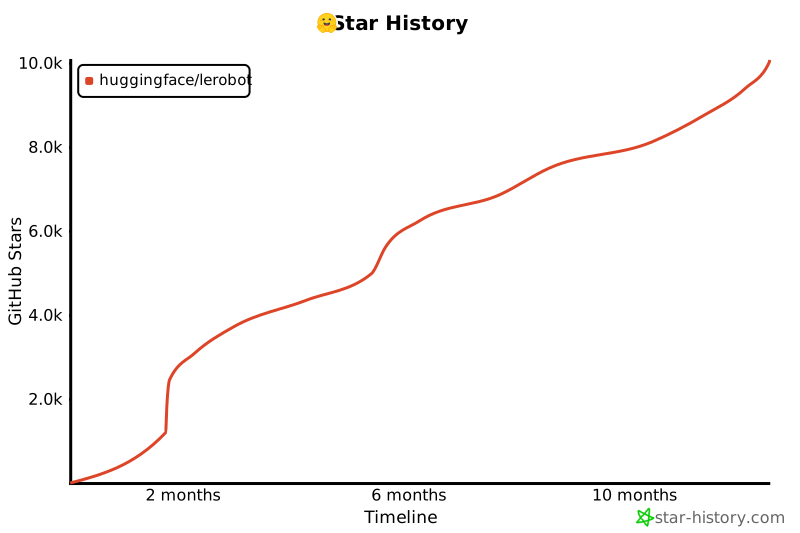](https://star-history.com/#huggingface/lerobot&Timeline)
|
||||
|
||||
@@ -0,0 +1,94 @@
|
||||
#!/usr/bin/env python
|
||||
|
||||
# Copyright 2024 The HuggingFace Inc. team. All rights reserved.
|
||||
#
|
||||
# Licensed under the Apache License, Version 2.0 (the "License");
|
||||
# you may not use this file except in compliance with the License.
|
||||
# You may obtain a copy of the License at
|
||||
#
|
||||
# http://www.apache.org/licenses/LICENSE-2.0
|
||||
#
|
||||
# Unless required by applicable law or agreed to in writing, software
|
||||
# distributed under the License is distributed on an "AS IS" BASIS,
|
||||
# WITHOUT WARRANTIES OR CONDITIONS OF ANY KIND, either express or implied.
|
||||
# See the License for the specific language governing permissions and
|
||||
# limitations under the License.
|
||||
import threading
|
||||
import time
|
||||
from contextlib import ContextDecorator
|
||||
|
||||
|
||||
class TimeBenchmark(ContextDecorator):
|
||||
"""
|
||||
Measures execution time using a context manager or decorator.
|
||||
|
||||
This class supports both context manager and decorator usage, and is thread-safe for multithreaded
|
||||
environments.
|
||||
|
||||
Args:
|
||||
print: If True, prints the elapsed time upon exiting the context or completing the function. Defaults
|
||||
to False.
|
||||
|
||||
Examples:
|
||||
|
||||
Using as a context manager:
|
||||
|
||||
>>> benchmark = TimeBenchmark()
|
||||
>>> with benchmark:
|
||||
... time.sleep(1)
|
||||
>>> print(f"Block took {benchmark.result:.4f} seconds")
|
||||
Block took approximately 1.0000 seconds
|
||||
|
||||
Using with multithreading:
|
||||
|
||||
```python
|
||||
import threading
|
||||
|
||||
benchmark = TimeBenchmark()
|
||||
|
||||
|
||||
def context_manager_example():
|
||||
with benchmark:
|
||||
time.sleep(0.01)
|
||||
print(f"Block took {benchmark.result_ms:.2f} milliseconds")
|
||||
|
||||
|
||||
threads = []
|
||||
for _ in range(3):
|
||||
t1 = threading.Thread(target=context_manager_example)
|
||||
threads.append(t1)
|
||||
|
||||
for t in threads:
|
||||
t.start()
|
||||
|
||||
for t in threads:
|
||||
t.join()
|
||||
```
|
||||
Expected output:
|
||||
Block took approximately 10.00 milliseconds
|
||||
Block took approximately 10.00 milliseconds
|
||||
Block took approximately 10.00 milliseconds
|
||||
"""
|
||||
|
||||
def __init__(self, print=False):
|
||||
self.local = threading.local()
|
||||
self.print_time = print
|
||||
|
||||
def __enter__(self):
|
||||
self.local.start_time = time.perf_counter()
|
||||
return self
|
||||
|
||||
def __exit__(self, *exc):
|
||||
self.local.end_time = time.perf_counter()
|
||||
self.local.elapsed_time = self.local.end_time - self.local.start_time
|
||||
if self.print_time:
|
||||
print(f"Elapsed time: {self.local.elapsed_time:.4f} seconds")
|
||||
return False
|
||||
|
||||
@property
|
||||
def result(self):
|
||||
return getattr(self.local, "elapsed_time", None)
|
||||
|
||||
@property
|
||||
def result_ms(self):
|
||||
return self.result * 1e3
|
||||
@@ -0,0 +1,102 @@
|
||||
#!/usr/bin/env python
|
||||
|
||||
# Copyright 2024 The HuggingFace Inc. team. All rights reserved.
|
||||
#
|
||||
# Licensed under the Apache License, Version 2.0 (the "License");
|
||||
# you may not use this file except in compliance with the License.
|
||||
# You may obtain a copy of the License at
|
||||
#
|
||||
# http://www.apache.org/licenses/LICENSE-2.0
|
||||
#
|
||||
# Unless required by applicable law or agreed to in writing, software
|
||||
# distributed under the License is distributed on an "AS IS" BASIS,
|
||||
# WITHOUT WARRANTIES OR CONDITIONS OF ANY KIND, either express or implied.
|
||||
# See the License for the specific language governing permissions and
|
||||
# limitations under the License.
|
||||
"""Capture video feed from a camera as raw images."""
|
||||
|
||||
import argparse
|
||||
import datetime as dt
|
||||
import os
|
||||
import time
|
||||
from pathlib import Path
|
||||
|
||||
import cv2
|
||||
import rerun as rr
|
||||
|
||||
# see https://rerun.io/docs/howto/visualization/limit-ram
|
||||
RERUN_MEMORY_LIMIT = os.getenv("LEROBOT_RERUN_MEMORY_LIMIT", "5%")
|
||||
|
||||
|
||||
def display_and_save_video_stream(output_dir: Path, fps: int, width: int, height: int, duration: int):
|
||||
rr.init("lerobot_capture_camera_feed")
|
||||
rr.spawn(memory_limit=RERUN_MEMORY_LIMIT)
|
||||
|
||||
now = dt.datetime.now()
|
||||
capture_dir = output_dir / f"{now:%Y-%m-%d}" / f"{now:%H-%M-%S}"
|
||||
if not capture_dir.exists():
|
||||
capture_dir.mkdir(parents=True, exist_ok=True)
|
||||
|
||||
# Opens the default webcam
|
||||
cap = cv2.VideoCapture(0)
|
||||
if not cap.isOpened():
|
||||
print("Error: Could not open video stream.")
|
||||
return
|
||||
|
||||
cap.set(cv2.CAP_PROP_FPS, fps)
|
||||
cap.set(cv2.CAP_PROP_FRAME_WIDTH, width)
|
||||
cap.set(cv2.CAP_PROP_FRAME_HEIGHT, height)
|
||||
|
||||
frame_index = 0
|
||||
start_time = time.time()
|
||||
while time.time() - start_time < duration:
|
||||
ret, frame = cap.read()
|
||||
|
||||
if not ret:
|
||||
print("Error: Could not read frame.")
|
||||
break
|
||||
rr.log("video/stream", rr.Image(frame), static=True)
|
||||
cv2.imwrite(str(capture_dir / f"frame_{frame_index:06d}.png"), frame)
|
||||
frame_index += 1
|
||||
|
||||
# Release the capture
|
||||
cap.release()
|
||||
|
||||
# TODO(Steven): Add a graceful shutdown via a close() method for the Viewer context, though not currently supported in the Rerun API.
|
||||
|
||||
|
||||
if __name__ == "__main__":
|
||||
parser = argparse.ArgumentParser()
|
||||
|
||||
parser.add_argument(
|
||||
"--output-dir",
|
||||
type=Path,
|
||||
default=Path("outputs/cam_capture/"),
|
||||
help="Directory where the capture images are written. A subfolder named with the current date & time will be created inside it for each capture.",
|
||||
)
|
||||
parser.add_argument(
|
||||
"--fps",
|
||||
type=int,
|
||||
default=30,
|
||||
help="Frames Per Second of the capture.",
|
||||
)
|
||||
parser.add_argument(
|
||||
"--width",
|
||||
type=int,
|
||||
default=1280,
|
||||
help="Width of the captured images.",
|
||||
)
|
||||
parser.add_argument(
|
||||
"--height",
|
||||
type=int,
|
||||
default=720,
|
||||
help="Height of the captured images.",
|
||||
)
|
||||
parser.add_argument(
|
||||
"--duration",
|
||||
type=int,
|
||||
default=20,
|
||||
help="Duration in seconds for which the video stream should be captured.",
|
||||
)
|
||||
args = parser.parse_args()
|
||||
display_and_save_video_stream(**vars(args))
|
||||
@@ -21,13 +21,11 @@ See the provided README.md or run `python benchmark/video/run_video_benchmark.py
|
||||
|
||||
import argparse
|
||||
import datetime as dt
|
||||
import itertools
|
||||
import random
|
||||
import shutil
|
||||
from collections import OrderedDict
|
||||
from concurrent.futures import ThreadPoolExecutor, as_completed
|
||||
from pathlib import Path
|
||||
from threading import Lock
|
||||
|
||||
import einops
|
||||
import numpy as np
|
||||
@@ -37,13 +35,13 @@ import torch
|
||||
from skimage.metrics import mean_squared_error, peak_signal_noise_ratio, structural_similarity
|
||||
from tqdm import tqdm
|
||||
|
||||
from benchmarks.video.benchmark import TimeBenchmark
|
||||
from lerobot.datasets.lerobot_dataset import LeRobotDataset
|
||||
from lerobot.datasets.video_utils import (
|
||||
decode_video_frames,
|
||||
decode_video_frames_torchvision,
|
||||
encode_video_frames,
|
||||
)
|
||||
from lerobot.utils.constants import OBS_IMAGE
|
||||
from lerobot.utils.utils import TimerManager
|
||||
|
||||
BASE_ENCODING = OrderedDict(
|
||||
[
|
||||
@@ -88,7 +86,7 @@ def load_original_frames(imgs_dir: Path, timestamps: list[float], fps: int) -> t
|
||||
frames = []
|
||||
for ts in timestamps:
|
||||
idx = int(ts * fps)
|
||||
frame = PIL.Image.open(imgs_dir / f"frame-{idx:06d}.png")
|
||||
frame = PIL.Image.open(imgs_dir / f"frame_{idx:06d}.png")
|
||||
frame = torch.from_numpy(np.array(frame))
|
||||
frame = frame.type(torch.float32) / 255
|
||||
frame = einops.rearrange(frame, "h w c -> c h w")
|
||||
@@ -99,21 +97,21 @@ def load_original_frames(imgs_dir: Path, timestamps: list[float], fps: int) -> t
|
||||
def save_decoded_frames(
|
||||
imgs_dir: Path, save_dir: Path, frames: torch.Tensor, timestamps: list[float], fps: int
|
||||
) -> None:
|
||||
if save_dir.exists() and len(list(save_dir.glob("frame-*.png"))) == len(timestamps):
|
||||
if save_dir.exists() and len(list(save_dir.glob("frame_*.png"))) == len(timestamps):
|
||||
return
|
||||
|
||||
save_dir.mkdir(parents=True, exist_ok=True)
|
||||
for i, ts in enumerate(timestamps):
|
||||
idx = int(ts * fps)
|
||||
frame_hwc = (frames[i].permute((1, 2, 0)) * 255).type(torch.uint8).cpu().numpy()
|
||||
PIL.Image.fromarray(frame_hwc).save(save_dir / f"frame-{idx:06d}_decoded.png")
|
||||
shutil.copyfile(imgs_dir / f"frame-{idx:06d}.png", save_dir / f"frame-{idx:06d}_original.png")
|
||||
PIL.Image.fromarray(frame_hwc).save(save_dir / f"frame_{idx:06d}_decoded.png")
|
||||
shutil.copyfile(imgs_dir / f"frame_{idx:06d}.png", save_dir / f"frame_{idx:06d}_original.png")
|
||||
|
||||
|
||||
def save_first_episode(imgs_dir: Path, dataset: LeRobotDataset) -> None:
|
||||
episode_index = 0
|
||||
ep_num_images = dataset.meta.episodes["length"][episode_index]
|
||||
if imgs_dir.exists() and len(list(imgs_dir.glob("frame-*.png"))) == ep_num_images:
|
||||
if imgs_dir.exists() and len(list(imgs_dir.glob("frame_*.png"))) == ep_num_images:
|
||||
return
|
||||
|
||||
imgs_dir.mkdir(parents=True, exist_ok=True)
|
||||
@@ -127,7 +125,7 @@ def save_first_episode(imgs_dir: Path, dataset: LeRobotDataset) -> None:
|
||||
tqdm(imgs_dataset, desc=f"saving {dataset.repo_id} first episode images", leave=False)
|
||||
):
|
||||
img = item[img_keys[0]]
|
||||
img.save(str(imgs_dir / f"frame-{i:06d}.png"), quality=100)
|
||||
img.save(str(imgs_dir / f"frame_{i:06d}.png"), quality=100)
|
||||
|
||||
if i >= ep_num_images - 1:
|
||||
break
|
||||
@@ -151,6 +149,18 @@ def sample_timestamps(timestamps_mode: str, ep_num_images: int, fps: int) -> lis
|
||||
return [idx / fps for idx in frame_indexes]
|
||||
|
||||
|
||||
def decode_video_frames(
|
||||
video_path: str,
|
||||
timestamps: list[float],
|
||||
tolerance_s: float,
|
||||
backend: str,
|
||||
) -> torch.Tensor:
|
||||
if backend in ["pyav", "video_reader"]:
|
||||
return decode_video_frames_torchvision(video_path, timestamps, tolerance_s, backend)
|
||||
else:
|
||||
raise NotImplementedError(backend)
|
||||
|
||||
|
||||
def benchmark_decoding(
|
||||
imgs_dir: Path,
|
||||
video_path: Path,
|
||||
@@ -162,8 +172,8 @@ def benchmark_decoding(
|
||||
num_workers: int = 4,
|
||||
save_frames: bool = False,
|
||||
) -> dict:
|
||||
def process_sample(sample: int, lock: Lock):
|
||||
time_benchmark = TimerManager(log=False)
|
||||
def process_sample(sample: int):
|
||||
time_benchmark = TimeBenchmark()
|
||||
timestamps = sample_timestamps(timestamps_mode, ep_num_images, fps)
|
||||
num_frames = len(timestamps)
|
||||
result = {
|
||||
@@ -172,13 +182,13 @@ def benchmark_decoding(
|
||||
"mse_values": [],
|
||||
}
|
||||
|
||||
with time_benchmark, lock:
|
||||
with time_benchmark:
|
||||
frames = decode_video_frames(video_path, timestamps=timestamps, tolerance_s=5e-1, backend=backend)
|
||||
result["load_time_video_ms"] = (time_benchmark.last * 1000) / num_frames
|
||||
result["load_time_video_ms"] = time_benchmark.result_ms / num_frames
|
||||
|
||||
with time_benchmark:
|
||||
original_frames = load_original_frames(imgs_dir, timestamps, fps)
|
||||
result["load_time_images_ms"] = (time_benchmark.last * 1000) / num_frames
|
||||
result["load_time_images_ms"] = time_benchmark.result_ms / num_frames
|
||||
|
||||
frames_np, original_frames_np = frames.numpy(), original_frames.numpy()
|
||||
for i in range(num_frames):
|
||||
@@ -205,10 +215,8 @@ def benchmark_decoding(
|
||||
# A sample is a single set of decoded frames specified by timestamps_mode (e.g. a single frame, 2 frames, etc.).
|
||||
# For each sample, we record metrics (loading time and quality metrics) which are then averaged over all samples.
|
||||
# As these samples are independent, we run them in parallel threads to speed up the benchmark.
|
||||
# Use a single shared lock for all worker threads
|
||||
shared_lock = Lock()
|
||||
with ThreadPoolExecutor(max_workers=num_workers) as executor:
|
||||
futures = [executor.submit(process_sample, i, shared_lock) for i in range(num_samples)]
|
||||
futures = [executor.submit(process_sample, i) for i in range(num_samples)]
|
||||
for future in tqdm(as_completed(futures), total=num_samples, desc="samples", leave=False):
|
||||
result = future.result()
|
||||
load_times_video_ms.append(result["load_time_video_ms"])
|
||||
@@ -350,27 +358,24 @@ def main(
|
||||
imgs_dir = output_dir / "images" / dataset.repo_id.replace("/", "_")
|
||||
# We only use the first episode
|
||||
save_first_episode(imgs_dir, dataset)
|
||||
for duet in [
|
||||
dict(zip(encoding_benchmarks.keys(), unique_combination, strict=False))
|
||||
for unique_combination in itertools.product(*encoding_benchmarks.values())
|
||||
]:
|
||||
encoding_cfg = BASE_ENCODING.copy()
|
||||
encoding_cfg["vcodec"] = video_codec
|
||||
encoding_cfg["pix_fmt"] = pixel_format
|
||||
for key, value in duet.items():
|
||||
for key, values in tqdm(encoding_benchmarks.items(), desc="encodings (g, crf)", leave=False):
|
||||
for value in tqdm(values, desc=f"encodings ({key})", leave=False):
|
||||
encoding_cfg = BASE_ENCODING.copy()
|
||||
encoding_cfg["vcodec"] = video_codec
|
||||
encoding_cfg["pix_fmt"] = pixel_format
|
||||
encoding_cfg[key] = value
|
||||
args_path = Path("_".join(str(value) for value in encoding_cfg.values()))
|
||||
video_path = output_dir / "videos" / args_path / f"{repo_id.replace('/', '_')}.mp4"
|
||||
benchmark_table += benchmark_encoding_decoding(
|
||||
dataset,
|
||||
video_path,
|
||||
imgs_dir,
|
||||
encoding_cfg,
|
||||
decoding_benchmarks,
|
||||
num_samples,
|
||||
num_workers,
|
||||
save_frames,
|
||||
)
|
||||
args_path = Path("_".join(str(value) for value in encoding_cfg.values()))
|
||||
video_path = output_dir / "videos" / args_path / f"{repo_id.replace('/', '_')}.mp4"
|
||||
benchmark_table += benchmark_encoding_decoding(
|
||||
dataset,
|
||||
video_path,
|
||||
imgs_dir,
|
||||
encoding_cfg,
|
||||
decoding_benchmarks,
|
||||
num_samples,
|
||||
num_workers,
|
||||
save_frames,
|
||||
)
|
||||
|
||||
# Save intermediate results
|
||||
benchmark_df = pd.DataFrame(benchmark_table, columns=headers)
|
||||
@@ -404,9 +409,9 @@ if __name__ == "__main__":
|
||||
nargs="*",
|
||||
default=[
|
||||
"lerobot/pusht_image",
|
||||
"lerobot/aloha_mobile_shrimp_image",
|
||||
"lerobot/paris_street",
|
||||
"lerobot/kitchen",
|
||||
"aliberts/aloha_mobile_shrimp_image",
|
||||
"aliberts/paris_street",
|
||||
"aliberts/kitchen",
|
||||
],
|
||||
help="Datasets repo-ids to test against. First episodes only are used. Must be images.",
|
||||
)
|
||||
@@ -414,7 +419,7 @@ if __name__ == "__main__":
|
||||
"--vcodec",
|
||||
type=str,
|
||||
nargs="*",
|
||||
default=["h264", "hevc", "libsvtav1"],
|
||||
default=["libx264", "hevc", "libsvtav1"],
|
||||
help="Video codecs to be tested",
|
||||
)
|
||||
parser.add_argument(
|
||||
@@ -463,7 +468,7 @@ if __name__ == "__main__":
|
||||
"--backends",
|
||||
type=str,
|
||||
nargs="*",
|
||||
default=["torchcodec", "pyav"],
|
||||
default=["pyav", "video_reader"],
|
||||
help="Torchvision decoding backend to be tested.",
|
||||
)
|
||||
parser.add_argument(
|
||||
|
||||
@@ -9,8 +9,6 @@
|
||||
title: Imitation Learning for Robots
|
||||
- local: cameras
|
||||
title: Cameras
|
||||
- local: bring_your_own_policies
|
||||
title: Bring Your Own Policies
|
||||
- local: integrate_hardware
|
||||
title: Bring Your Own Hardware
|
||||
- local: hilserl
|
||||
@@ -19,8 +17,6 @@
|
||||
title: Train RL in Simulation
|
||||
- local: multi_gpu_training
|
||||
title: Multi GPU training
|
||||
- local: peft_training
|
||||
title: Training with PEFT (e.g., LoRA)
|
||||
title: "Tutorials"
|
||||
- sections:
|
||||
- local: lerobot-dataset-v3
|
||||
@@ -41,13 +37,7 @@
|
||||
title: π₀.₅ (Pi05)
|
||||
- local: groot
|
||||
title: NVIDIA GR00T N1.5
|
||||
- local: xvla
|
||||
title: X-VLA
|
||||
title: "Policies"
|
||||
- sections:
|
||||
- local: sarm
|
||||
title: SARM
|
||||
title: "Reward Models"
|
||||
- sections:
|
||||
- local: async
|
||||
title: Use Async Inference
|
||||
@@ -57,8 +47,8 @@
|
||||
- sections:
|
||||
- local: envhub
|
||||
title: Environments from the Hub
|
||||
- local: envhub_leisaac
|
||||
title: Control & Train Robots in Sim (LeIsaac)
|
||||
- local: il_sim
|
||||
title: Imitation Learning in Sim
|
||||
- local: libero
|
||||
title: Using Libero
|
||||
- local: metaworld
|
||||
@@ -89,19 +79,11 @@
|
||||
title: Hope Jr
|
||||
- local: reachy2
|
||||
title: Reachy 2
|
||||
- local: unitree_g1
|
||||
title: Unitree G1
|
||||
- local: earthrover_mini_plus
|
||||
title: Earth Rover Mini
|
||||
title: "Robots"
|
||||
- sections:
|
||||
- local: phone_teleop
|
||||
title: Phone
|
||||
title: "Teleoperators"
|
||||
- sections:
|
||||
- local: torch_accelerators
|
||||
title: PyTorch accelerators
|
||||
title: "Supported Hardware"
|
||||
- sections:
|
||||
- local: notebooks
|
||||
title: Notebooks
|
||||
|
||||
@@ -196,7 +196,7 @@ client_cfg = RobotClientConfig(
|
||||
server_address="localhost:8080",
|
||||
policy_device="mps",
|
||||
policy_type="smolvla",
|
||||
pretrained_name_or_path="<user>/smolvla_async",
|
||||
pretrained_name_or_path="fracapuano/smolvla_async",
|
||||
chunk_size_threshold=0.5,
|
||||
actions_per_chunk=50, # make sure this is less than the max actions of the policy
|
||||
)
|
||||
@@ -278,7 +278,7 @@ We found the default values of `actions_per_chunk` and `chunk_size_threshold` to
|
||||
2. **Adjust your `fps` based on inference latency.** While the server generates a new action chunk, the client is not idle and is stepping through its current action queue. If the two processes happen at fundamentally different speeds, the client might end up with an empty queue. As such, you should reduce your fps if you consistently run out of actions in queue.
|
||||
3. **Adjust `chunk_size_threshold`**.
|
||||
- Values closer to `0.0` result in almost sequential behavior. Values closer to `1.0` → send observation every step (more bandwidth, relies on good world-model).
|
||||
- We found values around 0.5-0.6 to work well. If you want to tweak this, spin up a `RobotClient` setting the `--debug_visualize_queue_size` to `True`. This will plot the action queue size evolution at runtime, and you can use it to find the value of `chunk_size_threshold` that works best for your setup.
|
||||
- We found values around 0.5-0.6 to work well. If you want to tweak this, spin up a `RobotClient` setting the `--debug-visualize-queue-size` to `True`. This will plot the action queue size evolution at runtime, and you can use it to find the value of `chunk_size_threshold` that works best for your setup.
|
||||
|
||||
<p align="center">
|
||||
<img
|
||||
@@ -289,7 +289,7 @@ We found the default values of `actions_per_chunk` and `chunk_size_threshold` to
|
||||
<p align="center">
|
||||
<i>
|
||||
The action queue size is plotted at runtime when the
|
||||
`--debug_visualize_queue_size` flag is passed, for various levels of
|
||||
`--debug-visualize-queue-size` flag is passed, for various levels of
|
||||
`chunk_size_threshold` (`g` in the SmolVLA paper).
|
||||
</i>
|
||||
</p>
|
||||
|
||||
@@ -1,175 +0,0 @@
|
||||
# Bring Your Own Policies
|
||||
|
||||
This tutorial explains how to integrate your own custom policy implementations into the LeRobot ecosystem, allowing you to leverage all LeRobot tools for training, evaluation, and deployment while using your own algorithms.
|
||||
|
||||
## Step 1: Create a Policy Package
|
||||
|
||||
Your custom policy should be organized as an installable Python package following LeRobot's plugin conventions.
|
||||
|
||||
### Package Structure
|
||||
|
||||
Create a package with the prefix `lerobot_policy_` (IMPORTANT!) followed by your policy name:
|
||||
|
||||
```bash
|
||||
lerobot_policy_my_custom_policy/
|
||||
├── pyproject.toml
|
||||
└── src/
|
||||
└── lerobot_policy_my_custom_policy/
|
||||
├── __init__.py
|
||||
├── configuration_my_custom_policy.py
|
||||
├── modeling_my_custom_policy.py
|
||||
└── processor_my_custom_policy.py
|
||||
```
|
||||
|
||||
### Package Configuration
|
||||
|
||||
Set up your `pyproject.toml`:
|
||||
|
||||
```toml
|
||||
[project]
|
||||
name = "lerobot_policy_my_custom_policy"
|
||||
version = "0.1.0"
|
||||
dependencies = [
|
||||
# your policy-specific dependencies
|
||||
]
|
||||
requires-python = ">= 3.11"
|
||||
|
||||
[build-system]
|
||||
build-backend = # your-build-backend
|
||||
requires = # your-build-system
|
||||
```
|
||||
|
||||
## Step 2: Define the Policy Configuration
|
||||
|
||||
Create a configuration class that inherits from `PreTrainedConfig` and registers your policy type:
|
||||
|
||||
```python
|
||||
# configuration_my_custom_policy.py
|
||||
from dataclasses import dataclass, field
|
||||
from lerobot.configs.policies import PreTrainedConfig
|
||||
from lerobot.configs.types import NormalizationMode
|
||||
|
||||
@PreTrainedConfig.register_subclass("my_custom_policy")
|
||||
@dataclass
|
||||
class MyCustomPolicyConfig(PreTrainedConfig):
|
||||
"""Configuration class for MyCustomPolicy.
|
||||
|
||||
Args:
|
||||
n_obs_steps: Number of observation steps to use as input
|
||||
horizon: Action prediction horizon
|
||||
n_action_steps: Number of action steps to execute
|
||||
hidden_dim: Hidden dimension for the policy network
|
||||
# Add your policy-specific parameters here
|
||||
"""
|
||||
# ...PreTrainedConfig fields...
|
||||
pass
|
||||
|
||||
def __post_init__(self):
|
||||
super().__post_init__()
|
||||
# Add any validation logic here
|
||||
|
||||
def validate_features(self) -> None:
|
||||
"""Validate input/output feature compatibility."""
|
||||
# Implement validation logic for your policy's requirements
|
||||
pass
|
||||
```
|
||||
|
||||
## Step 3: Implement the Policy Class
|
||||
|
||||
Create your policy implementation by inheriting from LeRobot's base `PreTrainedPolicy` class:
|
||||
|
||||
```python
|
||||
# modeling_my_custom_policy.py
|
||||
import torch
|
||||
import torch.nn as nn
|
||||
from typing import Dict, Any
|
||||
|
||||
from lerobot.policies.pretrained import PreTrainedPolicy
|
||||
from .configuration_my_custom_policy import MyCustomPolicyConfig
|
||||
|
||||
class MyCustomPolicy(PreTrainedPolicy):
|
||||
config_class = MyCustomPolicyConfig
|
||||
name = "my_custom_policy"
|
||||
|
||||
def __init__(self, config: MyCustomPolicyConfig, dataset_stats: Dict[str, Any] = None):
|
||||
super().__init__(config, dataset_stats)
|
||||
...
|
||||
```
|
||||
|
||||
## Step 4: Add Data Processors
|
||||
|
||||
Create processor functions:
|
||||
|
||||
```python
|
||||
# processor_my_custom_policy.py
|
||||
from typing import Dict, Any
|
||||
import torch
|
||||
|
||||
|
||||
def make_my_custom_policy_pre_post_processors(
|
||||
config,
|
||||
) -> tuple[
|
||||
PolicyProcessorPipeline[dict[str, Any], dict[str, Any]],
|
||||
PolicyProcessorPipeline[PolicyAction, PolicyAction],
|
||||
]:
|
||||
"""Create preprocessing and postprocessing functions for your policy."""
|
||||
pass # Define your preprocessing and postprocessing logic here
|
||||
|
||||
```
|
||||
|
||||
## Step 5: Package Initialization
|
||||
|
||||
Expose your classes in the package's `__init__.py`:
|
||||
|
||||
```python
|
||||
# __init__.py
|
||||
"""Custom policy package for LeRobot."""
|
||||
|
||||
try:
|
||||
import lerobot # noqa: F401
|
||||
except ImportError:
|
||||
raise ImportError(
|
||||
"lerobot is not installed. Please install lerobot to use this policy package."
|
||||
)
|
||||
|
||||
from .configuration_my_custom_policy import MyCustomPolicyConfig
|
||||
from .modeling_my_custom_policy import MyCustomPolicy
|
||||
from .processor_my_custom_policy import make_my_custom_policy_pre_post_processors
|
||||
|
||||
__all__ = [
|
||||
"MyCustomPolicyConfig",
|
||||
"MyCustomPolicy",
|
||||
"make_my_custom_policy_pre_post_processors",
|
||||
]
|
||||
```
|
||||
|
||||
## Step 6: Installation and Usage
|
||||
|
||||
### Install Your Policy Package
|
||||
|
||||
```bash
|
||||
cd lerobot_policy_my_custom_policy
|
||||
pip install -e .
|
||||
|
||||
# Or install from PyPI if published
|
||||
pip install lerobot_policy_my_custom_policy
|
||||
```
|
||||
|
||||
### Use Your Policy
|
||||
|
||||
Once installed, your policy automatically integrates with LeRobot's training and evaluation tools:
|
||||
|
||||
```bash
|
||||
lerobot-train \
|
||||
--policy.type my_custom_policy \
|
||||
--env.type pusht \
|
||||
--steps 200000
|
||||
```
|
||||
|
||||
## Examples and Community Contributions
|
||||
|
||||
Check out these example policy implementations:
|
||||
|
||||
- [DiTFlow Policy](https://github.com/danielsanjosepro/lerobot_policy_ditflow) - Diffusion Transformer policy with flow-matching objective. Try it out in this example: [DiTFlow Example](https://github.com/danielsanjosepro/test_lerobot_policy_ditflow)
|
||||
|
||||
Share your policy implementations with the community! 🤗
|
||||
@@ -1,206 +0,0 @@
|
||||
# EarthRover Mini Plus
|
||||
|
||||
The EarthRover Mini Plus is a fully open source mobile robot that connects through the cloud using the Frodobots SDK. This lets you control the robot and record datasets for training AI models.
|
||||
|
||||
## What You Need
|
||||
|
||||
### Hardware
|
||||
|
||||
- EarthRover Mini robot
|
||||
- Computer with Python 3.10 or newer
|
||||
- Internet connection
|
||||
|
||||
### Setting Up the Frodobots SDK
|
||||
|
||||
The robot needs the [Frodobots SDK](https://github.com/Frodobots/earth-rovers-sdk) running on your computer. Here's how:
|
||||
|
||||
1. Download and install the SDK:
|
||||
|
||||
```bash
|
||||
git clone https://github.com/Frodobots/earth-rovers-sdk.git
|
||||
cd earth-rovers-sdk
|
||||
pip install -r requirements.txt
|
||||
```
|
||||
|
||||
2. Start the SDK:
|
||||
|
||||
```bash
|
||||
hypercorn main:app --reload
|
||||
```
|
||||
|
||||
3. Open your web browser and go to `http://localhost:8000`, then click "Join"
|
||||
|
||||
The SDK gives you:
|
||||
|
||||
- Live video from front and rear cameras
|
||||
|
||||
> [!IMPORTANT]
|
||||
> The SDK must be running before you can use the robot.
|
||||
|
||||
## Install LeRobot
|
||||
|
||||
Follow our [Installation Guide](./installation) to install LeRobot.
|
||||
|
||||
In addition to the base installation, install the EarthRover Mini dependencies:
|
||||
|
||||
```bash
|
||||
pip install -e .
|
||||
```
|
||||
|
||||
## How It Works
|
||||
|
||||
The robot uses the internet to communicate:
|
||||
|
||||
- **Movement commands**: Sent through the SDK
|
||||
- **Camera video**: Received from the SDK
|
||||
- **Robot info**: Battery, location, speed from the SDK
|
||||
|
||||
You don't need to plug anything in - it all works through the SDK.
|
||||
|
||||
## Calibration
|
||||
|
||||
No calibration needed! The robot is ready to use as soon as the SDK is running.
|
||||
|
||||
## Controlling the Robot
|
||||
|
||||
You control the robot using your keyboard - just like playing a video game with WASD keys.
|
||||
|
||||
### Keyboard Controls
|
||||
|
||||
| Key | Action |
|
||||
| --- | -------------------------------- |
|
||||
| W | Move forward |
|
||||
| S | Move backward |
|
||||
| A | Turn left (with forward motion) |
|
||||
| D | Turn right (with forward motion) |
|
||||
| Q | Rotate left in place |
|
||||
| E | Rotate right in place |
|
||||
| X | Stop all movement |
|
||||
| +/= | Increase speed |
|
||||
| - | Decrease speed |
|
||||
| ESC | Disconnect |
|
||||
|
||||
### Speed Settings
|
||||
|
||||
You can adjust how fast the robot moves:
|
||||
|
||||
- **Forward/backward speed**: Default is full speed (1.0)
|
||||
- **Turning speed**: Default is full speed (1.0)
|
||||
- **Speed changes**: Use +/- keys to adjust by 0.1 each time
|
||||
|
||||
### Try It Out
|
||||
|
||||
Test driving the robot before recording data:
|
||||
|
||||
```python
|
||||
from lerobot.robots.earthrover_mini_plus import EarthRoverMiniPlus, EarthRoverMiniPlusConfig
|
||||
from lerobot.teleoperators.keyboard import KeyboardRoverTeleop, KeyboardRoverTeleopConfig
|
||||
|
||||
# Initialize robot
|
||||
robot_config = EarthRoverMiniPlusConfig()
|
||||
robot = EarthRoverMiniPlus(robot_config)
|
||||
|
||||
# Initialize teleoperator
|
||||
teleop_config = KeyboardRoverTeleopConfig(
|
||||
linear_speed=1.0,
|
||||
angular_speed=1.0,
|
||||
speed_increment=0.1
|
||||
)
|
||||
teleop = KeyboardRoverTeleop(teleop_config)
|
||||
|
||||
# Connect
|
||||
robot.connect()
|
||||
teleop.connect()
|
||||
|
||||
# Teleoperate (use keyboard controls)
|
||||
try:
|
||||
while True:
|
||||
action = teleop.get_action()
|
||||
robot.send_action(action)
|
||||
except KeyboardInterrupt:
|
||||
pass
|
||||
finally:
|
||||
robot.disconnect()
|
||||
teleop.disconnect()
|
||||
```
|
||||
|
||||
> [!TIP]
|
||||
> If you're using a Mac, you might need to give Terminal permission to access your keyboard for teleoperation. Go to System Preferences > Security & Privacy > Input Monitoring and check the box for Terminal.
|
||||
|
||||
## Recording Data
|
||||
|
||||
Once you can drive the robot well, you can start recording data to train AI models. The system records:
|
||||
|
||||
- **What you do**: How you move the robot (forward, backward, turning)
|
||||
- **What the robot sees**:
|
||||
- Videos from both cameras
|
||||
- Robot speed and direction
|
||||
- Battery level and location
|
||||
- GPS position and signal
|
||||
- Other sensor data
|
||||
- **When it happened**: Timestamps for everything
|
||||
|
||||
### Setting Up Hugging Face
|
||||
|
||||
We use Hugging Face to store your data online. First, log in with your token from [Hugging Face settings](https://huggingface.co/settings/tokens):
|
||||
|
||||
```bash
|
||||
huggingface-cli login --token ${HUGGINGFACE_TOKEN} --add-to-git-credential
|
||||
```
|
||||
|
||||
Store your Hugging Face username:
|
||||
|
||||
```bash
|
||||
HF_USER=$(huggingface-cli whoami | head -n 1)
|
||||
echo $HF_USER
|
||||
```
|
||||
|
||||
### Start Recording
|
||||
|
||||
Use the standard recording command:
|
||||
|
||||
```bash
|
||||
python src/lerobot/scripts/lerobot_record.py \
|
||||
--robot.type=earthrover_mini_plus \
|
||||
--teleop.type=keyboard_rover \
|
||||
--dataset.repo_id=your_username/dataset_name \
|
||||
--dataset.num_episodes=2 \
|
||||
--dataset.fps=10 \
|
||||
--dataset.single_task="Navigate around obstacles" \
|
||||
--display_data=true
|
||||
```
|
||||
|
||||
Replace `your_username/dataset_name` with your Hugging Face username and a name for your dataset.
|
||||
|
||||
### What Gets Saved
|
||||
|
||||
Your dataset includes:
|
||||
|
||||
**Your Actions (2 things)**:
|
||||
|
||||
- How much you moved forward/backward
|
||||
- How much you turned left/right
|
||||
|
||||
**Robot Observations (12 things)**:
|
||||
|
||||
- Front camera video
|
||||
- Rear camera video
|
||||
- Current speed
|
||||
- Battery level
|
||||
- Which way the robot is facing
|
||||
- GPS location (latitude, longitude, signal strength)
|
||||
- Network signal strength
|
||||
- Vibration level
|
||||
- Lamp status (on/off)
|
||||
|
||||
### Where Your Data Goes
|
||||
|
||||
On your computer: `~/.cache/huggingface/lerobot/{repo-id}`
|
||||
|
||||
After recording, your data automatically uploads to your Hugging Face page:
|
||||
|
||||
```bash
|
||||
echo https://huggingface.co/datasets/${HF_USER}/earthrover-navigation
|
||||
```
|
||||
|
||||
Your dataset will be tagged with `LeRobot` for community discovery.
|
||||
@@ -1,301 +0,0 @@
|
||||
# LeIsaac × LeRobot EnvHub
|
||||
|
||||
LeRobot EnvHub now supports **imitation learning in simulation** with LeIsaac.
|
||||
Spin up everyday manipulation tasks, teleoperate the robot, collect demos, push them to the Hub, and train policies in LeRobot — all in one loop.
|
||||
|
||||
[LeIsaac](https://github.com/LightwheelAI/leisaac) integrates with IsaacLab and the SO101 Leader/Follower setup to provide:
|
||||
|
||||
- 🕹️ **Teleoperation-first workflows** for data collection
|
||||
- 📦 **Built-in data conversion** ready for LeRobot training
|
||||
- 🤖 **Everyday skills** like picking oranges, lifting cubes, cleaning tables, and folding cloth
|
||||
- ☁️ **Ongoing upgrades** from [LightWheel](https://lightwheel.ai/): cloud simulation, EnvHub support, Sim2Real tooling, and more
|
||||
|
||||
Below you’ll find the currently supported LeIsaac tasks exposed through LeRobot EnvHub.
|
||||
|
||||
# Available Environments
|
||||
|
||||
The following table lists all available tasks and environments in LeIsaac x LeRobot Envhub. You can also get the latest list of environments by running the following command:
|
||||
|
||||
```bash
|
||||
python scripts/environments/list_envs.py
|
||||
```
|
||||
|
||||
| Task | Environment ID | Task Description | Related Robot |
|
||||
| :-------------------------------------------------------------------------------------------------------------------------------------------------------------- | :-------------------------------------------------------------------------------------------------------------------------------------------------------------------------------------------------------------------------------------------------------------------------------------------------------------------------------------------------------------------------------------------------------------------------------------------------------------------------------------------------------------------------------------------- | :------------------------------------------------------------------------------------------------------------------------- | :--------------------------------------------------------- |
|
||||
| <video src="https://github.com/user-attachments/assets/466eddff-f720-4f99-94d5-5e123e4c302c" autoplay loop muted playsinline style="max-width: 300px;"></video> | [LeIsaac-SO101-PickOrange-v0](https://github.com/LightwheelAI/leisaac/blob/main/source/leisaac/leisaac/tasks/pick_orange/pick_orange_env_cfg.py)<br /><br />[LeIsaac-SO101-PickOrange-Direct-v0](https://github.com/LightwheelAI/leisaac/blob/main/source/leisaac/leisaac/tasks/pick_orange/direct/pick_orange_env.py) | Pick three oranges and put them into the plate, then reset the arm to rest state. | Single-Arm SO101 Follower |
|
||||
| <video src="https://github.com/user-attachments/assets/1e4eb83a-0b38-40fb-a0b2-ddb0fe201e6d" autoplay loop muted playsinline style="max-width: 300px;"></video> | [LeIsaac-SO101-LiftCube-v0](https://github.com/LightwheelAI/leisaac/blob/main/source/leisaac/leisaac/tasks/lift_cube/lift_cube_env_cfg.py)<br /><br />[LeIsaac-SO101-LiftCube-Direct-v0](https://github.com/LightwheelAI/leisaac/blob/main/source/leisaac/leisaac/tasks/lift_cube/direct/lift_cube_env.py) | Lift the red cube up. | Single-Arm SO101 Follower |
|
||||
| <video src="https://github.com/user-attachments/assets/e49d8f1c-dcc9-412b-a88f-100680d8a45b" autoplay loop muted playsinline style="max-width: 300px;"></video> | [LeIsaac-SO101-CleanToyTable-v0](https://github.com/LightwheelAI/leisaac/blob/main/source/leisaac/leisaac/tasks/clean_toy_table/clean_toy_table_env_cfg.py)<br /><br />[LeIsaac-SO101-CleanToyTable-BiArm-v0](https://github.com/LightwheelAI/leisaac/blob/main/source/leisaac/leisaac/tasks/clean_toy_table/clean_toy_table_bi_arm_env_cfg.py)<br /><br />[LeIsaac-SO101-CleanToyTable-BiArm-Direct-v0](https://github.com/LightwheelAI/leisaac/blob/main/source/leisaac/leisaac/tasks/clean_toy_table/direct/clean_toy_table_bi_arm_env.py) | Pick two letter e objects into the box, and reset the arm to rest state. | Single-Arm SO101 Follower<br /><br />Bi-Arm SO101 Follower |
|
||||
| <video src="https://github.com/user-attachments/assets/e29a0f8a-9286-4ce6-b45d-342c3d3ba754" autoplay loop muted playsinline style="max-width: 300px;"></video> | [LeIsaac-SO101-FoldCloth-BiArm-v0](https://github.com/LightwheelAI/leisaac/blob/main/source/leisaac/leisaac/tasks/fold_cloth/fold_cloth_bi_arm_env_cfg.py)<br /><br />[LeIsaac-SO101-FoldCloth-BiArm-Direct-v0](https://github.com/LightwheelAI/leisaac/blob/main/source/leisaac/leisaac/tasks/fold_cloth/direct/fold_cloth_bi_arm_env.py) | Fold the cloth, and reset the arm to rest state.<br /><br />_Note: Only the DirectEnv support check_success in this task._ | Bi-Arm SO101 Follower |
|
||||
|
||||
# Load LeIsaac directly in LeRobot with one line of code
|
||||
|
||||
> EnvHub: Share LeIsaac environments through HuggingFace
|
||||
|
||||
[EnvHub](https://huggingface.co/docs/lerobot/envhub) is our reproducible environment hub, spin up a packaged simulation with one line, experiment immediately, and publish your own tasks for the community.
|
||||
|
||||
LeIsaac offers EnvHub support so you can consume or share tasks with only a few commands.
|
||||
|
||||
<video
|
||||
controls
|
||||
src="https://github.com/user-attachments/assets/687666f5-ebe0-421d-84a0-eb86116ac5f8"
|
||||
style={{ width: "100%", maxWidth: "960px", borderRadius: "8px" }}
|
||||
/>
|
||||
|
||||
## How to get started, environment Setup
|
||||
|
||||
Run the following commands to setup your code environments:
|
||||
|
||||
```bash
|
||||
# Refer to Getting Started/Installation to install leisaac firstly
|
||||
conda create -n leisaac_envhub python=3.11
|
||||
conda activate leisaac_envhub
|
||||
|
||||
conda install -c "nvidia/label/cuda-12.8.1" cuda-toolkit
|
||||
pip install -U torch==2.7.0 torchvision==0.22.0 --index-url https://download.pytorch.org/whl/cu128
|
||||
pip install 'leisaac[isaaclab] @ git+https://github.com/LightwheelAI/leisaac.git#subdirectory=source/leisaac' --extra-index-url https://pypi.nvidia.com
|
||||
|
||||
# Install lerobot
|
||||
pip install lerobot==0.4.1
|
||||
|
||||
# Fix numpy version
|
||||
pip install numpy==1.26.0
|
||||
```
|
||||
|
||||
## Usage Example
|
||||
|
||||
EnvHub exposes every LeIsaac-supported task in a uniform interface. The examples below load `so101_pick_orange` and demonstrate a random-action rollout and an interactive teleoperation.
|
||||
|
||||
### Random Action
|
||||
|
||||
<details>
|
||||
<summary>Click to expand code example</summary>
|
||||
|
||||
```python
|
||||
# envhub_random_action.py
|
||||
|
||||
import torch
|
||||
from lerobot.envs.factory import make_env
|
||||
|
||||
# Load from the hub
|
||||
envs_dict = make_env("LightwheelAI/leisaac_env:envs/so101_pick_orange.py", n_envs=1, trust_remote_code=True)
|
||||
|
||||
# Access the environment
|
||||
suite_name = next(iter(envs_dict))
|
||||
sync_vector_env = envs_dict[suite_name][0]
|
||||
# retrieve the isaac environment from the sync vector env
|
||||
env = sync_vector_env.envs[0].unwrapped
|
||||
|
||||
# Use it like any gym environment
|
||||
obs, info = env.reset()
|
||||
|
||||
while True:
|
||||
action = torch.tensor(env.action_space.sample())
|
||||
obs, reward, terminated, truncated, info = env.step(action)
|
||||
if terminated or truncated:
|
||||
obs, info = env.reset()
|
||||
|
||||
env.close()
|
||||
```
|
||||
|
||||
</details>
|
||||
|
||||
```bash
|
||||
python envhub_random_action.py
|
||||
```
|
||||
|
||||
You should see the SO101 arm swinging under purely random commands.
|
||||
|
||||
### Teleoperation
|
||||
|
||||
LeRobot’s teleoperation stack can drive the simulated arm.
|
||||
|
||||
Connect the SO101 Leader controller, run the calibration command below.
|
||||
|
||||
```bash
|
||||
lerobot-calibrate \
|
||||
--teleop.type=so101_leader \
|
||||
--teleop.port=/dev/ttyACM0 \
|
||||
--teleop.id=leader
|
||||
```
|
||||
|
||||
And then launch the teleop script.
|
||||
|
||||
<details>
|
||||
<summary>Click to expand code example</summary>
|
||||
|
||||
```python
|
||||
# envhub_teleop_example.py
|
||||
|
||||
import logging
|
||||
import time
|
||||
import gymnasium as gym
|
||||
|
||||
from dataclasses import asdict, dataclass
|
||||
from pprint import pformat
|
||||
|
||||
from lerobot.teleoperators import ( # noqa: F401
|
||||
Teleoperator,
|
||||
TeleoperatorConfig,
|
||||
make_teleoperator_from_config,
|
||||
so101_leader,
|
||||
)
|
||||
from lerobot.utils.robot_utils import precise_sleep
|
||||
from lerobot.utils.utils import init_logging
|
||||
from lerobot.envs.factory import make_env
|
||||
|
||||
|
||||
@dataclass
|
||||
class TeleoperateConfig:
|
||||
teleop: TeleoperatorConfig
|
||||
env_name: str = "so101_pick_orange"
|
||||
fps: int = 60
|
||||
|
||||
|
||||
@dataclass
|
||||
class EnvWrap:
|
||||
env: gym.Env
|
||||
|
||||
|
||||
def make_env_from_leisaac(env_name: str = "so101_pick_orange"):
|
||||
envs_dict = make_env(
|
||||
f'LightwheelAI/leisaac_env:envs/{env_name}.py',
|
||||
n_envs=1,
|
||||
trust_remote_code=True
|
||||
)
|
||||
suite_name = next(iter(envs_dict))
|
||||
sync_vector_env = envs_dict[suite_name][0]
|
||||
env = sync_vector_env.envs[0].unwrapped
|
||||
|
||||
return env
|
||||
|
||||
|
||||
def teleop_loop(teleop: Teleoperator, env: gym.Env, fps: int):
|
||||
from leisaac.devices.action_process import preprocess_device_action
|
||||
from leisaac.assets.robots.lerobot import SO101_FOLLOWER_MOTOR_LIMITS
|
||||
from leisaac.utils.env_utils import dynamic_reset_gripper_effort_limit_sim
|
||||
|
||||
env_wrap = EnvWrap(env=env)
|
||||
|
||||
obs, info = env.reset()
|
||||
while True:
|
||||
loop_start = time.perf_counter()
|
||||
if env.cfg.dynamic_reset_gripper_effort_limit:
|
||||
dynamic_reset_gripper_effort_limit_sim(env, 'so101leader')
|
||||
|
||||
raw_action = teleop.get_action()
|
||||
processed_action = preprocess_device_action(
|
||||
dict(
|
||||
so101_leader=True,
|
||||
joint_state={
|
||||
k.removesuffix(".pos"): v for k, v in raw_action.items()},
|
||||
motor_limits=SO101_FOLLOWER_MOTOR_LIMITS),
|
||||
env_wrap
|
||||
)
|
||||
obs, reward, terminated, truncated, info = env.step(processed_action)
|
||||
if terminated or truncated:
|
||||
obs, info = env.reset()
|
||||
|
||||
dt_s = time.perf_counter() - loop_start
|
||||
precise_sleep(1 / fps - dt_s)
|
||||
loop_s = time.perf_counter() - loop_start
|
||||
print(f"\ntime: {loop_s * 1e3:.2f}ms ({1 / loop_s:.0f} Hz)")
|
||||
|
||||
|
||||
def teleoperate(cfg: TeleoperateConfig):
|
||||
init_logging()
|
||||
logging.info(pformat(asdict(cfg)))
|
||||
|
||||
teleop = make_teleoperator_from_config(cfg.teleop)
|
||||
env = make_env_from_leisaac(cfg.env_name)
|
||||
|
||||
teleop.connect()
|
||||
if hasattr(env, 'initialize'):
|
||||
env.initialize()
|
||||
try:
|
||||
teleop_loop(teleop=teleop, env=env, fps=cfg.fps)
|
||||
except KeyboardInterrupt:
|
||||
pass
|
||||
finally:
|
||||
teleop.disconnect()
|
||||
env.close()
|
||||
|
||||
|
||||
def main():
|
||||
teleoperate(TeleoperateConfig(
|
||||
teleop=so101_leader.SO101LeaderConfig(
|
||||
port="/dev/ttyACM0",
|
||||
id='leader',
|
||||
use_degrees=False,
|
||||
),
|
||||
env_name="so101_pick_orange",
|
||||
fps=60,
|
||||
))
|
||||
|
||||
|
||||
if __name__ == "__main__":
|
||||
main()
|
||||
|
||||
```
|
||||
|
||||
</details>
|
||||
|
||||
```bash
|
||||
python envhub_teleop_example.py
|
||||
```
|
||||
|
||||
Running the script lets you operate the simulated arm using the physical Leader device.
|
||||
|
||||
## ☁️ Cloud Simulation (No GPU Required)
|
||||
|
||||
Don’t have a local GPU or the right drivers? No problem! You can run LeIsaac entirely in the cloud with zero setup.
|
||||
LeIsaac works out-of-the-box on **NVIDIA Brev**, giving you a fully configured environment directly in your browser.
|
||||
|
||||
👉 **Start here:** [https://lightwheelai.github.io/leisaac/docs/cloud_simulation/nvidia_brev](https://lightwheelai.github.io/leisaac/docs/cloud_simulation/nvidia_brev)
|
||||
|
||||
Once your instance is deployed, simply open the link for **port 80 (HTTP)** to launch **Visual Studio Code Server** (default password: `password`). From there, you can run simulations, edit code, and visualize IsaacLab environments — all from your web browser.
|
||||
|
||||
**No GPU, no drivers, no local installation. Just click and run.**
|
||||
|
||||
## Additional Notes
|
||||
|
||||
We keep EnvHub coverage aligned with the LeIsaac task. Currently supported:
|
||||
|
||||
- `so101_pick_orange`
|
||||
- `so101_lift_cube`
|
||||
- `so101_clean_toytable`
|
||||
- `bi_so101_fold_cloth`
|
||||
|
||||
Switch tasks by targeting a different script when calling `make_env`, for example:
|
||||
|
||||
```python
|
||||
envs_dict_pick_orange = make_env("LightwheelAI/leisaac_env:envs/so101_pick_orange.py", n_envs=1, trust_remote_code=True)
|
||||
envs_dict_lift_cube = make_env("LightwheelAI/leisaac_env:envs/so101_lift_cube.py", n_envs=1, trust_remote_code=True)
|
||||
envs_dict_clean_toytable = make_env("LightwheelAI/leisaac_env:envs/so101_clean_toytable.py", n_envs=1, trust_remote_code=True)
|
||||
envs_dict_fold_cloth = make_env("LightwheelAI/leisaac_env:envs/bi_so101_fold_cloth.py", n_envs=1, trust_remote_code=True)
|
||||
```
|
||||
|
||||
Note: when working with `bi_so101_fold_cloth`, call `initialize()` immediately after retrieving the env before performing any other operations:
|
||||
|
||||
<details>
|
||||
<summary>Click to expand code example</summary>
|
||||
|
||||
```python
|
||||
import torch
|
||||
from lerobot.envs.factory import make_env
|
||||
|
||||
# Load from the hub
|
||||
envs_dict = make_env("LightwheelAI/leisaac_env:envs/bi_so101_fold_cloth.py", n_envs=1, trust_remote_code=True)
|
||||
|
||||
# Access the environment
|
||||
suite_name = next(iter(envs_dict))
|
||||
sync_vector_env = envs_dict[suite_name][0]
|
||||
# retrieve the isaac environment from the sync vector env
|
||||
env = sync_vector_env.envs[0].unwrapped
|
||||
|
||||
# NOTE: initialize() first
|
||||
env.initialize()
|
||||
|
||||
# other operation with env...
|
||||
```
|
||||
|
||||
</details>
|
||||
@@ -201,8 +201,7 @@ from lerobot.teleoperators.so100_leader.so100_leader import SO100Leader
|
||||
from lerobot.utils.control_utils import init_keyboard_listener
|
||||
from lerobot.utils.utils import log_say
|
||||
from lerobot.utils.visualization_utils import init_rerun
|
||||
from lerobot.scripts.lerobot_record import record_loop
|
||||
from lerobot.processor import make_default_processors
|
||||
from lerobot.record import record_loop
|
||||
|
||||
NUM_EPISODES = 5
|
||||
FPS = 30
|
||||
@@ -210,19 +209,12 @@ EPISODE_TIME_SEC = 60
|
||||
RESET_TIME_SEC = 10
|
||||
TASK_DESCRIPTION = "My task description"
|
||||
|
||||
# Create robot configuration
|
||||
# Create the robot and teleoperator configurations
|
||||
camera_config = {"front": OpenCVCameraConfig(index_or_path=0, width=640, height=480, fps=FPS)}
|
||||
robot_config = SO100FollowerConfig(
|
||||
id="my_awesome_follower_arm",
|
||||
cameras={
|
||||
"front": OpenCVCameraConfig(index_or_path=0, width=640, height=480, fps=FPS) # Optional: fourcc="MJPG" for troubleshooting OpenCV async error.
|
||||
},
|
||||
port="/dev/tty.usbmodem58760434471",
|
||||
)
|
||||
|
||||
teleop_config = SO100LeaderConfig(
|
||||
id="my_awesome_leader_arm",
|
||||
port="/dev/tty.usbmodem585A0077581",
|
||||
port="/dev/tty.usbmodem58760434471", id="my_awesome_follower_arm", cameras=camera_config
|
||||
)
|
||||
teleop_config = SO100LeaderConfig(port="/dev/tty.usbmodem585A0077581", id="my_awesome_leader_arm")
|
||||
|
||||
# Initialize the robot and teleoperator
|
||||
robot = SO100Follower(robot_config)
|
||||
@@ -251,9 +243,6 @@ init_rerun(session_name="recording")
|
||||
robot.connect()
|
||||
teleop.connect()
|
||||
|
||||
# Create the required processors
|
||||
teleop_action_processor, robot_action_processor, robot_observation_processor = make_default_processors()
|
||||
|
||||
episode_idx = 0
|
||||
while episode_idx < NUM_EPISODES and not events["stop_recording"]:
|
||||
log_say(f"Recording episode {episode_idx + 1} of {NUM_EPISODES}")
|
||||
@@ -262,9 +251,6 @@ while episode_idx < NUM_EPISODES and not events["stop_recording"]:
|
||||
robot=robot,
|
||||
events=events,
|
||||
fps=FPS,
|
||||
teleop_action_processor=teleop_action_processor,
|
||||
robot_action_processor=robot_action_processor,
|
||||
robot_observation_processor=robot_observation_processor,
|
||||
teleop=teleop,
|
||||
dataset=dataset,
|
||||
control_time_s=EPISODE_TIME_SEC,
|
||||
@@ -279,9 +265,6 @@ while episode_idx < NUM_EPISODES and not events["stop_recording"]:
|
||||
robot=robot,
|
||||
events=events,
|
||||
fps=FPS,
|
||||
teleop_action_processor=teleop_action_processor,
|
||||
robot_action_processor=robot_action_processor,
|
||||
robot_observation_processor=robot_observation_processor,
|
||||
teleop=teleop,
|
||||
control_time_s=RESET_TIME_SEC,
|
||||
single_task=TASK_DESCRIPTION,
|
||||
@@ -410,7 +393,7 @@ import time
|
||||
from lerobot.datasets.lerobot_dataset import LeRobotDataset
|
||||
from lerobot.robots.so100_follower.config_so100_follower import SO100FollowerConfig
|
||||
from lerobot.robots.so100_follower.so100_follower import SO100Follower
|
||||
from lerobot.utils.robot_utils import precise_sleep
|
||||
from lerobot.utils.robot_utils import busy_wait
|
||||
from lerobot.utils.utils import log_say
|
||||
|
||||
episode_idx = 0
|
||||
@@ -432,7 +415,7 @@ for idx in range(dataset.num_frames):
|
||||
}
|
||||
robot.send_action(action)
|
||||
|
||||
precise_sleep(1.0 / dataset.fps - (time.perf_counter() - t0))
|
||||
busy_wait(1.0 / dataset.fps - (time.perf_counter() - t0))
|
||||
|
||||
robot.disconnect()
|
||||
```
|
||||
@@ -445,7 +428,7 @@ Your robot should replicate movements similar to those you recorded. For example
|
||||
|
||||
## Train a policy
|
||||
|
||||
To train a policy to control your robot, use the [`lerobot-train`](https://github.com/huggingface/lerobot/blob/main/src/lerobot/scripts/lerobot_train.py) script. A few arguments are required. Here is an example command:
|
||||
To train a policy to control your robot, use the [`lerobot-train`](https://github.com/huggingface/lerobot/blob/main/src/lerobot/scripts/train.py) script. A few arguments are required. Here is an example command:
|
||||
|
||||
```bash
|
||||
lerobot-train \
|
||||
@@ -502,7 +485,7 @@ huggingface-cli upload ${HF_USER}/act_so101_test${CKPT} \
|
||||
|
||||
## Run inference and evaluate your policy
|
||||
|
||||
You can use the `record` script from [`lerobot-record`](https://github.com/huggingface/lerobot/blob/main/src/lerobot/scripts/lerobot_record.py) with a policy checkpoint as input, to run inference and evaluate your policy. For instance, run this command or API example to run inference and record 10 evaluation episodes:
|
||||
You can use the `record` script from [`lerobot/record.py`](https://github.com/huggingface/lerobot/blob/main/src/lerobot/record.py) with a policy checkpoint as input, to run inference and evaluate your policy. For instance, run this command or API example to run inference and record 10 evaluation episodes:
|
||||
|
||||
<hfoptions id="eval">
|
||||
<hfoption id="Command">
|
||||
|
||||
@@ -0,0 +1,220 @@
|
||||
# Imitation Learning in Sim
|
||||
|
||||
This tutorial will explain how to train a neural network to control a robot in simulation with imitation learning.
|
||||
|
||||
**You'll learn:**
|
||||
|
||||
1. How to record a dataset in simulation with [gym-hil](https://github.com/huggingface/gym-hil) and visualize the dataset.
|
||||
2. How to train a policy using your data.
|
||||
3. How to evaluate your policy in simulation and visualize the results.
|
||||
|
||||
For the simulation environment we use the same [repo](https://github.com/huggingface/gym-hil) that is also being used by the Human-In-the-Loop (HIL) reinforcement learning algorithm.
|
||||
This environment is based on [MuJoCo](https://mujoco.org) and allows you to record datasets in LeRobotDataset format.
|
||||
Teleoperation is easiest with a controller like the Logitech F710, but you can also use your keyboard if you are up for the challenge.
|
||||
|
||||
## Installation
|
||||
|
||||
First, install the `gym_hil` package within the LeRobot environment, go to your LeRobot folder and run this command:
|
||||
|
||||
```bash
|
||||
pip install -e ".[hilserl]"
|
||||
```
|
||||
|
||||
## Teleoperate and Record a Dataset
|
||||
|
||||
To use `gym_hil` with LeRobot, you need to use a configuration file. An example config file can be found [here](https://huggingface.co/datasets/lerobot/config_examples/resolve/main/sim_il/env_config.json).
|
||||
|
||||
To teleoperate and collect a dataset, we need to modify this config file. Here's an example configuration for imitation learning data collection:
|
||||
|
||||
```json
|
||||
{
|
||||
"env": {
|
||||
"type": "gym_manipulator",
|
||||
"name": "gym_hil",
|
||||
"task": "PandaPickCubeGamepad-v0",
|
||||
"fps": 10
|
||||
},
|
||||
"dataset": {
|
||||
"repo_id": "your_username/il_gym",
|
||||
"root": null,
|
||||
"task": "pick_cube",
|
||||
"num_episodes_to_record": 30,
|
||||
"replay_episode": null,
|
||||
"push_to_hub": true
|
||||
},
|
||||
"mode": "record",
|
||||
"device": "cuda"
|
||||
}
|
||||
```
|
||||
|
||||
Key configuration points:
|
||||
|
||||
- Set your `repo_id` in the `dataset` section: `"repo_id": "your_username/il_gym"`
|
||||
- Set `num_episodes_to_record: 30` to collect 30 demonstration episodes
|
||||
- Ensure `mode` is set to `"record"`
|
||||
- If you don't have an NVIDIA GPU, change `"device": "cuda"` to `"mps"` for macOS or `"cpu"`
|
||||
- To use keyboard instead of gamepad, change `"task"` to `"PandaPickCubeKeyboard-v0"`
|
||||
|
||||
Then we can run this command to start:
|
||||
|
||||
<hfoptions id="teleop_sim">
|
||||
<hfoption id="Linux">
|
||||
|
||||
```bash
|
||||
python -m lerobot.rl.gym_manipulator --config_path path/to/env_config_gym_hil_il.json
|
||||
```
|
||||
|
||||
</hfoption>
|
||||
<hfoption id="MacOS">
|
||||
|
||||
```bash
|
||||
mjpython -m lerobot.rl.gym_manipulator --config_path path/to/env_config_gym_hil_il.json
|
||||
```
|
||||
|
||||
</hfoption>
|
||||
</hfoptions>
|
||||
|
||||
Once rendered you can teleoperate the robot with the gamepad or keyboard, below you can find the gamepad/keyboard controls.
|
||||
|
||||
Note that to teleoperate the robot you have to hold the "Human Take Over Pause Policy" Button `RB` to enable control!
|
||||
|
||||
**Gamepad Controls**
|
||||
|
||||
<p align="center">
|
||||
<img
|
||||
src="https://huggingface.co/datasets/huggingface/documentation-images/resolve/main/lerobot/gamepad_guide.jpg?raw=true"
|
||||
alt="Figure shows the control mappings on a Logitech gamepad."
|
||||
title="Gamepad Control Mapping"
|
||||
width="100%"
|
||||
></img>
|
||||
</p>
|
||||
<p align="center">
|
||||
<i>Gamepad button mapping for robot control and episode management</i>
|
||||
</p>
|
||||
|
||||
**Keyboard controls**
|
||||
|
||||
For keyboard controls use the `spacebar` to enable control and the following keys to move the robot:
|
||||
|
||||
```bash
|
||||
Arrow keys: Move in X-Y plane
|
||||
Shift and Shift_R: Move in Z axis
|
||||
Right Ctrl and Left Ctrl: Open and close gripper
|
||||
ESC: Exit
|
||||
```
|
||||
|
||||
## Visualize a dataset
|
||||
|
||||
If you uploaded your dataset to the hub you can [visualize your dataset online](https://huggingface.co/spaces/lerobot/visualize_dataset) by copy pasting your repo id.
|
||||
|
||||
<p align="center">
|
||||
<img
|
||||
src="https://huggingface.co/datasets/huggingface/documentation-images/resolve/main/lerobot/dataset_visualizer_sim.png"
|
||||
alt="Figure shows the dataset visualizer"
|
||||
title="Dataset visualization"
|
||||
width="100%"
|
||||
></img>
|
||||
</p>
|
||||
<p align="center">
|
||||
<i>Dataset visualizer</i>
|
||||
</p>
|
||||
|
||||
## Train a policy
|
||||
|
||||
To train a policy to control your robot, use the [`lerobot-train`](https://github.com/huggingface/lerobot/blob/main/src/lerobot/scripts/train.py) script. A few arguments are required. Here is an example command:
|
||||
|
||||
```bash
|
||||
lerobot-train \
|
||||
--dataset.repo_id=${HF_USER}/il_gym \
|
||||
--policy.type=act \
|
||||
--output_dir=outputs/train/il_sim_test \
|
||||
--job_name=il_sim_test \
|
||||
--policy.device=cuda \
|
||||
--wandb.enable=true
|
||||
```
|
||||
|
||||
Let's explain the command:
|
||||
|
||||
1. We provided the dataset as argument with `--dataset.repo_id=${HF_USER}/il_gym`.
|
||||
2. We provided the policy with `policy.type=act`. This loads configurations from [`configuration_act.py`](https://github.com/huggingface/lerobot/blob/main/src/lerobot/policies/act/configuration_act.py). Importantly, this policy will automatically adapt to the number of motor states, motor actions and cameras of your robot (e.g. `laptop` and `phone`) which have been saved in your dataset.
|
||||
3. We provided `policy.device=cuda` since we are training on a Nvidia GPU, but you could use `policy.device=mps` to train on Apple silicon.
|
||||
4. We provided `wandb.enable=true` to use [Weights and Biases](https://docs.wandb.ai/quickstart) for visualizing training plots. This is optional but if you use it, make sure you are logged in by running `wandb login`.
|
||||
|
||||
Training should take several hours, 100k steps (which is the default) will take about 1h on Nvidia A100. You will find checkpoints in `outputs/train/il_sim_test/checkpoints`.
|
||||
|
||||
#### Train using Collab
|
||||
|
||||
If your local computer doesn't have a powerful GPU you could utilize Google Collab to train your model by following the [ACT training notebook](./notebooks#training-act).
|
||||
|
||||
#### Upload policy checkpoints
|
||||
|
||||
Once training is done, upload the latest checkpoint with:
|
||||
|
||||
```bash
|
||||
huggingface-cli upload ${HF_USER}/il_sim_test \
|
||||
outputs/train/il_sim_test/checkpoints/last/pretrained_model
|
||||
```
|
||||
|
||||
You can also upload intermediate checkpoints with:
|
||||
|
||||
```bash
|
||||
CKPT=010000
|
||||
huggingface-cli upload ${HF_USER}/il_sim_test${CKPT} \
|
||||
outputs/train/il_sim_test/checkpoints/${CKPT}/pretrained_model
|
||||
```
|
||||
|
||||
## Evaluate your policy in Sim
|
||||
|
||||
To evaluate your policy we have to use a configuration file. An example can be found [here](https://huggingface.co/datasets/lerobot/config_examples/resolve/main/sim_il/eval_config.json).
|
||||
|
||||
Here's an example evaluation configuration:
|
||||
|
||||
```json
|
||||
{
|
||||
"env": {
|
||||
"type": "gym_manipulator",
|
||||
"name": "gym_hil",
|
||||
"task": "PandaPickCubeGamepad-v0",
|
||||
"fps": 10
|
||||
},
|
||||
"dataset": {
|
||||
"repo_id": "your_username/il_sim_dataset",
|
||||
"dataset_root": null,
|
||||
"task": "pick_cube"
|
||||
},
|
||||
"pretrained_policy_name_or_path": "your_username/il_sim_model",
|
||||
"device": "cuda"
|
||||
}
|
||||
```
|
||||
|
||||
Make sure to replace:
|
||||
|
||||
- `repo_id` with the dataset you trained on (e.g., `your_username/il_sim_dataset`)
|
||||
- `pretrained_policy_name_or_path` with your model ID (e.g., `your_username/il_sim_model`)
|
||||
|
||||
Then you can run this command to visualize your trained policy
|
||||
|
||||
<hfoptions id="eval_policy">
|
||||
<hfoption id="Linux">
|
||||
|
||||
```bash
|
||||
python -m lerobot.rl.eval_policy --config_path=path/to/eval_config_gym_hil.json
|
||||
```
|
||||
|
||||
</hfoption>
|
||||
<hfoption id="MacOS">
|
||||
|
||||
```bash
|
||||
mjpython -m lerobot.rl.eval_policy --config_path=path/to/eval_config_gym_hil.json
|
||||
```
|
||||
|
||||
</hfoption>
|
||||
</hfoptions>
|
||||
|
||||
> [!WARNING]
|
||||
> While the main workflow of training ACT in simulation is straightforward, there is significant room for exploring how to set up the task, define the initial state of the environment, and determine the type of data required during collection to learn the most effective policy. If your trained policy doesn't perform well, investigate the quality of the dataset it was trained on using our visualizers, as well as the action values and various hyperparameters related to ACT and the simulation.
|
||||
|
||||
Congrats 🎉, you have finished this tutorial. If you want to continue with using LeRobot in simulation follow this [Tutorial on reinforcement learning in sim with HIL-SERL](https://huggingface.co/docs/lerobot/hilserl_sim)
|
||||
|
||||
> [!TIP]
|
||||
> If you have any questions or need help, please reach out on [Discord](https://discord.com/invite/s3KuuzsPFb).
|
||||
@@ -90,7 +90,7 @@ If you encounter build errors, you may need to install additional dependencies:
|
||||
To install these for linux run:
|
||||
|
||||
```bash
|
||||
sudo apt-get install cmake build-essential python3-dev pkg-config libavformat-dev libavcodec-dev libavdevice-dev libavutil-dev libswscale-dev libswresample-dev libavfilter-dev
|
||||
sudo apt-get install cmake build-essential python-dev pkg-config libavformat-dev libavcodec-dev libavdevice-dev libavutil-dev libswscale-dev libswresample-dev libavfilter-dev pkg-config
|
||||
```
|
||||
|
||||
For other systems, see: [Compiling PyAV](https://pyav.org/docs/develop/overview/installation.html#bring-your-own-ffmpeg)
|
||||
|
||||
@@ -62,11 +62,6 @@ lerobot-eval \
|
||||
|
||||
- Pass a comma-separated list to `--env.task` for multi-suite evaluation.
|
||||
|
||||
### Control Mode
|
||||
|
||||
LIBERO now supports two control modes: relative and absolute. This matters because different VLA checkpoints are trained with different mode of action to output hence control parameterizations.
|
||||
You can switch them with: `env.control_mode = "relative"` and `env.control_mode = "absolute"`
|
||||
|
||||
### Policy inputs and outputs
|
||||
|
||||
When using LIBERO through LeRobot, policies interact with the environment via **observations** and **actions**:
|
||||
|
||||
@@ -1,62 +0,0 @@
|
||||
# Parameter efficient fine-tuning with 🤗 PEFT
|
||||
|
||||
[🤗 PEFT](https://github.com/huggingface/peft) (Parameter-Efficient Fine-Tuning) is a library for efficiently adapting
|
||||
large pretrained models such as pre-trained policies (e.g., SmolVLA, π₀, ...) to new tasks without training all
|
||||
of the model's parameters while yielding comparable performance.
|
||||
|
||||
Install the `lerobot[peft]` optional package to enable PEFT support.
|
||||
|
||||
To read about all the possible methods of adaption, please refer to the [🤗 PEFT docs](https://huggingface.co/docs/peft/index).
|
||||
|
||||
## Training SmolVLA
|
||||
|
||||
In this section we'll show you how to train a pre-trained SmolVLA policy with PEFT on the libero dataset.
|
||||
For brevity we're only training on the `libero_spatial` subset. We will use `lerobot/smolvla_base` as the model
|
||||
to parameter efficiently fine-tune:
|
||||
|
||||
```
|
||||
lerobot-train \
|
||||
--policy.path=lerobot/smolvla_base \
|
||||
--policy.repo_id=your_hub_name/my_libero_smolvla \
|
||||
--dataset.repo_id=HuggingFaceVLA/libero \
|
||||
--policy.output_features=null \
|
||||
--policy.input_features=null \
|
||||
--policy.optimizer_lr=1e-3 \
|
||||
--policy.scheduler_decay_lr=1e-4 \
|
||||
--env.type=libero \
|
||||
--env.task=libero_spatial \
|
||||
--steps=100000 \
|
||||
--batch_size=32 \
|
||||
--peft.method_type=LORA \
|
||||
--peft.r=64
|
||||
```
|
||||
|
||||
Note the `--peft.method_type` parameter that let's you select which PEFT method to use. Here we use
|
||||
[LoRA](https://huggingface.co/docs/peft/main/en/package_reference/lora) (Low-Rank Adapter) which is probably the most
|
||||
popular fine-tuning method to date. Low-rank adaption means that we only fine-tune a matrix with comparably low rank
|
||||
instead of the full weight matrix. This rank can be specified using the `--peft.r` parameter. The higher the rank
|
||||
the closer you get to full fine-tuning
|
||||
|
||||
There are more complex methods that have more parameters. These are not yet supported, feel free to raise an issue
|
||||
if you want to see a specific PEFT method supported.
|
||||
|
||||
By default, PEFT will target the `q_proj` and `v_proj` layers of the LM expert in SmolVLA. It will also target the
|
||||
state and action projection matrices as they are most likely task-dependent. If you need to target different layers
|
||||
you can use `--peft.target_modules` to specify which layers to target. You can refer to the respective PEFT method's
|
||||
documentation to see what inputs are supported, (e.g., [LoRA's target_modules documentation](https://huggingface.co/docs/peft/main/en/package_reference/lora#peft.LoraConfig.target_modules)).
|
||||
Usually a list of suffixes or a regex are supported. For example, to target the MLPs of the `lm_expert` instead of
|
||||
the `q` and `v` projections, use:
|
||||
|
||||
```
|
||||
--peft.target_modules='(model\.vlm_with_expert\.lm_expert\..*\.(down|gate|up)_proj|.*\.(state_proj|action_in_proj|action_out_proj|action_time_mlp_in|action_time_mlp_out))'
|
||||
```
|
||||
|
||||
In case you need to fully fine-tune a layer instead of just adapting it, you can supply a list of layer suffixes
|
||||
to the `--peft.full_training_modules` parameter:
|
||||
|
||||
```
|
||||
--peft.full_training_modules=["state_proj"]
|
||||
```
|
||||
|
||||
The learning rate and the scheduled target learning rate can usually be scaled by a factor of 10 compared to the
|
||||
learning rate used for full fine-tuning (e.g., 1e-4 normal, so 1e-3 using LoRA).
|
||||
@@ -1,586 +0,0 @@
|
||||
# SARM: Stage-Aware Reward Modeling
|
||||
|
||||
SARM (Stage-Aware Reward Modeling) is a video-based reward modeling framework for long-horizon robot manipulation tasks. This guide covers how to train SARM reward models and optionally use them with Reward-Aligned Behavior Cloning (RA-BC).
|
||||
|
||||
**Paper**: [SARM: Stage-Aware Reward Modeling for Long Horizon Robot Manipulation](https://arxiv.org/abs/2509.25358)
|
||||
|
||||
## Why Reward Models?
|
||||
|
||||
Standard behavior cloning treats all demonstration frames equally, but real-world robot datasets are messy. They contain hesitations, corrections, and variable-quality trajectories. Reward models solve this by learning a generalizable notion of **task progress** from demonstrations: given video frames and a task description, they predict how close the robot is to completing the task (0→1). This learned "progress signal" can be used in multiple ways, two promising applications are: (1) **weighted imitation learning** (RA-BC), where high-progress frames receive more weight during policy training, and (2) **reinforcement learning**, where the reward model provides dense rewards for online or offline policy improvement.
|
||||
|
||||
## Overview
|
||||
|
||||
SARM has following features:
|
||||
|
||||
1. **Stage-aware architecture**: Jointly predicts the high-level task stage and fine-grained progress within each stage
|
||||
2. **Subtask annotations**: Uses natural language subtask annotations to derive consistent progress labels
|
||||
3. **Temporal proportions**: Computes dataset-level priors (α̅\_k) for each subtask to normalize progress across variable-length demonstrations
|
||||
|
||||
SARM trains on a compact **stage+tau** target for each frame:
|
||||
|
||||
- **stage**: integer stage index `k ∈ {0, ..., K-1}`
|
||||
- **τ (tau)**: within-stage progress `τ ∈ [0, 1]`
|
||||
- **target encoding**: `y = k + τ` (this is what the dataset processor produces)
|
||||
|
||||
At inference time (and in downstream RA-BC), SARM converts the raw `k + τ` value into a **normalized progress** in `[0, 1]` using dataset-level **temporal proportions** `α̅_k` (stored in `meta/temporal_proportions_*.json`).
|
||||
|
||||
This matches **Formula (2)** from the paper:
|
||||
|
||||
```
|
||||
progress_t = P_{k-1} + α̅_k × τ_t
|
||||
```
|
||||
|
||||
Where:
|
||||
|
||||
- `τ_t = (t - s_k) / (e_k - s_k)` is within-subtask normalized time
|
||||
- `P_{k-1}` is cumulative prior (sum of previous subtask proportions)
|
||||
- `α̅_k` is the temporal proportion for subtask k
|
||||
|
||||
This ensures identical task states map to consistent progress values, even across demonstrations of different lengths.
|
||||
|
||||
## Inputs and Targets (What the new code expects)
|
||||
|
||||
SARM is trained through its processor (`src/lerobot/policies/sarm/processor_sarm.py`), which:
|
||||
|
||||
- **Encodes** images and task text with CLIP (ViT-B/32) into `video_features` and `text_features`
|
||||
- **Pads/truncates** robot state into `state_features` (up to `max_state_dim`)
|
||||
- **Builds targets** as `sparse_targets` (and `dense_targets` in `dense_only`/`dual`) using the stage+tau encoding `y = k + τ`
|
||||
- **Masks rewind frames** using a per-sample `lengths` tensor (rewind is a training-time augmentation)
|
||||
|
||||
At minimum, each training sample needs:
|
||||
|
||||
- `task` (string): task description
|
||||
- `policy.image_key` images and `policy.state_key` states from the dataset
|
||||
|
||||
---
|
||||
|
||||
## Annotation Modes
|
||||
|
||||
You can choose from **3 annotation modes** that determine how progress labels are computed:
|
||||
|
||||
| Mode | Annotations Required | Heads | Use Case |
|
||||
| -------------- | -------------------- | ---------------------------- | ------------------------------------------------------------ |
|
||||
| `single_stage` | None | Sparse only | Simple tasks, quick experiments, no VLM needed |
|
||||
| `dense_only` | Dense (VLM) | Dual (sparse auto-generated) | Detailed subtask tracking without defining high-level stages |
|
||||
| `dual` | Sparse + Dense (VLM) | Dual | Full SARM paper setup with both granularities |
|
||||
|
||||
### Mode Details
|
||||
|
||||
<hfoptions id="mode_explanation">
|
||||
<hfoption id="single_stage">
|
||||
|
||||
**No annotations required.** The entire episode is treated as a single stage called `"task"`, and progress is linear from 0 to 1 over the episode duration.
|
||||
|
||||
- **Sparse head**: 1 stage ("task"), linear progress
|
||||
- **Dense head**: Not used
|
||||
- **Best for**: Simple tasks, quick experiments, or when VLM annotation is not available
|
||||
|
||||
## Set Up Your Environment
|
||||
|
||||
1. Install LeRobot by following our [Installation Guide](./installation).
|
||||
2. Install SARM dependencies by running:
|
||||
|
||||
```bash
|
||||
pip install -e ".[sarm]"
|
||||
```
|
||||
|
||||
Workflow:
|
||||
|
||||
```
|
||||
1. Train SARM → 2. Visualize predictions → 3. (Optional) Train policy with RA-BC
|
||||
```
|
||||
|
||||
</hfoption>
|
||||
<hfoption id="dense_only">
|
||||
|
||||
**Only dense (fine-grained) annotations from a VLM.** The sparse head automatically uses a single `"task"` stage covering the full episode, while the dense head learns detailed subtask progression.
|
||||
|
||||
- **Sparse head**: 1 stage ("task"), linear progress (auto-generated)
|
||||
- **Dense head**: Multiple fine-grained stages from VLM annotations
|
||||
- **Best for**: When you want detailed subtask tracking but don't need to define high-level stages
|
||||
|
||||
Workflow:
|
||||
|
||||
```
|
||||
1. Annotate (dense) → 2. Verify → 3. Train SARM → 4. Visualize → 5. (Optional) Train policy with RA-BC
|
||||
```
|
||||
|
||||
</hfoption>
|
||||
<hfoption id="dual">
|
||||
|
||||
**Both sparse and dense annotations from VLM.** Full dual-head mode as described in the SARM paper, with both high-level (sparse) and fine-grained (dense) stage predictions.
|
||||
|
||||
- **Sparse head**: High-level stages from VLM annotations
|
||||
- **Dense head**: Fine-grained stages from VLM annotations
|
||||
- **Best for**: Complex multi-stage tasks where both granularities are useful
|
||||
|
||||
Workflow:
|
||||
|
||||
```
|
||||
1. Annotate (sparse+dense) → 2. Verify → 3. Train SARM → 4. Visualize → 5. (Optional) Train policy with RA-BC
|
||||
```
|
||||
|
||||
</hfoption>
|
||||
</hfoptions>
|
||||
|
||||
---
|
||||
|
||||
## Step 1: Subtask Annotation
|
||||
|
||||
<hfoptions id="annotation_mode">
|
||||
<hfoption id="single_stage">
|
||||
|
||||
**No annotation required!** Skip this step entirely. The model will use the episode's task description and compute linear progress automatically.
|
||||
|
||||
</hfoption>
|
||||
<hfoption id="dense_only">
|
||||
|
||||
Generate **dense (fine-grained) annotations only** using a VLM. The sparse stage will be auto-generated.
|
||||
|
||||
```bash
|
||||
python src/lerobot/data_processing/sarm_annotations/subtask_annotation.py \
|
||||
--repo-id your-username/your-dataset \
|
||||
--dense-only \
|
||||
--dense-subtasks "Bring robot arms up from starting position,Grab near side and do 1st fold,Grab side and do 2nd fold,Grab side and do 3rd fold to finish folding" \
|
||||
--video-key observation.images.base \
|
||||
--num-workers 4 \
|
||||
--push-to-hub
|
||||
```
|
||||
|
||||
**What gets saved:**
|
||||
|
||||
- `meta/temporal_proportions_sparse.json` - Auto-generated sparse proportions (`{"task": 1.0}`)
|
||||
- `meta/temporal_proportions_dense.json` - Dense temporal proportions
|
||||
- Per-episode columns in `episodes/*.parquet`:
|
||||
- `dense_subtask_names`, `dense_subtask_start_frames`, `dense_subtask_end_frames`
|
||||
- (also time-based columns: `dense_subtask_start_times`, `dense_subtask_end_times`)
|
||||
|
||||
</hfoption>
|
||||
<hfoption id="dual">
|
||||
|
||||
Generate **both sparse (high-level) and dense (fine-grained) annotations** using a VLM.
|
||||
|
||||
```bash
|
||||
python src/lerobot/data_processing/sarm_annotations/subtask_annotation.py \
|
||||
--repo-id your-username/your-dataset \
|
||||
--sparse-subtasks "Bring arms up from starting position,Fold the towel (3 folds in total)" \
|
||||
--dense-subtasks "Bring robot arms up from starting position,Grab near side and do 1st fold,Grab side and do 2nd fold,Grab side and do 3rd fold to finish folding" \
|
||||
--video-key observation.images.base \
|
||||
--num-workers 4 \
|
||||
--push-to-hub
|
||||
```
|
||||
|
||||
**What gets saved:**
|
||||
|
||||
- `meta/temporal_proportions_sparse.json` - Sparse temporal proportions
|
||||
- `meta/temporal_proportions_dense.json` - Dense temporal proportions
|
||||
- Per-episode columns in `episodes/*.parquet`:
|
||||
- `sparse_subtask_names`, `sparse_subtask_start_frames`, `sparse_subtask_end_frames`
|
||||
- `dense_subtask_names`, `dense_subtask_start_frames`, `dense_subtask_end_frames`
|
||||
- (also time-based columns: `*_subtask_start_times`, `*_subtask_end_times`)
|
||||
|
||||
</hfoption>
|
||||
</hfoptions>
|
||||
|
||||
### Annotation Arguments
|
||||
|
||||
| Argument | Description |
|
||||
| ---------------------- | ------------------------------------------------------------------------------- |
|
||||
| `--repo-id` | HuggingFace dataset repository ID |
|
||||
| `--sparse-subtasks` | Comma-separated list of high-level subtask names |
|
||||
| `--dense-subtasks` | Comma-separated list of fine-grained subtask names |
|
||||
| `--dense-only` | Generate only dense annotations (auto-creates sparse "task" stage) |
|
||||
| `--video-key` | Camera/video key to use (e.g., `observation.images.top`) |
|
||||
| `--num-workers` | Number of parallel GPU workers (default: 1) |
|
||||
| `--episodes` | Specific episode indices to annotate (default: all) |
|
||||
| `--skip-existing` | Skip episodes that already have annotations |
|
||||
| `--model` | VLM model (default: `Qwen/Qwen3-VL-30B-A3B-Instruct`) |
|
||||
| `--num-visualizations` | Number of episodes to visualize after annotation (default: 5, set to 0 to skip) |
|
||||
|
||||
> **Note**: After annotation completes, 5 episodes are automatically visualized by default. Use `--num-visualizations 0` to skip this step.
|
||||
|
||||
---
|
||||
|
||||
## Step 2: Verify Annotations
|
||||
|
||||
<hfoptions id="verify_mode">
|
||||
<hfoption id="single_stage">
|
||||
|
||||
**No verification needed!** Skip this step.
|
||||
|
||||
</hfoption>
|
||||
<hfoption id="dense_only">
|
||||
|
||||
Visualize annotations using the `--visualize-only` flag:
|
||||
|
||||
```bash
|
||||
python src/lerobot/data_processing/sarm_annotations/subtask_annotation.py \
|
||||
--repo-id your-username/your-dataset \
|
||||
--visualize-only \
|
||||
--visualize-type dense \
|
||||
--num-visualizations 5 \
|
||||
--video-key observation.images.base \
|
||||
--output-dir ./subtask_viz
|
||||
```
|
||||
|
||||
</hfoption>
|
||||
<hfoption id="dual">
|
||||
|
||||
Visualize annotations using the `--visualize-only` flag:
|
||||
|
||||
```bash
|
||||
python src/lerobot/data_processing/sarm_annotations/subtask_annotation.py \
|
||||
--repo-id your-username/your-dataset \
|
||||
--visualize-only \
|
||||
--visualize-type both \
|
||||
--num-visualizations 5 \
|
||||
--video-key observation.images.base \
|
||||
--output-dir ./subtask_viz
|
||||
```
|
||||
|
||||
</hfoption>
|
||||
</hfoptions>
|
||||
|
||||
This generates visualizations showing video frames with subtask boundaries overlaid and timeline of subtasks.
|
||||
|
||||
### Visualization Arguments
|
||||
|
||||
| Argument | Description |
|
||||
| ---------------------- | -------------------------------------------------------------- |
|
||||
| `--visualize-only` | Only visualize existing annotations (no generation) |
|
||||
| `--num-visualizations` | Number of episodes to visualize (default: 5) |
|
||||
| `--visualize-type` | Type of annotations to visualize: `sparse`, `dense`, or `both` |
|
||||
|
||||
**Tip**: If annotations are inaccurate, adjust your subtask descriptions to be more specific and re-run.
|
||||
|
||||
---
|
||||
|
||||
## Step 3: Train SARM
|
||||
|
||||
<hfoptions id="train_mode">
|
||||
<hfoption id="single_stage">
|
||||
|
||||
Train with **no annotations** - uses linear progress from 0 to 1:
|
||||
|
||||
```bash
|
||||
python src/lerobot/scripts/lerobot_train.py \
|
||||
--dataset.repo_id=your-username/your-dataset \
|
||||
--policy.type=sarm \
|
||||
--policy.annotation_mode=single_stage \
|
||||
--policy.image_key=observation.images.base \
|
||||
--output_dir=outputs/train/sarm_single \
|
||||
--batch_size=32 \
|
||||
--steps=5000 \
|
||||
--wandb.enable=true \
|
||||
--wandb.project=sarm \
|
||||
--policy.repo_id=your-username/your-model-name
|
||||
```
|
||||
|
||||
</hfoption>
|
||||
<hfoption id="dense_only">
|
||||
|
||||
Train with **dense annotations only** (sparse auto-generated):
|
||||
|
||||
```bash
|
||||
python src/lerobot/scripts/lerobot_train.py \
|
||||
--dataset.repo_id=your-username/your-dataset \
|
||||
--policy.type=sarm \
|
||||
--policy.annotation_mode=dense_only \
|
||||
--policy.image_key=observation.images.base \
|
||||
--output_dir=outputs/train/sarm_dense \
|
||||
--batch_size=32 \
|
||||
--steps=5000 \
|
||||
--wandb.enable=true \
|
||||
--wandb.project=sarm \
|
||||
--policy.repo_id=your-username/your-model-name
|
||||
```
|
||||
|
||||
</hfoption>
|
||||
<hfoption id="dual">
|
||||
|
||||
Train with **both sparse and dense annotations**:
|
||||
|
||||
```bash
|
||||
python src/lerobot/scripts/lerobot_train.py \
|
||||
--dataset.repo_id=your-username/your-dataset \
|
||||
--policy.type=sarm \
|
||||
--policy.annotation_mode=dual \
|
||||
--policy.image_key=observation.images.base \
|
||||
--output_dir=outputs/train/sarm_dual \
|
||||
--batch_size=32 \
|
||||
--steps=5000 \
|
||||
--wandb.enable=true \
|
||||
--wandb.project=sarm \
|
||||
--policy.repo_id=your-username/your-model-name
|
||||
```
|
||||
|
||||
</hfoption>
|
||||
</hfoptions>
|
||||
|
||||
### Multi-GPU Training
|
||||
|
||||
Add `accelerate launch --multi_gpu --num_processes=4` to use multiple GPUs for training.
|
||||
|
||||
### Training Arguments
|
||||
|
||||
| Argument | Description | Default |
|
||||
| -------------------------- | ----------------------------------------------------------------- | ------------------------ |
|
||||
| `--policy.annotation_mode` | `single_stage`, `dense_only`, or `dual` | `single_stage` |
|
||||
| `--policy.image_key` | Camera key for images | `observation.images.top` |
|
||||
| `--policy.state_key` | Key for joint states | `observation.state` |
|
||||
| `--policy.n_obs_steps` | Observation history steps (total obs frames = `n_obs_steps + 1`) | `8` |
|
||||
| `--policy.frame_gap` | Gap (in frames) between sampled observations (at 30 fps: 30 ≈ 1s) | `30` |
|
||||
|
||||
---
|
||||
|
||||
## Step 4: Visualize Predictions
|
||||
|
||||
Use `compute_rabc_weights.py` with `--visualize-only` to visualize model predictions (and, if available, annotation-derived targets) without writing a parquet file.
|
||||
|
||||
<hfoptions id="viz_mode">
|
||||
<hfoption id="single_stage">
|
||||
|
||||
```bash
|
||||
python src/lerobot/policies/sarm/compute_rabc_weights.py \
|
||||
--dataset-repo-id your-username/your-dataset \
|
||||
--reward-model-path your-username/sarm-model \
|
||||
--visualize-only \
|
||||
--num-visualizations 5 \
|
||||
--head-mode sparse \
|
||||
--output-dir ./sarm_viz
|
||||
```
|
||||
|
||||
</hfoption>
|
||||
<hfoption id="dense_only">
|
||||
|
||||
```bash
|
||||
python src/lerobot/policies/sarm/compute_rabc_weights.py \
|
||||
--dataset-repo-id your-username/your-dataset \
|
||||
--reward-model-path your-username/sarm-model \
|
||||
--visualize-only \
|
||||
--num-visualizations 5 \
|
||||
--head-mode dense \
|
||||
--output-dir ./sarm_viz
|
||||
```
|
||||
|
||||
</hfoption>
|
||||
<hfoption id="dual">
|
||||
|
||||
```bash
|
||||
python src/lerobot/policies/sarm/compute_rabc_weights.py \
|
||||
--dataset-repo-id your-username/your-dataset \
|
||||
--reward-model-path your-username/sarm-model \
|
||||
--visualize-only \
|
||||
--num-visualizations 5 \
|
||||
--head-mode both \
|
||||
--output-dir ./sarm_viz
|
||||
```
|
||||
|
||||
</hfoption>
|
||||
</hfoptions>
|
||||
|
||||
The visualization shows:
|
||||
|
||||
- **Progress plot**: Predicted progress (and optional annotation-derived “GT” when available and `--stride 1`)
|
||||
- **Stage probabilities**: Stacked area plot of predicted stage probabilities
|
||||
- **Sample frames**: Key frames from the episode with progress/stage labels
|
||||
|
||||
### Visualization Arguments
|
||||
|
||||
| Argument | Description |
|
||||
| ---------------------- | --------------------------------------------------------- |
|
||||
| `--visualize-only` | Only visualize predictions (no RABC computation) |
|
||||
| `--num-visualizations` | Number of episodes to visualize (default: 5) |
|
||||
| `--head-mode` | SARM head to use: `sparse`, `dense`, or `both` |
|
||||
| `--stride` | Compute every N frames, interpolate the rest (default: 1) |
|
||||
|
||||
---
|
||||
|
||||
## Step 5 (Optional): Train Policy with RA-BC
|
||||
|
||||
Reward-Aligned Behavior Cloning (RA-BC) uses the trained SARM model to weight training samples based on predicted progress improvement. This requires two steps:
|
||||
|
||||
1. **Precompute progress values** for all frames using the trained SARM model
|
||||
2. **Train policy** with RA-BC weighting using the precomputed values
|
||||
|
||||
### How RA-BC Works
|
||||
|
||||
For each training sample, RA-BC computes the progress delta:
|
||||
|
||||
```
|
||||
r_i = φ(o_{t+Δ}) - φ(o_t)
|
||||
```
|
||||
|
||||
Where `φ` is the SARM progress prediction and `Δ` is the policy's `chunk_size`. Samples with positive progress (good demonstrations) get higher weights, while samples with negative or zero progress get down-weighted.
|
||||
|
||||
The weighting follows **Equations 8-9** from the paper:
|
||||
|
||||
- **Soft weight**: `w̃_i = clip((r_i − (μ − 2σ)) / (4σ + ε), 0, 1)`
|
||||
- **Final weight**: `w_i = 𝟙{r_i > κ} + 𝟙{0 ≤ r_i ≤ κ} × w̃_i`
|
||||
|
||||
### Step 5a: Compute SARM Progress Values
|
||||
|
||||
First, run the SARM model on all frames in your dataset to compute progress values:
|
||||
|
||||
```bash
|
||||
python src/lerobot/policies/sarm/compute_rabc_weights.py \
|
||||
--dataset-repo-id your-username/your-dataset \
|
||||
--reward-model-path your-username/sarm-model \
|
||||
--head-mode sparse \
|
||||
--num-visualizations 5 \
|
||||
--push-to-hub
|
||||
```
|
||||
|
||||
This script:
|
||||
|
||||
- Processes all frames and computes progress values
|
||||
- Saves progress values to a parquet file next to the dataset on disk (defaults to `<dataset_root>/sarm_progress.parquet`)
|
||||
- Generates visualizations of the first N episodes (default: 5)
|
||||
|
||||
**Arguments:**
|
||||
|
||||
| Argument | Description | Default |
|
||||
| ---------------------- | -------------------------------------------------------------- | ---------- |
|
||||
| `--reward-model-path` | Path to trained SARM model | (required) |
|
||||
| `--head-mode` | SARM head to use: `sparse`, `dense`, or `both` | `sparse` |
|
||||
| `--device` | Device for inference | `cuda` |
|
||||
| `--visualize-only` | Only visualize predictions (no RA-BC computation) | `false` |
|
||||
| `--num-visualizations` | Number of episodes to visualize (default: 5, set to 0 to skip) | `5` |
|
||||
|
||||
**Output format** (`sarm_progress.parquet`):
|
||||
|
||||
| Column | Description |
|
||||
| ----------------- | ---------------------------------------------- |
|
||||
| `index` | Global frame index in dataset |
|
||||
| `episode_index` | Episode number |
|
||||
| `frame_index` | Local frame index within episode |
|
||||
| `progress_sparse` | Sparse head progress value [0, 1] |
|
||||
| `progress_dense` | Dense head progress value [0, 1] (if computed) |
|
||||
|
||||
### Step 5b: Train Policy with RA-BC
|
||||
|
||||
Once you have the progress file, train your policy with RA-BC weighting. The progress file is auto-detected from the dataset path (`sarm_progress.parquet`). Currently PI0, PI0.5 and SmolVLA are supported with RA-BC:
|
||||
|
||||
```bash
|
||||
python src/lerobot/scripts/lerobot_train.py \
|
||||
--dataset.repo_id=your-username/your-dataset \
|
||||
--policy.type=pi0 \
|
||||
--use_rabc=true \
|
||||
--rabc_head_mode=sparse \
|
||||
--rabc_kappa=0.01 \
|
||||
--output_dir=outputs/train/policy_rabc \
|
||||
--batch_size=32 \
|
||||
--steps=40000
|
||||
```
|
||||
|
||||
The training script automatically:
|
||||
|
||||
- Loads the precomputed progress values from the parquet file
|
||||
- Uses the policy's `chunk_size` to compute progress deltas (Δ)
|
||||
- Computes sample weights based on progress improvement
|
||||
- Applies weighted loss during training
|
||||
|
||||
**RA-BC Arguments:**
|
||||
|
||||
| Argument | Description | Default |
|
||||
| ---------------------- | ---------------------------------------------------------- | ---------------------------------- |
|
||||
| `--use_rabc` | Enable RA-BC sample weighting | `false` |
|
||||
| `--rabc_progress_path` | Path to progress parquet file (auto-detected from dataset) | `sarm_progress.parquet` in dataset |
|
||||
| `--rabc_head_mode` | Which SARM head's progress to use: `sparse` or `dense` | `sparse` |
|
||||
| `--rabc_kappa` | Threshold κ for high-quality samples | `0.01` |
|
||||
|
||||
### Tuning RA-BC Kappa
|
||||
|
||||
The `kappa` parameter is the threshold that determines which samples get full weight (w=1). Understanding how to tune it is critical for RA-BC to work effectively.
|
||||
|
||||
**How the weighting works:**
|
||||
|
||||
| Condition | Weight |
|
||||
| ------------------- | ----------------------- |
|
||||
| `delta > kappa` | 1.0 (hard threshold) |
|
||||
| `0 ≤ delta ≤ kappa` | Soft weight from Eq. 8 |
|
||||
| `delta < 0` | 0.0 (negative progress) |
|
||||
|
||||
**Diagnosing kappa issues:**
|
||||
|
||||
Monitor these WandB metrics during training:
|
||||
|
||||
| Metric | Healthy Range | Problem Indicator |
|
||||
| ------------------ | ------------- | ------------------------- |
|
||||
| `rabc_mean_weight` | 0.3 - 0.8 | ≈ 1.0 means kappa too low |
|
||||
| `rabc_delta_mean` | > 0 | Should be positive |
|
||||
| `rabc_delta_std` | > 0 | Variance in data quality |
|
||||
|
||||
**If `rabc_mean_weight ≈ 1.0`:** Your kappa is too low. Most samples have `delta > kappa` and bypass the soft-weighting entirely. RA-BC becomes equivalent to vanilla BC.
|
||||
|
||||
**Setting kappa based on your data:**
|
||||
|
||||
The default `kappa=0.01` was tuned for the paper's T-shirt folding task (~90s episodes at 30fps). For your dataset, check the logged `rabc_delta_mean` and `rabc_delta_std`:
|
||||
|
||||
```
|
||||
# If delta_mean ≈ 0.03 and delta_std ≈ 0.02:
|
||||
# Most deltas fall in range [0.01, 0.05]
|
||||
|
||||
# Option 1: Set kappa = delta_mean (medium selectivity)
|
||||
--rabc_kappa=0.03
|
||||
|
||||
# Option 2: Set kappa = delta_mean + delta_std (high selectivity)
|
||||
--rabc_kappa=0.05
|
||||
|
||||
# Option 3: Set kappa = delta_mean + 2*delta_std (very selective)
|
||||
--rabc_kappa=0.07
|
||||
```
|
||||
|
||||
**When RA-BC may not help:**
|
||||
|
||||
If your dataset is already high quality (consistent progress across all demonstrations), RA-BC won't provide much benefit since there's nothing to filter.
|
||||
|
||||
### Multi-GPU Training with RA-BC
|
||||
|
||||
```bash
|
||||
accelerate launch \
|
||||
--multi_gpu \
|
||||
--num_processes=4 \
|
||||
src/lerobot/scripts/lerobot_train.py \
|
||||
--dataset.repo_id=your-username/your-dataset \
|
||||
--policy.type=pi0 \
|
||||
--use_rabc=true \
|
||||
--rabc_kappa=0.01 \
|
||||
--output_dir=outputs/train/policy_rabc \
|
||||
--batch_size=32 \
|
||||
--steps=40000
|
||||
```
|
||||
|
||||
---
|
||||
|
||||
## Tips & Best Practices
|
||||
|
||||
### Choosing a Mode
|
||||
|
||||
- **Start with `single_stage`** for quick experiments - no annotation overhead
|
||||
- Use **`dense_only`** when you want detailed progress tracking but tasks don't have clear high-level stages
|
||||
- Use **`dual`** for complex tasks where both coarse and fine-grained progress is meaningful
|
||||
|
||||
### Annotation Quality
|
||||
|
||||
1. **Be specific with subtask names**: Instead of "fold", use "grab near side and fold toward center"
|
||||
2. **Verify with visualization**: Always check a few episodes before training
|
||||
3. **Consistent naming**: Use the same subtask names across all episodes
|
||||
|
||||
### RA-BC
|
||||
|
||||
1. **Train SARM first**: RA-BC quality depends entirely on SARM quality
|
||||
2. **Monitor `rabc_mean_weight`**: If it's ≈ 1.0, increase kappa (see [Tuning RA-BC Kappa](#tuning-ra-bc-kappa))
|
||||
|
||||
---
|
||||
|
||||
## Citation
|
||||
|
||||
```bibtex
|
||||
@article{chen2025sarm,
|
||||
title={SARM: Stage-Aware Reward Modeling for Long Horizon Robot Manipulation},
|
||||
author={Chen, Qianzhong and Yu, Justin and Schwager, Mac and Abbeel, Pieter and Shentu, Yide and Wu, Philipp},
|
||||
journal={arXiv preprint arXiv:2509.25358},
|
||||
year={2025}
|
||||
}
|
||||
```
|
||||
@@ -30,6 +30,131 @@ The follower arm uses 6x STS3215 motors with 1/345 gearing. The leader, however,
|
||||
| Wrist Roll | 5 | 1 / 147 |
|
||||
| Gripper | 6 | 1 / 147 |
|
||||
|
||||
### Clean Parts
|
||||
|
||||
Remove all support material from the 3D-printed parts. The easiest way to do this is using a small screwdriver to get underneath the support material.
|
||||
|
||||
It is advisable to install one 3-pin cable in the motor after placing them before continuing assembly.
|
||||
|
||||
### Joint 1
|
||||
|
||||
- Place the first motor into the base.
|
||||
- Fasten the motor with 4 M2x6mm screws (smallest screws). Two from the top and two from the bottom.
|
||||
- Slide over the first motor holder and fasten it using two M2x6mm screws (one on each side).
|
||||
- Install both motor horns, securing the top horn with a M3x6mm screw.
|
||||
- Attach the shoulder part.
|
||||
- Tighten the shoulder part with 4 M3x6mm screws on top and 4 M3x6mm screws on the bottom
|
||||
- Add the shoulder motor holder.
|
||||
|
||||
<div class="video-container">
|
||||
<video controls width="600">
|
||||
<source
|
||||
src="https://huggingface.co/datasets/huggingface/documentation-images/resolve/main/lerobot/Joint1_v2.mp4"
|
||||
type="video/mp4"
|
||||
/>
|
||||
</video>
|
||||
</div>
|
||||
|
||||
### Joint 2
|
||||
|
||||
- Slide the second motor in from the top.
|
||||
- Fasten the second motor with 4 M2x6mm screws.
|
||||
- Attach both motor horns to motor 2, again use the M3x6mm horn screw.
|
||||
- Attach the upper arm with 4 M3x6mm screws on each side.
|
||||
|
||||
<div class="video-container">
|
||||
<video controls width="600">
|
||||
<source
|
||||
src="https://huggingface.co/datasets/huggingface/documentation-images/resolve/main/lerobot/Joint2_v2.mp4"
|
||||
type="video/mp4"
|
||||
/>
|
||||
</video>
|
||||
</div>
|
||||
|
||||
### Joint 3
|
||||
|
||||
- Insert motor 3 and fasten using 4 M2x6mm screws
|
||||
- Attach both motor horns to motor 3 and secure one again with a M3x6mm horn screw.
|
||||
- Connect the forearm to motor 3 using 4 M3x6mm screws on each side.
|
||||
|
||||
<div class="video-container">
|
||||
<video controls width="600">
|
||||
<source
|
||||
src="https://huggingface.co/datasets/huggingface/documentation-images/resolve/main/lerobot/Joint3_v2.mp4"
|
||||
type="video/mp4"
|
||||
/>
|
||||
</video>
|
||||
</div>
|
||||
|
||||
### Joint 4
|
||||
|
||||
- Slide over motor holder 4.
|
||||
- Slide in motor 4.
|
||||
- Fasten motor 4 with 4 M2x6mm screws and attach its motor horns, use a M3x6mm horn screw.
|
||||
|
||||
<div class="video-container">
|
||||
<video controls width="600">
|
||||
<source
|
||||
src="https://huggingface.co/datasets/huggingface/documentation-images/resolve/main/lerobot/Joint4_v2.mp4"
|
||||
type="video/mp4"
|
||||
/>
|
||||
</video>
|
||||
</div>
|
||||
|
||||
### Joint 5
|
||||
|
||||
- Insert motor 5 into the wrist holder and secure it with 2 M2x6mm front screws.
|
||||
- Install only one motor horn on the wrist motor and secure it with a M3x6mm horn screw.
|
||||
- Secure the wrist to motor 4 using 4 M3x6mm screws on both sides.
|
||||
|
||||
<div class="video-container">
|
||||
<video controls width="600">
|
||||
<source
|
||||
src="https://huggingface.co/datasets/huggingface/documentation-images/resolve/main/lerobot/Joint5_v2.mp4"
|
||||
type="video/mp4"
|
||||
/>
|
||||
</video>
|
||||
</div>
|
||||
|
||||
### Gripper / Handle
|
||||
|
||||
<hfoptions id="assembly">
|
||||
<hfoption id="Follower">
|
||||
|
||||
- Attach the gripper to motor 5, attach it to the motor horn on the wrist using 4 M3x6mm screws.
|
||||
- Insert the gripper motor and secure it with 2 M2x6mm screws on each side.
|
||||
- Attach the motor horns and again use a M3x6mm horn screw.
|
||||
- Install the gripper claw and secure it with 4 M3x6mm screws on both sides.
|
||||
|
||||
<div class="video-container">
|
||||
<video controls width="600">
|
||||
<source
|
||||
src="https://huggingface.co/datasets/huggingface/documentation-images/resolve/main/lerobot/Gripper_v2.mp4"
|
||||
type="video/mp4"
|
||||
/>
|
||||
</video>
|
||||
</div>
|
||||
|
||||
</hfoption>
|
||||
<hfoption id="Leader">
|
||||
|
||||
- Mount the leader holder onto the wrist and secure it with 4 M3x6mm screws.
|
||||
- Attach the handle to motor 5 using 1 M2x6mm screw.
|
||||
- Insert the gripper motor, secure it with 2 M2x6mm screws on each side, attach a motor horn using a M3x6mm horn screw.
|
||||
- Attach the follower trigger with 4 M3x6mm screws.
|
||||
|
||||
<div class="video-container">
|
||||
<video controls width="600">
|
||||
<source
|
||||
src="https://huggingface.co/datasets/huggingface/documentation-images/resolve/main/lerobot/Leader_v2.mp4"
|
||||
type="video/mp4"
|
||||
/>
|
||||
</video>
|
||||
</div>
|
||||
|
||||
</hfoption>
|
||||
</hfoptions>
|
||||
|
||||
## Configure the motors
|
||||
|
||||
### 1. Find the USB ports associated with each arm
|
||||
@@ -215,131 +340,6 @@ leader.setup_motors()
|
||||
</hfoption>
|
||||
</hfoptions>
|
||||
|
||||
### Clean Parts
|
||||
|
||||
Remove all support material from the 3D-printed parts. The easiest way to do this is using a small screwdriver to get underneath the support material.
|
||||
|
||||
It is advisable to install one 3-pin cable in the motor after placing them before continuing assembly.
|
||||
|
||||
### Joint 1
|
||||
|
||||
- Place the first motor into the base.
|
||||
- Fasten the motor with 4 M2x6mm screws (smallest screws). Two from the top and two from the bottom.
|
||||
- Slide over the first motor holder and fasten it using two M2x6mm screws (one on each side).
|
||||
- Install both motor horns, securing the top horn with a M3x6mm screw.
|
||||
- Attach the shoulder part.
|
||||
- Tighten the shoulder part with 4 M3x6mm screws on top and 4 M3x6mm screws on the bottom
|
||||
- Add the shoulder motor holder.
|
||||
|
||||
<div class="video-container">
|
||||
<video controls width="600">
|
||||
<source
|
||||
src="https://huggingface.co/datasets/huggingface/documentation-images/resolve/main/lerobot/Joint1_v2.mp4"
|
||||
type="video/mp4"
|
||||
/>
|
||||
</video>
|
||||
</div>
|
||||
|
||||
### Joint 2
|
||||
|
||||
- Slide the second motor in from the top.
|
||||
- Fasten the second motor with 4 M2x6mm screws.
|
||||
- Attach both motor horns to motor 2, again use the M3x6mm horn screw.
|
||||
- Attach the upper arm with 4 M3x6mm screws on each side.
|
||||
|
||||
<div class="video-container">
|
||||
<video controls width="600">
|
||||
<source
|
||||
src="https://huggingface.co/datasets/huggingface/documentation-images/resolve/main/lerobot/Joint2_v2.mp4"
|
||||
type="video/mp4"
|
||||
/>
|
||||
</video>
|
||||
</div>
|
||||
|
||||
### Joint 3
|
||||
|
||||
- Insert motor 3 and fasten using 4 M2x6mm screws
|
||||
- Attach both motor horns to motor 3 and secure one again with a M3x6mm horn screw.
|
||||
- Connect the forearm to motor 3 using 4 M3x6mm screws on each side.
|
||||
|
||||
<div class="video-container">
|
||||
<video controls width="600">
|
||||
<source
|
||||
src="https://huggingface.co/datasets/huggingface/documentation-images/resolve/main/lerobot/Joint3_v2.mp4"
|
||||
type="video/mp4"
|
||||
/>
|
||||
</video>
|
||||
</div>
|
||||
|
||||
### Joint 4
|
||||
|
||||
- Slide over motor holder 4.
|
||||
- Slide in motor 4.
|
||||
- Fasten motor 4 with 4 M2x6mm screws and attach its motor horns, use a M3x6mm horn screw.
|
||||
|
||||
<div class="video-container">
|
||||
<video controls width="600">
|
||||
<source
|
||||
src="https://huggingface.co/datasets/huggingface/documentation-images/resolve/main/lerobot/Joint4_v2.mp4"
|
||||
type="video/mp4"
|
||||
/>
|
||||
</video>
|
||||
</div>
|
||||
|
||||
### Joint 5
|
||||
|
||||
- Insert motor 5 into the wrist holder and secure it with 2 M2x6mm front screws.
|
||||
- Install only one motor horn on the wrist motor and secure it with a M3x6mm horn screw.
|
||||
- Secure the wrist to motor 4 using 4 M3x6mm screws on both sides.
|
||||
|
||||
<div class="video-container">
|
||||
<video controls width="600">
|
||||
<source
|
||||
src="https://huggingface.co/datasets/huggingface/documentation-images/resolve/main/lerobot/Joint5_v2.mp4"
|
||||
type="video/mp4"
|
||||
/>
|
||||
</video>
|
||||
</div>
|
||||
|
||||
### Gripper / Handle
|
||||
|
||||
<hfoptions id="assembly">
|
||||
<hfoption id="Follower">
|
||||
|
||||
- Attach the gripper to motor 5, attach it to the motor horn on the wrist using 4 M3x6mm screws.
|
||||
- Insert the gripper motor and secure it with 2 M2x6mm screws on each side.
|
||||
- Attach the motor horns and again use a M3x6mm horn screw.
|
||||
- Install the gripper claw and secure it with 4 M3x6mm screws on both sides.
|
||||
|
||||
<div class="video-container">
|
||||
<video controls width="600">
|
||||
<source
|
||||
src="https://huggingface.co/datasets/huggingface/documentation-images/resolve/main/lerobot/Gripper_v2.mp4"
|
||||
type="video/mp4"
|
||||
/>
|
||||
</video>
|
||||
</div>
|
||||
|
||||
</hfoption>
|
||||
<hfoption id="Leader">
|
||||
|
||||
- Mount the leader holder onto the wrist and secure it with 4 M3x6mm screws.
|
||||
- Attach the handle to motor 5 using 1 M2x6mm screw.
|
||||
- Insert the gripper motor, secure it with 2 M2x6mm screws on each side, attach a motor horn using a M3x6mm horn screw.
|
||||
- Attach the follower trigger with 4 M3x6mm screws.
|
||||
|
||||
<div class="video-container">
|
||||
<video controls width="600">
|
||||
<source
|
||||
src="https://huggingface.co/datasets/huggingface/documentation-images/resolve/main/lerobot/Leader_v2.mp4"
|
||||
type="video/mp4"
|
||||
/>
|
||||
</video>
|
||||
</div>
|
||||
|
||||
</hfoption>
|
||||
</hfoptions>
|
||||
|
||||
## Calibrate
|
||||
|
||||
Next, you'll need to calibrate your robot to ensure that the leader and follower arms have the same position values when they are in the same physical position.
|
||||
|
||||
@@ -1,42 +0,0 @@
|
||||
# PyTorch accelerators
|
||||
|
||||
LeRobot supports multiple hardware acceleration options for both training and inference.
|
||||
|
||||
These options include:
|
||||
|
||||
- **CPU**: CPU executes all computations, no dedicated accelerator is used
|
||||
- **CUDA**: acceleration with NVIDIA & AMD GPUs
|
||||
- **MPS**: acceleration with Apple Silicon GPUs
|
||||
- **XPU**: acceleration with Intel integrated and discrete GPUs
|
||||
|
||||
## Getting Started
|
||||
|
||||
To use particular accelerator, a suitable version of PyTorch should be installed.
|
||||
|
||||
For CPU, CUDA, and MPS backends follow instructions provided on [PyTorch installation page](https://pytorch.org/get-started/locally).
|
||||
For XPU backend, follow instructions from [PyTorch documentation](https://docs.pytorch.org/docs/stable/notes/get_start_xpu.html).
|
||||
|
||||
### Verifying the installation
|
||||
|
||||
After installation, accelerator availability can be verified by running
|
||||
|
||||
```python
|
||||
import torch
|
||||
print(torch.<backend_name>.is_available()) # <backend_name> is cuda, mps, or xpu
|
||||
```
|
||||
|
||||
## How to run training or evaluation
|
||||
|
||||
To select the desired accelerator, use the `--policy.device` flag when running `lerobot-train` or `lerobot-eval`. For example, to use MPS on Apple Silicon, run:
|
||||
|
||||
```bash
|
||||
lerobot-train
|
||||
--policy.device=mps ...
|
||||
```
|
||||
|
||||
```bash
|
||||
lerobot-eval \
|
||||
--policy.device=mps ...
|
||||
```
|
||||
|
||||
However, in most cases, presence of an accelerator is detected automatically and `policy.device` parameter can be omitted from CLI commands.
|
||||
@@ -1,208 +0,0 @@
|
||||
# Unitree G1 Robot Setup and Control
|
||||
|
||||
This guide covers the complete setup process for the Unitree G1 humanoid, from initial connection to running gr00t_wbc locomotion.
|
||||
|
||||
## About the Unitree G1
|
||||
|
||||
We offer support for both 29 and 23 DOF G1. We introduce:
|
||||
|
||||
- **`unitree g1` robot class, handling low level communication with the humanoid**
|
||||
- **ZMQ socket bridge** for remote communication over WiFi, allowing one to deploy policies remotely instead of over ethernet or directly on the Orin
|
||||
- **GR00T locomotion policy** for bipedal walking and balance
|
||||
- **MuJoCo simulation mode** for testing policies without the physical robot
|
||||
|
||||
---
|
||||
|
||||
## Part 1: Connect to Robot over Ethernet
|
||||
|
||||
### Step 1: Configure Your Computer's Ethernet Interface
|
||||
|
||||
Set a static IP on the same subnet as the robot:
|
||||
|
||||
```bash
|
||||
# Replace 'enp131s0' with your ethernet interface name (check with `ip a`)
|
||||
sudo ip addr flush dev enp131s0
|
||||
sudo ip addr add 192.168.123.200/24 dev enp131s0
|
||||
sudo ip link set enp131s0 up
|
||||
```
|
||||
|
||||
**Note**: The robot's Ethernet IP is fixed at `192.168.123.164`. Your computer must use `192.168.123.x` where x ≠ 164.
|
||||
|
||||
### Step 2: SSH into the Robot
|
||||
|
||||
```bash
|
||||
ssh unitree@192.168.123.164
|
||||
# Password: 123
|
||||
```
|
||||
|
||||
You should now be connected to the robot's onboard computer.
|
||||
|
||||
---
|
||||
|
||||
## Part 2: Enable WiFi on the Robot
|
||||
|
||||
Once connected via Ethernet, follow these steps to enable WiFi:
|
||||
|
||||
### Step 1: Enable WiFi Hardware
|
||||
|
||||
```bash
|
||||
# Unblock WiFi radio
|
||||
sudo rfkill unblock wifi
|
||||
sudo rfkill unblock all
|
||||
|
||||
# Bring up WiFi interface
|
||||
sudo ip link set wlan0 up
|
||||
|
||||
# Enable NetworkManager control
|
||||
sudo nmcli radio wifi on
|
||||
sudo nmcli device set wlan0 managed yes
|
||||
sudo systemctl restart NetworkManager
|
||||
```
|
||||
|
||||
### Step 2: Enable Internet Forwarding
|
||||
|
||||
**On your laptop:**
|
||||
|
||||
```bash
|
||||
# Enable IP forwarding
|
||||
sudo sysctl -w net.ipv4.ip_forward=1
|
||||
|
||||
# Set up NAT (replace wlp132s0f0 with your WiFi interface)
|
||||
sudo iptables -t nat -A POSTROUTING -o wlp132s0f0 -s 192.168.123.0/24 -j MASQUERADE
|
||||
sudo iptables -A FORWARD -i wlp132s0f0 -o enp131s0 -m state --state RELATED,ESTABLISHED -j ACCEPT
|
||||
sudo iptables -A FORWARD -i enp131s0 -o wlp132s0f0 -j ACCEPT
|
||||
```
|
||||
|
||||
**On the robot:**
|
||||
|
||||
```bash
|
||||
# Add laptop as default gateway
|
||||
sudo ip route del default 2>/dev/null || true
|
||||
sudo ip route add default via 192.168.123.200 dev eth0
|
||||
echo "nameserver 8.8.8.8" | sudo tee /etc/resolv.conf
|
||||
|
||||
# Test connection
|
||||
ping -c 3 8.8.8.8
|
||||
```
|
||||
|
||||
### Step 3: Connect to WiFi Network
|
||||
|
||||
```bash
|
||||
# List available networks
|
||||
nmcli device wifi list
|
||||
|
||||
# Connect to your WiFi (example)
|
||||
sudo nmcli connection add type wifi ifname wlan0 con-name "YourNetwork" ssid "YourNetwork"
|
||||
sudo nmcli connection modify "YourNetwork" wifi-sec.key-mgmt wpa-psk
|
||||
sudo nmcli connection modify "YourNetwork" wifi-sec.psk "YourPassword"
|
||||
sudo nmcli connection modify "YourNetwork" connection.autoconnect yes
|
||||
sudo nmcli connection up "YourNetwork"
|
||||
|
||||
# Check WiFi IP address
|
||||
ip a show wlan0
|
||||
```
|
||||
|
||||
### Step 4: SSH Over WiFi
|
||||
|
||||
Once connected to WiFi, note the robot's IP address and disconnect the Ethernet cable. You can now SSH over WiFi:
|
||||
|
||||
```bash
|
||||
ssh unitree@<YOUR_ROBOT_IP>
|
||||
# Password: 123
|
||||
```
|
||||
|
||||
Replace `<YOUR_ROBOT_IP>` with your robot's actual WiFi IP address (e.g., `172.18.129.215`).
|
||||
|
||||
---
|
||||
|
||||
## Part 3: Robot Server Setup
|
||||
|
||||
### Step 1: Install LeRobot on the Orin
|
||||
|
||||
SSH into the robot and install LeRobot:
|
||||
|
||||
```bash
|
||||
ssh unitree@<YOUR_ROBOT_IP>
|
||||
|
||||
conda create -y -n lerobot python=3.10
|
||||
conda activate lerobot
|
||||
git clone https://github.com/huggingface/lerobot.git
|
||||
cd lerobot
|
||||
pip install -e '.[unitree_g1]'
|
||||
git clone https://github.com/unitreerobotics/unitree_sdk2_python.git
|
||||
cd unitree_sdk2_python && pip install -e .
|
||||
```
|
||||
|
||||
**Note**: The Unitree SDK requires CycloneDDS v0.10.2 to be installed. See the [Unitree SDK documentation](https://github.com/unitreerobotics/unitree_sdk2_python) for details.
|
||||
|
||||
### Step 2: Run the Robot Server
|
||||
|
||||
On the robot:
|
||||
|
||||
```bash
|
||||
python src/lerobot/robots/unitree_g1/run_g1_server.py
|
||||
```
|
||||
|
||||
**Important**: Keep this terminal running. The server must be active for remote control.
|
||||
|
||||
---
|
||||
|
||||
## Part 4: Running GR00T Locomotion
|
||||
|
||||
With the robot server running, you can now control the robot from your laptop.
|
||||
|
||||
### Step 1: Install LeRobot on your machine
|
||||
|
||||
```bash
|
||||
conda create -y -n lerobot python=3.10
|
||||
conda activate lerobot
|
||||
git clone https://github.com/huggingface/lerobot.git
|
||||
cd lerobot
|
||||
pip install -e '.[unitree_g1]'
|
||||
git clone https://github.com/unitreerobotics/unitree_sdk2_python.git
|
||||
cd unitree_sdk2_python && pip install -e .
|
||||
```
|
||||
|
||||
### Step 2: Update Robot IP in Config
|
||||
|
||||
Edit the config file to match your robot's WiFi IP:
|
||||
|
||||
```python
|
||||
# In src/lerobot/robots/unitree_g1/config_unitree_g1.py
|
||||
robot_ip: str = "<YOUR_ROBOT_IP>" # Replace with your robot's WiFi IP.
|
||||
```
|
||||
|
||||
**Note**: When running directly on the G1 (not remotely), set `robot_ip: str = "127.0.0.1"` instead.
|
||||
|
||||
### Step 3: Run the Locomotion Policy
|
||||
|
||||
```bash
|
||||
# Run GR00T locomotion controller
|
||||
python examples/unitree_g1/gr00t_locomotion.py --repo-id "nepyope/GR00T-WholeBodyControl_g1"
|
||||
```
|
||||
|
||||
### Step 4: Control with Remote
|
||||
|
||||
- **Left stick**: Forward/backward and left/right movement
|
||||
- **Right stick**: Rotation
|
||||
- **R1 button**: Raise waist height
|
||||
- **R2 button**: Lower waist height
|
||||
|
||||
Press `Ctrl+C` to stop the policy.
|
||||
|
||||
---
|
||||
|
||||
## Extra: Running in Simulation Mode (MuJoCo)
|
||||
|
||||
You can now test and develop policies without a physical robot using MuJoCo. to do so set `is_simulation=True` in config.
|
||||
|
||||
## Additional Resources
|
||||
|
||||
- [Unitree SDK Documentation](https://github.com/unitreerobotics/unitree_sdk2_python)
|
||||
- [GR00T Policy Repository](https://huggingface.co/nepyope/GR00T-WholeBodyControl_g1)
|
||||
- [LeRobot Documentation](https://github.com/huggingface/lerobot)
|
||||
- [Unitree_IL_Lerobot](https://github.com/unitreerobotics/unitree_IL_lerobot)
|
||||
|
||||
---
|
||||
|
||||
_Last updated: December 2025_
|
||||
@@ -11,14 +11,13 @@ LeRobot provides several utilities for manipulating datasets:
|
||||
3. **Merge Datasets** - Combine multiple datasets into one. The datasets must have identical features, and episodes are concatenated in the order specified in `repo_ids`
|
||||
4. **Add Features** - Add new features to a dataset
|
||||
5. **Remove Features** - Remove features from a dataset
|
||||
6. **Convert to Video** - Convert image-based datasets to video format for efficient storage
|
||||
|
||||
The core implementation is in `lerobot.datasets.dataset_tools`.
|
||||
An example script detailing how to use the tools API is available in `examples/dataset/use_dataset_tools.py`.
|
||||
|
||||
## Command-Line Tool: lerobot-edit-dataset
|
||||
|
||||
`lerobot-edit-dataset` is a command-line script for editing datasets. It can be used to delete episodes, split datasets, merge datasets, add features, remove features, and convert image datasets to video format.
|
||||
`lerobot-edit-dataset` is a command-line script for editing datasets. It can be used to delete episodes, split datasets, merge datasets, add features, and remove features.
|
||||
|
||||
Run `lerobot-edit-dataset --help` for more information on the configuration of each operation.
|
||||
|
||||
@@ -87,71 +86,9 @@ lerobot-edit-dataset \
|
||||
--operation.feature_names "['observation.images.top']"
|
||||
```
|
||||
|
||||
#### Convert to Video
|
||||
|
||||
Convert an image-based dataset to video format, creating a new LeRobotDataset where images are stored as videos. This is useful for reducing storage requirements and improving data loading performance. The new dataset will have the exact same structure as the original, but with images encoded as MP4 videos in the proper LeRobot format.
|
||||
|
||||
```bash
|
||||
# Local-only: Save to a custom output directory (no hub push)
|
||||
lerobot-edit-dataset \
|
||||
--repo_id lerobot/pusht_image \
|
||||
--operation.type convert_to_video \
|
||||
--operation.output_dir /path/to/output/pusht_video
|
||||
|
||||
# Save with new repo_id (local storage)
|
||||
lerobot-edit-dataset \
|
||||
--repo_id lerobot/pusht_image \
|
||||
--new_repo_id lerobot/pusht_video \
|
||||
--operation.type convert_to_video
|
||||
|
||||
# Convert and push to Hugging Face Hub
|
||||
lerobot-edit-dataset \
|
||||
--repo_id lerobot/pusht_image \
|
||||
--new_repo_id lerobot/pusht_video \
|
||||
--operation.type convert_to_video \
|
||||
--push_to_hub true
|
||||
|
||||
# Convert with custom video codec and quality settings
|
||||
lerobot-edit-dataset \
|
||||
--repo_id lerobot/pusht_image \
|
||||
--operation.type convert_to_video \
|
||||
--operation.output_dir outputs/pusht_video \
|
||||
--operation.vcodec libsvtav1 \
|
||||
--operation.pix_fmt yuv420p \
|
||||
--operation.g 2 \
|
||||
--operation.crf 30
|
||||
|
||||
# Convert only specific episodes
|
||||
lerobot-edit-dataset \
|
||||
--repo_id lerobot/pusht_image \
|
||||
--operation.type convert_to_video \
|
||||
--operation.output_dir outputs/pusht_video \
|
||||
--operation.episode_indices "[0, 1, 2, 5, 10]"
|
||||
|
||||
# Convert with multiple workers for parallel processing
|
||||
lerobot-edit-dataset \
|
||||
--repo_id lerobot/pusht_image \
|
||||
--operation.type convert_to_video \
|
||||
--operation.output_dir outputs/pusht_video \
|
||||
--operation.num_workers 8
|
||||
```
|
||||
|
||||
**Parameters:**
|
||||
|
||||
- `output_dir`: Custom output directory (optional - by default uses `new_repo_id` or `{repo_id}_video`)
|
||||
- `vcodec`: Video codec to use - options: `h264`, `hevc`, `libsvtav1` (default: `libsvtav1`)
|
||||
- `pix_fmt`: Pixel format - options: `yuv420p`, `yuv444p` (default: `yuv420p`)
|
||||
- `g`: Group of pictures (GOP) size - lower values give better quality but larger files (default: 2)
|
||||
- `crf`: Constant rate factor - lower values give better quality but larger files, 0 is lossless (default: 30)
|
||||
- `fast_decode`: Fast decode tuning option (default: 0)
|
||||
- `episode_indices`: List of specific episodes to convert (default: all episodes)
|
||||
- `num_workers`: Number of parallel workers for processing (default: 4)
|
||||
|
||||
**Note:** The resulting dataset will be a proper LeRobotDataset with all cameras encoded as videos in the `videos/` directory, with parquet files containing only metadata (no raw image data). All episodes, stats, and tasks are preserved.
|
||||
|
||||
### Push to Hub
|
||||
|
||||
Add the `--push_to_hub true` flag to any command to automatically upload the resulting dataset to the Hugging Face Hub:
|
||||
Add the `--push_to_hub` flag to any command to automatically upload the resulting dataset to the Hugging Face Hub:
|
||||
|
||||
```bash
|
||||
lerobot-edit-dataset \
|
||||
@@ -159,45 +96,7 @@ lerobot-edit-dataset \
|
||||
--new_repo_id lerobot/pusht_after_deletion \
|
||||
--operation.type delete_episodes \
|
||||
--operation.episode_indices "[0, 2, 5]" \
|
||||
--push_to_hub true
|
||||
--push_to_hub
|
||||
```
|
||||
|
||||
There is also a tool for adding features to a dataset that is not yet covered in `lerobot-edit-dataset`.
|
||||
|
||||
# Dataset Visualization
|
||||
|
||||
## Online Visualization
|
||||
|
||||
When you record a dataset using `lerobot`, it automatically uploads to the Hugging Face Hub unless you specify otherwise. To view the dataset online, use our **LeRobot Dataset Visualizer**, available at:
|
||||
https://huggingface.co/spaces/lerobot/visualize_dataset
|
||||
|
||||
## Local Visualization
|
||||
|
||||
You can also visualize episodes from a dataset locally using our command-line tool.
|
||||
|
||||
**From the Hugging Face Hub:**
|
||||
|
||||
```bash
|
||||
lerobot-dataset-viz \
|
||||
--repo-id lerobot/pusht \
|
||||
--episode-index 0
|
||||
```
|
||||
|
||||
**From a local folder:**
|
||||
Add the `--root` option and set `--mode local`. For example, to search in `./my_local_data_dir/lerobot/pusht`:
|
||||
|
||||
```bash
|
||||
lerobot-dataset-viz \
|
||||
--repo-id lerobot/pusht \
|
||||
--root ./my_local_data_dir \
|
||||
--mode local \
|
||||
--episode-index 0
|
||||
```
|
||||
|
||||
Once executed, the tool opens `rerun.io` and displays the camera streams, robot states, and actions for the selected episode.
|
||||
|
||||
For advanced usage—including visualizing datasets stored on a remote server—run:
|
||||
|
||||
```bash
|
||||
lerobot-dataset-viz --help
|
||||
```
|
||||
|
||||
@@ -1,528 +0,0 @@
|
||||
# X-VLA: The First Soft-Prompted Robot Foundation Model for Any Robot, Any Task
|
||||
|
||||
## Overview
|
||||
|
||||
For years, robotics has aspired to build agents that can follow natural human instructions and operate dexterously across many environments and robot bodies. Recent breakthroughs in LLMs and VLMs suggest a path forward: extend these foundation-model architectures to embodied control by grounding them in actions. This has led to the rise of Vision-Language-Action (VLA) models, with the hope that a single generalist model could combine broad semantic understanding with robust manipulation skills.
|
||||
|
||||
But training such models is difficult. Robot data is fragmented across platforms, sensors, embodiments, and collection protocols. Heterogeneity appears everywhere: different arm configurations, different action spaces, different camera setups, different visual domains, and different task distributions. These inconsistencies create major distribution shifts that make pretraining unstable and adaptation unreliable.
|
||||
|
||||
Inspired by meta-learning and prompt learning, we ask: **"What if a VLA model could learn the structure of each robot and dataset the same way LLMs learn tasks, through prompts?"**
|
||||
|
||||
**X-VLA** is a soft-prompted, flow-matching VLA framework that treats each hardware setup as a "task" and encodes it using a small set of learnable embeddings. These **Soft Prompts** capture embodiment and domain-specific variations, guiding the Transformer from the earliest stages of multimodal fusion. With this mechanism, X-VLA can reconcile diverse robot morphologies, data types, and sensor setups within a single unified architecture.
|
||||
|
||||
<p align="center">
|
||||
<img
|
||||
src="https://huggingface.co/datasets/huggingface/documentation-images/resolve/main/lerobot/xvla-architecture.png"
|
||||
alt="XVLA Architecture"
|
||||
style="max-width: 100%; height: auto; width: 800px;"
|
||||
/>
|
||||
</p>
|
||||
|
||||
Built from pure Transformer encoders, X-VLA scales naturally with model size and dataset diversity. Across 6 simulation benchmarks and 3 real robots, Soft Prompts consistently outperform existing methods in handling hardware and domain differences. X-VLA-0.9B, trained on 290K episodes spanning seven robotic platforms, learns an embodiment-agnostic generalist policy in Phase I, and adapts efficiently to new robots in Phase II simply by learning a new set of prompts, while keeping the backbone frozen.
|
||||
|
||||
<p align="center">
|
||||
<img
|
||||
src="https://huggingface.co/datasets/huggingface/documentation-images/resolve/main/lerobot/xvla-architecture2.png"
|
||||
alt="XVLA Architecture 2"
|
||||
style="width: 60%; height: auto;"
|
||||
/>
|
||||
</p>
|
||||
|
||||
With only 1% of parameters tuned (9M), X-VLA-0.9B achieves near-π₀ performance on LIBERO and Simpler-WidowX, despite using **300× fewer trainable parameters**. It also demonstrates strong real-world dexterity with minimal demonstrations, including folding cloths in under two minutes.
|
||||
|
||||
<p align="center">
|
||||
<img
|
||||
src="https://huggingface.co/datasets/huggingface/documentation-images/resolve/main/lerobot/xvla-fold.png"
|
||||
alt="XVLA fold visualization"
|
||||
style="width: 95%; max-width: 1100px; height: auto;"
|
||||
/>
|
||||
</p>
|
||||
|
||||
X-VLA shows that generalist robot intelligence does not require increasingly complex architectures, only the right way to absorb heterogeneity. Soft Prompts offer a simple, scalable mechanism for unifying diverse robotic data, paving the way toward adaptable, cross-embodiment robot foundation models.
|
||||
|
||||
## Installation
|
||||
|
||||
After installing LeRobot, install the X-VLA dependencies:
|
||||
|
||||
```bash
|
||||
pip install -e .[xvla]
|
||||
```
|
||||
|
||||
After the new release, you'll be able to do:
|
||||
|
||||
```bash
|
||||
pip install lerobot[xvla]
|
||||
```
|
||||
|
||||
## Quick Start
|
||||
|
||||
### Basic Usage
|
||||
|
||||
To use X-VLA in your LeRobot configuration, specify the policy type as:
|
||||
|
||||
```bash
|
||||
policy.type=xvla
|
||||
```
|
||||
|
||||
### Evaluating Pre-trained Checkpoints
|
||||
|
||||
Example evaluation with LIBERO:
|
||||
|
||||
```bash
|
||||
lerobot-eval \
|
||||
--policy.path="lerobot/xvla-libero" \
|
||||
--env.type=libero \
|
||||
--env.task=libero_spatial,libero_goal,libero_10 \
|
||||
--env.control_mode=absolute \
|
||||
--eval.batch_size=1 \
|
||||
--eval.n_episodes=1 \
|
||||
--env.episode_length=800 \
|
||||
--seed=142
|
||||
```
|
||||
|
||||
## Available Checkpoints
|
||||
|
||||
### 🎯 Base Model
|
||||
|
||||
**[lerobot/xvla-base](https://huggingface.co/lerobot/xvla-base)**
|
||||
|
||||
A 0.9B parameter instantiation of X-VLA, trained with a carefully designed data processing and learning recipe. The training pipeline consists of two phases:
|
||||
|
||||
- **Phase I: Pretraining** - Pretrained on 290K episodes from Droid, Robomind, and Agibot, spanning seven platforms across five types of robotic arms (single-arm to bi-manual setups). By leveraging soft prompts to absorb embodiment-specific variations, the model learns an embodiment-agnostic generalist policy.
|
||||
|
||||
- **Phase II: Domain Adaptation** - Adapted to deployable policies for target domains. A new set of soft prompts is introduced and optimized to encode the hardware configuration of the novel domain, while the pretrained backbone remains frozen.
|
||||
|
||||
### Simulation Checkpoints
|
||||
|
||||
**[lerobot/xvla-libero](https://huggingface.co/lerobot/xvla-libero)**
|
||||
|
||||
Achieves 93% success rate on LIBERO benchmarks. Fine-tuned from the base model for simulation tasks.
|
||||
|
||||
**[lerobot/xvla-widowx](https://huggingface.co/lerobot/xvla-widowx)**
|
||||
|
||||
Fine-tuned on BridgeData for pick-and-place experiments on compact WidowX platforms. Demonstrates robust manipulation capabilities.
|
||||
|
||||
### 🤖 Real-World Checkpoints
|
||||
|
||||
**[lerobot/xvla-folding](https://huggingface.co/lerobot/xvla-folding)**
|
||||
|
||||
A fine-tuned dexterous manipulation model trained on the high-quality Soft-FOLD cloth folding dataset. Achieves 100% success rate over 2 hours of continuous cloth folding.
|
||||
|
||||
**[lerobot/xvla-agibot-world](https://huggingface.co/lerobot/xvla-agibot-world)**
|
||||
|
||||
Optimized for AgileX robot dexterous manipulation tasks.
|
||||
|
||||
**[lerobot/xvla-google-robot](https://huggingface.co/lerobot/xvla-google-robot)**
|
||||
|
||||
Adapted for Google Robot platforms.
|
||||
|
||||
## Training X-VLA
|
||||
|
||||
### Recommended Training Configuration
|
||||
|
||||
When fine-tuning X-VLA for a new embodiment or task, we recommend not freezing the VLM, and also setting the `policy.dtype=bfloat16` to not hit OOM errors.
|
||||
|
||||
```bash
|
||||
lerobot-train \
|
||||
--dataset.repo_id=YOUR_DATASET \
|
||||
--output_dir=./outputs/xvla_training \
|
||||
--job_name=xvla_training \
|
||||
--policy.path="lerobot/xvla-base" \
|
||||
--policy.repo_id="HF_USER/xvla-your-robot" \
|
||||
--policy.dtype=bfloat16 \
|
||||
--policy.action_mode=auto \
|
||||
--steps=20000 \
|
||||
--policy.device=cuda \
|
||||
--policy.freeze_vision_encoder=false \
|
||||
--policy.freeze_language_encoder=false \
|
||||
--policy.train_policy_transformer=true \
|
||||
--policy.train_soft_prompts=true \
|
||||
```
|
||||
|
||||
### Training Parameters Explained
|
||||
|
||||
| Parameter | Default | Description |
|
||||
| -------------------------- | ------- | ---------------------------------------------- |
|
||||
| `freeze_vision_encoder` | `false` | Do not freeze the VLM vision encoder weights |
|
||||
| `freeze_language_encoder` | `false` | Do not freeze the VLM language encoder weights |
|
||||
| `train_policy_transformer` | `true` | Allow policy transformer layers to train |
|
||||
| `train_soft_prompts` | `true` | Allow soft prompts to train |
|
||||
|
||||
**💡 Best Practice**: For Phase II adaptation to new embodiments, do not freeze the VLM encoders and also train the policy transformer and soft prompts.
|
||||
|
||||
### Example: Training on Bimanual Robot
|
||||
|
||||
```bash
|
||||
lerobot-train \
|
||||
--dataset.repo_id=pepijn223/bimanual-so100-handover-cube \
|
||||
--output_dir=./outputs/xvla_bimanual \
|
||||
--job_name=xvla_so101_training \
|
||||
--policy.path="lerobot/xvla-base" \
|
||||
--policy.dtype=bfloat16 \
|
||||
--policy.repo_id="YOUR_USERNAME/xvla-biso101" \
|
||||
--steps=3000 \
|
||||
--policy.device=cuda \
|
||||
--policy.action_mode=so101_bimanual \
|
||||
--policy.freeze_vision_encoder=false \
|
||||
--policy.freeze_language_encoder=false \
|
||||
--policy.train_policy_transformer=true \
|
||||
--policy.train_soft_prompts=true
|
||||
```
|
||||
|
||||
💡 **Best Performance:** If you have sufficient computational resources and want to achieve best X-VLA finetuning performance, you should follow the official finetuning strategy:
|
||||
|
||||
**🔥 Full-finetune all components with a custom learning-rate scheme**
|
||||
|
||||
To ensure stable optimization, the Vision-Language Model (VLM) must be trained with only 1/10 of the base learning rate, while all other components use the full LR.
|
||||
This LR ratio is crucial for achieving strong and stable finetuning performance. This is already done for you by default.
|
||||
❕Note
|
||||
|
||||
Completely matching the official reported performance may require an additional warm-up LR schedule for soft-prompts, which can bring minor improvements.
|
||||
We encourage implementing this in your customized training pipeline for optimal results.
|
||||
|
||||
## Core Concepts
|
||||
|
||||
### 1. Action Modes
|
||||
|
||||
X-VLA uses an **Action Registry** system to handle different action spaces and embodiments. The `action_mode` parameter defines how actions are processed, what loss functions are used, and how predictions are post-processed.
|
||||
|
||||
#### Available Action Modes
|
||||
|
||||
| Action Mode | Action Dim | Description | Use Case |
|
||||
| ---------------- | ----------------------- | ------------------------------------------- | ------------------------------------ |
|
||||
| `ee6d` | 20 | End-effector with xyz, 6D rotation, gripper | Dual-arm setups with spatial control |
|
||||
| `joint` | 14 | Joint-space with gripper | Direct joint control robots |
|
||||
| `agibot_ee6d` | 20 | AGI-bot variant with MSE loss | AGI-bot platforms |
|
||||
| `so101_bimanual` | 20 (model), 12 (real) | SO101 bimanual robot | Bimanual manipulation tasks |
|
||||
| `auto` | 20 (model), auto (real) | Auto-detects action dim from dataset | **Recommended** for new robots |
|
||||
|
||||
#### Why Action Modes Matter
|
||||
|
||||
When you have a pretrained checkpoint like `lerobot/xvla-base` trained with `action_dim=20`, and you want to train on a dataset with a different action dimension (e.g., 14 for bimanual arms), you can't simply trim the action dimension. The action mode orchestrates:
|
||||
|
||||
1. **Loss Computation**: Different loss functions for different action components (MSE for joints, BCE for grippers, etc.)
|
||||
2. **Preprocessing**: Zeroing out gripper channels, padding dimensions
|
||||
3. **Postprocessing**: Applying sigmoid to gripper logits, trimming padding
|
||||
|
||||
#### Example: BimanualSO101 Action Space
|
||||
|
||||
The `so101_bimanual` action mode handles the mismatch between model output (20D) and real robot control (12D):
|
||||
|
||||
```python
|
||||
# Model outputs 20 dimensions for compatibility
|
||||
dim_action = 20
|
||||
|
||||
# Real robot only needs 12 dimensions
|
||||
# [left_arm (6), right_arm (6)] = [joints (5) + gripper (1)] × 2
|
||||
REAL_DIM = 12
|
||||
|
||||
# Preprocessing: Pad 12D actions to 20D for training
|
||||
# Postprocessing: Trim 20D predictions to 12D for deployment
|
||||
```
|
||||
|
||||
See the [action_hub.py](/home/jade_choghari/robot/lerobot/src/lerobot/policies/xvla/action_hub.py) implementation for details.
|
||||
|
||||
#### Auto Action Mode (Recommended)
|
||||
|
||||
The `auto` action mode is the easiest way to use X-VLA with any robot. It automatically detects your dataset's action dimension and handles padding/trimming:
|
||||
|
||||
```bash
|
||||
lerobot-train \
|
||||
--policy.path="lerobot/xvla-base" \
|
||||
--policy.action_mode=auto \
|
||||
--policy.max_action_dim=20 \
|
||||
...
|
||||
```
|
||||
|
||||
**How it works:**
|
||||
|
||||
- Reads `action_feature.shape[-1]` from your dataset (e.g., 7 for Franka)
|
||||
- Model outputs `max_action_dim` (default 20) for pretrained compatibility
|
||||
- Loss is computed **only on the real dimensions**: `MSE(pred[:,:,:real_dim], target[:,:,:real_dim])`
|
||||
- Postprocess trims output back to `real_dim` for robot control
|
||||
|
||||
This eliminates the need to create custom action modes for most robots.
|
||||
|
||||
### 2. Domain IDs
|
||||
|
||||
Domain IDs are learnable identifiers for different robot configurations and camera setups. They allow X-VLA to distinguish between:
|
||||
|
||||
- Different robots (Robot 1 vs Robot 2)
|
||||
- Different camera configurations (cam1 vs cam2)
|
||||
- Different combinations (Robot1-cam1-cam2 vs Robot1-cam1 vs Robot2-cam1)
|
||||
|
||||
#### Setting Domain IDs
|
||||
|
||||
**During Training**: By default, domain_id is set to 0 for general training.
|
||||
|
||||
**During Evaluation**: Specify the domain_id that matches your checkpoint's training configuration.
|
||||
|
||||
```python
|
||||
# Example: LIBERO checkpoint uses domain_id=3
|
||||
domain_id = 3
|
||||
```
|
||||
|
||||
The domain_id is automatically added to observations by the `XVLAAddDomainIdProcessorStep` in the preprocessing pipeline.
|
||||
|
||||
The `lerobot/xvla-base` model has been trained on the following domain IDs. It is recommended to choose one that most resembles your robot/configuration:
|
||||
|
||||
#### Fine-tuning Datasets
|
||||
|
||||
| Dataset Name | Domain ID |
|
||||
| ---------------- | --------- |
|
||||
| Bridge | 0 |
|
||||
| RT1 | 1 |
|
||||
| Calvin | 2 |
|
||||
| libero | 3 |
|
||||
| widowx-air | 4 |
|
||||
| AIR-AGILEX-HQ | 5 |
|
||||
| robotwin2_abs_ee | 6 |
|
||||
| robotwin2_clean | 6 |
|
||||
| robocasa-human | 7 |
|
||||
| VLABench | 8 |
|
||||
| AGIBOT-challenge | 9 |
|
||||
| AIR-AGILEX | 10 |
|
||||
| AIRBOT | 18 |
|
||||
|
||||
### 3. Processor Steps
|
||||
|
||||
X-VLA requires specific preprocessing and postprocessing steps for proper operation.
|
||||
|
||||
#### Required Preprocessing Steps
|
||||
|
||||
1. **XVLAImageToFloatProcessorStep**: Converts images from [0, 255] to [0, 1] range
|
||||
2. **XVLAImageNetNormalizeProcessorStep**: Applies ImageNet normalization (required for VLM backbone)
|
||||
3. **XVLAAddDomainIdProcessorStep**: Adds domain_id to observations
|
||||
|
||||
#### Example Custom Processor
|
||||
|
||||
For LIBERO environments, a custom processor handles the specific observation format:
|
||||
|
||||
```python
|
||||
from lerobot.policies.xvla.processor_xvla import LiberoProcessorStep
|
||||
|
||||
processor = LiberoProcessorStep()
|
||||
# Handles robot_state dictionary, converts rotation matrices to 6D representation
|
||||
# Applies 180° image rotation for camera convention
|
||||
```
|
||||
|
||||
### 4. Configuration Parameters
|
||||
|
||||
Key configuration parameters for X-VLA:
|
||||
|
||||
```python
|
||||
# Observation and action
|
||||
n_obs_steps: int = 1 # Number of observation timesteps
|
||||
chunk_size: int = 32 # Action sequence length
|
||||
n_action_steps: int = 32 # Number of action steps to execute
|
||||
|
||||
# Model architecture
|
||||
hidden_size: int = 1024 # Transformer hidden dimension
|
||||
depth: int = 24 # Number of transformer layers
|
||||
num_heads: int = 16 # Number of attention heads
|
||||
num_domains: int = 30 # Maximum number of domain IDs
|
||||
len_soft_prompts: int = 32 # Length of soft prompt embeddings
|
||||
|
||||
# Action space
|
||||
action_mode: str = "ee6d" # Action space type (use "auto" for auto-detection)
|
||||
use_proprio: bool = True # Use proprioceptive state
|
||||
max_state_dim: int = 32 # Maximum state dimension
|
||||
max_action_dim: int = 20 # Max action dim for padding (used by "auto" mode)
|
||||
|
||||
# Vision
|
||||
num_image_views: int | None # Number of camera views
|
||||
resize_imgs_with_padding: tuple[int, int] | None # Target image size with padding
|
||||
|
||||
# Training
|
||||
num_denoising_steps: int = 10 # Flow matching denoising steps
|
||||
```
|
||||
|
||||
## Creating Custom Action Modes
|
||||
|
||||
If your robot has a unique action space, you can create a custom action mode:
|
||||
|
||||
### Step 1: Define Your Action Space
|
||||
|
||||
```python
|
||||
from lerobot.policies.xvla.action_hub import BaseActionSpace, register_action
|
||||
import torch.nn as nn
|
||||
|
||||
@register_action("my_custom_robot")
|
||||
class MyCustomActionSpace(BaseActionSpace):
|
||||
"""Custom action space for my robot."""
|
||||
|
||||
dim_action = 15 # Your robot's action dimension
|
||||
gripper_idx = (7, 14) # Gripper channel indices
|
||||
|
||||
def __init__(self):
|
||||
super().__init__()
|
||||
self.mse = nn.MSELoss()
|
||||
self.bce = nn.BCEWithLogitsLoss()
|
||||
|
||||
def compute_loss(self, pred, target):
|
||||
"""Define your loss computation."""
|
||||
# Example: MSE for joints, BCE for grippers
|
||||
joints_loss = self.mse(pred[:, :, :7], target[:, :, :7])
|
||||
gripper_loss = self.bce(pred[:, :, self.gripper_idx],
|
||||
target[:, :, self.gripper_idx])
|
||||
|
||||
return {
|
||||
"joints_loss": joints_loss,
|
||||
"gripper_loss": gripper_loss,
|
||||
}
|
||||
|
||||
def preprocess(self, proprio, action, mode="train"):
|
||||
"""Preprocess actions before training."""
|
||||
# Example: Zero out grippers in proprioception
|
||||
proprio_m = proprio.clone()
|
||||
action_m = action.clone() if action is not None else None
|
||||
proprio_m[..., self.gripper_idx] = 0.0
|
||||
if action_m is not None:
|
||||
action_m[..., self.gripper_idx] = 0.0
|
||||
return proprio_m, action_m
|
||||
|
||||
def postprocess(self, action):
|
||||
"""Post-process predictions for deployment."""
|
||||
# Example: Apply sigmoid to gripper logits
|
||||
action[..., self.gripper_idx] = torch.sigmoid(action[..., self.gripper_idx])
|
||||
return action
|
||||
```
|
||||
|
||||
### Step 2: Use Your Custom Action Mode
|
||||
|
||||
```bash
|
||||
lerobot-train \
|
||||
--policy.action_mode=my_custom_robot \
|
||||
--dataset.repo_id=YOUR_DATASET \
|
||||
--policy.path="lerobot/xvla-base" \
|
||||
...
|
||||
```
|
||||
|
||||
## Advanced Topics
|
||||
|
||||
### Multi-Camera Support
|
||||
|
||||
X-VLA supports multiple camera views through the `num_image_views` parameter:
|
||||
|
||||
```python
|
||||
# Configure for 3 camera views
|
||||
policy.num_image_views=3
|
||||
|
||||
# Add empty cameras if you have fewer physical cameras
|
||||
policy.empty_cameras=1 # Adds 1 zero-padded camera view
|
||||
```
|
||||
|
||||
### Custom Preprocessing Pipeline
|
||||
|
||||
Create a custom preprocessing pipeline for your environment:
|
||||
|
||||
```python
|
||||
from lerobot.processor import PolicyProcessorPipeline
|
||||
from lerobot.policies.xvla.processor_xvla import (
|
||||
XVLAImageToFloatProcessorStep,
|
||||
XVLAImageNetNormalizeProcessorStep,
|
||||
XVLAAddDomainIdProcessorStep,
|
||||
)
|
||||
|
||||
# Build custom pipeline
|
||||
preprocessor = PolicyProcessorPipeline(
|
||||
steps=[
|
||||
YourCustomProcessorStep(), # Your custom processing
|
||||
XVLAImageToFloatProcessorStep(), # Required: convert to float
|
||||
XVLAImageNetNormalizeProcessorStep(), # Required: ImageNet norm
|
||||
XVLAAddDomainIdProcessorStep(domain_id=5), # Your domain ID
|
||||
]
|
||||
)
|
||||
```
|
||||
|
||||
### Handling Different Action Dimensions
|
||||
|
||||
When your dataset has fewer action dimensions than the pretrained model:
|
||||
|
||||
**Option 1 (Recommended)**: Use `auto` action mode
|
||||
|
||||
```bash
|
||||
# Automatically detects your dataset's action dimension
|
||||
# Works with any robot without custom code
|
||||
policy.action_mode=auto
|
||||
policy.max_action_dim=20 # Match pretrained model
|
||||
```
|
||||
|
||||
**Option 2**: Use a predefined action mode with built-in padding
|
||||
|
||||
```python
|
||||
# Model expects 20D, dataset has 12D
|
||||
# Action mode handles padding internally
|
||||
action_mode = "so101_bimanual" # Pads 12 → 20
|
||||
```
|
||||
|
||||
**Option 2**: Create a custom action mode that maps dimensions explicitly
|
||||
|
||||
```python
|
||||
@register_action("my_mapped_action")
|
||||
class MappedActionSpace(BaseActionSpace):
|
||||
dim_action = 20
|
||||
REAL_DIM = 12
|
||||
|
||||
def _pad_to_model_dim(self, x):
|
||||
# Custom padding logic
|
||||
...
|
||||
```
|
||||
|
||||
## Troubleshooting
|
||||
|
||||
### Common Issues
|
||||
|
||||
**Issue**: "Action dimension mismatch"
|
||||
|
||||
- **Solution**: Check that your `action_mode` matches your robot's action space. Create a custom action mode if needed.
|
||||
|
||||
**Issue**: "Image values outside [0, 1] range"
|
||||
|
||||
- **Solution**: Ensure images are preprocessed with `XVLAImageToFloatProcessorStep` before normalization.
|
||||
|
||||
**Issue**: "Domain ID not found"
|
||||
|
||||
- **Solution**: Make sure `XVLAAddDomainIdProcessorStep` is in your preprocessing pipeline with the correct domain_id.
|
||||
|
||||
**Issue**: "Low success rate on new embodiment"
|
||||
|
||||
- **Solution**:
|
||||
1. Verify your action_mode is correct
|
||||
2. Check that soft prompts are being trained (`train_soft_prompts=True`)
|
||||
3. Ensure proper preprocessing (ImageNet normalization, domain_id)
|
||||
4. Consider increasing training steps
|
||||
|
||||
**Issue**: "Out of memory during training"
|
||||
|
||||
- **Solution**:
|
||||
1. Reduce `chunk_size` (e.g., from 32 to 16)
|
||||
2. Enable gradient checkpointing
|
||||
3. Reduce batch size
|
||||
4. Freeze more components
|
||||
|
||||
## Citation
|
||||
|
||||
If you use X-VLA in your research, please cite:
|
||||
|
||||
```bibtex
|
||||
@article{zheng2025x,
|
||||
title = {X-VLA: Soft-Prompted Transformer as Scalable Cross-Embodiment Vision-Language-Action Model},
|
||||
author = {Zheng, Jinliang and Li, Jianxiong and Wang, Zhihao and Liu, Dongxiu and Kang, Xirui
|
||||
and Feng, Yuchun and Zheng, Yinan and Zou, Jiayin and Chen, Yilun and Zeng, Jia and others},
|
||||
journal = {arXiv preprint arXiv:2510.10274},
|
||||
year = {2025}
|
||||
}
|
||||
```
|
||||
|
||||
## Additional Resources
|
||||
|
||||
- [X-VLA Paper](https://arxiv.org/pdf/2510.10274)
|
||||
- [LeRobot Documentation](https://github.com/huggingface/lerobot)
|
||||
- [Action Registry Implementation](https://github.com/huggingface/lerobot/src/lerobot/policies/xvla/action_hub.py)
|
||||
- [Processor Implementation](https://github.com/huggingface/lerobot/src/lerobot/policies/xvla/processor_xvla.py)
|
||||
- [Model Configuration](https://github.com/huggingface/lerobot/src/lerobot/policies/xvla/configuration_xvla.py)
|
||||
|
||||
## Contributing
|
||||
|
||||
We welcome contributions! If you've implemented a new action mode or processor for your robot, please consider submitting a PR to help the community.
|
||||
@@ -45,7 +45,7 @@ from lerobot.robots import ( # noqa: F401
|
||||
so101_follower,
|
||||
)
|
||||
from lerobot.utils.constants import ACTION
|
||||
from lerobot.utils.robot_utils import precise_sleep
|
||||
from lerobot.utils.robot_utils import busy_wait
|
||||
from lerobot.utils.utils import (
|
||||
init_logging,
|
||||
log_say,
|
||||
@@ -97,7 +97,7 @@ def replay(cfg: ReplayConfig):
|
||||
robot.send_action(action)
|
||||
|
||||
dt_s = time.perf_counter() - start_episode_t
|
||||
precise_sleep(1 / dataset.fps - dt_s)
|
||||
busy_wait(1 / dataset.fps - dt_s)
|
||||
|
||||
robot.disconnect()
|
||||
|
||||
|
||||
@@ -0,0 +1,29 @@
|
||||
#!/bin/bash
|
||||
#SBATCH -J b1k-aggregate
|
||||
#SBATCH -p hopper-cpu
|
||||
#SBATCH --qos=high
|
||||
#SBATCH -c 2
|
||||
#SBATCH -t 20:00:00
|
||||
#SBATCH --mem=4G
|
||||
#SBATCH -D /admin/home/francesco_capuano/lerobot
|
||||
#SBATCH -o /admin/home/francesco_capuano/lerobot/examples/behavior_1k/logs/%x-%j.out
|
||||
#SBATCH -e /admin/home/francesco_capuano/lerobot/examples/behavior_1k/logs/%x-%j.err
|
||||
|
||||
set -euo pipefail
|
||||
set -x
|
||||
export PYTHONUNBUFFERED=1
|
||||
export OMP_NUM_THREADS=${SLURM_CPUS_PER_TASK:-1}
|
||||
|
||||
source "$HOME/.bashrc" 2>/dev/null || true
|
||||
if ! command -v conda >/dev/null 2>&1; then
|
||||
source "$HOME/miniconda3/etc/profile.d/conda.sh" 2>/dev/null || true
|
||||
source "$HOME/anaconda3/etc/profile.d/conda.sh" 2>/dev/null || true
|
||||
fi
|
||||
conda activate lerobot
|
||||
|
||||
python examples/behavior_1k/aggregate_tasks_datasets.py \
|
||||
--task-datasets-dir /fsx/francesco_capuano/behavior1k-v3 \
|
||||
--aggregated-root /fsx/francesco_capuano/behavior1k-v3/behavior1k \
|
||||
--num-tasks 50 \
|
||||
--hf-user fracapuano \
|
||||
--push-to-hub
|
||||
@@ -0,0 +1,100 @@
|
||||
"""Aggregate multiple task-specific LeRobot datasets into a single combined dataset."""
|
||||
|
||||
import argparse
|
||||
import os
|
||||
from pathlib import Path
|
||||
|
||||
from lerobot.datasets.aggregate import aggregate_datasets
|
||||
from lerobot.datasets.lerobot_dataset import LeRobotDataset
|
||||
|
||||
|
||||
def main():
|
||||
parser = argparse.ArgumentParser(
|
||||
description="Aggregate multiple task-specific datasets into a single LeRobot dataset"
|
||||
)
|
||||
parser.add_argument(
|
||||
"--task-datasets-dir",
|
||||
type=str,
|
||||
required=True,
|
||||
help="Directory containing individual task datasets (e.g., /path/to/behavior1k/)",
|
||||
)
|
||||
parser.add_argument(
|
||||
"--aggregated-root",
|
||||
type=str,
|
||||
required=True,
|
||||
help="Path where the aggregated dataset will be written",
|
||||
)
|
||||
parser.add_argument(
|
||||
"--num-tasks",
|
||||
type=int,
|
||||
default=50,
|
||||
help="Number of tasks to aggregate (default: 50)",
|
||||
)
|
||||
parser.add_argument(
|
||||
"--task-start-idx",
|
||||
type=int,
|
||||
default=0,
|
||||
help="Starting task index (default: 0)",
|
||||
)
|
||||
parser.add_argument(
|
||||
"--hf-user",
|
||||
type=str,
|
||||
default=None,
|
||||
help="HuggingFace username for repo IDs (defaults to HF_USER env var or 'lerobot')",
|
||||
)
|
||||
parser.add_argument(
|
||||
"--aggregated-repo-id",
|
||||
type=str,
|
||||
default=None,
|
||||
help="Repository ID for the aggregated dataset (defaults to {hf_user}/behavior1k)",
|
||||
)
|
||||
parser.add_argument(
|
||||
"--push-to-hub",
|
||||
action="store_true",
|
||||
help="Push the aggregated dataset to the Hugging Face Hub",
|
||||
)
|
||||
|
||||
args = parser.parse_args()
|
||||
|
||||
# Determine HF user
|
||||
hf_user = args.hf_user or os.environ.get("HF_USER", "lerobot")
|
||||
|
||||
# Set default aggregated repo ID if not provided
|
||||
aggregated_repo_id = args.aggregated_repo_id or f"{hf_user}/behavior1k"
|
||||
|
||||
# Generate task indices
|
||||
task_indices = range(args.task_start_idx, args.task_start_idx + args.num_tasks)
|
||||
|
||||
# Generate repo IDs for individual tasks
|
||||
repo_ids = [f"{hf_user}/behavior1k-task{i:04d}" for i in task_indices]
|
||||
|
||||
# Generate local paths for individual task datasets
|
||||
task_datasets_dir = Path(args.task_datasets_dir)
|
||||
roots = [task_datasets_dir / f"behavior1k-task{i:04d}" for i in task_indices]
|
||||
|
||||
# Aggregated dataset path
|
||||
aggregated_root = Path(args.aggregated_root)
|
||||
|
||||
print(f"🔹 Aggregating {args.num_tasks} task datasets")
|
||||
print(f"Task datasets directory: {task_datasets_dir}")
|
||||
print(f"Aggregated output: {aggregated_root}")
|
||||
print(f"Aggregated repo ID: {aggregated_repo_id}")
|
||||
|
||||
aggregate_datasets(
|
||||
repo_ids=repo_ids,
|
||||
roots=roots,
|
||||
aggr_repo_id=aggregated_repo_id,
|
||||
aggr_root=aggregated_root,
|
||||
)
|
||||
|
||||
print("✅ Aggregation complete")
|
||||
|
||||
if args.push_to_hub:
|
||||
print(f"📤 Pushing aggregated dataset to {aggregated_repo_id}")
|
||||
ds = LeRobotDataset(repo_id=aggregated_repo_id, root=aggregated_root)
|
||||
ds.push_to_hub()
|
||||
print("✅ Successfully pushed to hub")
|
||||
|
||||
|
||||
if __name__ == "__main__":
|
||||
main()
|
||||
@@ -0,0 +1,38 @@
|
||||
#!/bin/bash
|
||||
#SBATCH -J b1k-convert
|
||||
#SBATCH -p hopper-cpu # pick your partition
|
||||
#SBATCH --qos=high
|
||||
#SBATCH --array=0-49%8 # 50 tasks, max 8 running concurrently (conversion is I/O bound)
|
||||
#SBATCH -c 1 # CPUs per conversion (tune as needed)
|
||||
#SBATCH -t 2:00:00 # Time per conversion
|
||||
#SBATCH --mem=3G # ~1.75GB for task 0, ~doubled for safety
|
||||
#SBATCH -D /admin/home/francesco_capuano/lerobot
|
||||
#SBATCH -o /admin/home/francesco_capuano/lerobot/examples/behavior_1k/logs/%x-%A_%a.out
|
||||
#SBATCH -e /admin/home/francesco_capuano/lerobot/examples/behavior_1k/logs/%x-%A_%a.err
|
||||
|
||||
set -euo pipefail
|
||||
set -x
|
||||
export PYTHONUNBUFFERED=1
|
||||
export OMP_NUM_THREADS=${SLURM_CPUS_PER_TASK:-1} # avoid BLAS oversubscription
|
||||
|
||||
DATA_PATH="/fsx/francesco_capuano/behavior1k-2025-v21"
|
||||
BASE_OUT="/fsx/francesco_capuano/behavior1k-v3"
|
||||
mkdir -p "$BASE_OUT" logs
|
||||
|
||||
i="${SLURM_ARRAY_TASK_ID}"
|
||||
OUT_DIR="$(printf "%s/behavior1k-task%04d" "$BASE_OUT" "$i")"
|
||||
|
||||
# activate your env if needed
|
||||
source "$HOME/.bashrc" 2>/dev/null || true
|
||||
if ! command -v conda >/dev/null 2>&1; then
|
||||
source "$HOME/miniconda3/etc/profile.d/conda.sh" 2>/dev/null || true
|
||||
source "$HOME/anaconda3/etc/profile.d/conda.sh" 2>/dev/null || true
|
||||
fi
|
||||
conda activate lerobot
|
||||
|
||||
python examples/behavior_1k/convert_to_lerobot_v3.py \
|
||||
--data-path "$DATA_PATH" \
|
||||
--new-repo "$OUT_DIR" \
|
||||
--task-id "$i" \
|
||||
--force-conversion \
|
||||
--push-to-hub
|
||||
@@ -0,0 +1,667 @@
|
||||
#!/usr/bin/env python
|
||||
|
||||
# Copyright 2025 The HuggingFace Inc. team. All rights reserved.
|
||||
#
|
||||
# Licensed under the Apache License, Version 2.0 (the "License");
|
||||
# you may not use this file except in compliance with the License.
|
||||
# You may obtain a copy of the License at
|
||||
#
|
||||
# http://www.apache.org/licenses/LICENSE-2.0
|
||||
#
|
||||
# Unless required by applicable law or agreed to in writing, software
|
||||
# distributed under the License is distributed on an "AS IS" BASIS,
|
||||
# WITHOUT WARRANTIES OR CONDITIONS OF ANY KIND, either express or implied.
|
||||
# See the License for the specific language governing permissions and
|
||||
# limitations under the License.
|
||||
"""Convert Behavior Dataset to LeRobotDataset v3.0 format"""
|
||||
|
||||
import argparse
|
||||
import json
|
||||
import logging
|
||||
import os
|
||||
import shutil
|
||||
from pathlib import Path
|
||||
|
||||
import jsonlines
|
||||
import pandas as pd
|
||||
import pyarrow as pa
|
||||
import tqdm
|
||||
from datasets import Dataset, Features, Image
|
||||
|
||||
from lerobot.datasets.compute_stats import aggregate_stats
|
||||
from lerobot.datasets.lerobot_dataset import LeRobotDataset
|
||||
from lerobot.datasets.utils import (
|
||||
DEFAULT_CHUNK_SIZE,
|
||||
DEFAULT_DATA_FILE_SIZE_IN_MB,
|
||||
DEFAULT_DATA_PATH,
|
||||
DEFAULT_FEATURES,
|
||||
DEFAULT_VIDEO_FILE_SIZE_IN_MB,
|
||||
DEFAULT_VIDEO_PATH,
|
||||
LEGACY_EPISODES_PATH,
|
||||
LEGACY_EPISODES_STATS_PATH,
|
||||
LEGACY_TASKS_PATH,
|
||||
cast_stats_to_numpy,
|
||||
flatten_dict,
|
||||
get_file_size_in_mb,
|
||||
get_parquet_file_size_in_mb,
|
||||
get_parquet_num_frames,
|
||||
load_info,
|
||||
update_chunk_file_indices,
|
||||
write_episodes,
|
||||
write_info,
|
||||
write_stats,
|
||||
write_tasks,
|
||||
)
|
||||
from lerobot.datasets.video_utils import concatenate_video_files, get_video_duration_in_s
|
||||
from lerobot.utils.utils import init_logging
|
||||
|
||||
# script to convert one single task to v3.1
|
||||
# TASK = 1
|
||||
NEW_ROOT = Path("/fsx/jade_choghari/tmp/bb")
|
||||
|
||||
|
||||
def fix_episode_dataframe(df: pd.DataFrame) -> pd.DataFrame:
|
||||
"""Performs several fixes to an underlying dataframe to make it LeRobotDataset-v3 compatible"""
|
||||
# Inject per-episode frame_index if missing (0..N-1 within each episode)
|
||||
if "frame_index" not in df.columns:
|
||||
df["frame_index"] = range(len(df))
|
||||
|
||||
# Remove variable-length task_info feature (NOTE(fracapuano): change to padding at some point?)
|
||||
if "observation.task_info" in df.columns:
|
||||
df = df.drop(columns=["observation.task_info"])
|
||||
|
||||
# NOTE(fracapuano): tasks are ordered (and there is one task per file/dataset)
|
||||
if "task_index" in df.columns:
|
||||
df["task_index"] = 0
|
||||
|
||||
return df
|
||||
|
||||
|
||||
def get_total_episodes_task(local_dir: Path, task_id: int, task_ranges: dict, step) -> int:
|
||||
"""
|
||||
Calculates the total number of episodes for a single, specified task.
|
||||
"""
|
||||
# Simply load the episodes for the task and count them.
|
||||
episodes = legacy_load_episodes_task(
|
||||
local_dir=local_dir, task_id=task_id, task_ranges=task_ranges, step=step
|
||||
)
|
||||
return len(episodes)
|
||||
|
||||
|
||||
NUM_CAMERAS = 9
|
||||
|
||||
|
||||
def get_total_frames_task(local_dir, meta_path, task_id: int, task_ranges: dict, step: int) -> int:
|
||||
episodes_metadata = legacy_load_episodes_task(
|
||||
local_dir=local_dir, task_id=task_id, task_ranges=task_ranges, step=step
|
||||
)
|
||||
total_frames = 0
|
||||
# like 'duration'
|
||||
for ep in episodes_metadata.values():
|
||||
duration_s = ep["length"]
|
||||
total_frames += int(duration_s)
|
||||
return total_frames
|
||||
|
||||
|
||||
def convert_info(
|
||||
root, new_root, data_file_size_in_mb, video_file_size_in_mb, meta_path, task_id: int, task_ranges, step
|
||||
):
|
||||
info = load_info(root)
|
||||
features = {**info["features"], **DEFAULT_FEATURES}
|
||||
del features[
|
||||
"observation.task_info"
|
||||
] # variable-length task_info is not supported in LeRobotDataset v3.0!
|
||||
|
||||
info["codebase_version"] = "v3.0"
|
||||
info["features"] = features
|
||||
del info["total_videos"]
|
||||
info["data_files_size_in_mb"] = data_file_size_in_mb
|
||||
info["video_files_size_in_mb"] = video_file_size_in_mb
|
||||
info["data_path"] = DEFAULT_DATA_PATH
|
||||
info["video_path"] = DEFAULT_VIDEO_PATH if info["video_path"] is not None else None
|
||||
info["fps"] = int(info["fps"])
|
||||
for key in info["features"]:
|
||||
if info["features"][key]["dtype"] == "video":
|
||||
# already has fps in video_info
|
||||
continue
|
||||
info["features"][key]["fps"] = info["fps"]
|
||||
|
||||
info["total_episodes"] = get_total_episodes_task(root, task_id, task_ranges, step)
|
||||
info["total_videos"] = info["total_episodes"] * NUM_CAMERAS
|
||||
info["total_frames"] = get_total_frames_task(root, meta_path, task_id, task_ranges, step)
|
||||
info["total_tasks"] = 1
|
||||
write_info(info, new_root)
|
||||
|
||||
|
||||
def load_jsonlines(fpath: Path) -> list[any]:
|
||||
with jsonlines.open(fpath, "r") as reader:
|
||||
return list(reader)
|
||||
|
||||
|
||||
def legacy_load_tasks(local_dir: Path) -> tuple[dict, dict]:
|
||||
tasks = load_jsonlines(local_dir / LEGACY_TASKS_PATH)
|
||||
# return tasks dict such that
|
||||
tasks = {item["task_index"]: item["task"] for item in sorted(tasks, key=lambda x: x["task_index"])}
|
||||
task_to_task_index = {task: task_index for task_index, task in tasks.items()}
|
||||
return tasks, task_to_task_index
|
||||
|
||||
|
||||
def convert_tasks(root, new_root, task_id: int):
|
||||
tasks, _ = legacy_load_tasks(root)
|
||||
if task_id not in tasks:
|
||||
raise ValueError(f"Task ID {task_id} not found in tasks (available: {list(tasks.keys())})")
|
||||
tasks = {task_id: tasks[task_id]}
|
||||
# Tasks are ordered with 0..ntasks-1 in the converted dataset
|
||||
task_indices = range(len(tasks.keys()))
|
||||
task_strings = tasks.values()
|
||||
df_tasks = pd.DataFrame({"task_index": task_indices}, index=task_strings)
|
||||
write_tasks(df_tasks, new_root)
|
||||
|
||||
|
||||
def concat_data_files(paths_to_cat, new_root, chunk_idx, file_idx, image_keys):
|
||||
# TODO(rcadene): to save RAM use Dataset.from_parquet(file) and concatenate_datasets
|
||||
dataframes = []
|
||||
for file in paths_to_cat:
|
||||
df = pd.read_parquet(file)
|
||||
df = fix_episode_dataframe(df)
|
||||
dataframes.append(df)
|
||||
|
||||
# Concatenate all DataFrames along rows
|
||||
concatenated_df = pd.concat(dataframes, ignore_index=True)
|
||||
|
||||
path = new_root / DEFAULT_DATA_PATH.format(chunk_index=chunk_idx, file_index=file_idx)
|
||||
path.parent.mkdir(parents=True, exist_ok=True)
|
||||
if len(image_keys) > 0:
|
||||
schema = pa.Schema.from_pandas(concatenated_df)
|
||||
features = Features.from_arrow_schema(schema)
|
||||
for key in image_keys:
|
||||
features[key] = Image()
|
||||
schema = features.arrow_schema
|
||||
else:
|
||||
schema = None
|
||||
|
||||
concatenated_df.to_parquet(path, index=False, schema=schema)
|
||||
|
||||
|
||||
def get_image_keys(root):
|
||||
info = load_info(root)
|
||||
features = info["features"]
|
||||
image_keys = [key for key, ft in features.items() if ft["dtype"] == "image"]
|
||||
return image_keys
|
||||
|
||||
|
||||
def convert_data(root: Path, new_root: Path, data_file_size_in_mb: int, task_index: int):
|
||||
task_dir_name = f"task-{task_index:04d}"
|
||||
data_dir = root / "data" / task_dir_name
|
||||
ep_paths = sorted(data_dir.glob("*.parquet"))
|
||||
image_keys = get_image_keys(root)
|
||||
|
||||
ep_idx = 0
|
||||
chunk_idx = 0
|
||||
file_idx = 0
|
||||
size_in_mb = 0
|
||||
num_frames = 0
|
||||
paths_to_cat = []
|
||||
episodes_metadata = []
|
||||
|
||||
logging.info(f"Converting data files from {len(ep_paths)} episodes")
|
||||
|
||||
for ep_path in tqdm.tqdm(ep_paths, desc="convert data files"):
|
||||
ep_size_in_mb = get_parquet_file_size_in_mb(ep_path)
|
||||
ep_num_frames = get_parquet_num_frames(ep_path)
|
||||
ep_metadata = {
|
||||
"episode_index": ep_idx,
|
||||
"data/chunk_index": chunk_idx,
|
||||
"data/file_index": file_idx,
|
||||
"dataset_from_index": num_frames,
|
||||
"dataset_to_index": num_frames + ep_num_frames,
|
||||
}
|
||||
size_in_mb += ep_size_in_mb
|
||||
num_frames += ep_num_frames
|
||||
episodes_metadata.append(ep_metadata)
|
||||
|
||||
# write 0-based episode index instead of custom episode index (otherwise breaks compatibility with LeRobotDataset)
|
||||
tmp_df = pd.read_parquet(ep_path)
|
||||
tmp_df["episode_index"] = ep_idx
|
||||
tmp_df.to_parquet(ep_path)
|
||||
|
||||
ep_idx += 1
|
||||
|
||||
if size_in_mb < data_file_size_in_mb:
|
||||
paths_to_cat.append(ep_path)
|
||||
continue
|
||||
|
||||
if paths_to_cat:
|
||||
concat_data_files(paths_to_cat, new_root, chunk_idx, file_idx, image_keys)
|
||||
|
||||
# Reset for the next file
|
||||
size_in_mb = ep_size_in_mb
|
||||
paths_to_cat = [ep_path]
|
||||
|
||||
chunk_idx, file_idx = update_chunk_file_indices(chunk_idx, file_idx, DEFAULT_CHUNK_SIZE)
|
||||
|
||||
# Write remaining data if any
|
||||
if paths_to_cat:
|
||||
concat_data_files(paths_to_cat, new_root, chunk_idx, file_idx, image_keys)
|
||||
|
||||
return episodes_metadata
|
||||
|
||||
|
||||
def convert_videos_of_camera(
|
||||
root: Path, new_root: Path, video_key: str, video_file_size_in_mb: int, task_index: int
|
||||
):
|
||||
# Access old paths to mp4
|
||||
# videos_dir = root / "videos"
|
||||
# ep_paths = sorted(videos_dir.glob(f"*/{video_key}/*.mp4"))
|
||||
task_dir_name = f"task-{task_index:04d}"
|
||||
videos_dir = root / "videos" / task_dir_name / video_key
|
||||
ep_paths = sorted(videos_dir.glob("*.mp4"))
|
||||
ep_idx = 0
|
||||
chunk_idx = 0
|
||||
file_idx = 0
|
||||
size_in_mb = 0
|
||||
duration_in_s = 0.0
|
||||
paths_to_cat = []
|
||||
episodes_metadata = []
|
||||
|
||||
for ep_path in tqdm.tqdm(ep_paths, desc=f"convert videos of {video_key}"):
|
||||
ep_size_in_mb = get_file_size_in_mb(ep_path)
|
||||
ep_duration_in_s = get_video_duration_in_s(ep_path)
|
||||
|
||||
# Check if adding this episode would exceed the limit
|
||||
if size_in_mb + ep_size_in_mb >= video_file_size_in_mb and len(paths_to_cat) > 0:
|
||||
# Size limit would be exceeded, save current accumulation WITHOUT this episode
|
||||
concatenate_video_files(
|
||||
paths_to_cat,
|
||||
new_root
|
||||
/ DEFAULT_VIDEO_PATH.format(video_key=video_key, chunk_index=chunk_idx, file_index=file_idx),
|
||||
)
|
||||
|
||||
# Update episodes metadata for the file we just saved
|
||||
for i, _ in enumerate(paths_to_cat):
|
||||
past_ep_idx = ep_idx - len(paths_to_cat) + i
|
||||
episodes_metadata[past_ep_idx][f"videos/{video_key}/chunk_index"] = chunk_idx
|
||||
episodes_metadata[past_ep_idx][f"videos/{video_key}/file_index"] = file_idx
|
||||
|
||||
# Move to next file and start fresh with current episode
|
||||
chunk_idx, file_idx = update_chunk_file_indices(chunk_idx, file_idx, DEFAULT_CHUNK_SIZE)
|
||||
size_in_mb = 0
|
||||
duration_in_s = 0.0
|
||||
paths_to_cat = []
|
||||
|
||||
# Add current episode metadata
|
||||
ep_metadata = {
|
||||
"episode_index": ep_idx,
|
||||
f"videos/{video_key}/chunk_index": chunk_idx, # Will be updated when file is saved
|
||||
f"videos/{video_key}/file_index": file_idx, # Will be updated when file is saved
|
||||
f"videos/{video_key}/from_timestamp": duration_in_s,
|
||||
f"videos/{video_key}/to_timestamp": duration_in_s + ep_duration_in_s,
|
||||
}
|
||||
episodes_metadata.append(ep_metadata)
|
||||
|
||||
# Add current episode to accumulation
|
||||
paths_to_cat.append(ep_path)
|
||||
size_in_mb += ep_size_in_mb
|
||||
duration_in_s += ep_duration_in_s
|
||||
ep_idx += 1
|
||||
|
||||
# Write remaining videos if any
|
||||
if paths_to_cat:
|
||||
concatenate_video_files(
|
||||
paths_to_cat,
|
||||
new_root
|
||||
/ DEFAULT_VIDEO_PATH.format(video_key=video_key, chunk_index=chunk_idx, file_index=file_idx),
|
||||
)
|
||||
|
||||
# Update episodes metadata for the final file
|
||||
for i, _ in enumerate(paths_to_cat):
|
||||
past_ep_idx = ep_idx - len(paths_to_cat) + i
|
||||
episodes_metadata[past_ep_idx][f"videos/{video_key}/chunk_index"] = chunk_idx
|
||||
episodes_metadata[past_ep_idx][f"videos/{video_key}/file_index"] = file_idx
|
||||
|
||||
return episodes_metadata
|
||||
|
||||
|
||||
def get_video_keys(root):
|
||||
info = load_info(root)
|
||||
features = info["features"]
|
||||
video_keys = [key for key, ft in features.items() if ft["dtype"] == "video"]
|
||||
return video_keys
|
||||
|
||||
|
||||
def convert_videos(root: Path, new_root: Path, video_file_size_in_mb: int, task_id: int):
|
||||
logging.info(f"Converting videos from {root} to {new_root}")
|
||||
|
||||
video_keys = get_video_keys(root)
|
||||
if len(video_keys) == 0:
|
||||
return None
|
||||
|
||||
video_keys = sorted(video_keys)
|
||||
|
||||
eps_metadata_per_cam = []
|
||||
for camera in video_keys:
|
||||
eps_metadata = convert_videos_of_camera(root, new_root, camera, video_file_size_in_mb, task_id)
|
||||
eps_metadata_per_cam.append(eps_metadata)
|
||||
|
||||
num_eps_per_cam = [len(eps_cam_map) for eps_cam_map in eps_metadata_per_cam]
|
||||
if len(set(num_eps_per_cam)) != 1:
|
||||
raise ValueError(f"All cams dont have same number of episodes ({num_eps_per_cam}).")
|
||||
|
||||
episodes_metadata = []
|
||||
num_cameras = len(video_keys)
|
||||
num_episodes = num_eps_per_cam[0]
|
||||
for ep_idx in tqdm.tqdm(range(num_episodes), desc="convert videos"):
|
||||
# Sanity check
|
||||
ep_ids = [eps_metadata_per_cam[cam_idx][ep_idx]["episode_index"] for cam_idx in range(num_cameras)]
|
||||
ep_ids += [ep_idx]
|
||||
if len(set(ep_ids)) != 1:
|
||||
raise ValueError(f"All episode indices need to match ({ep_ids}).")
|
||||
|
||||
ep_dict = {}
|
||||
for cam_idx in range(num_cameras):
|
||||
ep_dict.update(eps_metadata_per_cam[cam_idx][ep_idx])
|
||||
episodes_metadata.append(ep_dict)
|
||||
|
||||
return episodes_metadata
|
||||
|
||||
|
||||
def infer_task_episode_ranges(episodes_jsonl_path: Path) -> dict:
|
||||
"""
|
||||
Parse the Behavior-1K episodes.jsonl metadata and infer contiguous episode ranges per unique task.
|
||||
Returns a dict:
|
||||
{ task_id: { "task_string": ..., "ep_start": ..., "ep_end": ... } }
|
||||
"""
|
||||
task_ranges = {}
|
||||
task_id = 0
|
||||
current_task_str = None
|
||||
ep_start = None
|
||||
ep_end = None
|
||||
|
||||
with open(episodes_jsonl_path) as f:
|
||||
for line in f:
|
||||
if not line.strip():
|
||||
continue
|
||||
ep = json.loads(line)
|
||||
ep_idx = ep["episode_index"]
|
||||
task_str = ep["tasks"][0] if ep["tasks"] else "UNKNOWN"
|
||||
|
||||
if current_task_str is None:
|
||||
current_task_str = task_str
|
||||
ep_start = ep_idx
|
||||
ep_end = ep_idx
|
||||
elif task_str == current_task_str:
|
||||
ep_end = ep_idx
|
||||
else:
|
||||
# close previous task group
|
||||
task_ranges[task_id] = {
|
||||
"task_string": current_task_str,
|
||||
"ep_start": ep_start,
|
||||
"ep_end": ep_end,
|
||||
}
|
||||
task_id += 1
|
||||
# start new one
|
||||
current_task_str = task_str
|
||||
ep_start = ep_idx
|
||||
ep_end = ep_idx
|
||||
|
||||
# store last task
|
||||
if current_task_str is not None:
|
||||
task_ranges[task_id] = {
|
||||
"task_string": current_task_str,
|
||||
"ep_start": ep_start,
|
||||
"ep_end": ep_end,
|
||||
}
|
||||
|
||||
return task_ranges
|
||||
|
||||
|
||||
def legacy_load_episodes_task(local_dir: Path, task_id: int, task_ranges: dict, step: int = 10) -> dict:
|
||||
"""
|
||||
Load only the episodes belonging to a specific task, inferred automatically from episode ranges.
|
||||
|
||||
Args:
|
||||
local_dir (Path): Root path containing legacy meta/episodes.jsonl
|
||||
task_id (int): Which task to load (key from the inferred task_ranges dict)
|
||||
task_ranges (dict): Mapping from infer_task_episode_ranges()
|
||||
step (int): Episode index step (Behavior-1K = 10)
|
||||
"""
|
||||
all_episodes = legacy_load_episodes(local_dir)
|
||||
|
||||
# get the range for this task
|
||||
if task_id not in task_ranges:
|
||||
raise ValueError(f"Task id {task_id} not found in task_ranges")
|
||||
|
||||
ep_start = task_ranges[task_id]["ep_start"]
|
||||
ep_end = task_ranges[task_id]["ep_end"]
|
||||
|
||||
task_episode_indices = range(ep_start, ep_end + step, step)
|
||||
return {i: all_episodes[i] for i in task_episode_indices if i in all_episodes}
|
||||
|
||||
|
||||
def legacy_load_episodes(local_dir: Path) -> dict:
|
||||
episodes = load_jsonlines(local_dir / LEGACY_EPISODES_PATH)
|
||||
return {item["episode_index"]: item for item in sorted(episodes, key=lambda x: x["episode_index"])}
|
||||
|
||||
|
||||
def legacy_load_episodes_stats(local_dir: Path) -> dict:
|
||||
episodes_stats = load_jsonlines(local_dir / LEGACY_EPISODES_STATS_PATH)
|
||||
return {
|
||||
item["episode_index"]: cast_stats_to_numpy(item["stats"])
|
||||
for item in sorted(episodes_stats, key=lambda x: x["episode_index"])
|
||||
}
|
||||
|
||||
|
||||
def legacy_load_episodes_stats_task(local_dir: Path, task_id: int, task_ranges: dict, step: int = 10) -> dict:
|
||||
all_stats = legacy_load_episodes_stats(local_dir)
|
||||
|
||||
if task_id not in task_ranges:
|
||||
raise ValueError(f"Task id {task_id} not found in task_ranges")
|
||||
|
||||
ep_start = task_ranges[task_id]["ep_start"]
|
||||
ep_end = task_ranges[task_id]["ep_end"]
|
||||
|
||||
task_episode_indices = range(ep_start, ep_end + step, step)
|
||||
return {i: all_stats[i] for i in task_episode_indices if i in all_stats}
|
||||
|
||||
|
||||
def generate_episode_metadata_dict(
|
||||
episodes_legacy_metadata, episodes_metadata, episodes_stats, episodes_videos=None
|
||||
):
|
||||
num_episodes = len(episodes_metadata)
|
||||
episodes_legacy_metadata_vals = list(episodes_legacy_metadata.values())
|
||||
episodes_stats_vals = list(episodes_stats.values())
|
||||
episodes_stats_keys = list(episodes_stats.keys())
|
||||
|
||||
for i in range(num_episodes):
|
||||
ep_legacy_metadata = episodes_legacy_metadata_vals[i]
|
||||
ep_metadata = episodes_metadata[i]
|
||||
ep_stats = episodes_stats_vals[i]
|
||||
|
||||
ep_ids_set = {
|
||||
ep_legacy_metadata["episode_index"],
|
||||
ep_metadata["episode_index"],
|
||||
episodes_stats_keys[i],
|
||||
}
|
||||
|
||||
if episodes_videos is None:
|
||||
ep_video = {}
|
||||
else:
|
||||
ep_video = episodes_videos[i]
|
||||
ep_ids_set.add(ep_video["episode_index"])
|
||||
|
||||
ep_dict = {
|
||||
**ep_legacy_metadata,
|
||||
**ep_video,
|
||||
**ep_metadata,
|
||||
**flatten_dict({"stats": ep_stats}),
|
||||
}
|
||||
|
||||
# enforce contiguous indexing 0..n-1, but also stores the legacy episode index
|
||||
ep_dict["episode_index"] = i
|
||||
|
||||
yield ep_dict
|
||||
|
||||
|
||||
def convert_episodes_metadata(
|
||||
root, new_root, episodes_metadata, task_id: int, task_ranges, episodes_video_metadata=None
|
||||
):
|
||||
logging.info(f"Converting episodes metadata from {root} to {new_root}")
|
||||
|
||||
# filter by task
|
||||
episodes_legacy_metadata = legacy_load_episodes_task(root, task_id=task_id, task_ranges=task_ranges)
|
||||
episodes_stats = legacy_load_episodes_stats_task(root, task_id=task_id, task_ranges=task_ranges)
|
||||
|
||||
num_eps_set = {len(episodes_legacy_metadata), len(episodes_metadata)}
|
||||
if episodes_video_metadata is not None:
|
||||
num_eps_set.add(len(episodes_video_metadata))
|
||||
|
||||
if len(num_eps_set) != 1:
|
||||
raise ValueError(f"Number of episodes is not the same ({num_eps_set}).")
|
||||
|
||||
# Single file approach: set meta indices to 0 for all rows and write once
|
||||
ds_episodes = Dataset.from_generator(
|
||||
lambda: generate_episode_metadata_dict(
|
||||
episodes_legacy_metadata, episodes_metadata, episodes_stats, episodes_video_metadata
|
||||
)
|
||||
)
|
||||
num_eps = len(ds_episodes)
|
||||
# NOTE(fracapuano): for the size of the average dataset this is fine!
|
||||
ds_episodes = ds_episodes.add_column("meta/episodes/chunk_index", [0] * num_eps)
|
||||
ds_episodes = ds_episodes.add_column("meta/episodes/file_index", [0] * num_eps)
|
||||
write_episodes(ds_episodes, new_root)
|
||||
|
||||
stats = aggregate_stats(list(episodes_stats.values()))
|
||||
write_stats(stats, new_root)
|
||||
|
||||
|
||||
def convert_dataset_local(
|
||||
data_path: Path,
|
||||
new_repo: Path,
|
||||
task_id: int,
|
||||
data_file_size_in_mb: int = DEFAULT_DATA_FILE_SIZE_IN_MB,
|
||||
video_file_size_in_mb: int = DEFAULT_VIDEO_FILE_SIZE_IN_MB,
|
||||
force_conversion: bool = False,
|
||||
):
|
||||
"""
|
||||
Convert a local dataset to v3.x format, task-by-task, without using the Hugging Face Hub.
|
||||
|
||||
Args:
|
||||
data_path (Path): path to local dataset root (e.g. /fsx/.../2025-challenge-demos)
|
||||
new_repo (Path): path where converted dataset will be written (e.g. /fsx/.../behavior1k_v3)
|
||||
task_id (int): which task to convert (index)
|
||||
data_file_size_in_mb (int): max size per data chunk
|
||||
video_file_size_in_mb (int): max size per video chunk
|
||||
force_conversion (bool): overwrite existing conversion if True
|
||||
"""
|
||||
|
||||
root = Path(data_path)
|
||||
new_root = Path(new_repo)
|
||||
|
||||
# Clean up if needed
|
||||
if new_root.exists() and force_conversion:
|
||||
shutil.rmtree(new_root)
|
||||
new_root.mkdir(parents=True, exist_ok=True)
|
||||
|
||||
print(f"🔹 Starting conversion for task {task_id}")
|
||||
print(f"Input root: {root}")
|
||||
print(f"Output root: {new_root}")
|
||||
# Infer task episode ranges
|
||||
episodes_meta_path = root / "meta" / "episodes.jsonl"
|
||||
task_ranges = infer_task_episode_ranges(episodes_meta_path)
|
||||
convert_info(
|
||||
root,
|
||||
new_root,
|
||||
data_file_size_in_mb,
|
||||
video_file_size_in_mb,
|
||||
episodes_meta_path,
|
||||
task_id,
|
||||
task_ranges,
|
||||
step=10,
|
||||
)
|
||||
convert_tasks(root, new_root, task_id)
|
||||
episodes_metadata = convert_data(root, new_root, data_file_size_in_mb, task_index=task_id)
|
||||
episodes_videos_metadata = convert_videos(root, new_root, video_file_size_in_mb, task_id=task_id)
|
||||
convert_episodes_metadata(
|
||||
root,
|
||||
new_root,
|
||||
episodes_metadata,
|
||||
task_id=task_id,
|
||||
task_ranges=task_ranges,
|
||||
episodes_video_metadata=episodes_videos_metadata,
|
||||
)
|
||||
|
||||
print(f"✅ Conversion complete for task {task_id}")
|
||||
print(f"Converted dataset written to: {new_root}")
|
||||
|
||||
|
||||
if __name__ == "__main__":
|
||||
import argparse
|
||||
from pathlib import Path
|
||||
|
||||
init_logging()
|
||||
|
||||
parser = argparse.ArgumentParser(
|
||||
description="Convert Behavior-1K tasks to LeRobot v3 format (local only)"
|
||||
)
|
||||
parser.add_argument(
|
||||
"--data-path",
|
||||
type=str,
|
||||
required=True,
|
||||
help="Path to the local Behavior-1K dataset (e.g. /fsx/francesco_capuano/.cache/behavior-1k/2025-challenge-demos)",
|
||||
)
|
||||
parser.add_argument(
|
||||
"--new-repo",
|
||||
type=str,
|
||||
required=True,
|
||||
help="Path to the output directory for the converted dataset",
|
||||
)
|
||||
parser.add_argument(
|
||||
"--task-id",
|
||||
type=int,
|
||||
required=True,
|
||||
help="Task index to convert (e.g. 0, 1, 2, ...)",
|
||||
)
|
||||
parser.add_argument(
|
||||
"--data-file-size-in-mb",
|
||||
type=int,
|
||||
default=DEFAULT_DATA_FILE_SIZE_IN_MB,
|
||||
help=f"Maximum size per data chunk (default: {DEFAULT_DATA_FILE_SIZE_IN_MB})",
|
||||
)
|
||||
parser.add_argument(
|
||||
"--video-file-size-in-mb",
|
||||
type=int,
|
||||
default=DEFAULT_VIDEO_FILE_SIZE_IN_MB,
|
||||
help=f"Maximum size per video chunk (default: {DEFAULT_VIDEO_FILE_SIZE_IN_MB})",
|
||||
)
|
||||
parser.add_argument(
|
||||
"--force-conversion",
|
||||
action="store_true",
|
||||
help="Force overwrite of existing conversion output if present.",
|
||||
)
|
||||
parser.add_argument(
|
||||
"--push-to-hub",
|
||||
action="store_true",
|
||||
help="Push the (converted) dataset to the hub.",
|
||||
)
|
||||
|
||||
args = parser.parse_args()
|
||||
|
||||
if args.push_to_hub:
|
||||
HF_USER = os.environ.get("HF_USER", "fracapuano")
|
||||
if HF_USER is None:
|
||||
raise ValueError(
|
||||
"HF_USER environment variable is not set! Set before converting and pushing to hub."
|
||||
)
|
||||
|
||||
convert_dataset_local(
|
||||
data_path=Path(args.data_path),
|
||||
new_repo=Path(args.new_repo),
|
||||
task_id=args.task_id,
|
||||
data_file_size_in_mb=args.data_file_size_in_mb,
|
||||
video_file_size_in_mb=args.video_file_size_in_mb,
|
||||
force_conversion=args.force_conversion,
|
||||
)
|
||||
|
||||
if args.push_to_hub:
|
||||
ds = LeRobotDataset(repo_id=f"{HF_USER}/behavior1k-task{args.task_id:04d}", root=args.new_repo)
|
||||
ds.push_to_hub()
|
||||
@@ -0,0 +1,27 @@
|
||||
#!/bin/bash
|
||||
#SBATCH -J b1k-download
|
||||
#SBATCH -p hopper-cpu
|
||||
#SBATCH --qos=high
|
||||
#SBATCH -c 32 # CPUs per conversion (tune as needed)
|
||||
#SBATCH -t 20:00:00 # Time per conversion
|
||||
#SBATCH -D /admin/home/francesco_capuano/lerobot
|
||||
#SBATCH -o /admin/home/francesco_capuano/lerobot/examples/behavior_1k/logs/%x-%A.out
|
||||
#SBATCH -e /admin/home/francesco_capuano/lerobot/examples/behavior_1k/logs/%x-%A.err
|
||||
|
||||
set -euo pipefail
|
||||
set -x
|
||||
export PYTHONUNBUFFERED=1
|
||||
export OMP_NUM_THREADS=${SLURM_CPUS_PER_TASK:-1}
|
||||
|
||||
# activate your env if needed
|
||||
source "$HOME/.bashrc" 2>/dev/null || true
|
||||
if ! command -v conda >/dev/null 2>&1; then
|
||||
source "$HOME/miniconda3/etc/profile.d/conda.sh" 2>/dev/null || true
|
||||
source "$HOME/anaconda3/etc/profile.d/conda.sh" 2>/dev/null || true
|
||||
fi
|
||||
conda activate lerobot
|
||||
|
||||
python examples/behavior_1k/download_data.py \
|
||||
--repo-id "behavior-1k/2025-challenge-demos" \
|
||||
--local-dir "/fsx/francesco_capuano/behavior1k-2025-v21" \
|
||||
--max-workers 32
|
||||
@@ -0,0 +1,26 @@
|
||||
import shutil
|
||||
|
||||
from huggingface_hub import snapshot_download
|
||||
|
||||
if __name__ == "__main__":
|
||||
import argparse
|
||||
|
||||
parser = argparse.ArgumentParser()
|
||||
parser.add_argument("--repo-id", type=str, required=True)
|
||||
parser.add_argument("--max-workers", type=int, default=8)
|
||||
parser.add_argument("--local-dir", type=str, required=True)
|
||||
parser.add_argument("--force-download", action="store_true")
|
||||
|
||||
args = parser.parse_args()
|
||||
|
||||
if args.force_download:
|
||||
shutil.rmtree(args.local_dir, ignore_errors=True)
|
||||
|
||||
snapshot_download(
|
||||
repo_id=args.repo_id,
|
||||
repo_type="dataset",
|
||||
force_download=args.force_download,
|
||||
max_workers=args.max_workers,
|
||||
local_dir=args.local_dir,
|
||||
ignore_patterns=["annotations/*"], # NOTE(fracapuano): Dropping textual annotations right now
|
||||
)
|
||||
@@ -0,0 +1,41 @@
|
||||
#!/bin/bash
|
||||
#SBATCH -J b1k-upload
|
||||
#SBATCH -p hopper-cpu
|
||||
#SBATCH --qos=high
|
||||
#SBATCH -c 1
|
||||
#SBATCH -t 48:00:00
|
||||
#SBATCH --mem=4G
|
||||
#SBATCH --array=0-49%2
|
||||
#SBATCH -D /admin/home/francesco_capuano/lerobot
|
||||
#SBATCH -o /admin/home/francesco_capuano/lerobot/examples/behavior_1k/logs/%x-%A_%a.out
|
||||
#SBATCH -e /admin/home/francesco_capuano/lerobot/examples/behavior_1k/logs/%x-%A_%a.err
|
||||
|
||||
set -euo pipefail
|
||||
set -x
|
||||
export PYTHONUNBUFFERED=1
|
||||
export OMP_NUM_THREADS=${SLURM_CPUS_PER_TASK:-1}
|
||||
|
||||
source "$HOME/.bashrc" 2>/dev/null || true
|
||||
if ! command -v conda >/dev/null 2>&1; then
|
||||
source "$HOME/miniconda3/etc/profile.d/conda.sh" 2>/dev/null || true
|
||||
source "$HOME/anaconda3/etc/profile.d/conda.sh" 2>/dev/null || true
|
||||
fi
|
||||
conda activate lerobot
|
||||
|
||||
# The SLURM_ARRAY_TASK_ID will be used as the task-id
|
||||
TASK_ID=${SLURM_ARRAY_TASK_ID}
|
||||
|
||||
# Configuration
|
||||
ROOT_PATH="/fsx/francesco_capuano/behavior1k-v3"
|
||||
HF_USER="fracapuano"
|
||||
# Limit upload workers to reduce network contention (default in HF Hub is 4)
|
||||
# For I/O-bound uploads, 2-4 workers per task is optimal
|
||||
NUM_WORKERS=2
|
||||
|
||||
echo "Task ${TASK_ID}: uploading with ${NUM_WORKERS} workers from ${ROOT_PATH}"
|
||||
|
||||
python examples/behavior_1k/upload_folders.py \
|
||||
--task-id ${TASK_ID} \
|
||||
--root-path ${ROOT_PATH} \
|
||||
--hf-user ${HF_USER} \
|
||||
--num-workers ${NUM_WORKERS}
|
||||
@@ -0,0 +1,108 @@
|
||||
import argparse
|
||||
from pathlib import Path
|
||||
|
||||
from huggingface_hub import HfApi, upload_large_folder
|
||||
|
||||
|
||||
def main():
|
||||
parser = argparse.ArgumentParser(
|
||||
description="Upload a folder to Hugging Face Hub using upload_large_folder"
|
||||
)
|
||||
parser.add_argument(
|
||||
"--folder-path",
|
||||
type=str,
|
||||
required=False,
|
||||
help="Path to the folder to upload (used if task-id is not provided)",
|
||||
)
|
||||
parser.add_argument(
|
||||
"--repo-id",
|
||||
type=str,
|
||||
required=False,
|
||||
help="Repository ID on Hugging Face Hub (e.g., 'username/repo-name'). If task-id is provided, will be constructed as '{hf-user}/behavior1k-task{task_id:04d}'",
|
||||
)
|
||||
parser.add_argument(
|
||||
"--task-id",
|
||||
type=int,
|
||||
required=False,
|
||||
help="Task index to upload (e.g., 0, 1, 2, ...). When provided, folder-path is constructed from root-path.",
|
||||
)
|
||||
parser.add_argument(
|
||||
"--root-path",
|
||||
type=str,
|
||||
required=False,
|
||||
help="Root path containing task folders (e.g., /fsx/user/behavior1k-v3). Used with --task-id to construct folder path.",
|
||||
)
|
||||
parser.add_argument(
|
||||
"--hf-user",
|
||||
type=str,
|
||||
default=None,
|
||||
help="Hugging Face username for constructing repo-id with task-id (default: from HF_USER env var or 'fracapuano')",
|
||||
)
|
||||
parser.add_argument(
|
||||
"--create-repo", action="store_true", help="Create the repository if it doesn't exist"
|
||||
)
|
||||
parser.add_argument(
|
||||
"--num-workers",
|
||||
type=int,
|
||||
default=2,
|
||||
help="Number of parallel workers for upload (default: 2). For I/O-bound uploads, use 1-4 to avoid network contention.",
|
||||
)
|
||||
|
||||
args = parser.parse_args()
|
||||
|
||||
# Construct folder path and repo ID based on task-id or use provided values
|
||||
if args.task_id is not None:
|
||||
if not args.root_path:
|
||||
raise ValueError("--root-path is required when --task-id is provided")
|
||||
|
||||
task_folder_name = f"behavior1k-task{args.task_id:04d}"
|
||||
folder_path = Path(args.root_path) / task_folder_name
|
||||
repo_id = f"{args.hf_user}/{task_folder_name}"
|
||||
|
||||
print(f"Task mode: uploading task {args.task_id}")
|
||||
else:
|
||||
if not args.folder_path or not args.repo_id:
|
||||
raise ValueError(
|
||||
"Either --task-id with --root-path, or both --folder-path and --repo-id must be provided"
|
||||
)
|
||||
|
||||
folder_path = Path(args.folder_path)
|
||||
repo_id = args.repo_id
|
||||
|
||||
# Validate folder path
|
||||
if not folder_path.exists():
|
||||
raise ValueError(f"Folder path does not exist: {folder_path}")
|
||||
if not folder_path.is_dir():
|
||||
raise ValueError(f"Path is not a directory: {folder_path}")
|
||||
|
||||
print(f"Uploading folder: {folder_path}")
|
||||
print(f"Repository: {repo_id}")
|
||||
|
||||
# Create repository if requested
|
||||
if args.create_repo:
|
||||
api = HfApi()
|
||||
print(f"Creating repository {repo_id}...")
|
||||
try:
|
||||
api.create_repo(repo_id=repo_id, repo_type="dataset", exist_ok=True)
|
||||
print("Repository created or already exists. Updating its contents")
|
||||
except Exception as e:
|
||||
print(f"Warning: Could not create repository: {e}")
|
||||
|
||||
# Upload the folder
|
||||
print(f"Starting upload with {args.num_workers} parallel workers...")
|
||||
try:
|
||||
result = upload_large_folder(
|
||||
folder_path=str(folder_path),
|
||||
repo_id=repo_id,
|
||||
repo_type="dataset",
|
||||
num_workers=args.num_workers,
|
||||
)
|
||||
print("✓ Upload completed successfully!")
|
||||
print(f"Commit URL: {result}")
|
||||
except Exception as e:
|
||||
print(f"✗ Upload failed: {e}")
|
||||
raise
|
||||
|
||||
|
||||
if __name__ == "__main__":
|
||||
main()
|
||||
@@ -34,106 +34,105 @@ from huggingface_hub import HfApi
|
||||
import lerobot
|
||||
from lerobot.datasets.lerobot_dataset import LeRobotDataset, LeRobotDatasetMetadata
|
||||
|
||||
# We ported a number of existing datasets ourselves, use this to see the list:
|
||||
print("List of available datasets:")
|
||||
pprint(lerobot.available_datasets)
|
||||
|
||||
def main():
|
||||
# We ported a number of existing datasets ourselves, use this to see the list:
|
||||
print("List of available datasets:")
|
||||
pprint(lerobot.available_datasets)
|
||||
# You can also browse through the datasets created/ported by the community on the hub using the hub api:
|
||||
hub_api = HfApi()
|
||||
repo_ids = [info.id for info in hub_api.list_datasets(task_categories="robotics", tags=["LeRobot"])]
|
||||
pprint(repo_ids)
|
||||
|
||||
# You can also browse through the datasets created/ported by the community on the hub using the hub api:
|
||||
hub_api = HfApi()
|
||||
repo_ids = [info.id for info in hub_api.list_datasets(task_categories="robotics", tags=["LeRobot"])]
|
||||
pprint(repo_ids)
|
||||
# Or simply explore them in your web browser directly at:
|
||||
# https://huggingface.co/datasets?other=LeRobot
|
||||
|
||||
# Or simply explore them in your web browser directly at:
|
||||
# https://huggingface.co/datasets?other=LeRobot
|
||||
# Let's take this one for this example
|
||||
repo_id = "lerobot/aloha_mobile_cabinet"
|
||||
# We can have a look and fetch its metadata to know more about it:
|
||||
ds_meta = LeRobotDatasetMetadata(repo_id)
|
||||
|
||||
# Let's take this one for this example
|
||||
repo_id = "lerobot/aloha_mobile_cabinet"
|
||||
# We can have a look and fetch its metadata to know more about it:
|
||||
ds_meta = LeRobotDatasetMetadata(repo_id)
|
||||
# By instantiating just this class, you can quickly access useful information about the content and the
|
||||
# structure of the dataset without downloading the actual data yet (only metadata files — which are
|
||||
# lightweight).
|
||||
print(f"Total number of episodes: {ds_meta.total_episodes}")
|
||||
print(f"Average number of frames per episode: {ds_meta.total_frames / ds_meta.total_episodes:.3f}")
|
||||
print(f"Frames per second used during data collection: {ds_meta.fps}")
|
||||
print(f"Robot type: {ds_meta.robot_type}")
|
||||
print(f"keys to access images from cameras: {ds_meta.camera_keys=}\n")
|
||||
|
||||
# By instantiating just this class, you can quickly access useful information about the content and the
|
||||
# structure of the dataset without downloading the actual data yet (only metadata files — which are
|
||||
# lightweight).
|
||||
print(f"Total number of episodes: {ds_meta.total_episodes}")
|
||||
print(f"Average number of frames per episode: {ds_meta.total_frames / ds_meta.total_episodes:.3f}")
|
||||
print(f"Frames per second used during data collection: {ds_meta.fps}")
|
||||
print(f"Robot type: {ds_meta.robot_type}")
|
||||
print(f"keys to access images from cameras: {ds_meta.camera_keys=}\n")
|
||||
print("Tasks:")
|
||||
print(ds_meta.tasks)
|
||||
print("Features:")
|
||||
pprint(ds_meta.features)
|
||||
|
||||
print("Tasks:")
|
||||
print(ds_meta.tasks)
|
||||
print("Features:")
|
||||
pprint(ds_meta.features)
|
||||
# You can also get a short summary by simply printing the object:
|
||||
print(ds_meta)
|
||||
|
||||
# You can also get a short summary by simply printing the object:
|
||||
print(ds_meta)
|
||||
# You can then load the actual dataset from the hub.
|
||||
# Either load any subset of episodes:
|
||||
dataset = LeRobotDataset(repo_id, episodes=[0, 10, 11, 23])
|
||||
|
||||
# You can then load the actual dataset from the hub.
|
||||
# Either load any subset of episodes:
|
||||
dataset = LeRobotDataset(repo_id, episodes=[0, 10, 11, 23])
|
||||
# And see how many frames you have:
|
||||
print(f"Selected episodes: {dataset.episodes}")
|
||||
print(f"Number of episodes selected: {dataset.num_episodes}")
|
||||
print(f"Number of frames selected: {dataset.num_frames}")
|
||||
|
||||
# And see how many frames you have:
|
||||
print(f"Selected episodes: {dataset.episodes}")
|
||||
print(f"Number of episodes selected: {dataset.num_episodes}")
|
||||
print(f"Number of frames selected: {dataset.num_frames}")
|
||||
# Or simply load the entire dataset:
|
||||
dataset = LeRobotDataset(repo_id)
|
||||
print(f"Number of episodes selected: {dataset.num_episodes}")
|
||||
print(f"Number of frames selected: {dataset.num_frames}")
|
||||
|
||||
# Or simply load the entire dataset:
|
||||
dataset = LeRobotDataset(repo_id)
|
||||
print(f"Number of episodes selected: {dataset.num_episodes}")
|
||||
print(f"Number of frames selected: {dataset.num_frames}")
|
||||
# The previous metadata class is contained in the 'meta' attribute of the dataset:
|
||||
print(dataset.meta)
|
||||
|
||||
# The previous metadata class is contained in the 'meta' attribute of the dataset:
|
||||
print(dataset.meta)
|
||||
# LeRobotDataset actually wraps an underlying Hugging Face dataset
|
||||
# (see https://huggingface.co/docs/datasets for more information).
|
||||
print(dataset.hf_dataset)
|
||||
|
||||
# LeRobotDataset actually wraps an underlying Hugging Face dataset
|
||||
# (see https://huggingface.co/docs/datasets for more information).
|
||||
print(dataset.hf_dataset)
|
||||
# LeRobot datasets also subclasses PyTorch datasets so you can do everything you know and love from working
|
||||
# with the latter, like iterating through the dataset.
|
||||
# The __getitem__ iterates over the frames of the dataset. Since our datasets are also structured by
|
||||
# episodes, you can access the frame indices of any episode using dataset.meta.episodes. Here, we access
|
||||
# frame indices associated to the first episode:
|
||||
episode_index = 0
|
||||
from_idx = dataset.meta.episodes["dataset_from_index"][episode_index]
|
||||
to_idx = dataset.meta.episodes["dataset_to_index"][episode_index]
|
||||
|
||||
# LeRobot datasets also subclasses PyTorch datasets so you can do everything you know and love from working
|
||||
# with the latter, like iterating through the dataset.
|
||||
# The __getitem__ iterates over the frames of the dataset. Since our datasets are also structured by
|
||||
# episodes, you can access the frame indices of any episode using dataset.meta.episodes. Here, we access
|
||||
# frame indices associated to the first episode:
|
||||
episode_index = 0
|
||||
from_idx = dataset.meta.episodes["dataset_from_index"][episode_index]
|
||||
to_idx = dataset.meta.episodes["dataset_to_index"][episode_index]
|
||||
# Then we grab all the image frames from the first camera:
|
||||
camera_key = dataset.meta.camera_keys[0]
|
||||
frames = [dataset[idx][camera_key] for idx in range(from_idx, to_idx)]
|
||||
|
||||
# Then we grab all the image frames from the first camera:
|
||||
camera_key = dataset.meta.camera_keys[0]
|
||||
frames = [dataset[idx][camera_key] for idx in range(from_idx, to_idx)]
|
||||
# The objects returned by the dataset are all torch.Tensors
|
||||
print(type(frames[0]))
|
||||
print(frames[0].shape)
|
||||
|
||||
# The objects returned by the dataset are all torch.Tensors
|
||||
print(type(frames[0]))
|
||||
print(frames[0].shape)
|
||||
# Since we're using pytorch, the shape is in pytorch, channel-first convention (c, h, w).
|
||||
# We can compare this shape with the information available for that feature
|
||||
pprint(dataset.features[camera_key])
|
||||
# In particular:
|
||||
print(dataset.features[camera_key]["shape"])
|
||||
# The shape is in (h, w, c) which is a more universal format.
|
||||
|
||||
# Since we're using pytorch, the shape is in pytorch, channel-first convention (c, h, w).
|
||||
# We can compare this shape with the information available for that feature
|
||||
pprint(dataset.features[camera_key])
|
||||
# In particular:
|
||||
print(dataset.features[camera_key]["shape"])
|
||||
# The shape is in (h, w, c) which is a more universal format.
|
||||
# For many machine learning applications we need to load the history of past observations or trajectories of
|
||||
# future actions. Our datasets can load previous and future frames for each key/modality, using timestamps
|
||||
# differences with the current loaded frame. For instance:
|
||||
delta_timestamps = {
|
||||
# loads 4 images: 1 second before current frame, 500 ms before, 200 ms before, and current frame
|
||||
camera_key: [-1, -0.5, -0.20, 0],
|
||||
# loads 6 state vectors: 1.5 seconds before, 1 second before, ... 200 ms, 100 ms, and current frame
|
||||
"observation.state": [-1.5, -1, -0.5, -0.20, -0.10, 0],
|
||||
# loads 64 action vectors: current frame, 1 frame in the future, 2 frames, ... 63 frames in the future
|
||||
"action": [t / dataset.fps for t in range(64)],
|
||||
}
|
||||
# Note that in any case, these delta_timestamps values need to be multiples of (1/fps) so that added to any
|
||||
# timestamp, you still get a valid timestamp.
|
||||
|
||||
# For many machine learning applications we need to load the history of past observations or trajectories of
|
||||
# future actions. Our datasets can load previous and future frames for each key/modality, using timestamps
|
||||
# differences with the current loaded frame. For instance:
|
||||
delta_timestamps = {
|
||||
# loads 4 images: 1 second before current frame, 500 ms before, 200 ms before, and current frame
|
||||
camera_key: [-1, -0.5, -0.20, 0],
|
||||
# loads 6 state vectors: 1.5 seconds before, 1 second before, ... 200 ms, 100 ms, and current frame
|
||||
"observation.state": [-1.5, -1, -0.5, -0.20, -0.10, 0],
|
||||
# loads 64 action vectors: current frame, 1 frame in the future, 2 frames, ... 63 frames in the future
|
||||
"action": [t / dataset.fps for t in range(64)],
|
||||
}
|
||||
# Note that in any case, these delta_timestamps values need to be multiples of (1/fps) so that added to any
|
||||
# timestamp, you still get a valid timestamp.
|
||||
|
||||
dataset = LeRobotDataset(repo_id, delta_timestamps=delta_timestamps)
|
||||
print(f"\n{dataset[0][camera_key].shape=}") # (4, c, h, w)
|
||||
print(f"{dataset[0]['observation.state'].shape=}") # (6, c)
|
||||
print(f"{dataset[0]['action'].shape=}\n") # (64, c)
|
||||
dataset = LeRobotDataset(repo_id, delta_timestamps=delta_timestamps)
|
||||
print(f"\n{dataset[0][camera_key].shape=}") # (4, c, h, w)
|
||||
print(f"{dataset[0]['observation.state'].shape=}") # (6, c)
|
||||
print(f"{dataset[0]['action'].shape=}\n") # (64, c)
|
||||
|
||||
if __name__ == "__main__":
|
||||
dataloader = torch.utils.data.DataLoader(
|
||||
dataset,
|
||||
num_workers=4,
|
||||
@@ -145,7 +144,3 @@ def main():
|
||||
print(f"{batch['observation.state'].shape=}") # (32, 6, c)
|
||||
print(f"{batch['action'].shape=}") # (32, 64, c)
|
||||
break
|
||||
|
||||
|
||||
if __name__ == "__main__":
|
||||
main()
|
||||
|
||||
@@ -33,68 +33,83 @@ TASK_DESCRIPTION = "My task description"
|
||||
HF_MODEL_ID = "<hf_username>/<model_repo_id>"
|
||||
HF_DATASET_ID = "<hf_username>/<eval_dataset_repo_id>"
|
||||
|
||||
# Create the robot configuration & robot
|
||||
robot_config = LeKiwiClientConfig(remote_ip="172.18.134.136", id="lekiwi")
|
||||
|
||||
def main():
|
||||
# Create the robot configuration & robot
|
||||
robot_config = LeKiwiClientConfig(remote_ip="172.18.134.136", id="lekiwi")
|
||||
robot = LeKiwiClient(robot_config)
|
||||
|
||||
robot = LeKiwiClient(robot_config)
|
||||
# Create policy
|
||||
policy = ACTPolicy.from_pretrained(HF_MODEL_ID)
|
||||
|
||||
# Create policy
|
||||
policy = ACTPolicy.from_pretrained(HF_MODEL_ID)
|
||||
# Configure the dataset features
|
||||
action_features = hw_to_dataset_features(robot.action_features, ACTION)
|
||||
obs_features = hw_to_dataset_features(robot.observation_features, OBS_STR)
|
||||
dataset_features = {**action_features, **obs_features}
|
||||
|
||||
# Configure the dataset features
|
||||
action_features = hw_to_dataset_features(robot.action_features, ACTION)
|
||||
obs_features = hw_to_dataset_features(robot.observation_features, OBS_STR)
|
||||
dataset_features = {**action_features, **obs_features}
|
||||
# Create the dataset
|
||||
dataset = LeRobotDataset.create(
|
||||
repo_id=HF_DATASET_ID,
|
||||
fps=FPS,
|
||||
features=dataset_features,
|
||||
robot_type=robot.name,
|
||||
use_videos=True,
|
||||
image_writer_threads=4,
|
||||
)
|
||||
|
||||
# Create the dataset
|
||||
dataset = LeRobotDataset.create(
|
||||
repo_id=HF_DATASET_ID,
|
||||
# Build Policy Processors
|
||||
preprocessor, postprocessor = make_pre_post_processors(
|
||||
policy_cfg=policy,
|
||||
pretrained_path=HF_MODEL_ID,
|
||||
dataset_stats=dataset.meta.stats,
|
||||
# The inference device is automatically set to match the detected hardware, overriding any previous device settings from training to ensure compatibility.
|
||||
preprocessor_overrides={"device_processor": {"device": str(policy.config.device)}},
|
||||
)
|
||||
|
||||
# Connect the robot
|
||||
# To connect you already should have this script running on LeKiwi: `python -m lerobot.robots.lekiwi.lekiwi_host --robot.id=my_awesome_kiwi`
|
||||
robot.connect()
|
||||
|
||||
# TODO(Steven): Update this example to use pipelines
|
||||
teleop_action_processor, robot_action_processor, robot_observation_processor = make_default_processors()
|
||||
|
||||
# Initialize the keyboard listener and rerun visualization
|
||||
listener, events = init_keyboard_listener()
|
||||
init_rerun(session_name="lekiwi_evaluate")
|
||||
|
||||
if not robot.is_connected:
|
||||
raise ValueError("Robot is not connected!")
|
||||
|
||||
print("Starting evaluate loop...")
|
||||
recorded_episodes = 0
|
||||
while recorded_episodes < NUM_EPISODES and not events["stop_recording"]:
|
||||
log_say(f"Running inference, recording eval episode {recorded_episodes} of {NUM_EPISODES}")
|
||||
|
||||
# Main record loop
|
||||
record_loop(
|
||||
robot=robot,
|
||||
events=events,
|
||||
fps=FPS,
|
||||
features=dataset_features,
|
||||
robot_type=robot.name,
|
||||
use_videos=True,
|
||||
image_writer_threads=4,
|
||||
policy=policy,
|
||||
preprocessor=preprocessor, # Pass the pre and post policy processors
|
||||
postprocessor=postprocessor,
|
||||
dataset=dataset,
|
||||
control_time_s=EPISODE_TIME_SEC,
|
||||
single_task=TASK_DESCRIPTION,
|
||||
display_data=True,
|
||||
teleop_action_processor=teleop_action_processor,
|
||||
robot_action_processor=robot_action_processor,
|
||||
robot_observation_processor=robot_observation_processor,
|
||||
)
|
||||
|
||||
# Build Policy Processors
|
||||
preprocessor, postprocessor = make_pre_post_processors(
|
||||
policy_cfg=policy,
|
||||
pretrained_path=HF_MODEL_ID,
|
||||
dataset_stats=dataset.meta.stats,
|
||||
# The inference device is automatically set to match the detected hardware, overriding any previous device settings from training to ensure compatibility.
|
||||
preprocessor_overrides={"device_processor": {"device": str(policy.config.device)}},
|
||||
)
|
||||
|
||||
# Connect the robot
|
||||
# To connect you already should have this script running on LeKiwi: `python -m lerobot.robots.lekiwi.lekiwi_host --robot.id=my_awesome_kiwi`
|
||||
robot.connect()
|
||||
|
||||
# TODO(Steven): Update this example to use pipelines
|
||||
teleop_action_processor, robot_action_processor, robot_observation_processor = make_default_processors()
|
||||
|
||||
# Initialize the keyboard listener and rerun visualization
|
||||
listener, events = init_keyboard_listener()
|
||||
init_rerun(session_name="lekiwi_evaluate")
|
||||
|
||||
if not robot.is_connected:
|
||||
raise ValueError("Robot is not connected!")
|
||||
|
||||
print("Starting evaluate loop...")
|
||||
recorded_episodes = 0
|
||||
while recorded_episodes < NUM_EPISODES and not events["stop_recording"]:
|
||||
log_say(f"Running inference, recording eval episode {recorded_episodes} of {NUM_EPISODES}")
|
||||
|
||||
# Main record loop
|
||||
# Reset the environment if not stopping or re-recording
|
||||
if not events["stop_recording"] and (
|
||||
(recorded_episodes < NUM_EPISODES - 1) or events["rerecord_episode"]
|
||||
):
|
||||
log_say("Reset the environment")
|
||||
record_loop(
|
||||
robot=robot,
|
||||
events=events,
|
||||
fps=FPS,
|
||||
policy=policy,
|
||||
preprocessor=preprocessor, # Pass the pre and post policy processors
|
||||
postprocessor=postprocessor,
|
||||
dataset=dataset,
|
||||
control_time_s=EPISODE_TIME_SEC,
|
||||
single_task=TASK_DESCRIPTION,
|
||||
display_data=True,
|
||||
@@ -103,42 +118,21 @@ def main():
|
||||
robot_observation_processor=robot_observation_processor,
|
||||
)
|
||||
|
||||
# Reset the environment if not stopping or re-recording
|
||||
if not events["stop_recording"] and (
|
||||
(recorded_episodes < NUM_EPISODES - 1) or events["rerecord_episode"]
|
||||
):
|
||||
log_say("Reset the environment")
|
||||
record_loop(
|
||||
robot=robot,
|
||||
events=events,
|
||||
fps=FPS,
|
||||
control_time_s=EPISODE_TIME_SEC,
|
||||
single_task=TASK_DESCRIPTION,
|
||||
display_data=True,
|
||||
teleop_action_processor=teleop_action_processor,
|
||||
robot_action_processor=robot_action_processor,
|
||||
robot_observation_processor=robot_observation_processor,
|
||||
)
|
||||
if events["rerecord_episode"]:
|
||||
log_say("Re-record episode")
|
||||
events["rerecord_episode"] = False
|
||||
events["exit_early"] = False
|
||||
dataset.clear_episode_buffer()
|
||||
continue
|
||||
|
||||
if events["rerecord_episode"]:
|
||||
log_say("Re-record episode")
|
||||
events["rerecord_episode"] = False
|
||||
events["exit_early"] = False
|
||||
dataset.clear_episode_buffer()
|
||||
continue
|
||||
# Save episode
|
||||
dataset.save_episode()
|
||||
recorded_episodes += 1
|
||||
|
||||
# Save episode
|
||||
dataset.save_episode()
|
||||
recorded_episodes += 1
|
||||
# Clean up
|
||||
log_say("Stop recording")
|
||||
robot.disconnect()
|
||||
listener.stop()
|
||||
|
||||
# Clean up
|
||||
log_say("Stop recording")
|
||||
robot.disconnect()
|
||||
listener.stop()
|
||||
|
||||
dataset.finalize()
|
||||
dataset.push_to_hub()
|
||||
|
||||
|
||||
if __name__ == "__main__":
|
||||
main()
|
||||
dataset.finalize()
|
||||
dataset.push_to_hub()
|
||||
|
||||
@@ -34,62 +34,78 @@ RESET_TIME_SEC = 10
|
||||
TASK_DESCRIPTION = "My task description"
|
||||
HF_REPO_ID = "<hf_username>/<dataset_repo_id>"
|
||||
|
||||
# Create the robot and teleoperator configurations
|
||||
robot_config = LeKiwiClientConfig(remote_ip="172.18.134.136", id="lekiwi")
|
||||
leader_arm_config = SO100LeaderConfig(port="/dev/tty.usbmodem585A0077581", id="my_awesome_leader_arm")
|
||||
keyboard_config = KeyboardTeleopConfig()
|
||||
|
||||
def main():
|
||||
# Create the robot and teleoperator configurations
|
||||
robot_config = LeKiwiClientConfig(remote_ip="172.18.134.136", id="lekiwi")
|
||||
leader_arm_config = SO100LeaderConfig(port="/dev/tty.usbmodem585A0077581", id="my_awesome_leader_arm")
|
||||
keyboard_config = KeyboardTeleopConfig()
|
||||
# Initialize the robot and teleoperator
|
||||
robot = LeKiwiClient(robot_config)
|
||||
leader_arm = SO100Leader(leader_arm_config)
|
||||
keyboard = KeyboardTeleop(keyboard_config)
|
||||
|
||||
# Initialize the robot and teleoperator
|
||||
robot = LeKiwiClient(robot_config)
|
||||
leader_arm = SO100Leader(leader_arm_config)
|
||||
keyboard = KeyboardTeleop(keyboard_config)
|
||||
# TODO(Steven): Update this example to use pipelines
|
||||
teleop_action_processor, robot_action_processor, robot_observation_processor = make_default_processors()
|
||||
|
||||
# TODO(Steven): Update this example to use pipelines
|
||||
teleop_action_processor, robot_action_processor, robot_observation_processor = make_default_processors()
|
||||
# Configure the dataset features
|
||||
action_features = hw_to_dataset_features(robot.action_features, ACTION)
|
||||
obs_features = hw_to_dataset_features(robot.observation_features, OBS_STR)
|
||||
dataset_features = {**action_features, **obs_features}
|
||||
|
||||
# Configure the dataset features
|
||||
action_features = hw_to_dataset_features(robot.action_features, ACTION)
|
||||
obs_features = hw_to_dataset_features(robot.observation_features, OBS_STR)
|
||||
dataset_features = {**action_features, **obs_features}
|
||||
# Create the dataset
|
||||
dataset = LeRobotDataset.create(
|
||||
repo_id=HF_REPO_ID,
|
||||
fps=FPS,
|
||||
features=dataset_features,
|
||||
robot_type=robot.name,
|
||||
use_videos=True,
|
||||
image_writer_threads=4,
|
||||
)
|
||||
|
||||
# Create the dataset
|
||||
dataset = LeRobotDataset.create(
|
||||
repo_id=HF_REPO_ID,
|
||||
# Connect the robot and teleoperator
|
||||
# To connect you already should have this script running on LeKiwi: `python -m lerobot.robots.lekiwi.lekiwi_host --robot.id=my_awesome_kiwi`
|
||||
robot.connect()
|
||||
leader_arm.connect()
|
||||
keyboard.connect()
|
||||
|
||||
# Initialize the keyboard listener and rerun visualization
|
||||
listener, events = init_keyboard_listener()
|
||||
init_rerun(session_name="lekiwi_record")
|
||||
|
||||
if not robot.is_connected or not leader_arm.is_connected or not keyboard.is_connected:
|
||||
raise ValueError("Robot or teleop is not connected!")
|
||||
|
||||
print("Starting record loop...")
|
||||
recorded_episodes = 0
|
||||
while recorded_episodes < NUM_EPISODES and not events["stop_recording"]:
|
||||
log_say(f"Recording episode {recorded_episodes}")
|
||||
|
||||
# Main record loop
|
||||
record_loop(
|
||||
robot=robot,
|
||||
events=events,
|
||||
fps=FPS,
|
||||
features=dataset_features,
|
||||
robot_type=robot.name,
|
||||
use_videos=True,
|
||||
image_writer_threads=4,
|
||||
dataset=dataset,
|
||||
teleop=[leader_arm, keyboard],
|
||||
control_time_s=EPISODE_TIME_SEC,
|
||||
single_task=TASK_DESCRIPTION,
|
||||
display_data=True,
|
||||
teleop_action_processor=teleop_action_processor,
|
||||
robot_action_processor=robot_action_processor,
|
||||
robot_observation_processor=robot_observation_processor,
|
||||
)
|
||||
|
||||
# Connect the robot and teleoperator
|
||||
# To connect you already should have this script running on LeKiwi: `python -m lerobot.robots.lekiwi.lekiwi_host --robot.id=my_awesome_kiwi`
|
||||
robot.connect()
|
||||
leader_arm.connect()
|
||||
keyboard.connect()
|
||||
|
||||
# Initialize the keyboard listener and rerun visualization
|
||||
listener, events = init_keyboard_listener()
|
||||
init_rerun(session_name="lekiwi_record")
|
||||
|
||||
if not robot.is_connected or not leader_arm.is_connected or not keyboard.is_connected:
|
||||
raise ValueError("Robot or teleop is not connected!")
|
||||
|
||||
print("Starting record loop...")
|
||||
recorded_episodes = 0
|
||||
while recorded_episodes < NUM_EPISODES and not events["stop_recording"]:
|
||||
log_say(f"Recording episode {recorded_episodes}")
|
||||
|
||||
# Main record loop
|
||||
# Reset the environment if not stopping or re-recording
|
||||
if not events["stop_recording"] and (
|
||||
(recorded_episodes < NUM_EPISODES - 1) or events["rerecord_episode"]
|
||||
):
|
||||
log_say("Reset the environment")
|
||||
record_loop(
|
||||
robot=robot,
|
||||
events=events,
|
||||
fps=FPS,
|
||||
dataset=dataset,
|
||||
teleop=[leader_arm, keyboard],
|
||||
control_time_s=EPISODE_TIME_SEC,
|
||||
control_time_s=RESET_TIME_SEC,
|
||||
single_task=TASK_DESCRIPTION,
|
||||
display_data=True,
|
||||
teleop_action_processor=teleop_action_processor,
|
||||
@@ -97,45 +113,23 @@ def main():
|
||||
robot_observation_processor=robot_observation_processor,
|
||||
)
|
||||
|
||||
# Reset the environment if not stopping or re-recording
|
||||
if not events["stop_recording"] and (
|
||||
(recorded_episodes < NUM_EPISODES - 1) or events["rerecord_episode"]
|
||||
):
|
||||
log_say("Reset the environment")
|
||||
record_loop(
|
||||
robot=robot,
|
||||
events=events,
|
||||
fps=FPS,
|
||||
teleop=[leader_arm, keyboard],
|
||||
control_time_s=RESET_TIME_SEC,
|
||||
single_task=TASK_DESCRIPTION,
|
||||
display_data=True,
|
||||
teleop_action_processor=teleop_action_processor,
|
||||
robot_action_processor=robot_action_processor,
|
||||
robot_observation_processor=robot_observation_processor,
|
||||
)
|
||||
if events["rerecord_episode"]:
|
||||
log_say("Re-record episode")
|
||||
events["rerecord_episode"] = False
|
||||
events["exit_early"] = False
|
||||
dataset.clear_episode_buffer()
|
||||
continue
|
||||
|
||||
if events["rerecord_episode"]:
|
||||
log_say("Re-record episode")
|
||||
events["rerecord_episode"] = False
|
||||
events["exit_early"] = False
|
||||
dataset.clear_episode_buffer()
|
||||
continue
|
||||
# Save episode
|
||||
dataset.save_episode()
|
||||
recorded_episodes += 1
|
||||
|
||||
# Save episode
|
||||
dataset.save_episode()
|
||||
recorded_episodes += 1
|
||||
# Clean up
|
||||
log_say("Stop recording")
|
||||
robot.disconnect()
|
||||
leader_arm.disconnect()
|
||||
keyboard.disconnect()
|
||||
listener.stop()
|
||||
|
||||
# Clean up
|
||||
log_say("Stop recording")
|
||||
robot.disconnect()
|
||||
leader_arm.disconnect()
|
||||
keyboard.disconnect()
|
||||
listener.stop()
|
||||
|
||||
dataset.finalize()
|
||||
dataset.push_to_hub()
|
||||
|
||||
|
||||
if __name__ == "__main__":
|
||||
main()
|
||||
dataset.finalize()
|
||||
dataset.push_to_hub()
|
||||
|
||||
@@ -20,48 +20,42 @@ from lerobot.datasets.lerobot_dataset import LeRobotDataset
|
||||
from lerobot.robots.lekiwi.config_lekiwi import LeKiwiClientConfig
|
||||
from lerobot.robots.lekiwi.lekiwi_client import LeKiwiClient
|
||||
from lerobot.utils.constants import ACTION
|
||||
from lerobot.utils.robot_utils import precise_sleep
|
||||
from lerobot.utils.robot_utils import busy_wait
|
||||
from lerobot.utils.utils import log_say
|
||||
|
||||
EPISODE_IDX = 0
|
||||
|
||||
# Initialize the robot config
|
||||
robot_config = LeKiwiClientConfig(remote_ip="172.18.134.136", id="lekiwi")
|
||||
|
||||
def main():
|
||||
# Initialize the robot config
|
||||
robot_config = LeKiwiClientConfig(remote_ip="172.18.134.136", id="lekiwi")
|
||||
# Initialize the robot
|
||||
robot = LeKiwiClient(robot_config)
|
||||
|
||||
# Initialize the robot
|
||||
robot = LeKiwiClient(robot_config)
|
||||
# Fetch the dataset to replay
|
||||
dataset = LeRobotDataset("<hf_username>/<dataset_repo_id>", episodes=[EPISODE_IDX])
|
||||
# Filter dataset to only include frames from the specified episode since episodes are chunked in dataset V3.0
|
||||
episode_frames = dataset.hf_dataset.filter(lambda x: x["episode_index"] == EPISODE_IDX)
|
||||
actions = episode_frames.select_columns(ACTION)
|
||||
|
||||
# Fetch the dataset to replay
|
||||
dataset = LeRobotDataset("<hf_username>/<dataset_repo_id>", episodes=[EPISODE_IDX])
|
||||
# Filter dataset to only include frames from the specified episode since episodes are chunked in dataset V3.0
|
||||
episode_frames = dataset.hf_dataset.filter(lambda x: x["episode_index"] == EPISODE_IDX)
|
||||
actions = episode_frames.select_columns(ACTION)
|
||||
# Connect to the robot
|
||||
robot.connect()
|
||||
|
||||
# Connect to the robot
|
||||
robot.connect()
|
||||
if not robot.is_connected:
|
||||
raise ValueError("Robot is not connected!")
|
||||
|
||||
if not robot.is_connected:
|
||||
raise ValueError("Robot is not connected!")
|
||||
print("Starting replay loop...")
|
||||
log_say(f"Replaying episode {EPISODE_IDX}")
|
||||
for idx in range(len(episode_frames)):
|
||||
t0 = time.perf_counter()
|
||||
|
||||
print("Starting replay loop...")
|
||||
log_say(f"Replaying episode {EPISODE_IDX}")
|
||||
for idx in range(len(episode_frames)):
|
||||
t0 = time.perf_counter()
|
||||
# Get recorded action from dataset
|
||||
action = {
|
||||
name: float(actions[idx][ACTION][i]) for i, name in enumerate(dataset.features[ACTION]["names"])
|
||||
}
|
||||
|
||||
# Get recorded action from dataset
|
||||
action = {
|
||||
name: float(actions[idx][ACTION][i]) for i, name in enumerate(dataset.features[ACTION]["names"])
|
||||
}
|
||||
# Send action to robot
|
||||
_ = robot.send_action(action)
|
||||
|
||||
# Send action to robot
|
||||
_ = robot.send_action(action)
|
||||
busy_wait(max(1.0 / dataset.fps - (time.perf_counter() - t0), 0.0))
|
||||
|
||||
precise_sleep(max(1.0 / dataset.fps - (time.perf_counter() - t0), 0.0))
|
||||
|
||||
robot.disconnect()
|
||||
|
||||
|
||||
if __name__ == "__main__":
|
||||
main()
|
||||
robot.disconnect()
|
||||
|
||||
@@ -19,60 +19,54 @@ import time
|
||||
from lerobot.robots.lekiwi import LeKiwiClient, LeKiwiClientConfig
|
||||
from lerobot.teleoperators.keyboard.teleop_keyboard import KeyboardTeleop, KeyboardTeleopConfig
|
||||
from lerobot.teleoperators.so100_leader import SO100Leader, SO100LeaderConfig
|
||||
from lerobot.utils.robot_utils import precise_sleep
|
||||
from lerobot.utils.robot_utils import busy_wait
|
||||
from lerobot.utils.visualization_utils import init_rerun, log_rerun_data
|
||||
|
||||
FPS = 30
|
||||
|
||||
# Create the robot and teleoperator configurations
|
||||
robot_config = LeKiwiClientConfig(remote_ip="172.18.134.136", id="my_lekiwi")
|
||||
teleop_arm_config = SO100LeaderConfig(port="/dev/tty.usbmodem585A0077581", id="my_awesome_leader_arm")
|
||||
keyboard_config = KeyboardTeleopConfig(id="my_laptop_keyboard")
|
||||
|
||||
def main():
|
||||
# Create the robot and teleoperator configurations
|
||||
robot_config = LeKiwiClientConfig(remote_ip="172.18.134.136", id="my_lekiwi")
|
||||
teleop_arm_config = SO100LeaderConfig(port="/dev/tty.usbmodem585A0077581", id="my_awesome_leader_arm")
|
||||
keyboard_config = KeyboardTeleopConfig(id="my_laptop_keyboard")
|
||||
# Initialize the robot and teleoperator
|
||||
robot = LeKiwiClient(robot_config)
|
||||
leader_arm = SO100Leader(teleop_arm_config)
|
||||
keyboard = KeyboardTeleop(keyboard_config)
|
||||
|
||||
# Initialize the robot and teleoperator
|
||||
robot = LeKiwiClient(robot_config)
|
||||
leader_arm = SO100Leader(teleop_arm_config)
|
||||
keyboard = KeyboardTeleop(keyboard_config)
|
||||
# Connect to the robot and teleoperator
|
||||
# To connect you already should have this script running on LeKiwi: `python -m lerobot.robots.lekiwi.lekiwi_host --robot.id=my_awesome_kiwi`
|
||||
robot.connect()
|
||||
leader_arm.connect()
|
||||
keyboard.connect()
|
||||
|
||||
# Connect to the robot and teleoperator
|
||||
# To connect you already should have this script running on LeKiwi: `python -m lerobot.robots.lekiwi.lekiwi_host --robot.id=my_awesome_kiwi`
|
||||
robot.connect()
|
||||
leader_arm.connect()
|
||||
keyboard.connect()
|
||||
# Init rerun viewer
|
||||
init_rerun(session_name="lekiwi_teleop")
|
||||
|
||||
# Init rerun viewer
|
||||
init_rerun(session_name="lekiwi_teleop")
|
||||
if not robot.is_connected or not leader_arm.is_connected or not keyboard.is_connected:
|
||||
raise ValueError("Robot or teleop is not connected!")
|
||||
|
||||
if not robot.is_connected or not leader_arm.is_connected or not keyboard.is_connected:
|
||||
raise ValueError("Robot or teleop is not connected!")
|
||||
print("Starting teleop loop...")
|
||||
while True:
|
||||
t0 = time.perf_counter()
|
||||
|
||||
print("Starting teleop loop...")
|
||||
while True:
|
||||
t0 = time.perf_counter()
|
||||
# Get robot observation
|
||||
observation = robot.get_observation()
|
||||
|
||||
# Get robot observation
|
||||
observation = robot.get_observation()
|
||||
# Get teleop action
|
||||
# Arm
|
||||
arm_action = leader_arm.get_action()
|
||||
arm_action = {f"arm_{k}": v for k, v in arm_action.items()}
|
||||
# Keyboard
|
||||
keyboard_keys = keyboard.get_action()
|
||||
base_action = robot._from_keyboard_to_base_action(keyboard_keys)
|
||||
|
||||
# Get teleop action
|
||||
# Arm
|
||||
arm_action = leader_arm.get_action()
|
||||
arm_action = {f"arm_{k}": v for k, v in arm_action.items()}
|
||||
# Keyboard
|
||||
keyboard_keys = keyboard.get_action()
|
||||
base_action = robot._from_keyboard_to_base_action(keyboard_keys)
|
||||
action = {**arm_action, **base_action} if len(base_action) > 0 else arm_action
|
||||
|
||||
action = {**arm_action, **base_action} if len(base_action) > 0 else arm_action
|
||||
# Send action to robot
|
||||
_ = robot.send_action(action)
|
||||
|
||||
# Send action to robot
|
||||
_ = robot.send_action(action)
|
||||
# Visualize
|
||||
log_rerun_data(observation=observation, action=action)
|
||||
|
||||
# Visualize
|
||||
log_rerun_data(observation=observation, action=action)
|
||||
|
||||
precise_sleep(max(1.0 / FPS - (time.perf_counter() - t0), 0.0))
|
||||
|
||||
|
||||
if __name__ == "__main__":
|
||||
main()
|
||||
busy_wait(max(1.0 / FPS - (time.perf_counter() - t0), 0.0))
|
||||
|
||||
@@ -52,114 +52,125 @@ TASK_DESCRIPTION = "My task description"
|
||||
HF_MODEL_ID = "<hf_username>/<model_repo_id>"
|
||||
HF_DATASET_ID = "<hf_username>/<dataset_repo_id>"
|
||||
|
||||
# Create the robot configuration & robot
|
||||
camera_config = {"front": OpenCVCameraConfig(index_or_path=0, width=640, height=480, fps=FPS)}
|
||||
robot_config = SO100FollowerConfig(
|
||||
port="/dev/tty.usbmodem58760434471",
|
||||
id="my_awesome_follower_arm",
|
||||
cameras=camera_config,
|
||||
use_degrees=True,
|
||||
)
|
||||
|
||||
def main():
|
||||
# Create the robot configuration & robot
|
||||
camera_config = {"front": OpenCVCameraConfig(index_or_path=0, width=640, height=480, fps=FPS)}
|
||||
robot_config = SO100FollowerConfig(
|
||||
port="/dev/tty.usbmodem58760434471",
|
||||
id="my_awesome_follower_arm",
|
||||
cameras=camera_config,
|
||||
use_degrees=True,
|
||||
)
|
||||
robot = SO100Follower(robot_config)
|
||||
|
||||
robot = SO100Follower(robot_config)
|
||||
# Create policy
|
||||
policy = ACTPolicy.from_pretrained(HF_MODEL_ID)
|
||||
|
||||
# Create policy
|
||||
policy = ACTPolicy.from_pretrained(HF_MODEL_ID)
|
||||
# NOTE: It is highly recommended to use the urdf in the SO-ARM100 repo: https://github.com/TheRobotStudio/SO-ARM100/blob/main/Simulation/SO101/so101_new_calib.urdf
|
||||
kinematics_solver = RobotKinematics(
|
||||
urdf_path="./SO101/so101_new_calib.urdf",
|
||||
target_frame_name="gripper_frame_link",
|
||||
joint_names=list(robot.bus.motors.keys()),
|
||||
)
|
||||
|
||||
# NOTE: It is highly recommended to use the urdf in the SO-ARM100 repo: https://github.com/TheRobotStudio/SO-ARM100/blob/main/Simulation/SO101/so101_new_calib.urdf
|
||||
kinematics_solver = RobotKinematics(
|
||||
urdf_path="./SO101/so101_new_calib.urdf",
|
||||
target_frame_name="gripper_frame_link",
|
||||
joint_names=list(robot.bus.motors.keys()),
|
||||
)
|
||||
|
||||
# Build pipeline to convert EE action to joints action
|
||||
robot_ee_to_joints_processor = RobotProcessorPipeline[tuple[RobotAction, RobotObservation], RobotAction](
|
||||
steps=[
|
||||
InverseKinematicsEEToJoints(
|
||||
kinematics=kinematics_solver,
|
||||
motor_names=list(robot.bus.motors.keys()),
|
||||
initial_guess_current_joints=True,
|
||||
),
|
||||
],
|
||||
to_transition=robot_action_observation_to_transition,
|
||||
to_output=transition_to_robot_action,
|
||||
)
|
||||
|
||||
# Build pipeline to convert joints observation to EE observation
|
||||
robot_joints_to_ee_pose_processor = RobotProcessorPipeline[RobotObservation, RobotObservation](
|
||||
steps=[
|
||||
ForwardKinematicsJointsToEE(
|
||||
kinematics=kinematics_solver, motor_names=list(robot.bus.motors.keys())
|
||||
)
|
||||
],
|
||||
to_transition=observation_to_transition,
|
||||
to_output=transition_to_observation,
|
||||
)
|
||||
|
||||
# Create the dataset
|
||||
dataset = LeRobotDataset.create(
|
||||
repo_id=HF_DATASET_ID,
|
||||
fps=FPS,
|
||||
features=combine_feature_dicts(
|
||||
aggregate_pipeline_dataset_features(
|
||||
pipeline=robot_joints_to_ee_pose_processor,
|
||||
initial_features=create_initial_features(observation=robot.observation_features),
|
||||
use_videos=True,
|
||||
),
|
||||
# User for now should be explicit on the feature keys that were used for record
|
||||
# Alternatively, the user can pass the processor step that has the right features
|
||||
aggregate_pipeline_dataset_features(
|
||||
pipeline=make_default_teleop_action_processor(),
|
||||
initial_features=create_initial_features(
|
||||
action={
|
||||
f"ee.{k}": PolicyFeature(type=FeatureType.ACTION, shape=(1,))
|
||||
for k in ["x", "y", "z", "wx", "wy", "wz", "gripper_pos"]
|
||||
}
|
||||
),
|
||||
use_videos=True,
|
||||
),
|
||||
# Build pipeline to convert EE action to joints action
|
||||
robot_ee_to_joints_processor = RobotProcessorPipeline[tuple[RobotAction, RobotObservation], RobotAction](
|
||||
steps=[
|
||||
InverseKinematicsEEToJoints(
|
||||
kinematics=kinematics_solver,
|
||||
motor_names=list(robot.bus.motors.keys()),
|
||||
initial_guess_current_joints=True,
|
||||
),
|
||||
robot_type=robot.name,
|
||||
use_videos=True,
|
||||
image_writer_threads=4,
|
||||
],
|
||||
to_transition=robot_action_observation_to_transition,
|
||||
to_output=transition_to_robot_action,
|
||||
)
|
||||
|
||||
# Build pipeline to convert joints observation to EE observation
|
||||
robot_joints_to_ee_pose_processor = RobotProcessorPipeline[RobotObservation, RobotObservation](
|
||||
steps=[
|
||||
ForwardKinematicsJointsToEE(kinematics=kinematics_solver, motor_names=list(robot.bus.motors.keys()))
|
||||
],
|
||||
to_transition=observation_to_transition,
|
||||
to_output=transition_to_observation,
|
||||
)
|
||||
|
||||
# Create the dataset
|
||||
dataset = LeRobotDataset.create(
|
||||
repo_id=HF_DATASET_ID,
|
||||
fps=FPS,
|
||||
features=combine_feature_dicts(
|
||||
aggregate_pipeline_dataset_features(
|
||||
pipeline=robot_joints_to_ee_pose_processor,
|
||||
initial_features=create_initial_features(observation=robot.observation_features),
|
||||
use_videos=True,
|
||||
),
|
||||
# User for now should be explicit on the feature keys that were used for record
|
||||
# Alternatively, the user can pass the processor step that has the right features
|
||||
aggregate_pipeline_dataset_features(
|
||||
pipeline=make_default_teleop_action_processor(),
|
||||
initial_features=create_initial_features(
|
||||
action={
|
||||
f"ee.{k}": PolicyFeature(type=FeatureType.ACTION, shape=(1,))
|
||||
for k in ["x", "y", "z", "wx", "wy", "wz", "gripper_pos"]
|
||||
}
|
||||
),
|
||||
use_videos=True,
|
||||
),
|
||||
),
|
||||
robot_type=robot.name,
|
||||
use_videos=True,
|
||||
image_writer_threads=4,
|
||||
)
|
||||
|
||||
# Build Policy Processors
|
||||
preprocessor, postprocessor = make_pre_post_processors(
|
||||
policy_cfg=policy,
|
||||
pretrained_path=HF_MODEL_ID,
|
||||
dataset_stats=dataset.meta.stats,
|
||||
# The inference device is automatically set to match the detected hardware, overriding any previous device settings from training to ensure compatibility.
|
||||
preprocessor_overrides={"device_processor": {"device": str(policy.config.device)}},
|
||||
)
|
||||
|
||||
# Connect the robot
|
||||
robot.connect()
|
||||
|
||||
# Initialize the keyboard listener and rerun visualization
|
||||
listener, events = init_keyboard_listener()
|
||||
init_rerun(session_name="phone_so100_evaluate")
|
||||
|
||||
if not robot.is_connected:
|
||||
raise ValueError("Robot is not connected!")
|
||||
|
||||
print("Starting evaluate loop...")
|
||||
episode_idx = 0
|
||||
for episode_idx in range(NUM_EPISODES):
|
||||
log_say(f"Running inference, recording eval episode {episode_idx + 1} of {NUM_EPISODES}")
|
||||
|
||||
# Main record loop
|
||||
record_loop(
|
||||
robot=robot,
|
||||
events=events,
|
||||
fps=FPS,
|
||||
policy=policy,
|
||||
preprocessor=preprocessor, # Pass the pre and post policy processors
|
||||
postprocessor=postprocessor,
|
||||
dataset=dataset,
|
||||
control_time_s=EPISODE_TIME_SEC,
|
||||
single_task=TASK_DESCRIPTION,
|
||||
display_data=True,
|
||||
teleop_action_processor=make_default_teleop_action_processor(),
|
||||
robot_action_processor=robot_ee_to_joints_processor,
|
||||
robot_observation_processor=robot_joints_to_ee_pose_processor,
|
||||
)
|
||||
|
||||
# Build Policy Processors
|
||||
preprocessor, postprocessor = make_pre_post_processors(
|
||||
policy_cfg=policy,
|
||||
pretrained_path=HF_MODEL_ID,
|
||||
dataset_stats=dataset.meta.stats,
|
||||
# The inference device is automatically set to match the detected hardware, overriding any previous device settings from training to ensure compatibility.
|
||||
preprocessor_overrides={"device_processor": {"device": str(policy.config.device)}},
|
||||
)
|
||||
|
||||
# Connect the robot
|
||||
robot.connect()
|
||||
|
||||
# Initialize the keyboard listener and rerun visualization
|
||||
listener, events = init_keyboard_listener()
|
||||
init_rerun(session_name="phone_so100_evaluate")
|
||||
|
||||
if not robot.is_connected:
|
||||
raise ValueError("Robot is not connected!")
|
||||
|
||||
print("Starting evaluate loop...")
|
||||
episode_idx = 0
|
||||
for episode_idx in range(NUM_EPISODES):
|
||||
log_say(f"Running inference, recording eval episode {episode_idx + 1} of {NUM_EPISODES}")
|
||||
|
||||
# Main record loop
|
||||
# Reset the environment if not stopping or re-recording
|
||||
if not events["stop_recording"] and ((episode_idx < NUM_EPISODES - 1) or events["rerecord_episode"]):
|
||||
log_say("Reset the environment")
|
||||
record_loop(
|
||||
robot=robot,
|
||||
events=events,
|
||||
fps=FPS,
|
||||
policy=policy,
|
||||
preprocessor=preprocessor, # Pass the pre and post policy processors
|
||||
postprocessor=postprocessor,
|
||||
dataset=dataset,
|
||||
control_time_s=EPISODE_TIME_SEC,
|
||||
single_task=TASK_DESCRIPTION,
|
||||
display_data=True,
|
||||
@@ -168,40 +179,21 @@ def main():
|
||||
robot_observation_processor=robot_joints_to_ee_pose_processor,
|
||||
)
|
||||
|
||||
# Reset the environment if not stopping or re-recording
|
||||
if not events["stop_recording"] and ((episode_idx < NUM_EPISODES - 1) or events["rerecord_episode"]):
|
||||
log_say("Reset the environment")
|
||||
record_loop(
|
||||
robot=robot,
|
||||
events=events,
|
||||
fps=FPS,
|
||||
control_time_s=EPISODE_TIME_SEC,
|
||||
single_task=TASK_DESCRIPTION,
|
||||
display_data=True,
|
||||
teleop_action_processor=make_default_teleop_action_processor(),
|
||||
robot_action_processor=robot_ee_to_joints_processor,
|
||||
robot_observation_processor=robot_joints_to_ee_pose_processor,
|
||||
)
|
||||
if events["rerecord_episode"]:
|
||||
log_say("Re-record episode")
|
||||
events["rerecord_episode"] = False
|
||||
events["exit_early"] = False
|
||||
dataset.clear_episode_buffer()
|
||||
continue
|
||||
|
||||
if events["rerecord_episode"]:
|
||||
log_say("Re-record episode")
|
||||
events["rerecord_episode"] = False
|
||||
events["exit_early"] = False
|
||||
dataset.clear_episode_buffer()
|
||||
continue
|
||||
# Save episode
|
||||
dataset.save_episode()
|
||||
episode_idx += 1
|
||||
|
||||
# Save episode
|
||||
dataset.save_episode()
|
||||
episode_idx += 1
|
||||
# Clean up
|
||||
log_say("Stop recording")
|
||||
robot.disconnect()
|
||||
listener.stop()
|
||||
|
||||
# Clean up
|
||||
log_say("Stop recording")
|
||||
robot.disconnect()
|
||||
listener.stop()
|
||||
|
||||
dataset.finalize()
|
||||
dataset.push_to_hub()
|
||||
|
||||
|
||||
if __name__ == "__main__":
|
||||
main()
|
||||
dataset.finalize()
|
||||
dataset.push_to_hub()
|
||||
|
||||
@@ -50,122 +50,133 @@ RESET_TIME_SEC = 30
|
||||
TASK_DESCRIPTION = "My task description"
|
||||
HF_REPO_ID = "<hf_username>/<dataset_repo_id>"
|
||||
|
||||
# Create the robot and teleoperator configurations
|
||||
camera_config = {"front": OpenCVCameraConfig(index_or_path=0, width=640, height=480, fps=FPS)}
|
||||
robot_config = SO100FollowerConfig(
|
||||
port="/dev/tty.usbmodem5A460814411",
|
||||
id="my_awesome_follower_arm",
|
||||
cameras=camera_config,
|
||||
use_degrees=True,
|
||||
)
|
||||
teleop_config = PhoneConfig(phone_os=PhoneOS.IOS) # or PhoneOS.ANDROID
|
||||
|
||||
def main():
|
||||
# Create the robot and teleoperator configurations
|
||||
camera_config = {"front": OpenCVCameraConfig(index_or_path=0, width=640, height=480, fps=FPS)}
|
||||
robot_config = SO100FollowerConfig(
|
||||
port="/dev/tty.usbmodem5A460814411",
|
||||
id="my_awesome_follower_arm",
|
||||
cameras=camera_config,
|
||||
use_degrees=True,
|
||||
)
|
||||
teleop_config = PhoneConfig(phone_os=PhoneOS.IOS) # or PhoneOS.ANDROID
|
||||
# Initialize the robot and teleoperator
|
||||
robot = SO100Follower(robot_config)
|
||||
phone = Phone(teleop_config)
|
||||
|
||||
# Initialize the robot and teleoperator
|
||||
robot = SO100Follower(robot_config)
|
||||
phone = Phone(teleop_config)
|
||||
# NOTE: It is highly recommended to use the urdf in the SO-ARM100 repo: https://github.com/TheRobotStudio/SO-ARM100/blob/main/Simulation/SO101/so101_new_calib.urdf
|
||||
kinematics_solver = RobotKinematics(
|
||||
urdf_path="./SO101/so101_new_calib.urdf",
|
||||
target_frame_name="gripper_frame_link",
|
||||
joint_names=list(robot.bus.motors.keys()),
|
||||
)
|
||||
|
||||
# NOTE: It is highly recommended to use the urdf in the SO-ARM100 repo: https://github.com/TheRobotStudio/SO-ARM100/blob/main/Simulation/SO101/so101_new_calib.urdf
|
||||
kinematics_solver = RobotKinematics(
|
||||
urdf_path="./SO101/so101_new_calib.urdf",
|
||||
target_frame_name="gripper_frame_link",
|
||||
joint_names=list(robot.bus.motors.keys()),
|
||||
)
|
||||
|
||||
# Build pipeline to convert phone action to EE action
|
||||
phone_to_robot_ee_pose_processor = RobotProcessorPipeline[
|
||||
tuple[RobotAction, RobotObservation], RobotAction
|
||||
](
|
||||
steps=[
|
||||
MapPhoneActionToRobotAction(platform=teleop_config.phone_os),
|
||||
EEReferenceAndDelta(
|
||||
kinematics=kinematics_solver,
|
||||
end_effector_step_sizes={"x": 0.5, "y": 0.5, "z": 0.5},
|
||||
motor_names=list(robot.bus.motors.keys()),
|
||||
use_latched_reference=True,
|
||||
),
|
||||
EEBoundsAndSafety(
|
||||
end_effector_bounds={"min": [-1.0, -1.0, -1.0], "max": [1.0, 1.0, 1.0]},
|
||||
max_ee_step_m=0.20,
|
||||
),
|
||||
GripperVelocityToJoint(speed_factor=20.0),
|
||||
],
|
||||
to_transition=robot_action_observation_to_transition,
|
||||
to_output=transition_to_robot_action,
|
||||
)
|
||||
|
||||
# Build pipeline to convert EE action to joints action
|
||||
robot_ee_to_joints_processor = RobotProcessorPipeline[tuple[RobotAction, RobotObservation], RobotAction](
|
||||
steps=[
|
||||
InverseKinematicsEEToJoints(
|
||||
kinematics=kinematics_solver,
|
||||
motor_names=list(robot.bus.motors.keys()),
|
||||
initial_guess_current_joints=True,
|
||||
),
|
||||
],
|
||||
to_transition=robot_action_observation_to_transition,
|
||||
to_output=transition_to_robot_action,
|
||||
)
|
||||
|
||||
# Build pipeline to convert joint observation to EE observation
|
||||
robot_joints_to_ee_pose = RobotProcessorPipeline[RobotObservation, RobotObservation](
|
||||
steps=[
|
||||
ForwardKinematicsJointsToEE(
|
||||
kinematics=kinematics_solver, motor_names=list(robot.bus.motors.keys())
|
||||
)
|
||||
],
|
||||
to_transition=observation_to_transition,
|
||||
to_output=transition_to_observation,
|
||||
)
|
||||
|
||||
# Create the dataset
|
||||
dataset = LeRobotDataset.create(
|
||||
repo_id=HF_REPO_ID,
|
||||
fps=FPS,
|
||||
features=combine_feature_dicts(
|
||||
# Run the feature contract of the pipelines
|
||||
# This tells you how the features would look like after the pipeline steps
|
||||
aggregate_pipeline_dataset_features(
|
||||
pipeline=phone_to_robot_ee_pose_processor,
|
||||
initial_features=create_initial_features(action=phone.action_features),
|
||||
use_videos=True,
|
||||
),
|
||||
aggregate_pipeline_dataset_features(
|
||||
pipeline=robot_joints_to_ee_pose,
|
||||
initial_features=create_initial_features(observation=robot.observation_features),
|
||||
use_videos=True,
|
||||
),
|
||||
# Build pipeline to convert phone action to EE action
|
||||
phone_to_robot_ee_pose_processor = RobotProcessorPipeline[tuple[RobotAction, RobotObservation], RobotAction](
|
||||
steps=[
|
||||
MapPhoneActionToRobotAction(platform=teleop_config.phone_os),
|
||||
EEReferenceAndDelta(
|
||||
kinematics=kinematics_solver,
|
||||
end_effector_step_sizes={"x": 0.5, "y": 0.5, "z": 0.5},
|
||||
motor_names=list(robot.bus.motors.keys()),
|
||||
use_latched_reference=True,
|
||||
),
|
||||
robot_type=robot.name,
|
||||
use_videos=True,
|
||||
image_writer_threads=4,
|
||||
EEBoundsAndSafety(
|
||||
end_effector_bounds={"min": [-1.0, -1.0, -1.0], "max": [1.0, 1.0, 1.0]},
|
||||
max_ee_step_m=0.20,
|
||||
),
|
||||
GripperVelocityToJoint(speed_factor=20.0),
|
||||
],
|
||||
to_transition=robot_action_observation_to_transition,
|
||||
to_output=transition_to_robot_action,
|
||||
)
|
||||
|
||||
# Build pipeline to convert EE action to joints action
|
||||
robot_ee_to_joints_processor = RobotProcessorPipeline[tuple[RobotAction, RobotObservation], RobotAction](
|
||||
steps=[
|
||||
InverseKinematicsEEToJoints(
|
||||
kinematics=kinematics_solver,
|
||||
motor_names=list(robot.bus.motors.keys()),
|
||||
initial_guess_current_joints=True,
|
||||
),
|
||||
],
|
||||
to_transition=robot_action_observation_to_transition,
|
||||
to_output=transition_to_robot_action,
|
||||
)
|
||||
|
||||
# Build pipeline to convert joint observation to EE observation
|
||||
robot_joints_to_ee_pose = RobotProcessorPipeline[RobotObservation, RobotObservation](
|
||||
steps=[
|
||||
ForwardKinematicsJointsToEE(kinematics=kinematics_solver, motor_names=list(robot.bus.motors.keys()))
|
||||
],
|
||||
to_transition=observation_to_transition,
|
||||
to_output=transition_to_observation,
|
||||
)
|
||||
|
||||
# Create the dataset
|
||||
dataset = LeRobotDataset.create(
|
||||
repo_id=HF_REPO_ID,
|
||||
fps=FPS,
|
||||
features=combine_feature_dicts(
|
||||
# Run the feature contract of the pipelines
|
||||
# This tells you how the features would look like after the pipeline steps
|
||||
aggregate_pipeline_dataset_features(
|
||||
pipeline=phone_to_robot_ee_pose_processor,
|
||||
initial_features=create_initial_features(action=phone.action_features),
|
||||
use_videos=True,
|
||||
),
|
||||
aggregate_pipeline_dataset_features(
|
||||
pipeline=robot_joints_to_ee_pose,
|
||||
initial_features=create_initial_features(observation=robot.observation_features),
|
||||
use_videos=True,
|
||||
),
|
||||
),
|
||||
robot_type=robot.name,
|
||||
use_videos=True,
|
||||
image_writer_threads=4,
|
||||
)
|
||||
|
||||
# Connect the robot and teleoperator
|
||||
robot.connect()
|
||||
phone.connect()
|
||||
|
||||
# Initialize the keyboard listener and rerun visualization
|
||||
listener, events = init_keyboard_listener()
|
||||
init_rerun(session_name="phone_so100_record")
|
||||
|
||||
if not robot.is_connected or not phone.is_connected:
|
||||
raise ValueError("Robot or teleop is not connected!")
|
||||
|
||||
|
||||
print("Starting record loop. Move your phone to teleoperate the robot...")
|
||||
episode_idx = 0
|
||||
while episode_idx < NUM_EPISODES and not events["stop_recording"]:
|
||||
log_say(f"Recording episode {episode_idx + 1} of {NUM_EPISODES}")
|
||||
|
||||
# Main record loop
|
||||
record_loop(
|
||||
robot=robot,
|
||||
events=events,
|
||||
fps=FPS,
|
||||
teleop=phone,
|
||||
dataset=dataset,
|
||||
control_time_s=EPISODE_TIME_SEC,
|
||||
single_task=TASK_DESCRIPTION,
|
||||
display_data=True,
|
||||
teleop_action_processor=phone_to_robot_ee_pose_processor,
|
||||
robot_action_processor=robot_ee_to_joints_processor,
|
||||
robot_observation_processor=robot_joints_to_ee_pose,
|
||||
)
|
||||
|
||||
# Connect the robot and teleoperator
|
||||
robot.connect()
|
||||
phone.connect()
|
||||
|
||||
# Initialize the keyboard listener and rerun visualization
|
||||
listener, events = init_keyboard_listener()
|
||||
init_rerun(session_name="phone_so100_record")
|
||||
|
||||
if not robot.is_connected or not phone.is_connected:
|
||||
raise ValueError("Robot or teleop is not connected!")
|
||||
|
||||
print("Starting record loop. Move your phone to teleoperate the robot...")
|
||||
episode_idx = 0
|
||||
while episode_idx < NUM_EPISODES and not events["stop_recording"]:
|
||||
log_say(f"Recording episode {episode_idx + 1} of {NUM_EPISODES}")
|
||||
|
||||
# Main record loop
|
||||
# Reset the environment if not stopping or re-recording
|
||||
if not events["stop_recording"] and (episode_idx < NUM_EPISODES - 1 or events["rerecord_episode"]):
|
||||
log_say("Reset the environment")
|
||||
record_loop(
|
||||
robot=robot,
|
||||
events=events,
|
||||
fps=FPS,
|
||||
teleop=phone,
|
||||
dataset=dataset,
|
||||
control_time_s=EPISODE_TIME_SEC,
|
||||
control_time_s=RESET_TIME_SEC,
|
||||
single_task=TASK_DESCRIPTION,
|
||||
display_data=True,
|
||||
teleop_action_processor=phone_to_robot_ee_pose_processor,
|
||||
@@ -173,42 +184,22 @@ def main():
|
||||
robot_observation_processor=robot_joints_to_ee_pose,
|
||||
)
|
||||
|
||||
# Reset the environment if not stopping or re-recording
|
||||
if not events["stop_recording"] and (episode_idx < NUM_EPISODES - 1 or events["rerecord_episode"]):
|
||||
log_say("Reset the environment")
|
||||
record_loop(
|
||||
robot=robot,
|
||||
events=events,
|
||||
fps=FPS,
|
||||
teleop=phone,
|
||||
control_time_s=RESET_TIME_SEC,
|
||||
single_task=TASK_DESCRIPTION,
|
||||
display_data=True,
|
||||
teleop_action_processor=phone_to_robot_ee_pose_processor,
|
||||
robot_action_processor=robot_ee_to_joints_processor,
|
||||
robot_observation_processor=robot_joints_to_ee_pose,
|
||||
)
|
||||
if events["rerecord_episode"]:
|
||||
log_say("Re-recording episode")
|
||||
events["rerecord_episode"] = False
|
||||
events["exit_early"] = False
|
||||
dataset.clear_episode_buffer()
|
||||
continue
|
||||
|
||||
if events["rerecord_episode"]:
|
||||
log_say("Re-recording episode")
|
||||
events["rerecord_episode"] = False
|
||||
events["exit_early"] = False
|
||||
dataset.clear_episode_buffer()
|
||||
continue
|
||||
# Save episode
|
||||
dataset.save_episode()
|
||||
episode_idx += 1
|
||||
|
||||
# Save episode
|
||||
dataset.save_episode()
|
||||
episode_idx += 1
|
||||
# Clean up
|
||||
log_say("Stop recording")
|
||||
robot.disconnect()
|
||||
phone.disconnect()
|
||||
listener.stop()
|
||||
|
||||
# Clean up
|
||||
log_say("Stop recording")
|
||||
robot.disconnect()
|
||||
phone.disconnect()
|
||||
listener.stop()
|
||||
|
||||
dataset.finalize()
|
||||
dataset.push_to_hub()
|
||||
|
||||
|
||||
if __name__ == "__main__":
|
||||
main()
|
||||
dataset.finalize()
|
||||
dataset.push_to_hub()
|
||||
|
||||
@@ -29,78 +29,72 @@ from lerobot.robots.so100_follower.robot_kinematic_processor import (
|
||||
)
|
||||
from lerobot.robots.so100_follower.so100_follower import SO100Follower
|
||||
from lerobot.utils.constants import ACTION
|
||||
from lerobot.utils.robot_utils import precise_sleep
|
||||
from lerobot.utils.robot_utils import busy_wait
|
||||
from lerobot.utils.utils import log_say
|
||||
|
||||
EPISODE_IDX = 0
|
||||
HF_REPO_ID = "<hf_username>/<dataset_repo_id>"
|
||||
|
||||
# Initialize the robot config
|
||||
robot_config = SO100FollowerConfig(
|
||||
port="/dev/tty.usbmodem5A460814411", id="my_awesome_follower_arm", use_degrees=True
|
||||
)
|
||||
|
||||
def main():
|
||||
# Initialize the robot config
|
||||
robot_config = SO100FollowerConfig(
|
||||
port="/dev/tty.usbmodem5A460814411", id="my_awesome_follower_arm", use_degrees=True
|
||||
)
|
||||
# Initialize the robot
|
||||
robot = SO100Follower(robot_config)
|
||||
|
||||
# Initialize the robot
|
||||
robot = SO100Follower(robot_config)
|
||||
# NOTE: It is highly recommended to use the urdf in the SO-ARM100 repo: https://github.com/TheRobotStudio/SO-ARM100/blob/main/Simulation/SO101/so101_new_calib.urdf
|
||||
kinematics_solver = RobotKinematics(
|
||||
urdf_path="./SO101/so101_new_calib.urdf",
|
||||
target_frame_name="gripper_frame_link",
|
||||
joint_names=list(robot.bus.motors.keys()),
|
||||
)
|
||||
|
||||
# NOTE: It is highly recommended to use the urdf in the SO-ARM100 repo: https://github.com/TheRobotStudio/SO-ARM100/blob/main/Simulation/SO101/so101_new_calib.urdf
|
||||
kinematics_solver = RobotKinematics(
|
||||
urdf_path="./SO101/so101_new_calib.urdf",
|
||||
target_frame_name="gripper_frame_link",
|
||||
joint_names=list(robot.bus.motors.keys()),
|
||||
)
|
||||
# Build pipeline to convert EE action to joints action
|
||||
robot_ee_to_joints_processor = RobotProcessorPipeline[tuple[RobotAction, RobotObservation], RobotAction](
|
||||
steps=[
|
||||
InverseKinematicsEEToJoints(
|
||||
kinematics=kinematics_solver,
|
||||
motor_names=list(robot.bus.motors.keys()),
|
||||
initial_guess_current_joints=False, # Because replay is open loop
|
||||
),
|
||||
],
|
||||
to_transition=robot_action_observation_to_transition,
|
||||
to_output=transition_to_robot_action,
|
||||
)
|
||||
|
||||
# Build pipeline to convert EE action to joints action
|
||||
robot_ee_to_joints_processor = RobotProcessorPipeline[tuple[RobotAction, RobotObservation], RobotAction](
|
||||
steps=[
|
||||
InverseKinematicsEEToJoints(
|
||||
kinematics=kinematics_solver,
|
||||
motor_names=list(robot.bus.motors.keys()),
|
||||
initial_guess_current_joints=False, # Because replay is open loop
|
||||
),
|
||||
],
|
||||
to_transition=robot_action_observation_to_transition,
|
||||
to_output=transition_to_robot_action,
|
||||
)
|
||||
# Fetch the dataset to replay
|
||||
dataset = LeRobotDataset(HF_REPO_ID, episodes=[EPISODE_IDX])
|
||||
# Filter dataset to only include frames from the specified episode since episodes are chunked in dataset V3.0
|
||||
episode_frames = dataset.hf_dataset.filter(lambda x: x["episode_index"] == EPISODE_IDX)
|
||||
actions = episode_frames.select_columns(ACTION)
|
||||
|
||||
# Fetch the dataset to replay
|
||||
dataset = LeRobotDataset(HF_REPO_ID, episodes=[EPISODE_IDX])
|
||||
# Filter dataset to only include frames from the specified episode since episodes are chunked in dataset V3.0
|
||||
episode_frames = dataset.hf_dataset.filter(lambda x: x["episode_index"] == EPISODE_IDX)
|
||||
actions = episode_frames.select_columns(ACTION)
|
||||
# Connect to the robot
|
||||
robot.connect()
|
||||
|
||||
# Connect to the robot
|
||||
robot.connect()
|
||||
if not robot.is_connected:
|
||||
raise ValueError("Robot is not connected!")
|
||||
|
||||
if not robot.is_connected:
|
||||
raise ValueError("Robot is not connected!")
|
||||
print("Starting replay loop...")
|
||||
log_say(f"Replaying episode {EPISODE_IDX}")
|
||||
for idx in range(len(episode_frames)):
|
||||
t0 = time.perf_counter()
|
||||
|
||||
print("Starting replay loop...")
|
||||
log_say(f"Replaying episode {EPISODE_IDX}")
|
||||
for idx in range(len(episode_frames)):
|
||||
t0 = time.perf_counter()
|
||||
# Get recorded action from dataset
|
||||
ee_action = {
|
||||
name: float(actions[idx][ACTION][i]) for i, name in enumerate(dataset.features[ACTION]["names"])
|
||||
}
|
||||
|
||||
# Get recorded action from dataset
|
||||
ee_action = {
|
||||
name: float(actions[idx][ACTION][i]) for i, name in enumerate(dataset.features[ACTION]["names"])
|
||||
}
|
||||
# Get robot observation
|
||||
robot_obs = robot.get_observation()
|
||||
|
||||
# Get robot observation
|
||||
robot_obs = robot.get_observation()
|
||||
# Dataset EE -> robot joints
|
||||
joint_action = robot_ee_to_joints_processor((ee_action, robot_obs))
|
||||
|
||||
# Dataset EE -> robot joints
|
||||
joint_action = robot_ee_to_joints_processor((ee_action, robot_obs))
|
||||
# Send action to robot
|
||||
_ = robot.send_action(joint_action)
|
||||
|
||||
# Send action to robot
|
||||
_ = robot.send_action(joint_action)
|
||||
busy_wait(1.0 / dataset.fps - (time.perf_counter() - t0))
|
||||
|
||||
precise_sleep(1.0 / dataset.fps - (time.perf_counter() - t0))
|
||||
|
||||
# Clean up
|
||||
robot.disconnect()
|
||||
|
||||
|
||||
if __name__ == "__main__":
|
||||
main()
|
||||
# Clean up
|
||||
robot.disconnect()
|
||||
|
||||
@@ -32,90 +32,82 @@ from lerobot.robots.so100_follower.so100_follower import SO100Follower
|
||||
from lerobot.teleoperators.phone.config_phone import PhoneConfig, PhoneOS
|
||||
from lerobot.teleoperators.phone.phone_processor import MapPhoneActionToRobotAction
|
||||
from lerobot.teleoperators.phone.teleop_phone import Phone
|
||||
from lerobot.utils.robot_utils import precise_sleep
|
||||
from lerobot.utils.robot_utils import busy_wait
|
||||
from lerobot.utils.visualization_utils import init_rerun, log_rerun_data
|
||||
|
||||
FPS = 30
|
||||
|
||||
# Initialize the robot and teleoperator
|
||||
robot_config = SO100FollowerConfig(
|
||||
port="/dev/tty.usbmodem5A460814411", id="my_awesome_follower_arm", use_degrees=True
|
||||
)
|
||||
teleop_config = PhoneConfig(phone_os=PhoneOS.IOS) # or PhoneOS.ANDROID
|
||||
|
||||
def main():
|
||||
# Initialize the robot and teleoperator
|
||||
robot_config = SO100FollowerConfig(
|
||||
port="/dev/tty.usbmodem5A460814411", id="my_awesome_follower_arm", use_degrees=True
|
||||
)
|
||||
teleop_config = PhoneConfig(phone_os=PhoneOS.IOS) # or PhoneOS.ANDROID
|
||||
# Initialize the robot and teleoperator
|
||||
robot = SO100Follower(robot_config)
|
||||
teleop_device = Phone(teleop_config)
|
||||
|
||||
# Initialize the robot and teleoperator
|
||||
robot = SO100Follower(robot_config)
|
||||
teleop_device = Phone(teleop_config)
|
||||
# NOTE: It is highly recommended to use the urdf in the SO-ARM100 repo: https://github.com/TheRobotStudio/SO-ARM100/blob/main/Simulation/SO101/so101_new_calib.urdf
|
||||
kinematics_solver = RobotKinematics(
|
||||
urdf_path="./SO101/so101_new_calib.urdf",
|
||||
target_frame_name="gripper_frame_link",
|
||||
joint_names=list(robot.bus.motors.keys()),
|
||||
)
|
||||
|
||||
# NOTE: It is highly recommended to use the urdf in the SO-ARM100 repo: https://github.com/TheRobotStudio/SO-ARM100/blob/main/Simulation/SO101/so101_new_calib.urdf
|
||||
kinematics_solver = RobotKinematics(
|
||||
urdf_path="./SO101/so101_new_calib.urdf",
|
||||
target_frame_name="gripper_frame_link",
|
||||
joint_names=list(robot.bus.motors.keys()),
|
||||
)
|
||||
# Build pipeline to convert phone action to ee pose action to joint action
|
||||
phone_to_robot_joints_processor = RobotProcessorPipeline[tuple[RobotAction, RobotObservation], RobotAction](
|
||||
steps=[
|
||||
MapPhoneActionToRobotAction(platform=teleop_config.phone_os),
|
||||
EEReferenceAndDelta(
|
||||
kinematics=kinematics_solver,
|
||||
end_effector_step_sizes={"x": 0.5, "y": 0.5, "z": 0.5},
|
||||
motor_names=list(robot.bus.motors.keys()),
|
||||
use_latched_reference=True,
|
||||
),
|
||||
EEBoundsAndSafety(
|
||||
end_effector_bounds={"min": [-1.0, -1.0, -1.0], "max": [1.0, 1.0, 1.0]},
|
||||
max_ee_step_m=0.10,
|
||||
),
|
||||
GripperVelocityToJoint(
|
||||
speed_factor=20.0,
|
||||
),
|
||||
InverseKinematicsEEToJoints(
|
||||
kinematics=kinematics_solver,
|
||||
motor_names=list(robot.bus.motors.keys()),
|
||||
initial_guess_current_joints=True,
|
||||
),
|
||||
],
|
||||
to_transition=robot_action_observation_to_transition,
|
||||
to_output=transition_to_robot_action,
|
||||
)
|
||||
|
||||
# Build pipeline to convert phone action to ee pose action to joint action
|
||||
phone_to_robot_joints_processor = RobotProcessorPipeline[
|
||||
tuple[RobotAction, RobotObservation], RobotAction
|
||||
](
|
||||
steps=[
|
||||
MapPhoneActionToRobotAction(platform=teleop_config.phone_os),
|
||||
EEReferenceAndDelta(
|
||||
kinematics=kinematics_solver,
|
||||
end_effector_step_sizes={"x": 0.5, "y": 0.5, "z": 0.5},
|
||||
motor_names=list(robot.bus.motors.keys()),
|
||||
use_latched_reference=True,
|
||||
),
|
||||
EEBoundsAndSafety(
|
||||
end_effector_bounds={"min": [-1.0, -1.0, -1.0], "max": [1.0, 1.0, 1.0]},
|
||||
max_ee_step_m=0.10,
|
||||
),
|
||||
GripperVelocityToJoint(
|
||||
speed_factor=20.0,
|
||||
),
|
||||
InverseKinematicsEEToJoints(
|
||||
kinematics=kinematics_solver,
|
||||
motor_names=list(robot.bus.motors.keys()),
|
||||
initial_guess_current_joints=True,
|
||||
),
|
||||
],
|
||||
to_transition=robot_action_observation_to_transition,
|
||||
to_output=transition_to_robot_action,
|
||||
)
|
||||
# Connect to the robot and teleoperator
|
||||
robot.connect()
|
||||
teleop_device.connect()
|
||||
|
||||
# Connect to the robot and teleoperator
|
||||
robot.connect()
|
||||
teleop_device.connect()
|
||||
# Init rerun viewer
|
||||
init_rerun(session_name="phone_so100_teleop")
|
||||
|
||||
# Init rerun viewer
|
||||
init_rerun(session_name="phone_so100_teleop")
|
||||
if not robot.is_connected or not teleop_device.is_connected:
|
||||
raise ValueError("Robot or teleop is not connected!")
|
||||
|
||||
if not robot.is_connected or not teleop_device.is_connected:
|
||||
raise ValueError("Robot or teleop is not connected!")
|
||||
print("Starting teleop loop. Move your phone to teleoperate the robot...")
|
||||
while True:
|
||||
t0 = time.perf_counter()
|
||||
|
||||
print("Starting teleop loop. Move your phone to teleoperate the robot...")
|
||||
while True:
|
||||
t0 = time.perf_counter()
|
||||
# Get robot observation
|
||||
robot_obs = robot.get_observation()
|
||||
|
||||
# Get robot observation
|
||||
robot_obs = robot.get_observation()
|
||||
# Get teleop action
|
||||
phone_obs = teleop_device.get_action()
|
||||
|
||||
# Get teleop action
|
||||
phone_obs = teleop_device.get_action()
|
||||
# Phone -> EE pose -> Joints transition
|
||||
joint_action = phone_to_robot_joints_processor((phone_obs, robot_obs))
|
||||
|
||||
# Phone -> EE pose -> Joints transition
|
||||
joint_action = phone_to_robot_joints_processor((phone_obs, robot_obs))
|
||||
# Send action to robot
|
||||
_ = robot.send_action(joint_action)
|
||||
|
||||
# Send action to robot
|
||||
_ = robot.send_action(joint_action)
|
||||
# Visualize
|
||||
log_rerun_data(observation=phone_obs, action=joint_action)
|
||||
|
||||
# Visualize
|
||||
log_rerun_data(observation=phone_obs, action=joint_action)
|
||||
|
||||
precise_sleep(max(1.0 / FPS - (time.perf_counter() - t0), 0.0))
|
||||
|
||||
|
||||
if __name__ == "__main__":
|
||||
main()
|
||||
busy_wait(max(1.0 / FPS - (time.perf_counter() - t0), 0.0))
|
||||
|
||||
@@ -455,18 +455,7 @@ def demo_cli(cfg: RTCDemoConfig):
|
||||
if cfg.policy.type == "pi05" or cfg.policy.type == "pi0":
|
||||
config.compile_model = cfg.use_torch_compile
|
||||
|
||||
if config.use_peft:
|
||||
from peft import PeftConfig, PeftModel
|
||||
|
||||
peft_pretrained_path = cfg.policy.pretrained_path
|
||||
peft_config = PeftConfig.from_pretrained(peft_pretrained_path)
|
||||
|
||||
policy = policy_class.from_pretrained(
|
||||
pretrained_name_or_path=peft_config.base_model_name_or_path, config=config
|
||||
)
|
||||
policy = PeftModel.from_pretrained(policy, peft_pretrained_path, config=peft_config)
|
||||
else:
|
||||
policy = policy_class.from_pretrained(cfg.policy.pretrained_path, config=config)
|
||||
policy = policy_class.from_pretrained(cfg.policy.pretrained_path, config=config)
|
||||
|
||||
# Turn on RTC
|
||||
policy.config.rtc_config = cfg.rtc
|
||||
|
||||
@@ -52,114 +52,126 @@ TASK_DESCRIPTION = "My task description"
|
||||
HF_MODEL_ID = "<hf_username>/<model_repo_id>"
|
||||
HF_DATASET_ID = "<hf_username>/<dataset_repo_id>"
|
||||
|
||||
# Create the robot configuration & robot
|
||||
camera_config = {"front": OpenCVCameraConfig(index_or_path=0, width=640, height=480, fps=FPS)}
|
||||
robot_config = SO100FollowerConfig(
|
||||
port="/dev/tty.usbmodem5A460814411",
|
||||
id="my_awesome_follower_arm",
|
||||
cameras=camera_config,
|
||||
use_degrees=True,
|
||||
)
|
||||
|
||||
def main():
|
||||
# Create the robot configuration & robot
|
||||
camera_config = {"front": OpenCVCameraConfig(index_or_path=0, width=640, height=480, fps=FPS)}
|
||||
robot_config = SO100FollowerConfig(
|
||||
port="/dev/tty.usbmodem5A460814411",
|
||||
id="my_awesome_follower_arm",
|
||||
cameras=camera_config,
|
||||
use_degrees=True,
|
||||
)
|
||||
robot = SO100Follower(robot_config)
|
||||
|
||||
robot = SO100Follower(robot_config)
|
||||
# Create policy
|
||||
policy = ACTPolicy.from_pretrained(HF_MODEL_ID)
|
||||
|
||||
# Create policy
|
||||
policy = ACTPolicy.from_pretrained(HF_MODEL_ID)
|
||||
# NOTE: It is highly recommended to use the urdf in the SO-ARM100 repo: https://github.com/TheRobotStudio/SO-ARM100/blob/main/Simulation/SO101/so101_new_calib.urdf
|
||||
kinematics_solver = RobotKinematics(
|
||||
urdf_path="./SO101/so101_new_calib.urdf",
|
||||
target_frame_name="gripper_frame_link",
|
||||
joint_names=list(robot.bus.motors.keys()),
|
||||
)
|
||||
|
||||
# NOTE: It is highly recommended to use the urdf in the SO-ARM100 repo: https://github.com/TheRobotStudio/SO-ARM100/blob/main/Simulation/SO101/so101_new_calib.urdf
|
||||
kinematics_solver = RobotKinematics(
|
||||
urdf_path="./SO101/so101_new_calib.urdf",
|
||||
target_frame_name="gripper_frame_link",
|
||||
joint_names=list(robot.bus.motors.keys()),
|
||||
)
|
||||
|
||||
# Build pipeline to convert EE action to joints action
|
||||
robot_ee_to_joints_processor = RobotProcessorPipeline[tuple[RobotAction, RobotObservation], RobotAction](
|
||||
steps=[
|
||||
InverseKinematicsEEToJoints(
|
||||
kinematics=kinematics_solver,
|
||||
motor_names=list(robot.bus.motors.keys()),
|
||||
initial_guess_current_joints=True,
|
||||
),
|
||||
],
|
||||
to_transition=robot_action_observation_to_transition,
|
||||
to_output=transition_to_robot_action,
|
||||
)
|
||||
|
||||
# Build pipeline to convert joints observation to EE observation
|
||||
robot_joints_to_ee_pose_processor = RobotProcessorPipeline[RobotObservation, RobotObservation](
|
||||
steps=[
|
||||
ForwardKinematicsJointsToEE(
|
||||
kinematics=kinematics_solver, motor_names=list(robot.bus.motors.keys())
|
||||
)
|
||||
],
|
||||
to_transition=observation_to_transition,
|
||||
to_output=transition_to_observation,
|
||||
)
|
||||
|
||||
# Create the dataset
|
||||
dataset = LeRobotDataset.create(
|
||||
repo_id=HF_DATASET_ID,
|
||||
fps=FPS,
|
||||
features=combine_feature_dicts(
|
||||
aggregate_pipeline_dataset_features(
|
||||
pipeline=robot_joints_to_ee_pose_processor,
|
||||
initial_features=create_initial_features(observation=robot.observation_features),
|
||||
use_videos=True,
|
||||
),
|
||||
# User for now should be explicit on the feature keys that were used for record
|
||||
# Alternatively, the user can pass the processor step that has the right features
|
||||
aggregate_pipeline_dataset_features(
|
||||
pipeline=make_default_teleop_action_processor(),
|
||||
initial_features=create_initial_features(
|
||||
action={
|
||||
f"ee.{k}": PolicyFeature(type=FeatureType.ACTION, shape=(1,))
|
||||
for k in ["x", "y", "z", "wx", "wy", "wz", "gripper_pos"]
|
||||
}
|
||||
),
|
||||
use_videos=True,
|
||||
),
|
||||
# Build pipeline to convert EE action to joints action
|
||||
robot_ee_to_joints_processor = RobotProcessorPipeline[tuple[RobotAction, RobotObservation], RobotAction](
|
||||
steps=[
|
||||
InverseKinematicsEEToJoints(
|
||||
kinematics=kinematics_solver,
|
||||
motor_names=list(robot.bus.motors.keys()),
|
||||
initial_guess_current_joints=True,
|
||||
),
|
||||
robot_type=robot.name,
|
||||
use_videos=True,
|
||||
image_writer_threads=4,
|
||||
],
|
||||
to_transition=robot_action_observation_to_transition,
|
||||
to_output=transition_to_robot_action,
|
||||
)
|
||||
|
||||
# Build pipeline to convert joints observation to EE observation
|
||||
robot_joints_to_ee_pose_processor = RobotProcessorPipeline[RobotObservation, RobotObservation](
|
||||
steps=[
|
||||
ForwardKinematicsJointsToEE(kinematics=kinematics_solver, motor_names=list(robot.bus.motors.keys()))
|
||||
],
|
||||
to_transition=observation_to_transition,
|
||||
to_output=transition_to_observation,
|
||||
)
|
||||
|
||||
|
||||
# Create the dataset
|
||||
dataset = LeRobotDataset.create(
|
||||
repo_id=HF_DATASET_ID,
|
||||
fps=FPS,
|
||||
features=combine_feature_dicts(
|
||||
aggregate_pipeline_dataset_features(
|
||||
pipeline=robot_joints_to_ee_pose_processor,
|
||||
initial_features=create_initial_features(observation=robot.observation_features),
|
||||
use_videos=True,
|
||||
),
|
||||
# User for now should be explicit on the feature keys that were used for record
|
||||
# Alternatively, the user can pass the processor step that has the right features
|
||||
aggregate_pipeline_dataset_features(
|
||||
pipeline=make_default_teleop_action_processor(),
|
||||
initial_features=create_initial_features(
|
||||
action={
|
||||
f"ee.{k}": PolicyFeature(type=FeatureType.ACTION, shape=(1,))
|
||||
for k in ["x", "y", "z", "wx", "wy", "wz", "gripper_pos"]
|
||||
}
|
||||
),
|
||||
use_videos=True,
|
||||
),
|
||||
),
|
||||
robot_type=robot.name,
|
||||
use_videos=True,
|
||||
image_writer_threads=4,
|
||||
)
|
||||
|
||||
# Build Policy Processors
|
||||
preprocessor, postprocessor = make_pre_post_processors(
|
||||
policy_cfg=policy,
|
||||
pretrained_path=HF_MODEL_ID,
|
||||
dataset_stats=dataset.meta.stats,
|
||||
# The inference device is automatically set to match the detected hardware, overriding any previous device settings from training to ensure compatibility.
|
||||
preprocessor_overrides={"device_processor": {"device": str(policy.config.device)}},
|
||||
)
|
||||
|
||||
# Connect the robot and teleoperator
|
||||
robot.connect()
|
||||
|
||||
# Initialize the keyboard listener and rerun visualization
|
||||
listener, events = init_keyboard_listener()
|
||||
init_rerun(session_name="so100_so100_evaluate")
|
||||
|
||||
if not robot.is_connected:
|
||||
raise ValueError("Robot is not connected!")
|
||||
|
||||
print("Starting evaluate loop...")
|
||||
episode_idx = 0
|
||||
for episode_idx in range(NUM_EPISODES):
|
||||
log_say(f"Running inference, recording eval episode {episode_idx + 1} of {NUM_EPISODES}")
|
||||
|
||||
# Main record loop
|
||||
record_loop(
|
||||
robot=robot,
|
||||
events=events,
|
||||
fps=FPS,
|
||||
policy=policy,
|
||||
preprocessor=preprocessor, # Pass the pre and post policy processors
|
||||
postprocessor=postprocessor,
|
||||
dataset=dataset,
|
||||
control_time_s=EPISODE_TIME_SEC,
|
||||
single_task=TASK_DESCRIPTION,
|
||||
display_data=True,
|
||||
teleop_action_processor=make_default_teleop_action_processor(),
|
||||
robot_action_processor=robot_ee_to_joints_processor,
|
||||
robot_observation_processor=robot_joints_to_ee_pose_processor,
|
||||
)
|
||||
|
||||
# Build Policy Processors
|
||||
preprocessor, postprocessor = make_pre_post_processors(
|
||||
policy_cfg=policy,
|
||||
pretrained_path=HF_MODEL_ID,
|
||||
dataset_stats=dataset.meta.stats,
|
||||
# The inference device is automatically set to match the detected hardware, overriding any previous device settings from training to ensure compatibility.
|
||||
preprocessor_overrides={"device_processor": {"device": str(policy.config.device)}},
|
||||
)
|
||||
|
||||
# Connect the robot and teleoperator
|
||||
robot.connect()
|
||||
|
||||
# Initialize the keyboard listener and rerun visualization
|
||||
listener, events = init_keyboard_listener()
|
||||
init_rerun(session_name="so100_so100_evaluate")
|
||||
|
||||
if not robot.is_connected:
|
||||
raise ValueError("Robot is not connected!")
|
||||
|
||||
print("Starting evaluate loop...")
|
||||
episode_idx = 0
|
||||
for episode_idx in range(NUM_EPISODES):
|
||||
log_say(f"Running inference, recording eval episode {episode_idx + 1} of {NUM_EPISODES}")
|
||||
|
||||
# Main record loop
|
||||
# Reset the environment if not stopping or re-recording
|
||||
if not events["stop_recording"] and ((episode_idx < NUM_EPISODES - 1) or events["rerecord_episode"]):
|
||||
log_say("Reset the environment")
|
||||
record_loop(
|
||||
robot=robot,
|
||||
events=events,
|
||||
fps=FPS,
|
||||
policy=policy,
|
||||
preprocessor=preprocessor, # Pass the pre and post policy processors
|
||||
postprocessor=postprocessor,
|
||||
dataset=dataset,
|
||||
control_time_s=EPISODE_TIME_SEC,
|
||||
single_task=TASK_DESCRIPTION,
|
||||
display_data=True,
|
||||
@@ -168,40 +180,21 @@ def main():
|
||||
robot_observation_processor=robot_joints_to_ee_pose_processor,
|
||||
)
|
||||
|
||||
# Reset the environment if not stopping or re-recording
|
||||
if not events["stop_recording"] and ((episode_idx < NUM_EPISODES - 1) or events["rerecord_episode"]):
|
||||
log_say("Reset the environment")
|
||||
record_loop(
|
||||
robot=robot,
|
||||
events=events,
|
||||
fps=FPS,
|
||||
control_time_s=EPISODE_TIME_SEC,
|
||||
single_task=TASK_DESCRIPTION,
|
||||
display_data=True,
|
||||
teleop_action_processor=make_default_teleop_action_processor(),
|
||||
robot_action_processor=robot_ee_to_joints_processor,
|
||||
robot_observation_processor=robot_joints_to_ee_pose_processor,
|
||||
)
|
||||
if events["rerecord_episode"]:
|
||||
log_say("Re-record episode")
|
||||
events["rerecord_episode"] = False
|
||||
events["exit_early"] = False
|
||||
dataset.clear_episode_buffer()
|
||||
continue
|
||||
|
||||
if events["rerecord_episode"]:
|
||||
log_say("Re-record episode")
|
||||
events["rerecord_episode"] = False
|
||||
events["exit_early"] = False
|
||||
dataset.clear_episode_buffer()
|
||||
continue
|
||||
# Save episode
|
||||
dataset.save_episode()
|
||||
episode_idx += 1
|
||||
|
||||
# Save episode
|
||||
dataset.save_episode()
|
||||
episode_idx += 1
|
||||
# Clean up
|
||||
log_say("Stop recording")
|
||||
robot.disconnect()
|
||||
listener.stop()
|
||||
|
||||
# Clean up
|
||||
log_say("Stop recording")
|
||||
robot.disconnect()
|
||||
listener.stop()
|
||||
|
||||
dataset.finalize()
|
||||
dataset.push_to_hub()
|
||||
|
||||
|
||||
if __name__ == "__main__":
|
||||
main()
|
||||
dataset.finalize()
|
||||
dataset.push_to_hub()
|
||||
|
||||
@@ -48,122 +48,134 @@ RESET_TIME_SEC = 30
|
||||
TASK_DESCRIPTION = "My task description"
|
||||
HF_REPO_ID = "<hf_username>/<dataset_repo_id>"
|
||||
|
||||
# Create the robot and teleoperator configurations
|
||||
camera_config = {"front": OpenCVCameraConfig(index_or_path=0, width=640, height=480, fps=FPS)}
|
||||
follower_config = SO100FollowerConfig(
|
||||
port="/dev/tty.usbmodem5A460814411", id="my_awesome_follower_arm", cameras=camera_config, use_degrees=True
|
||||
)
|
||||
leader_config = SO100LeaderConfig(port="/dev/tty.usbmodem5A460819811", id="my_awesome_leader_arm")
|
||||
|
||||
def main():
|
||||
# Create the robot and teleoperator configurations
|
||||
camera_config = {"front": OpenCVCameraConfig(index_or_path=0, width=640, height=480, fps=FPS)}
|
||||
follower_config = SO100FollowerConfig(
|
||||
port="/dev/tty.usbmodem5A460814411",
|
||||
id="my_awesome_follower_arm",
|
||||
cameras=camera_config,
|
||||
use_degrees=True,
|
||||
)
|
||||
leader_config = SO100LeaderConfig(port="/dev/tty.usbmodem5A460819811", id="my_awesome_leader_arm")
|
||||
# Initialize the robot and teleoperator
|
||||
follower = SO100Follower(follower_config)
|
||||
leader = SO100Leader(leader_config)
|
||||
|
||||
# Initialize the robot and teleoperator
|
||||
follower = SO100Follower(follower_config)
|
||||
leader = SO100Leader(leader_config)
|
||||
# NOTE: It is highly recommended to use the urdf in the SO-ARM100 repo: https://github.com/TheRobotStudio/SO-ARM100/blob/main/Simulation/SO101/so101_new_calib.urdf
|
||||
follower_kinematics_solver = RobotKinematics(
|
||||
urdf_path="./SO101/so101_new_calib.urdf",
|
||||
target_frame_name="gripper_frame_link",
|
||||
joint_names=list(follower.bus.motors.keys()),
|
||||
)
|
||||
|
||||
# NOTE: It is highly recommended to use the urdf in the SO-ARM100 repo: https://github.com/TheRobotStudio/SO-ARM100/blob/main/Simulation/SO101/so101_new_calib.urdf
|
||||
follower_kinematics_solver = RobotKinematics(
|
||||
urdf_path="./SO101/so101_new_calib.urdf",
|
||||
target_frame_name="gripper_frame_link",
|
||||
joint_names=list(follower.bus.motors.keys()),
|
||||
)
|
||||
# NOTE: It is highly recommended to use the urdf in the SO-ARM100 repo: https://github.com/TheRobotStudio/SO-ARM100/blob/main/Simulation/SO101/so101_new_calib.urdf
|
||||
leader_kinematics_solver = RobotKinematics(
|
||||
urdf_path="./SO101/so101_new_calib.urdf",
|
||||
target_frame_name="gripper_frame_link",
|
||||
joint_names=list(leader.bus.motors.keys()),
|
||||
)
|
||||
|
||||
# NOTE: It is highly recommended to use the urdf in the SO-ARM100 repo: https://github.com/TheRobotStudio/SO-ARM100/blob/main/Simulation/SO101/so101_new_calib.urdf
|
||||
leader_kinematics_solver = RobotKinematics(
|
||||
urdf_path="./SO101/so101_new_calib.urdf",
|
||||
target_frame_name="gripper_frame_link",
|
||||
joint_names=list(leader.bus.motors.keys()),
|
||||
)
|
||||
|
||||
# Build pipeline to convert follower joints to EE observation
|
||||
follower_joints_to_ee = RobotProcessorPipeline[RobotObservation, RobotObservation](
|
||||
steps=[
|
||||
ForwardKinematicsJointsToEE(
|
||||
kinematics=follower_kinematics_solver, motor_names=list(follower.bus.motors.keys())
|
||||
),
|
||||
],
|
||||
to_transition=observation_to_transition,
|
||||
to_output=transition_to_observation,
|
||||
)
|
||||
|
||||
# Build pipeline to convert leader joints to EE action
|
||||
leader_joints_to_ee = RobotProcessorPipeline[tuple[RobotAction, RobotObservation], RobotAction](
|
||||
steps=[
|
||||
ForwardKinematicsJointsToEE(
|
||||
kinematics=leader_kinematics_solver, motor_names=list(leader.bus.motors.keys())
|
||||
),
|
||||
],
|
||||
to_transition=robot_action_observation_to_transition,
|
||||
to_output=transition_to_robot_action,
|
||||
)
|
||||
|
||||
# Build pipeline to convert EE action to follower joints
|
||||
ee_to_follower_joints = RobotProcessorPipeline[tuple[RobotAction, RobotObservation], RobotAction](
|
||||
[
|
||||
EEBoundsAndSafety(
|
||||
end_effector_bounds={"min": [-1.0, -1.0, -1.0], "max": [1.0, 1.0, 1.0]},
|
||||
max_ee_step_m=0.10,
|
||||
),
|
||||
InverseKinematicsEEToJoints(
|
||||
kinematics=follower_kinematics_solver,
|
||||
motor_names=list(follower.bus.motors.keys()),
|
||||
initial_guess_current_joints=True,
|
||||
),
|
||||
],
|
||||
to_transition=robot_action_observation_to_transition,
|
||||
to_output=transition_to_robot_action,
|
||||
)
|
||||
|
||||
# Create the dataset
|
||||
dataset = LeRobotDataset.create(
|
||||
repo_id=HF_REPO_ID,
|
||||
fps=FPS,
|
||||
features=combine_feature_dicts(
|
||||
# Run the feature contract of the pipelines
|
||||
# This tells you how the features would look like after the pipeline steps
|
||||
aggregate_pipeline_dataset_features(
|
||||
pipeline=leader_joints_to_ee,
|
||||
initial_features=create_initial_features(action=leader.action_features),
|
||||
use_videos=True,
|
||||
),
|
||||
aggregate_pipeline_dataset_features(
|
||||
pipeline=follower_joints_to_ee,
|
||||
initial_features=create_initial_features(observation=follower.observation_features),
|
||||
use_videos=True,
|
||||
),
|
||||
# Build pipeline to convert follower joints to EE observation
|
||||
follower_joints_to_ee = RobotProcessorPipeline[RobotObservation, RobotObservation](
|
||||
steps=[
|
||||
ForwardKinematicsJointsToEE(
|
||||
kinematics=follower_kinematics_solver, motor_names=list(follower.bus.motors.keys())
|
||||
),
|
||||
robot_type=follower.name,
|
||||
use_videos=True,
|
||||
image_writer_threads=4,
|
||||
],
|
||||
to_transition=observation_to_transition,
|
||||
to_output=transition_to_observation,
|
||||
)
|
||||
|
||||
# Build pipeline to convert leader joints to EE action
|
||||
leader_joints_to_ee = RobotProcessorPipeline[tuple[RobotAction, RobotObservation], RobotAction](
|
||||
steps=[
|
||||
ForwardKinematicsJointsToEE(
|
||||
kinematics=leader_kinematics_solver, motor_names=list(leader.bus.motors.keys())
|
||||
),
|
||||
],
|
||||
to_transition=robot_action_observation_to_transition,
|
||||
to_output=transition_to_robot_action,
|
||||
)
|
||||
|
||||
# Build pipeline to convert EE action to follower joints
|
||||
ee_to_follower_joints = RobotProcessorPipeline[tuple[RobotAction, RobotObservation], RobotAction](
|
||||
[
|
||||
EEBoundsAndSafety(
|
||||
end_effector_bounds={"min": [-1.0, -1.0, -1.0], "max": [1.0, 1.0, 1.0]},
|
||||
max_ee_step_m=0.10,
|
||||
),
|
||||
InverseKinematicsEEToJoints(
|
||||
kinematics=follower_kinematics_solver,
|
||||
motor_names=list(follower.bus.motors.keys()),
|
||||
initial_guess_current_joints=True,
|
||||
),
|
||||
],
|
||||
to_transition=robot_action_observation_to_transition,
|
||||
to_output=transition_to_robot_action,
|
||||
)
|
||||
|
||||
# Create the dataset
|
||||
dataset = LeRobotDataset.create(
|
||||
repo_id=HF_REPO_ID,
|
||||
fps=FPS,
|
||||
features=combine_feature_dicts(
|
||||
# Run the feature contract of the pipelines
|
||||
# This tells you how the features would look like after the pipeline steps
|
||||
aggregate_pipeline_dataset_features(
|
||||
pipeline=leader_joints_to_ee,
|
||||
initial_features=create_initial_features(action=leader.action_features),
|
||||
use_videos=True,
|
||||
),
|
||||
aggregate_pipeline_dataset_features(
|
||||
pipeline=follower_joints_to_ee,
|
||||
initial_features=create_initial_features(observation=follower.observation_features),
|
||||
use_videos=True,
|
||||
),
|
||||
),
|
||||
robot_type=follower.name,
|
||||
use_videos=True,
|
||||
image_writer_threads=4,
|
||||
)
|
||||
|
||||
|
||||
# Connect the robot and teleoperator
|
||||
leader.connect()
|
||||
follower.connect()
|
||||
|
||||
# Initialize the keyboard listener and rerun visualization
|
||||
listener, events = init_keyboard_listener()
|
||||
init_rerun(session_name="recording_phone")
|
||||
|
||||
if not leader.is_connected or not follower.is_connected:
|
||||
raise ValueError("Robot or teleop is not connected!")
|
||||
|
||||
print("Starting record loop...")
|
||||
episode_idx = 0
|
||||
while episode_idx < NUM_EPISODES and not events["stop_recording"]:
|
||||
log_say(f"Recording episode {episode_idx + 1} of {NUM_EPISODES}")
|
||||
|
||||
# Main record loop
|
||||
record_loop(
|
||||
robot=follower,
|
||||
events=events,
|
||||
fps=FPS,
|
||||
teleop=leader,
|
||||
dataset=dataset,
|
||||
control_time_s=EPISODE_TIME_SEC,
|
||||
single_task=TASK_DESCRIPTION,
|
||||
display_data=True,
|
||||
teleop_action_processor=leader_joints_to_ee,
|
||||
robot_action_processor=ee_to_follower_joints,
|
||||
robot_observation_processor=follower_joints_to_ee,
|
||||
)
|
||||
|
||||
# Connect the robot and teleoperator
|
||||
leader.connect()
|
||||
follower.connect()
|
||||
|
||||
# Initialize the keyboard listener and rerun visualization
|
||||
listener, events = init_keyboard_listener()
|
||||
init_rerun(session_name="recording_phone")
|
||||
|
||||
if not leader.is_connected or not follower.is_connected:
|
||||
raise ValueError("Robot or teleop is not connected!")
|
||||
|
||||
print("Starting record loop...")
|
||||
episode_idx = 0
|
||||
while episode_idx < NUM_EPISODES and not events["stop_recording"]:
|
||||
log_say(f"Recording episode {episode_idx + 1} of {NUM_EPISODES}")
|
||||
|
||||
# Main record loop
|
||||
# Reset the environment if not stopping or re-recording
|
||||
if not events["stop_recording"] and (episode_idx < NUM_EPISODES - 1 or events["rerecord_episode"]):
|
||||
log_say("Reset the environment")
|
||||
record_loop(
|
||||
robot=follower,
|
||||
events=events,
|
||||
fps=FPS,
|
||||
teleop=leader,
|
||||
dataset=dataset,
|
||||
control_time_s=EPISODE_TIME_SEC,
|
||||
control_time_s=RESET_TIME_SEC,
|
||||
single_task=TASK_DESCRIPTION,
|
||||
display_data=True,
|
||||
teleop_action_processor=leader_joints_to_ee,
|
||||
@@ -171,42 +183,22 @@ def main():
|
||||
robot_observation_processor=follower_joints_to_ee,
|
||||
)
|
||||
|
||||
# Reset the environment if not stopping or re-recording
|
||||
if not events["stop_recording"] and (episode_idx < NUM_EPISODES - 1 or events["rerecord_episode"]):
|
||||
log_say("Reset the environment")
|
||||
record_loop(
|
||||
robot=follower,
|
||||
events=events,
|
||||
fps=FPS,
|
||||
teleop=leader,
|
||||
control_time_s=RESET_TIME_SEC,
|
||||
single_task=TASK_DESCRIPTION,
|
||||
display_data=True,
|
||||
teleop_action_processor=leader_joints_to_ee,
|
||||
robot_action_processor=ee_to_follower_joints,
|
||||
robot_observation_processor=follower_joints_to_ee,
|
||||
)
|
||||
if events["rerecord_episode"]:
|
||||
log_say("Re-recording episode")
|
||||
events["rerecord_episode"] = False
|
||||
events["exit_early"] = False
|
||||
dataset.clear_episode_buffer()
|
||||
continue
|
||||
|
||||
if events["rerecord_episode"]:
|
||||
log_say("Re-recording episode")
|
||||
events["rerecord_episode"] = False
|
||||
events["exit_early"] = False
|
||||
dataset.clear_episode_buffer()
|
||||
continue
|
||||
# Save episode
|
||||
dataset.save_episode()
|
||||
episode_idx += 1
|
||||
|
||||
# Save episode
|
||||
dataset.save_episode()
|
||||
episode_idx += 1
|
||||
# Clean up
|
||||
log_say("Stop recording")
|
||||
leader.disconnect()
|
||||
follower.disconnect()
|
||||
listener.stop()
|
||||
|
||||
# Clean up
|
||||
log_say("Stop recording")
|
||||
leader.disconnect()
|
||||
follower.disconnect()
|
||||
listener.stop()
|
||||
|
||||
dataset.finalize()
|
||||
dataset.push_to_hub()
|
||||
|
||||
|
||||
if __name__ == "__main__":
|
||||
main()
|
||||
dataset.finalize()
|
||||
dataset.push_to_hub()
|
||||
|
||||
@@ -30,78 +30,72 @@ from lerobot.robots.so100_follower.robot_kinematic_processor import (
|
||||
)
|
||||
from lerobot.robots.so100_follower.so100_follower import SO100Follower
|
||||
from lerobot.utils.constants import ACTION
|
||||
from lerobot.utils.robot_utils import precise_sleep
|
||||
from lerobot.utils.robot_utils import busy_wait
|
||||
from lerobot.utils.utils import log_say
|
||||
|
||||
EPISODE_IDX = 0
|
||||
HF_REPO_ID = "<hf_username>/<dataset_repo_id>"
|
||||
|
||||
# Initialize the robot config
|
||||
robot_config = SO100FollowerConfig(
|
||||
port="/dev/tty.usbmodem5A460814411", id="my_awesome_follower_arm", use_degrees=True
|
||||
)
|
||||
|
||||
def main():
|
||||
# Initialize the robot config
|
||||
robot_config = SO100FollowerConfig(
|
||||
port="/dev/tty.usbmodem5A460814411", id="my_awesome_follower_arm", use_degrees=True
|
||||
)
|
||||
# Initialize the robot
|
||||
robot = SO100Follower(robot_config)
|
||||
|
||||
# Initialize the robot
|
||||
robot = SO100Follower(robot_config)
|
||||
# NOTE: It is highly recommended to use the urdf in the SO-ARM100 repo: https://github.com/TheRobotStudio/SO-ARM100/blob/main/Simulation/SO101/so101_new_calib.urdf
|
||||
kinematics_solver = RobotKinematics(
|
||||
urdf_path="./SO101/so101_new_calib.urdf",
|
||||
target_frame_name="gripper_frame_link",
|
||||
joint_names=list(robot.bus.motors.keys()),
|
||||
)
|
||||
|
||||
# NOTE: It is highly recommended to use the urdf in the SO-ARM100 repo: https://github.com/TheRobotStudio/SO-ARM100/blob/main/Simulation/SO101/so101_new_calib.urdf
|
||||
kinematics_solver = RobotKinematics(
|
||||
urdf_path="./SO101/so101_new_calib.urdf",
|
||||
target_frame_name="gripper_frame_link",
|
||||
joint_names=list(robot.bus.motors.keys()),
|
||||
)
|
||||
# Build pipeline to convert EE action to joints action
|
||||
robot_ee_to_joints_processor = RobotProcessorPipeline[tuple[RobotAction, RobotObservation], RobotAction](
|
||||
steps=[
|
||||
InverseKinematicsEEToJoints(
|
||||
kinematics=kinematics_solver,
|
||||
motor_names=list(robot.bus.motors.keys()),
|
||||
initial_guess_current_joints=False, # Because replay is open loop
|
||||
),
|
||||
],
|
||||
to_transition=robot_action_observation_to_transition,
|
||||
to_output=transition_to_robot_action,
|
||||
)
|
||||
|
||||
# Build pipeline to convert EE action to joints action
|
||||
robot_ee_to_joints_processor = RobotProcessorPipeline[tuple[RobotAction, RobotObservation], RobotAction](
|
||||
steps=[
|
||||
InverseKinematicsEEToJoints(
|
||||
kinematics=kinematics_solver,
|
||||
motor_names=list(robot.bus.motors.keys()),
|
||||
initial_guess_current_joints=False, # Because replay is open loop
|
||||
),
|
||||
],
|
||||
to_transition=robot_action_observation_to_transition,
|
||||
to_output=transition_to_robot_action,
|
||||
)
|
||||
# Fetch the dataset to replay
|
||||
dataset = LeRobotDataset(HF_REPO_ID, episodes=[EPISODE_IDX])
|
||||
# Filter dataset to only include frames from the specified episode since episodes are chunked in dataset V3.0
|
||||
episode_frames = dataset.hf_dataset.filter(lambda x: x["episode_index"] == EPISODE_IDX)
|
||||
actions = episode_frames.select_columns(ACTION)
|
||||
|
||||
# Fetch the dataset to replay
|
||||
dataset = LeRobotDataset(HF_REPO_ID, episodes=[EPISODE_IDX])
|
||||
# Filter dataset to only include frames from the specified episode since episodes are chunked in dataset V3.0
|
||||
episode_frames = dataset.hf_dataset.filter(lambda x: x["episode_index"] == EPISODE_IDX)
|
||||
actions = episode_frames.select_columns(ACTION)
|
||||
# Connect to the robot
|
||||
robot.connect()
|
||||
|
||||
# Connect to the robot
|
||||
robot.connect()
|
||||
if not robot.is_connected:
|
||||
raise ValueError("Robot is not connected!")
|
||||
|
||||
if not robot.is_connected:
|
||||
raise ValueError("Robot is not connected!")
|
||||
print("Starting replay loop...")
|
||||
log_say(f"Replaying episode {EPISODE_IDX}")
|
||||
for idx in range(len(episode_frames)):
|
||||
t0 = time.perf_counter()
|
||||
|
||||
print("Starting replay loop...")
|
||||
log_say(f"Replaying episode {EPISODE_IDX}")
|
||||
for idx in range(len(episode_frames)):
|
||||
t0 = time.perf_counter()
|
||||
# Get recorded action from dataset
|
||||
ee_action = {
|
||||
name: float(actions[idx][ACTION][i]) for i, name in enumerate(dataset.features[ACTION]["names"])
|
||||
}
|
||||
|
||||
# Get recorded action from dataset
|
||||
ee_action = {
|
||||
name: float(actions[idx][ACTION][i]) for i, name in enumerate(dataset.features[ACTION]["names"])
|
||||
}
|
||||
# Get robot observation
|
||||
robot_obs = robot.get_observation()
|
||||
|
||||
# Get robot observation
|
||||
robot_obs = robot.get_observation()
|
||||
# Dataset EE -> robot joints
|
||||
joint_action = robot_ee_to_joints_processor((ee_action, robot_obs))
|
||||
|
||||
# Dataset EE -> robot joints
|
||||
joint_action = robot_ee_to_joints_processor((ee_action, robot_obs))
|
||||
# Send action to robot
|
||||
_ = robot.send_action(joint_action)
|
||||
|
||||
# Send action to robot
|
||||
_ = robot.send_action(joint_action)
|
||||
busy_wait(1.0 / dataset.fps - (time.perf_counter() - t0))
|
||||
|
||||
precise_sleep(1.0 / dataset.fps - (time.perf_counter() - t0))
|
||||
|
||||
# Clean up
|
||||
robot.disconnect()
|
||||
|
||||
|
||||
if __name__ == "__main__":
|
||||
main()
|
||||
# Clean up
|
||||
robot.disconnect()
|
||||
|
||||
@@ -32,96 +32,90 @@ from lerobot.robots.so100_follower.robot_kinematic_processor import (
|
||||
from lerobot.robots.so100_follower.so100_follower import SO100Follower
|
||||
from lerobot.teleoperators.so100_leader.config_so100_leader import SO100LeaderConfig
|
||||
from lerobot.teleoperators.so100_leader.so100_leader import SO100Leader
|
||||
from lerobot.utils.robot_utils import precise_sleep
|
||||
from lerobot.utils.robot_utils import busy_wait
|
||||
from lerobot.utils.visualization_utils import init_rerun, log_rerun_data
|
||||
|
||||
FPS = 30
|
||||
|
||||
# Initialize the robot and teleoperator config
|
||||
follower_config = SO100FollowerConfig(
|
||||
port="/dev/tty.usbmodem5A460814411", id="my_awesome_follower_arm", use_degrees=True
|
||||
)
|
||||
leader_config = SO100LeaderConfig(port="/dev/tty.usbmodem5A460819811", id="my_awesome_leader_arm")
|
||||
|
||||
def main():
|
||||
# Initialize the robot and teleoperator config
|
||||
follower_config = SO100FollowerConfig(
|
||||
port="/dev/tty.usbmodem5A460814411", id="my_awesome_follower_arm", use_degrees=True
|
||||
)
|
||||
leader_config = SO100LeaderConfig(port="/dev/tty.usbmodem5A460819811", id="my_awesome_leader_arm")
|
||||
# Initialize the robot and teleoperator
|
||||
follower = SO100Follower(follower_config)
|
||||
leader = SO100Leader(leader_config)
|
||||
|
||||
# Initialize the robot and teleoperator
|
||||
follower = SO100Follower(follower_config)
|
||||
leader = SO100Leader(leader_config)
|
||||
# NOTE: It is highly recommended to use the urdf in the SO-ARM100 repo: https://github.com/TheRobotStudio/SO-ARM100/blob/main/Simulation/SO101/so101_new_calib.urdf
|
||||
follower_kinematics_solver = RobotKinematics(
|
||||
urdf_path="./SO101/so101_new_calib.urdf",
|
||||
target_frame_name="gripper_frame_link",
|
||||
joint_names=list(follower.bus.motors.keys()),
|
||||
)
|
||||
|
||||
# NOTE: It is highly recommended to use the urdf in the SO-ARM100 repo: https://github.com/TheRobotStudio/SO-ARM100/blob/main/Simulation/SO101/so101_new_calib.urdf
|
||||
follower_kinematics_solver = RobotKinematics(
|
||||
urdf_path="./SO101/so101_new_calib.urdf",
|
||||
target_frame_name="gripper_frame_link",
|
||||
joint_names=list(follower.bus.motors.keys()),
|
||||
)
|
||||
# NOTE: It is highly recommended to use the urdf in the SO-ARM100 repo: https://github.com/TheRobotStudio/SO-ARM100/blob/main/Simulation/SO101/so101_new_calib.urdf
|
||||
leader_kinematics_solver = RobotKinematics(
|
||||
urdf_path="./SO101/so101_new_calib.urdf",
|
||||
target_frame_name="gripper_frame_link",
|
||||
joint_names=list(leader.bus.motors.keys()),
|
||||
)
|
||||
|
||||
# NOTE: It is highly recommended to use the urdf in the SO-ARM100 repo: https://github.com/TheRobotStudio/SO-ARM100/blob/main/Simulation/SO101/so101_new_calib.urdf
|
||||
leader_kinematics_solver = RobotKinematics(
|
||||
urdf_path="./SO101/so101_new_calib.urdf",
|
||||
target_frame_name="gripper_frame_link",
|
||||
joint_names=list(leader.bus.motors.keys()),
|
||||
)
|
||||
# Build pipeline to convert teleop joints to EE action
|
||||
leader_to_ee = RobotProcessorPipeline[RobotAction, RobotAction](
|
||||
steps=[
|
||||
ForwardKinematicsJointsToEE(
|
||||
kinematics=leader_kinematics_solver, motor_names=list(leader.bus.motors.keys())
|
||||
),
|
||||
],
|
||||
to_transition=robot_action_to_transition,
|
||||
to_output=transition_to_robot_action,
|
||||
)
|
||||
|
||||
# Build pipeline to convert teleop joints to EE action
|
||||
leader_to_ee = RobotProcessorPipeline[RobotAction, RobotAction](
|
||||
steps=[
|
||||
ForwardKinematicsJointsToEE(
|
||||
kinematics=leader_kinematics_solver, motor_names=list(leader.bus.motors.keys())
|
||||
),
|
||||
],
|
||||
to_transition=robot_action_to_transition,
|
||||
to_output=transition_to_robot_action,
|
||||
)
|
||||
# build pipeline to convert EE action to robot joints
|
||||
ee_to_follower_joints = RobotProcessorPipeline[tuple[RobotAction, RobotObservation], RobotAction](
|
||||
[
|
||||
EEBoundsAndSafety(
|
||||
end_effector_bounds={"min": [-1.0, -1.0, -1.0], "max": [1.0, 1.0, 1.0]},
|
||||
max_ee_step_m=0.10,
|
||||
),
|
||||
InverseKinematicsEEToJoints(
|
||||
kinematics=follower_kinematics_solver,
|
||||
motor_names=list(follower.bus.motors.keys()),
|
||||
initial_guess_current_joints=False,
|
||||
),
|
||||
],
|
||||
to_transition=robot_action_observation_to_transition,
|
||||
to_output=transition_to_robot_action,
|
||||
)
|
||||
|
||||
# build pipeline to convert EE action to robot joints
|
||||
ee_to_follower_joints = RobotProcessorPipeline[tuple[RobotAction, RobotObservation], RobotAction](
|
||||
[
|
||||
EEBoundsAndSafety(
|
||||
end_effector_bounds={"min": [-1.0, -1.0, -1.0], "max": [1.0, 1.0, 1.0]},
|
||||
max_ee_step_m=0.10,
|
||||
),
|
||||
InverseKinematicsEEToJoints(
|
||||
kinematics=follower_kinematics_solver,
|
||||
motor_names=list(follower.bus.motors.keys()),
|
||||
initial_guess_current_joints=False,
|
||||
),
|
||||
],
|
||||
to_transition=robot_action_observation_to_transition,
|
||||
to_output=transition_to_robot_action,
|
||||
)
|
||||
# Connect to the robot and teleoperator
|
||||
follower.connect()
|
||||
leader.connect()
|
||||
|
||||
# Connect to the robot and teleoperator
|
||||
follower.connect()
|
||||
leader.connect()
|
||||
# Init rerun viewer
|
||||
init_rerun(session_name="so100_so100_EE_teleop")
|
||||
|
||||
# Init rerun viewer
|
||||
init_rerun(session_name="so100_so100_EE_teleop")
|
||||
print("Starting teleop loop...")
|
||||
while True:
|
||||
t0 = time.perf_counter()
|
||||
|
||||
print("Starting teleop loop...")
|
||||
while True:
|
||||
t0 = time.perf_counter()
|
||||
# Get robot observation
|
||||
robot_obs = follower.get_observation()
|
||||
|
||||
# Get robot observation
|
||||
robot_obs = follower.get_observation()
|
||||
# Get teleop observation
|
||||
leader_joints_obs = leader.get_action()
|
||||
|
||||
# Get teleop observation
|
||||
leader_joints_obs = leader.get_action()
|
||||
# teleop joints -> teleop EE action
|
||||
leader_ee_act = leader_to_ee(leader_joints_obs)
|
||||
|
||||
# teleop joints -> teleop EE action
|
||||
leader_ee_act = leader_to_ee(leader_joints_obs)
|
||||
# teleop EE -> robot joints
|
||||
follower_joints_act = ee_to_follower_joints((leader_ee_act, robot_obs))
|
||||
|
||||
# teleop EE -> robot joints
|
||||
follower_joints_act = ee_to_follower_joints((leader_ee_act, robot_obs))
|
||||
# Send action to robot
|
||||
_ = follower.send_action(follower_joints_act)
|
||||
|
||||
# Send action to robot
|
||||
_ = follower.send_action(follower_joints_act)
|
||||
# Visualize
|
||||
log_rerun_data(observation=leader_ee_act, action=follower_joints_act)
|
||||
|
||||
# Visualize
|
||||
log_rerun_data(observation=leader_ee_act, action=follower_joints_act)
|
||||
|
||||
precise_sleep(max(1.0 / FPS - (time.perf_counter() - t0), 0.0))
|
||||
|
||||
|
||||
if __name__ == "__main__":
|
||||
main()
|
||||
busy_wait(max(1.0 / FPS - (time.perf_counter() - t0), 0.0))
|
||||
|
||||
@@ -19,86 +19,80 @@ def make_delta_timestamps(delta_indices: list[int] | None, fps: int) -> list[flo
|
||||
return [i / fps for i in delta_indices]
|
||||
|
||||
|
||||
def main():
|
||||
output_directory = Path("outputs/robot_learning_tutorial/act")
|
||||
output_directory.mkdir(parents=True, exist_ok=True)
|
||||
output_directory = Path("outputs/robot_learning_tutorial/act")
|
||||
output_directory.mkdir(parents=True, exist_ok=True)
|
||||
|
||||
# Select your device
|
||||
device = torch.device("mps") # or "cuda" or "cpu"
|
||||
# Select your device
|
||||
device = torch.device("mps") # or "cuda" or "cpu"
|
||||
|
||||
dataset_id = "lerobot/svla_so101_pickplace"
|
||||
dataset_id = "lerobot/svla_so101_pickplace"
|
||||
|
||||
# This specifies the inputs the model will be expecting and the outputs it will produce
|
||||
dataset_metadata = LeRobotDatasetMetadata(dataset_id)
|
||||
features = dataset_to_policy_features(dataset_metadata.features)
|
||||
# This specifies the inputs the model will be expecting and the outputs it will produce
|
||||
dataset_metadata = LeRobotDatasetMetadata(dataset_id)
|
||||
features = dataset_to_policy_features(dataset_metadata.features)
|
||||
|
||||
output_features = {key: ft for key, ft in features.items() if ft.type is FeatureType.ACTION}
|
||||
input_features = {key: ft for key, ft in features.items() if key not in output_features}
|
||||
output_features = {key: ft for key, ft in features.items() if ft.type is FeatureType.ACTION}
|
||||
input_features = {key: ft for key, ft in features.items() if key not in output_features}
|
||||
|
||||
cfg = ACTConfig(input_features=input_features, output_features=output_features)
|
||||
policy = ACTPolicy(cfg)
|
||||
preprocessor, postprocessor = make_pre_post_processors(cfg, dataset_stats=dataset_metadata.stats)
|
||||
cfg = ACTConfig(input_features=input_features, output_features=output_features)
|
||||
policy = ACTPolicy(cfg)
|
||||
preprocessor, postprocessor = make_pre_post_processors(cfg, dataset_stats=dataset_metadata.stats)
|
||||
|
||||
policy.train()
|
||||
policy.to(device)
|
||||
policy.train()
|
||||
policy.to(device)
|
||||
|
||||
# To perform action chunking, ACT expects a given number of actions as targets
|
||||
delta_timestamps = {
|
||||
"action": make_delta_timestamps(cfg.action_delta_indices, dataset_metadata.fps),
|
||||
}
|
||||
# To perform action chunking, ACT expects a given number of actions as targets
|
||||
delta_timestamps = {
|
||||
"action": make_delta_timestamps(cfg.action_delta_indices, dataset_metadata.fps),
|
||||
}
|
||||
|
||||
# add image features if they are present
|
||||
delta_timestamps |= {
|
||||
k: make_delta_timestamps(cfg.observation_delta_indices, dataset_metadata.fps)
|
||||
for k in cfg.image_features
|
||||
}
|
||||
# add image features if they are present
|
||||
delta_timestamps |= {
|
||||
k: make_delta_timestamps(cfg.observation_delta_indices, dataset_metadata.fps) for k in cfg.image_features
|
||||
}
|
||||
|
||||
# Instantiate the dataset
|
||||
dataset = LeRobotDataset(dataset_id, delta_timestamps=delta_timestamps)
|
||||
# Instantiate the dataset
|
||||
dataset = LeRobotDataset(dataset_id, delta_timestamps=delta_timestamps)
|
||||
|
||||
# Create the optimizer and dataloader for offline training
|
||||
optimizer = cfg.get_optimizer_preset().build(policy.parameters())
|
||||
batch_size = 32
|
||||
dataloader = torch.utils.data.DataLoader(
|
||||
dataset,
|
||||
batch_size=batch_size,
|
||||
shuffle=True,
|
||||
pin_memory=device.type != "cpu",
|
||||
drop_last=True,
|
||||
)
|
||||
# Create the optimizer and dataloader for offline training
|
||||
optimizer = cfg.get_optimizer_preset().build(policy.parameters())
|
||||
batch_size = 32
|
||||
dataloader = torch.utils.data.DataLoader(
|
||||
dataset,
|
||||
batch_size=batch_size,
|
||||
shuffle=True,
|
||||
pin_memory=device.type != "cpu",
|
||||
drop_last=True,
|
||||
)
|
||||
|
||||
# Number of training steps and logging frequency
|
||||
training_steps = 1
|
||||
log_freq = 1
|
||||
# Number of training steps and logging frequency
|
||||
training_steps = 1
|
||||
log_freq = 1
|
||||
|
||||
# Run training loop
|
||||
step = 0
|
||||
done = False
|
||||
while not done:
|
||||
for batch in dataloader:
|
||||
batch = preprocessor(batch)
|
||||
loss, _ = policy.forward(batch)
|
||||
loss.backward()
|
||||
optimizer.step()
|
||||
optimizer.zero_grad()
|
||||
# Run training loop
|
||||
step = 0
|
||||
done = False
|
||||
while not done:
|
||||
for batch in dataloader:
|
||||
batch = preprocessor(batch)
|
||||
loss, _ = policy.forward(batch)
|
||||
loss.backward()
|
||||
optimizer.step()
|
||||
optimizer.zero_grad()
|
||||
|
||||
if step % log_freq == 0:
|
||||
print(f"step: {step} loss: {loss.item():.3f}")
|
||||
step += 1
|
||||
if step >= training_steps:
|
||||
done = True
|
||||
break
|
||||
if step % log_freq == 0:
|
||||
print(f"step: {step} loss: {loss.item():.3f}")
|
||||
step += 1
|
||||
if step >= training_steps:
|
||||
done = True
|
||||
break
|
||||
|
||||
# Save the policy checkpoint, alongside the pre/post processors
|
||||
policy.save_pretrained(output_directory)
|
||||
preprocessor.save_pretrained(output_directory)
|
||||
postprocessor.save_pretrained(output_directory)
|
||||
# Save the policy checkpoint, alongside the pre/post processors
|
||||
policy.save_pretrained(output_directory)
|
||||
preprocessor.save_pretrained(output_directory)
|
||||
postprocessor.save_pretrained(output_directory)
|
||||
|
||||
# Save all assets to the Hub
|
||||
policy.push_to_hub("<user>/robot_learning_tutorial_act")
|
||||
preprocessor.push_to_hub("<user>/robot_learning_tutorial_act")
|
||||
postprocessor.push_to_hub("<user>/robot_learning_tutorial_act")
|
||||
|
||||
|
||||
if __name__ == "__main__":
|
||||
main()
|
||||
# Save all assets to the Hub
|
||||
policy.push_to_hub("fracapuano/robot_learning_tutorial_act")
|
||||
preprocessor.push_to_hub("fracapuano/robot_learning_tutorial_act")
|
||||
postprocessor.push_to_hub("fracapuano/robot_learning_tutorial_act")
|
||||
|
||||
@@ -8,56 +8,50 @@ from lerobot.policies.utils import build_inference_frame, make_robot_action
|
||||
from lerobot.robots.so100_follower.config_so100_follower import SO100FollowerConfig
|
||||
from lerobot.robots.so100_follower.so100_follower import SO100Follower
|
||||
|
||||
device = torch.device("mps") # or "cuda" or "cpu"
|
||||
model_id = "fracapuano/robot_learning_tutorial_act"
|
||||
model = ACTPolicy.from_pretrained(model_id)
|
||||
|
||||
dataset_id = "lerobot/svla_so101_pickplace"
|
||||
# This only downloads the metadata for the dataset, ~10s of MB even for large-scale datasets
|
||||
dataset_metadata = LeRobotDatasetMetadata(dataset_id)
|
||||
preprocess, postprocess = make_pre_post_processors(model.config, dataset_stats=dataset_metadata.stats)
|
||||
|
||||
# # find ports using lerobot-find-port
|
||||
follower_port = ... # something like "/dev/tty.usbmodem58760431631"
|
||||
|
||||
# # the robot ids are used the load the right calibration files
|
||||
follower_id = ... # something like "follower_so100"
|
||||
|
||||
MAX_EPISODES = 5
|
||||
MAX_STEPS_PER_EPISODE = 20
|
||||
|
||||
# Robot and environment configuration
|
||||
# Camera keys must match the name and resolutions of the ones used for training!
|
||||
# You can check the camera keys expected by a model in the info.json card on the model card on the Hub
|
||||
camera_config = {
|
||||
"side": OpenCVCameraConfig(index_or_path=0, width=640, height=480, fps=30),
|
||||
"up": OpenCVCameraConfig(index_or_path=1, width=640, height=480, fps=30),
|
||||
}
|
||||
|
||||
def main():
|
||||
device = torch.device("mps") # or "cuda" or "cpu"
|
||||
model_id = "<user>/robot_learning_tutorial_act"
|
||||
model = ACTPolicy.from_pretrained(model_id)
|
||||
robot_cfg = SO100FollowerConfig(port=follower_port, id=follower_id, cameras=camera_config)
|
||||
robot = SO100Follower(robot_cfg)
|
||||
robot.connect()
|
||||
|
||||
dataset_id = "lerobot/svla_so101_pickplace"
|
||||
# This only downloads the metadata for the dataset, ~10s of MB even for large-scale datasets
|
||||
dataset_metadata = LeRobotDatasetMetadata(dataset_id)
|
||||
preprocess, postprocess = make_pre_post_processors(model.config, dataset_stats=dataset_metadata.stats)
|
||||
for _ in range(MAX_EPISODES):
|
||||
for _ in range(MAX_STEPS_PER_EPISODE):
|
||||
obs = robot.get_observation()
|
||||
obs_frame = build_inference_frame(
|
||||
observation=obs, ds_features=dataset_metadata.features, device=device
|
||||
)
|
||||
|
||||
# # find ports using lerobot-find-port
|
||||
follower_port = ... # something like "/dev/tty.usbmodem58760431631"
|
||||
obs = preprocess(obs_frame)
|
||||
|
||||
# # the robot ids are used the load the right calibration files
|
||||
follower_id = ... # something like "follower_so100"
|
||||
action = model.select_action(obs)
|
||||
action = postprocess(action)
|
||||
|
||||
# Robot and environment configuration
|
||||
# Camera keys must match the name and resolutions of the ones used for training!
|
||||
# You can check the camera keys expected by a model in the info.json card on the model card on the Hub
|
||||
camera_config = {
|
||||
"side": OpenCVCameraConfig(index_or_path=0, width=640, height=480, fps=30),
|
||||
"up": OpenCVCameraConfig(index_or_path=1, width=640, height=480, fps=30),
|
||||
}
|
||||
action = make_robot_action(action, dataset_metadata.features)
|
||||
|
||||
robot_cfg = SO100FollowerConfig(port=follower_port, id=follower_id, cameras=camera_config)
|
||||
robot = SO100Follower(robot_cfg)
|
||||
robot.connect()
|
||||
robot.send_action(action)
|
||||
|
||||
for _ in range(MAX_EPISODES):
|
||||
for _ in range(MAX_STEPS_PER_EPISODE):
|
||||
obs = robot.get_observation()
|
||||
obs_frame = build_inference_frame(
|
||||
observation=obs, ds_features=dataset_metadata.features, device=device
|
||||
)
|
||||
|
||||
obs = preprocess(obs_frame)
|
||||
|
||||
action = model.select_action(obs)
|
||||
action = postprocess(action)
|
||||
|
||||
action = make_robot_action(action, dataset_metadata.features)
|
||||
|
||||
robot.send_action(action)
|
||||
|
||||
print("Episode finished! Starting new episode...")
|
||||
|
||||
|
||||
if __name__ == "__main__":
|
||||
main()
|
||||
print("Episode finished! Starting new episode...")
|
||||
|
||||
@@ -1,17 +1,11 @@
|
||||
from lerobot.async_inference.configs import PolicyServerConfig
|
||||
from lerobot.async_inference.policy_server import serve
|
||||
|
||||
host = ... # something like "127.0.0.1" if you're exposing to localhost
|
||||
port = ... # something like 8080
|
||||
|
||||
def main():
|
||||
host = ... # something like "127.0.0.1" if you're exposing to localhost
|
||||
port = ... # something like 8080
|
||||
|
||||
config = PolicyServerConfig(
|
||||
host=host,
|
||||
port=port,
|
||||
)
|
||||
serve(config)
|
||||
|
||||
|
||||
if __name__ == "__main__":
|
||||
main()
|
||||
config = PolicyServerConfig(
|
||||
host=host,
|
||||
port=port,
|
||||
)
|
||||
serve(config)
|
||||
|
||||
@@ -6,56 +6,50 @@ from lerobot.async_inference.robot_client import RobotClient
|
||||
from lerobot.cameras.opencv.configuration_opencv import OpenCVCameraConfig
|
||||
from lerobot.robots.so100_follower import SO100FollowerConfig
|
||||
|
||||
# these cameras must match the ones expected by the policy - find your cameras with lerobot-find-cameras
|
||||
# check the config.json on the Hub for the policy you are using to see the expected camera specs
|
||||
camera_cfg = {
|
||||
"up": OpenCVCameraConfig(index_or_path=0, width=640, height=480, fps=30),
|
||||
"side": OpenCVCameraConfig(index_or_path=1, width=640, height=480, fps=30),
|
||||
}
|
||||
|
||||
def main():
|
||||
# these cameras must match the ones expected by the policy - find your cameras with lerobot-find-cameras
|
||||
# check the config.json on the Hub for the policy you are using to see the expected camera specs
|
||||
camera_cfg = {
|
||||
"up": OpenCVCameraConfig(index_or_path=0, width=640, height=480, fps=30),
|
||||
"side": OpenCVCameraConfig(index_or_path=1, width=640, height=480, fps=30),
|
||||
}
|
||||
# # find ports using lerobot-find-port
|
||||
follower_port = ... # something like "/dev/tty.usbmodem58760431631"
|
||||
|
||||
# # find ports using lerobot-find-port
|
||||
follower_port = ... # something like "/dev/tty.usbmodem58760431631"
|
||||
# # the robot ids are used the load the right calibration files
|
||||
follower_id = ... # something like "follower_so100"
|
||||
|
||||
# # the robot ids are used the load the right calibration files
|
||||
follower_id = ... # something like "follower_so100"
|
||||
robot_cfg = SO100FollowerConfig(port=follower_port, id=follower_id, cameras=camera_cfg)
|
||||
|
||||
robot_cfg = SO100FollowerConfig(port=follower_port, id=follower_id, cameras=camera_cfg)
|
||||
server_address = ... # something like "127.0.0.1:8080" if using localhost
|
||||
|
||||
server_address = ... # something like "127.0.0.1:8080" if using localhost
|
||||
# 3. Create client configuration
|
||||
client_cfg = RobotClientConfig(
|
||||
robot=robot_cfg,
|
||||
server_address=server_address,
|
||||
policy_device="mps",
|
||||
policy_type="act",
|
||||
pretrained_name_or_path="fracapuano/robot_learning_tutorial_act",
|
||||
chunk_size_threshold=0.5, # g
|
||||
actions_per_chunk=50, # make sure this is less than the max actions of the policy
|
||||
)
|
||||
|
||||
# 3. Create client configuration
|
||||
client_cfg = RobotClientConfig(
|
||||
robot=robot_cfg,
|
||||
server_address=server_address,
|
||||
policy_device="mps",
|
||||
policy_type="act",
|
||||
pretrained_name_or_path="<user>/robot_learning_tutorial_act",
|
||||
chunk_size_threshold=0.5, # g
|
||||
actions_per_chunk=50, # make sure this is less than the max actions of the policy
|
||||
)
|
||||
# 4. Create and start client
|
||||
client = RobotClient(client_cfg)
|
||||
|
||||
# 4. Create and start client
|
||||
client = RobotClient(client_cfg)
|
||||
# 5. Provide a textual description of the task
|
||||
task = ...
|
||||
|
||||
# 5. Provide a textual description of the task
|
||||
task = ...
|
||||
if client.start():
|
||||
# Start action receiver thread
|
||||
action_receiver_thread = threading.Thread(target=client.receive_actions, daemon=True)
|
||||
action_receiver_thread.start()
|
||||
|
||||
if client.start():
|
||||
# Start action receiver thread
|
||||
action_receiver_thread = threading.Thread(target=client.receive_actions, daemon=True)
|
||||
action_receiver_thread.start()
|
||||
|
||||
try:
|
||||
# Run the control loop
|
||||
client.control_loop(task)
|
||||
except KeyboardInterrupt:
|
||||
client.stop()
|
||||
action_receiver_thread.join()
|
||||
# (Optionally) plot the action queue size
|
||||
visualize_action_queue_size(client.action_queue_size)
|
||||
|
||||
|
||||
if __name__ == "__main__":
|
||||
main()
|
||||
try:
|
||||
# Run the control loop
|
||||
client.control_loop(task)
|
||||
except KeyboardInterrupt:
|
||||
client.stop()
|
||||
action_receiver_thread.join()
|
||||
# (Optionally) plot the action queue size
|
||||
visualize_action_queue_size(client.action_queue_size)
|
||||
|
||||
@@ -19,87 +19,81 @@ def make_delta_timestamps(delta_indices: list[int] | None, fps: int) -> list[flo
|
||||
return [i / fps for i in delta_indices]
|
||||
|
||||
|
||||
def main():
|
||||
output_directory = Path("outputs/robot_learning_tutorial/diffusion")
|
||||
output_directory.mkdir(parents=True, exist_ok=True)
|
||||
output_directory = Path("outputs/robot_learning_tutorial/diffusion")
|
||||
output_directory.mkdir(parents=True, exist_ok=True)
|
||||
|
||||
# Select your device
|
||||
device = torch.device("mps") # or "cuda" or "cpu"
|
||||
# Select your device
|
||||
device = torch.device("mps") # or "cuda" or "cpu"
|
||||
|
||||
dataset_id = "lerobot/svla_so101_pickplace"
|
||||
dataset_id = "lerobot/svla_so101_pickplace"
|
||||
|
||||
# This specifies the inputs the model will be expecting and the outputs it will produce
|
||||
dataset_metadata = LeRobotDatasetMetadata(dataset_id)
|
||||
features = dataset_to_policy_features(dataset_metadata.features)
|
||||
# This specifies the inputs the model will be expecting and the outputs it will produce
|
||||
dataset_metadata = LeRobotDatasetMetadata(dataset_id)
|
||||
features = dataset_to_policy_features(dataset_metadata.features)
|
||||
|
||||
output_features = {key: ft for key, ft in features.items() if ft.type is FeatureType.ACTION}
|
||||
input_features = {key: ft for key, ft in features.items() if key not in output_features}
|
||||
output_features = {key: ft for key, ft in features.items() if ft.type is FeatureType.ACTION}
|
||||
input_features = {key: ft for key, ft in features.items() if key not in output_features}
|
||||
|
||||
cfg = DiffusionConfig(input_features=input_features, output_features=output_features)
|
||||
policy = DiffusionPolicy(cfg)
|
||||
preprocessor, postprocessor = make_pre_post_processors(cfg, dataset_stats=dataset_metadata.stats)
|
||||
cfg = DiffusionConfig(input_features=input_features, output_features=output_features)
|
||||
policy = DiffusionPolicy(cfg)
|
||||
preprocessor, postprocessor = make_pre_post_processors(cfg, dataset_stats=dataset_metadata.stats)
|
||||
|
||||
policy.train()
|
||||
policy.to(device)
|
||||
policy.train()
|
||||
policy.to(device)
|
||||
|
||||
# To perform action chunking, ACT expects a given number of actions as targets
|
||||
delta_timestamps = {
|
||||
"observation.state": make_delta_timestamps(cfg.observation_delta_indices, dataset_metadata.fps),
|
||||
"action": make_delta_timestamps(cfg.action_delta_indices, dataset_metadata.fps),
|
||||
}
|
||||
# To perform action chunking, ACT expects a given number of actions as targets
|
||||
delta_timestamps = {
|
||||
"observation.state": make_delta_timestamps(cfg.observation_delta_indices, dataset_metadata.fps),
|
||||
"action": make_delta_timestamps(cfg.action_delta_indices, dataset_metadata.fps),
|
||||
}
|
||||
|
||||
# add image features if they are present
|
||||
delta_timestamps |= {
|
||||
k: make_delta_timestamps(cfg.observation_delta_indices, dataset_metadata.fps)
|
||||
for k in cfg.image_features
|
||||
}
|
||||
# add image features if they are present
|
||||
delta_timestamps |= {
|
||||
k: make_delta_timestamps(cfg.observation_delta_indices, dataset_metadata.fps) for k in cfg.image_features
|
||||
}
|
||||
|
||||
# Instantiate the dataset
|
||||
dataset = LeRobotDataset(dataset_id, delta_timestamps=delta_timestamps)
|
||||
# Instantiate the dataset
|
||||
dataset = LeRobotDataset(dataset_id, delta_timestamps=delta_timestamps)
|
||||
|
||||
# Create the optimizer and dataloader for offline training
|
||||
optimizer = cfg.get_optimizer_preset().build(policy.parameters())
|
||||
batch_size = 32
|
||||
dataloader = torch.utils.data.DataLoader(
|
||||
dataset,
|
||||
batch_size=batch_size,
|
||||
shuffle=True,
|
||||
pin_memory=device.type != "cpu",
|
||||
drop_last=True,
|
||||
)
|
||||
# Create the optimizer and dataloader for offline training
|
||||
optimizer = cfg.get_optimizer_preset().build(policy.parameters())
|
||||
batch_size = 32
|
||||
dataloader = torch.utils.data.DataLoader(
|
||||
dataset,
|
||||
batch_size=batch_size,
|
||||
shuffle=True,
|
||||
pin_memory=device.type != "cpu",
|
||||
drop_last=True,
|
||||
)
|
||||
|
||||
# Number of training steps and logging frequency
|
||||
training_steps = 1
|
||||
log_freq = 1
|
||||
# Number of training steps and logging frequency
|
||||
training_steps = 1
|
||||
log_freq = 1
|
||||
|
||||
# Run training loop
|
||||
step = 0
|
||||
done = False
|
||||
while not done:
|
||||
for batch in dataloader:
|
||||
batch = preprocessor(batch)
|
||||
loss, _ = policy.forward(batch)
|
||||
loss.backward()
|
||||
optimizer.step()
|
||||
optimizer.zero_grad()
|
||||
# Run training loop
|
||||
step = 0
|
||||
done = False
|
||||
while not done:
|
||||
for batch in dataloader:
|
||||
batch = preprocessor(batch)
|
||||
loss, _ = policy.forward(batch)
|
||||
loss.backward()
|
||||
optimizer.step()
|
||||
optimizer.zero_grad()
|
||||
|
||||
if step % log_freq == 0:
|
||||
print(f"step: {step} loss: {loss.item():.3f}")
|
||||
step += 1
|
||||
if step >= training_steps:
|
||||
done = True
|
||||
break
|
||||
if step % log_freq == 0:
|
||||
print(f"step: {step} loss: {loss.item():.3f}")
|
||||
step += 1
|
||||
if step >= training_steps:
|
||||
done = True
|
||||
break
|
||||
|
||||
# Save the policy checkpoint, alongside the pre/post processors
|
||||
policy.save_pretrained(output_directory)
|
||||
preprocessor.save_pretrained(output_directory)
|
||||
postprocessor.save_pretrained(output_directory)
|
||||
# Save the policy checkpoint, alongside the pre/post processors
|
||||
policy.save_pretrained(output_directory)
|
||||
preprocessor.save_pretrained(output_directory)
|
||||
postprocessor.save_pretrained(output_directory)
|
||||
|
||||
# Save all assets to the Hub
|
||||
policy.push_to_hub("<user>/robot_learning_tutorial_diffusion")
|
||||
preprocessor.push_to_hub("<user>/robot_learning_tutorial_diffusion")
|
||||
postprocessor.push_to_hub("<user>/robot_learning_tutorial_diffusion")
|
||||
|
||||
|
||||
if __name__ == "__main__":
|
||||
main()
|
||||
# Save all assets to the Hub
|
||||
policy.push_to_hub("fracapuano/robot_learning_tutorial_diffusion")
|
||||
preprocessor.push_to_hub("fracapuano/robot_learning_tutorial_diffusion")
|
||||
postprocessor.push_to_hub("fracapuano/robot_learning_tutorial_diffusion")
|
||||
|
||||
@@ -8,57 +8,53 @@ from lerobot.policies.utils import build_inference_frame, make_robot_action
|
||||
from lerobot.robots.so100_follower.config_so100_follower import SO100FollowerConfig
|
||||
from lerobot.robots.so100_follower.so100_follower import SO100Follower
|
||||
|
||||
device = torch.device("mps") # or "cuda" or "cpu"
|
||||
model_id = "fracapuano/robot_learning_tutorial_diffusion"
|
||||
|
||||
model = DiffusionPolicy.from_pretrained(model_id)
|
||||
|
||||
dataset_id = "lerobot/svla_so101_pickplace"
|
||||
# This only downloads the metadata for the dataset, ~10s of MB even for large-scale datasets
|
||||
dataset_metadata = LeRobotDatasetMetadata(dataset_id)
|
||||
preprocess, postprocess = make_pre_post_processors(
|
||||
model.config, model_id, dataset_stats=dataset_metadata.stats
|
||||
)
|
||||
|
||||
MAX_EPISODES = 5
|
||||
MAX_STEPS_PER_EPISODE = 20
|
||||
|
||||
|
||||
def main():
|
||||
device = torch.device("mps") # or "cuda" or "cpu"
|
||||
model_id = "<user>/robot_learning_tutorial_diffusion"
|
||||
# # find ports using lerobot-find-port
|
||||
follower_port = ... # something like "/dev/tty.usbmodem58760431631"
|
||||
|
||||
model = DiffusionPolicy.from_pretrained(model_id)
|
||||
# # the robot ids are used the load the right calibration files
|
||||
follower_id = ... # something like "follower_so100"
|
||||
|
||||
dataset_id = "lerobot/svla_so101_pickplace"
|
||||
# This only downloads the metadata for the dataset, ~10s of MB even for large-scale datasets
|
||||
dataset_metadata = LeRobotDatasetMetadata(dataset_id)
|
||||
preprocess, postprocess = make_pre_post_processors(
|
||||
model.config, model_id, dataset_stats=dataset_metadata.stats
|
||||
)
|
||||
# Robot and environment configuration
|
||||
# Camera keys must match the name and resolutions of the ones used for training!
|
||||
# You can check the camera keys expected by a model in the info.json card on the model card on the Hub
|
||||
camera_config = {
|
||||
"side": OpenCVCameraConfig(index_or_path=0, width=640, height=480, fps=30),
|
||||
"up": OpenCVCameraConfig(index_or_path=1, width=640, height=480, fps=30),
|
||||
}
|
||||
|
||||
# # find ports using lerobot-find-port
|
||||
follower_port = ... # something like "/dev/tty.usbmodem58760431631"
|
||||
|
||||
# # the robot ids are used the load the right calibration files
|
||||
follower_id = ... # something like "follower_so100"
|
||||
|
||||
# Robot and environment configuration
|
||||
# Camera keys must match the name and resolutions of the ones used for training!
|
||||
# You can check the camera keys expected by a model in the info.json card on the model card on the Hub
|
||||
camera_config = {
|
||||
"side": OpenCVCameraConfig(index_or_path=0, width=640, height=480, fps=30),
|
||||
"up": OpenCVCameraConfig(index_or_path=1, width=640, height=480, fps=30),
|
||||
}
|
||||
|
||||
robot_cfg = SO100FollowerConfig(port=follower_port, id=follower_id, cameras=camera_config)
|
||||
robot = SO100Follower(robot_cfg)
|
||||
robot.connect()
|
||||
|
||||
for _ in range(MAX_EPISODES):
|
||||
for _ in range(MAX_STEPS_PER_EPISODE):
|
||||
obs = robot.get_observation()
|
||||
obs_frame = build_inference_frame(
|
||||
observation=obs, ds_features=dataset_metadata.features, device=device
|
||||
)
|
||||
|
||||
obs = preprocess(obs_frame)
|
||||
|
||||
action = model.select_action(obs)
|
||||
action = postprocess(action)
|
||||
action = make_robot_action(action, dataset_metadata.features)
|
||||
robot.send_action(action)
|
||||
|
||||
print("Episode finished! Starting new episode...")
|
||||
robot_cfg = SO100FollowerConfig(port=follower_port, id=follower_id, cameras=camera_config)
|
||||
robot = SO100Follower(robot_cfg)
|
||||
robot.connect()
|
||||
|
||||
|
||||
if __name__ == "__main__":
|
||||
main()
|
||||
for _ in range(MAX_EPISODES):
|
||||
for _ in range(MAX_STEPS_PER_EPISODE):
|
||||
obs = robot.get_observation()
|
||||
obs_frame = build_inference_frame(
|
||||
observation=obs, ds_features=dataset_metadata.features, device=device
|
||||
)
|
||||
|
||||
obs = preprocess(obs_frame)
|
||||
|
||||
action = model.select_action(obs)
|
||||
action = postprocess(action)
|
||||
action = make_robot_action(action, dataset_metadata.features)
|
||||
robot.send_action(action)
|
||||
|
||||
print("Episode finished! Starting new episode...")
|
||||
|
||||
@@ -11,63 +11,57 @@ from lerobot.robots.so100_follower.so100_follower import SO100Follower
|
||||
MAX_EPISODES = 5
|
||||
MAX_STEPS_PER_EPISODE = 20
|
||||
|
||||
device = torch.device("mps") # or "cuda" or "cpu"
|
||||
model_id = "lerobot/pi0_base"
|
||||
|
||||
def main():
|
||||
device = torch.device("mps") # or "cuda" or "cpu"
|
||||
model_id = "lerobot/pi0_base"
|
||||
model = PI0Policy.from_pretrained(model_id)
|
||||
|
||||
model = PI0Policy.from_pretrained(model_id)
|
||||
preprocess, postprocess = make_pre_post_processors(
|
||||
model.config,
|
||||
model_id,
|
||||
# This overrides allows to run on MPS, otherwise defaults to CUDA (if available)
|
||||
preprocessor_overrides={"device_processor": {"device": str(device)}},
|
||||
)
|
||||
|
||||
preprocess, postprocess = make_pre_post_processors(
|
||||
model.config,
|
||||
model_id,
|
||||
# This overrides allows to run on MPS, otherwise defaults to CUDA (if available)
|
||||
preprocessor_overrides={"device_processor": {"device": str(device)}},
|
||||
)
|
||||
# find ports using lerobot-find-port
|
||||
follower_port = ... # something like "/dev/tty.usbmodem58760431631"
|
||||
|
||||
# find ports using lerobot-find-port
|
||||
follower_port = ... # something like "/dev/tty.usbmodem58760431631"
|
||||
# the robot ids are used the load the right calibration files
|
||||
follower_id = ... # something like "follower_so100"
|
||||
|
||||
# the robot ids are used the load the right calibration files
|
||||
follower_id = ... # something like "follower_so100"
|
||||
# Robot and environment configuration
|
||||
# Camera keys must match the name and resolutions of the ones used for training!
|
||||
# You can check the camera keys expected by a model in the info.json card on the model card on the Hub
|
||||
camera_config = {
|
||||
"base_0_rgb": OpenCVCameraConfig(index_or_path=0, width=640, height=480, fps=30),
|
||||
"left_wrist_0_rgb": OpenCVCameraConfig(index_or_path=1, width=640, height=480, fps=30),
|
||||
"right_wrist_0_rgb": OpenCVCameraConfig(index_or_path=2, width=640, height=480, fps=30),
|
||||
}
|
||||
|
||||
# Robot and environment configuration
|
||||
# Camera keys must match the name and resolutions of the ones used for training!
|
||||
# You can check the camera keys expected by a model in the info.json card on the model card on the Hub
|
||||
camera_config = {
|
||||
"base_0_rgb": OpenCVCameraConfig(index_or_path=0, width=640, height=480, fps=30),
|
||||
"left_wrist_0_rgb": OpenCVCameraConfig(index_or_path=1, width=640, height=480, fps=30),
|
||||
"right_wrist_0_rgb": OpenCVCameraConfig(index_or_path=2, width=640, height=480, fps=30),
|
||||
}
|
||||
robot_cfg = SO100FollowerConfig(port=follower_port, id=follower_id, cameras=camera_config)
|
||||
robot = SO100Follower(robot_cfg)
|
||||
robot.connect()
|
||||
|
||||
robot_cfg = SO100FollowerConfig(port=follower_port, id=follower_id, cameras=camera_config)
|
||||
robot = SO100Follower(robot_cfg)
|
||||
robot.connect()
|
||||
task = "" # something like "pick the red block"
|
||||
robot_type = "" # something like "so100_follower" for multi-embodiment datasets
|
||||
|
||||
task = "" # something like "pick the red block"
|
||||
robot_type = "" # something like "so100_follower" for multi-embodiment datasets
|
||||
# This is used to match the raw observation keys to the keys expected by the policy
|
||||
action_features = hw_to_dataset_features(robot.action_features, "action")
|
||||
obs_features = hw_to_dataset_features(robot.observation_features, "observation")
|
||||
dataset_features = {**action_features, **obs_features}
|
||||
|
||||
# This is used to match the raw observation keys to the keys expected by the policy
|
||||
action_features = hw_to_dataset_features(robot.action_features, "action")
|
||||
obs_features = hw_to_dataset_features(robot.observation_features, "observation")
|
||||
dataset_features = {**action_features, **obs_features}
|
||||
for _ in range(MAX_EPISODES):
|
||||
for _ in range(MAX_STEPS_PER_EPISODE):
|
||||
obs = robot.get_observation()
|
||||
obs_frame = build_inference_frame(
|
||||
observation=obs, ds_features=dataset_features, device=device, task=task, robot_type=robot_type
|
||||
)
|
||||
|
||||
for _ in range(MAX_EPISODES):
|
||||
for _ in range(MAX_STEPS_PER_EPISODE):
|
||||
obs = robot.get_observation()
|
||||
obs_frame = build_inference_frame(
|
||||
observation=obs, ds_features=dataset_features, device=device, task=task, robot_type=robot_type
|
||||
)
|
||||
obs = preprocess(obs_frame)
|
||||
|
||||
obs = preprocess(obs_frame)
|
||||
action = model.select_action(obs)
|
||||
action = postprocess(action)
|
||||
action = make_robot_action(action, dataset_features)
|
||||
robot.send_action(action)
|
||||
|
||||
action = model.select_action(obs)
|
||||
action = postprocess(action)
|
||||
action = make_robot_action(action, dataset_features)
|
||||
robot.send_action(action)
|
||||
|
||||
print("Episode finished! Starting new episode...")
|
||||
|
||||
|
||||
if __name__ == "__main__":
|
||||
main()
|
||||
print("Episode finished! Starting new episode...")
|
||||
|
||||
@@ -20,8 +20,6 @@ from lerobot.teleoperators.utils import TeleopEvents
|
||||
|
||||
LOG_EVERY = 10
|
||||
SEND_EVERY = 10
|
||||
MAX_EPISODES = 5
|
||||
MAX_STEPS_PER_EPISODE = 20
|
||||
|
||||
|
||||
def run_learner(
|
||||
@@ -225,123 +223,123 @@ def make_policy_obs(obs, device: torch.device = "cpu"):
|
||||
}
|
||||
|
||||
|
||||
def main():
|
||||
"""Main function - coordinates actor and learner processes."""
|
||||
"""Main function - coordinates actor and learner processes."""
|
||||
|
||||
device = "mps" # or "cuda" or "cpu"
|
||||
output_directory = Path("outputs/robot_learning_tutorial/hil_serl")
|
||||
output_directory.mkdir(parents=True, exist_ok=True)
|
||||
device = "mps" # or "cuda" or "cpu"
|
||||
output_directory = Path("outputs/robot_learning_tutorial/hil_serl")
|
||||
output_directory.mkdir(parents=True, exist_ok=True)
|
||||
|
||||
# find ports using lerobot-find-port
|
||||
follower_port = ...
|
||||
leader_port = ...
|
||||
# find ports using lerobot-find-port
|
||||
follower_port = ...
|
||||
leader_port = ...
|
||||
|
||||
# the robot ids are used the load the right calibration files
|
||||
follower_id = ...
|
||||
leader_id = ...
|
||||
# the robot ids are used the load the right calibration files
|
||||
follower_id = ...
|
||||
leader_id = ...
|
||||
|
||||
# A pretrained model (to be used in-distribution!)
|
||||
reward_classifier_id = "<user>/reward_classifier_hil_serl_example"
|
||||
reward_classifier = Classifier.from_pretrained(reward_classifier_id)
|
||||
# A pretrained model (to be used in-distribution!)
|
||||
reward_classifier_id = "fracapuano/reward_classifier_hil_serl_example"
|
||||
reward_classifier = Classifier.from_pretrained(reward_classifier_id)
|
||||
|
||||
reward_classifier.to(device)
|
||||
reward_classifier.eval()
|
||||
reward_classifier.to(device)
|
||||
reward_classifier.eval()
|
||||
|
||||
# Robot and environment configuration
|
||||
robot_cfg = SO100FollowerConfig(port=follower_port, id=follower_id)
|
||||
teleop_cfg = SO100LeaderConfig(port=leader_port, id=leader_id)
|
||||
processor_cfg = HILSerlProcessorConfig(control_mode="leader")
|
||||
MAX_EPISODES = 5
|
||||
MAX_STEPS_PER_EPISODE = 20
|
||||
|
||||
env_cfg = HILSerlRobotEnvConfig(robot=robot_cfg, teleop=teleop_cfg, processor=processor_cfg)
|
||||
# Robot and environment configuration
|
||||
robot_cfg = SO100FollowerConfig(port=follower_port, id=follower_id)
|
||||
teleop_cfg = SO100LeaderConfig(port=leader_port, id=leader_id)
|
||||
processor_cfg = HILSerlProcessorConfig(control_mode="leader")
|
||||
|
||||
# Create robot environment
|
||||
env, teleop_device = make_robot_env(env_cfg)
|
||||
env_cfg = HILSerlRobotEnvConfig(robot=robot_cfg, teleop=teleop_cfg, processor=processor_cfg)
|
||||
|
||||
obs_features = hw_to_dataset_features(env.robot.observation_features, "observation")
|
||||
action_features = hw_to_dataset_features(env.robot.action_features, "action")
|
||||
# Create robot environment
|
||||
env, teleop_device = make_robot_env(env_cfg)
|
||||
|
||||
# Create SAC policy for action selection
|
||||
policy_cfg = SACConfig(
|
||||
device=device,
|
||||
input_features=obs_features,
|
||||
output_features=action_features,
|
||||
)
|
||||
obs_features = hw_to_dataset_features(env.robot.observation_features, "observation")
|
||||
action_features = hw_to_dataset_features(env.robot.action_features, "action")
|
||||
|
||||
policy_actor = SACPolicy(policy_cfg)
|
||||
policy_learner = SACPolicy(policy_cfg)
|
||||
# Create SAC policy for action selection
|
||||
policy_cfg = SACConfig(
|
||||
device=device,
|
||||
input_features=obs_features,
|
||||
output_features=action_features,
|
||||
)
|
||||
|
||||
demonstrations_repo_id = "lerobot/example_hil_serl_dataset"
|
||||
offline_dataset = LeRobotDataset(repo_id=demonstrations_repo_id)
|
||||
policy_actor = SACPolicy(policy_cfg)
|
||||
policy_learner = SACPolicy(policy_cfg)
|
||||
|
||||
# Online buffer: initialized from scratch
|
||||
online_replay_buffer = ReplayBuffer(device=device, state_keys=list(obs_features.keys()))
|
||||
# Offline buffer: Created from dataset (pre-populated it with demonstrations)
|
||||
offline_replay_buffer = ReplayBuffer.from_lerobot_dataset(
|
||||
lerobot_dataset=offline_dataset, device=device, state_keys=list(obs_features.keys())
|
||||
)
|
||||
demonstrations_repo_id = "lerobot/example_hil_serl_dataset"
|
||||
offline_dataset = LeRobotDataset(repo_id=demonstrations_repo_id)
|
||||
|
||||
# Create communication channels between learner and actor processes
|
||||
transitions_queue = mp.Queue(maxsize=10)
|
||||
parameters_queue = mp.Queue(maxsize=2)
|
||||
shutdown_event = mp.Event()
|
||||
# Online buffer: initialized from scratch
|
||||
online_replay_buffer = ReplayBuffer(device=device, state_keys=list(obs_features.keys()))
|
||||
# Offline buffer: Created from dataset (pre-populated it with demonstrations)
|
||||
offline_replay_buffer = ReplayBuffer.from_lerobot_dataset(
|
||||
lerobot_dataset=offline_dataset, device=device, state_keys=list(obs_features.keys())
|
||||
)
|
||||
|
||||
# Signal handler for graceful shutdown
|
||||
def signal_handler(sig):
|
||||
print(f"\nSignal {sig} received, shutting down...")
|
||||
shutdown_event.set()
|
||||
|
||||
signal.signal(signal.SIGINT, signal_handler)
|
||||
signal.signal(signal.SIGTERM, signal_handler)
|
||||
|
||||
# Create processes
|
||||
learner_process = mp.Process(
|
||||
target=run_learner,
|
||||
args=(
|
||||
transitions_queue,
|
||||
parameters_queue,
|
||||
shutdown_event,
|
||||
policy_learner,
|
||||
online_replay_buffer,
|
||||
offline_replay_buffer,
|
||||
),
|
||||
kwargs={"device": device}, # can run on accelerated hardware for training
|
||||
)
|
||||
|
||||
actor_process = mp.Process(
|
||||
target=run_actor,
|
||||
args=(
|
||||
transitions_queue,
|
||||
parameters_queue,
|
||||
shutdown_event,
|
||||
policy_actor,
|
||||
reward_classifier,
|
||||
env_cfg,
|
||||
output_directory,
|
||||
),
|
||||
kwargs={"device": "cpu"}, # actor is frozen, can run on CPU or accelerate for inference
|
||||
)
|
||||
|
||||
learner_process.start()
|
||||
actor_process.start()
|
||||
|
||||
try:
|
||||
# Wait for actor to finish (it controls the episode loop)
|
||||
actor_process.join()
|
||||
shutdown_event.set()
|
||||
learner_process.join(timeout=10)
|
||||
|
||||
except KeyboardInterrupt:
|
||||
print("Main process interrupted")
|
||||
shutdown_event.set()
|
||||
actor_process.join(timeout=5)
|
||||
learner_process.join(timeout=10)
|
||||
|
||||
finally:
|
||||
if learner_process.is_alive():
|
||||
learner_process.terminate()
|
||||
if actor_process.is_alive():
|
||||
actor_process.terminate()
|
||||
# Create communication channels between learner and actor processes
|
||||
transitions_queue = mp.Queue(maxsize=10)
|
||||
parameters_queue = mp.Queue(maxsize=2)
|
||||
shutdown_event = mp.Event()
|
||||
|
||||
|
||||
if __name__ == "__main__":
|
||||
main()
|
||||
# Signal handler for graceful shutdown
|
||||
def signal_handler(sig):
|
||||
print(f"\nSignal {sig} received, shutting down...")
|
||||
shutdown_event.set()
|
||||
|
||||
|
||||
signal.signal(signal.SIGINT, signal_handler)
|
||||
signal.signal(signal.SIGTERM, signal_handler)
|
||||
|
||||
# Create processes
|
||||
learner_process = mp.Process(
|
||||
target=run_learner,
|
||||
args=(
|
||||
transitions_queue,
|
||||
parameters_queue,
|
||||
shutdown_event,
|
||||
policy_learner,
|
||||
online_replay_buffer,
|
||||
offline_replay_buffer,
|
||||
),
|
||||
kwargs={"device": device}, # can run on accelerated hardware for training
|
||||
)
|
||||
|
||||
actor_process = mp.Process(
|
||||
target=run_actor,
|
||||
args=(
|
||||
transitions_queue,
|
||||
parameters_queue,
|
||||
shutdown_event,
|
||||
policy_actor,
|
||||
reward_classifier,
|
||||
env_cfg,
|
||||
output_directory,
|
||||
),
|
||||
kwargs={"device": "cpu"}, # actor is frozen, can run on CPU or accelerate for inference
|
||||
)
|
||||
|
||||
learner_process.start()
|
||||
actor_process.start()
|
||||
|
||||
try:
|
||||
# Wait for actor to finish (it controls the episode loop)
|
||||
actor_process.join()
|
||||
shutdown_event.set()
|
||||
learner_process.join(timeout=10)
|
||||
|
||||
except KeyboardInterrupt:
|
||||
print("Main process interrupted")
|
||||
shutdown_event.set()
|
||||
actor_process.join(timeout=5)
|
||||
learner_process.join(timeout=10)
|
||||
|
||||
finally:
|
||||
if learner_process.is_alive():
|
||||
learner_process.terminate()
|
||||
if actor_process.is_alive():
|
||||
actor_process.terminate()
|
||||
|
||||
@@ -4,64 +4,59 @@ from lerobot.datasets.lerobot_dataset import LeRobotDataset
|
||||
from lerobot.policies.factory import make_policy, make_pre_post_processors
|
||||
from lerobot.policies.sac.reward_model.configuration_classifier import RewardClassifierConfig
|
||||
|
||||
# Device to use for training
|
||||
device = "mps" # or "cuda", or "cpu"
|
||||
|
||||
def main():
|
||||
# Device to use for training
|
||||
device = "mps" # or "cuda", or "cpu"
|
||||
# Load the dataset used for training
|
||||
repo_id = "lerobot/example_hil_serl_dataset"
|
||||
dataset = LeRobotDataset(repo_id)
|
||||
|
||||
# Load the dataset used for training
|
||||
repo_id = "lerobot/example_hil_serl_dataset"
|
||||
dataset = LeRobotDataset(repo_id)
|
||||
# Configure the policy to extract features from the image frames
|
||||
camera_keys = dataset.meta.camera_keys
|
||||
|
||||
# Configure the policy to extract features from the image frames
|
||||
camera_keys = dataset.meta.camera_keys
|
||||
config = RewardClassifierConfig(
|
||||
num_cameras=len(camera_keys),
|
||||
device=device,
|
||||
# backbone model to extract features from the image frames
|
||||
model_name="microsoft/resnet-18",
|
||||
)
|
||||
|
||||
config = RewardClassifierConfig(
|
||||
num_cameras=len(camera_keys),
|
||||
device=device,
|
||||
# backbone model to extract features from the image frames
|
||||
model_name="microsoft/resnet-18",
|
||||
)
|
||||
|
||||
# Make policy, preprocessor, and optimizer
|
||||
policy = make_policy(config, ds_meta=dataset.meta)
|
||||
optimizer = config.get_optimizer_preset().build(policy.parameters())
|
||||
preprocessor, _ = make_pre_post_processors(policy_cfg=config, dataset_stats=dataset.meta.stats)
|
||||
|
||||
classifier_id = "<user>/reward_classifier_hil_serl_example"
|
||||
|
||||
# Instantiate a dataloader
|
||||
dataloader = torch.utils.data.DataLoader(dataset, batch_size=16, shuffle=True)
|
||||
|
||||
# Training loop
|
||||
num_epochs = 5
|
||||
for epoch in range(num_epochs):
|
||||
total_loss = 0
|
||||
total_accuracy = 0
|
||||
for batch in dataloader:
|
||||
# Preprocess the batch and move it to the correct device.
|
||||
batch = preprocessor(batch)
|
||||
|
||||
# Forward pass
|
||||
loss, output_dict = policy.forward(batch)
|
||||
|
||||
# Backward pass and optimization
|
||||
optimizer.zero_grad()
|
||||
loss.backward()
|
||||
optimizer.step()
|
||||
|
||||
total_loss += loss.item()
|
||||
total_accuracy += output_dict["accuracy"]
|
||||
|
||||
avg_loss = total_loss / len(dataloader)
|
||||
avg_accuracy = total_accuracy / len(dataloader)
|
||||
print(f"Epoch {epoch + 1}/{num_epochs}, Loss: {avg_loss:.4f}, Accuracy: {avg_accuracy:.2f}%")
|
||||
|
||||
print("Training finished!")
|
||||
|
||||
# You can now save the trained policy.
|
||||
policy.push_to_hub(classifier_id)
|
||||
# Make policy, preprocessor, and optimizer
|
||||
policy = make_policy(config, ds_meta=dataset.meta)
|
||||
optimizer = config.get_optimizer_preset().build(policy.parameters())
|
||||
preprocessor, _ = make_pre_post_processors(policy_cfg=config, dataset_stats=dataset.meta.stats)
|
||||
|
||||
|
||||
if __name__ == "__main__":
|
||||
main()
|
||||
classifier_id = "fracapuano/reward_classifier_hil_serl_example"
|
||||
|
||||
# Instantiate a dataloader
|
||||
dataloader = torch.utils.data.DataLoader(dataset, batch_size=16, shuffle=True)
|
||||
|
||||
# Training loop
|
||||
num_epochs = 5
|
||||
for epoch in range(num_epochs):
|
||||
total_loss = 0
|
||||
total_accuracy = 0
|
||||
for batch in dataloader:
|
||||
# Preprocess the batch and move it to the correct device.
|
||||
batch = preprocessor(batch)
|
||||
|
||||
# Forward pass
|
||||
loss, output_dict = policy.forward(batch)
|
||||
|
||||
# Backward pass and optimization
|
||||
optimizer.zero_grad()
|
||||
loss.backward()
|
||||
optimizer.step()
|
||||
|
||||
total_loss += loss.item()
|
||||
total_accuracy += output_dict["accuracy"]
|
||||
|
||||
avg_loss = total_loss / len(dataloader)
|
||||
avg_accuracy = total_accuracy / len(dataloader)
|
||||
print(f"Epoch {epoch + 1}/{num_epochs}, Loss: {avg_loss:.4f}, Accuracy: {avg_accuracy:.2f}%")
|
||||
|
||||
print("Training finished!")
|
||||
|
||||
# You can now save the trained policy.
|
||||
policy.push_to_hub(classifier_id)
|
||||
|
||||
@@ -11,62 +11,56 @@ from lerobot.robots.so100_follower.so100_follower import SO100Follower
|
||||
MAX_EPISODES = 5
|
||||
MAX_STEPS_PER_EPISODE = 20
|
||||
|
||||
device = torch.device("mps") # or "cuda" or "cpu"
|
||||
model_id = "lerobot/smolvla_base"
|
||||
|
||||
def main():
|
||||
device = torch.device("mps") # or "cuda" or "cpu"
|
||||
model_id = "lerobot/smolvla_base"
|
||||
model = SmolVLAPolicy.from_pretrained(model_id)
|
||||
|
||||
model = SmolVLAPolicy.from_pretrained(model_id)
|
||||
preprocess, postprocess = make_pre_post_processors(
|
||||
model.config,
|
||||
model_id,
|
||||
# This overrides allows to run on MPS, otherwise defaults to CUDA (if available)
|
||||
preprocessor_overrides={"device_processor": {"device": str(device)}},
|
||||
)
|
||||
|
||||
preprocess, postprocess = make_pre_post_processors(
|
||||
model.config,
|
||||
model_id,
|
||||
# This overrides allows to run on MPS, otherwise defaults to CUDA (if available)
|
||||
preprocessor_overrides={"device_processor": {"device": str(device)}},
|
||||
)
|
||||
# find ports using lerobot-find-port
|
||||
follower_port = ... # something like "/dev/tty.usbmodem58760431631"
|
||||
|
||||
# find ports using lerobot-find-port
|
||||
follower_port = ... # something like "/dev/tty.usbmodem58760431631"
|
||||
# the robot ids are used the load the right calibration files
|
||||
follower_id = ... # something like "follower_so100"
|
||||
|
||||
# the robot ids are used the load the right calibration files
|
||||
follower_id = ... # something like "follower_so100"
|
||||
# Robot and environment configuration
|
||||
# Camera keys must match the name and resolutions of the ones used for training!
|
||||
# You can check the camera keys expected by a model in the info.json card on the model card on the Hub
|
||||
camera_config = {
|
||||
"camera1": OpenCVCameraConfig(index_or_path=0, width=640, height=480, fps=30),
|
||||
"camera2": OpenCVCameraConfig(index_or_path=1, width=640, height=480, fps=30),
|
||||
}
|
||||
|
||||
# Robot and environment configuration
|
||||
# Camera keys must match the name and resolutions of the ones used for training!
|
||||
# You can check the camera keys expected by a model in the info.json card on the model card on the Hub
|
||||
camera_config = {
|
||||
"camera1": OpenCVCameraConfig(index_or_path=0, width=640, height=480, fps=30),
|
||||
"camera2": OpenCVCameraConfig(index_or_path=1, width=640, height=480, fps=30),
|
||||
}
|
||||
robot_cfg = SO100FollowerConfig(port=follower_port, id=follower_id, cameras=camera_config)
|
||||
robot = SO100Follower(robot_cfg)
|
||||
robot.connect()
|
||||
|
||||
robot_cfg = SO100FollowerConfig(port=follower_port, id=follower_id, cameras=camera_config)
|
||||
robot = SO100Follower(robot_cfg)
|
||||
robot.connect()
|
||||
task = "" # something like "pick the red block"
|
||||
robot_type = "" # something like "so100_follower" for multi-embodiment datasets
|
||||
|
||||
task = "" # something like "pick the red block"
|
||||
robot_type = "" # something like "so100_follower" for multi-embodiment datasets
|
||||
# This is used to match the raw observation keys to the keys expected by the policy
|
||||
action_features = hw_to_dataset_features(robot.action_features, "action")
|
||||
obs_features = hw_to_dataset_features(robot.observation_features, "observation")
|
||||
dataset_features = {**action_features, **obs_features}
|
||||
|
||||
# This is used to match the raw observation keys to the keys expected by the policy
|
||||
action_features = hw_to_dataset_features(robot.action_features, "action")
|
||||
obs_features = hw_to_dataset_features(robot.observation_features, "observation")
|
||||
dataset_features = {**action_features, **obs_features}
|
||||
for _ in range(MAX_EPISODES):
|
||||
for _ in range(MAX_STEPS_PER_EPISODE):
|
||||
obs = robot.get_observation()
|
||||
obs_frame = build_inference_frame(
|
||||
observation=obs, ds_features=dataset_features, device=device, task=task, robot_type=robot_type
|
||||
)
|
||||
|
||||
for _ in range(MAX_EPISODES):
|
||||
for _ in range(MAX_STEPS_PER_EPISODE):
|
||||
obs = robot.get_observation()
|
||||
obs_frame = build_inference_frame(
|
||||
observation=obs, ds_features=dataset_features, device=device, task=task, robot_type=robot_type
|
||||
)
|
||||
obs = preprocess(obs_frame)
|
||||
|
||||
obs = preprocess(obs_frame)
|
||||
action = model.select_action(obs)
|
||||
action = postprocess(action)
|
||||
action = make_robot_action(action, dataset_features)
|
||||
robot.send_action(action)
|
||||
|
||||
action = model.select_action(obs)
|
||||
action = postprocess(action)
|
||||
action = make_robot_action(action, dataset_features)
|
||||
robot.send_action(action)
|
||||
|
||||
print("Episode finished! Starting new episode...")
|
||||
|
||||
|
||||
if __name__ == "__main__":
|
||||
main()
|
||||
print("Episode finished! Starting new episode...")
|
||||
|
||||
@@ -1,347 +0,0 @@
|
||||
#!/usr/bin/env python
|
||||
|
||||
# Copyright 2025 The HuggingFace Inc. team. All rights reserved.
|
||||
#
|
||||
# Licensed under the Apache License, Version 2.0 (the "License");
|
||||
# you may not use this file except in compliance with the License.
|
||||
# You may obtain a copy of the License at
|
||||
#
|
||||
# http://www.apache.org/licenses/LICENSE-2.0
|
||||
#
|
||||
# Unless required by applicable law or agreed to in writing, software
|
||||
# distributed under the License is distributed on an "AS IS" BASIS,
|
||||
# WITHOUT WARRANTIES OR CONDITIONS OF ANY KIND, either express or implied.
|
||||
# See the License for the specific language governing permissions and
|
||||
# limitations under the License.
|
||||
"""
|
||||
Example: GR00T Locomotion with Pre-loaded Policies
|
||||
|
||||
This example demonstrates the NEW pattern for loading GR00T policies externally
|
||||
and passing them to the robot class.
|
||||
"""
|
||||
|
||||
import argparse
|
||||
import logging
|
||||
import threading
|
||||
import time
|
||||
from collections import deque
|
||||
|
||||
import numpy as np
|
||||
import onnxruntime as ort
|
||||
from huggingface_hub import hf_hub_download
|
||||
|
||||
from lerobot.robots.unitree_g1.config_unitree_g1 import UnitreeG1Config
|
||||
from lerobot.robots.unitree_g1.unitree_g1 import UnitreeG1
|
||||
|
||||
logger = logging.getLogger(__name__)
|
||||
|
||||
GROOT_DEFAULT_ANGLES = np.zeros(29, dtype=np.float32)
|
||||
GROOT_DEFAULT_ANGLES[[0, 6]] = -0.1 # hip pitch
|
||||
GROOT_DEFAULT_ANGLES[[3, 9]] = 0.3 # knee
|
||||
GROOT_DEFAULT_ANGLES[[4, 10]] = -0.2 # ankle pitch
|
||||
|
||||
MISSING_JOINTS = []
|
||||
G1_MODEL = "g1_23" # or "g1_29"
|
||||
if G1_MODEL == "g1_23":
|
||||
MISSING_JOINTS = [12, 14, 20, 21, 27, 28] # waist yaw/pitch, wrist pitch/yaw
|
||||
|
||||
LOCOMOTION_ACTION_SCALE = 0.25
|
||||
|
||||
LOCOMOTION_CONTROL_DT = 0.02
|
||||
|
||||
ANG_VEL_SCALE: float = 0.25
|
||||
DOF_POS_SCALE: float = 1.0
|
||||
DOF_VEL_SCALE: float = 0.05
|
||||
CMD_SCALE: list = [2.0, 2.0, 0.25]
|
||||
|
||||
|
||||
DEFAULT_GROOT_REPO_ID = "nepyope/GR00T-WholeBodyControl_g1"
|
||||
|
||||
|
||||
def load_groot_policies(
|
||||
repo_id: str = DEFAULT_GROOT_REPO_ID,
|
||||
) -> tuple[ort.InferenceSession, ort.InferenceSession]:
|
||||
"""Load GR00T dual-policy system (Balance + Walk) from Hugging Face Hub.
|
||||
|
||||
Args:
|
||||
repo_id: Hugging Face Hub repository ID containing the ONNX policies.
|
||||
"""
|
||||
logger.info(f"Loading GR00T dual-policy system from Hugging Face Hub ({repo_id})...")
|
||||
|
||||
# Download ONNX policies from Hugging Face Hub
|
||||
balance_path = hf_hub_download(
|
||||
repo_id=repo_id,
|
||||
filename="GR00T-WholeBodyControl-Balance.onnx",
|
||||
)
|
||||
walk_path = hf_hub_download(
|
||||
repo_id=repo_id,
|
||||
filename="GR00T-WholeBodyControl-Walk.onnx",
|
||||
)
|
||||
|
||||
# Load ONNX policies
|
||||
policy_balance = ort.InferenceSession(balance_path)
|
||||
policy_walk = ort.InferenceSession(walk_path)
|
||||
|
||||
logger.info("GR00T policies loaded successfully")
|
||||
|
||||
return policy_balance, policy_walk
|
||||
|
||||
|
||||
class GrootLocomotionController:
|
||||
"""
|
||||
Handles GR00T-style locomotion control for the Unitree G1 robot.
|
||||
|
||||
This controller manages:
|
||||
- Dual-policy system (Balance + Walk)
|
||||
- 29-joint observation processing
|
||||
- 15D action output (legs + waist)
|
||||
- Policy inference and motor command generation
|
||||
"""
|
||||
|
||||
def __init__(self, policy_balance, policy_walk, robot, config):
|
||||
self.policy_balance = policy_balance
|
||||
self.policy_walk = policy_walk
|
||||
self.robot = robot
|
||||
self.config = config
|
||||
|
||||
self.locomotion_cmd = np.array([0.0, 0.0, 0.0], dtype=np.float32) # vx, vy, theta_dot
|
||||
|
||||
# GR00T-specific state
|
||||
self.groot_qj_all = np.zeros(29, dtype=np.float32)
|
||||
self.groot_dqj_all = np.zeros(29, dtype=np.float32)
|
||||
self.groot_action = np.zeros(15, dtype=np.float32)
|
||||
self.groot_obs_single = np.zeros(86, dtype=np.float32)
|
||||
self.groot_obs_history = deque(maxlen=6)
|
||||
self.groot_obs_stacked = np.zeros(516, dtype=np.float32)
|
||||
self.groot_height_cmd = 0.74 # Default base height
|
||||
self.groot_orientation_cmd = np.array([0.0, 0.0, 0.0], dtype=np.float32)
|
||||
|
||||
# input to gr00t is 6 frames (6*86D=516)
|
||||
for _ in range(6):
|
||||
self.groot_obs_history.append(np.zeros(86, dtype=np.float32))
|
||||
|
||||
# Thread management
|
||||
self.locomotion_running = False
|
||||
self.locomotion_thread = None
|
||||
|
||||
logger.info("GrootLocomotionController initialized")
|
||||
|
||||
def groot_locomotion_run(self):
|
||||
# get current observation
|
||||
robot_state = self.robot.get_observation()
|
||||
|
||||
if robot_state is None:
|
||||
return
|
||||
|
||||
# get command from remote controller
|
||||
if robot_state.wireless_remote is not None:
|
||||
self.robot.remote_controller.set(robot_state.wireless_remote)
|
||||
if self.robot.remote_controller.button[0]: # R1 - raise waist
|
||||
self.groot_height_cmd += 0.001
|
||||
self.groot_height_cmd = np.clip(self.groot_height_cmd, 0.50, 1.00)
|
||||
if self.robot.remote_controller.button[4]: # R2 - lower waist
|
||||
self.groot_height_cmd -= 0.001
|
||||
self.groot_height_cmd = np.clip(self.groot_height_cmd, 0.50, 1.00)
|
||||
else:
|
||||
self.robot.remote_controller.lx = 0.0
|
||||
self.robot.remote_controller.ly = 0.0
|
||||
self.robot.remote_controller.rx = 0.0
|
||||
self.robot.remote_controller.ry = 0.0
|
||||
|
||||
self.locomotion_cmd[0] = self.robot.remote_controller.ly # forward/backward
|
||||
self.locomotion_cmd[1] = self.robot.remote_controller.lx * -1 # left/right
|
||||
self.locomotion_cmd[2] = self.robot.remote_controller.rx * -1 # rotation rate
|
||||
|
||||
for i in range(29):
|
||||
self.groot_qj_all[i] = robot_state.motor_state[i].q
|
||||
self.groot_dqj_all[i] = robot_state.motor_state[i].dq
|
||||
|
||||
# adapt observation for g1_23dof
|
||||
for idx in MISSING_JOINTS:
|
||||
self.groot_qj_all[idx] = 0.0
|
||||
self.groot_dqj_all[idx] = 0.0
|
||||
|
||||
# Scale joint positions and velocities
|
||||
qj_obs = self.groot_qj_all.copy()
|
||||
dqj_obs = self.groot_dqj_all.copy()
|
||||
|
||||
# express imu data in gravity frame of reference
|
||||
quat = robot_state.imu_state.quaternion
|
||||
ang_vel = np.array(robot_state.imu_state.gyroscope, dtype=np.float32)
|
||||
gravity_orientation = self.robot.get_gravity_orientation(quat)
|
||||
|
||||
# scale joint positions and velocities before policy inference
|
||||
qj_obs = (qj_obs - GROOT_DEFAULT_ANGLES) * DOF_POS_SCALE
|
||||
dqj_obs = dqj_obs * DOF_VEL_SCALE
|
||||
ang_vel_scaled = ang_vel * ANG_VEL_SCALE
|
||||
|
||||
# build single frame observation
|
||||
self.groot_obs_single[:3] = self.locomotion_cmd * np.array(CMD_SCALE)
|
||||
self.groot_obs_single[3] = self.groot_height_cmd
|
||||
self.groot_obs_single[4:7] = self.groot_orientation_cmd
|
||||
self.groot_obs_single[7:10] = ang_vel_scaled
|
||||
self.groot_obs_single[10:13] = gravity_orientation
|
||||
self.groot_obs_single[13:42] = qj_obs
|
||||
self.groot_obs_single[42:71] = dqj_obs
|
||||
self.groot_obs_single[71:86] = self.groot_action # 15D previous actions
|
||||
|
||||
# Add to history and stack observations (6 frames × 86D = 516D)
|
||||
self.groot_obs_history.append(self.groot_obs_single.copy())
|
||||
|
||||
# Stack all 6 frames into 516D vector
|
||||
for i, obs_frame in enumerate(self.groot_obs_history):
|
||||
start_idx = i * 86
|
||||
end_idx = start_idx + 86
|
||||
self.groot_obs_stacked[start_idx:end_idx] = obs_frame
|
||||
|
||||
# Run policy inference (ONNX) with 516D stacked observation
|
||||
|
||||
cmd_magnitude = np.linalg.norm(self.locomotion_cmd)
|
||||
|
||||
selected_policy = (
|
||||
self.policy_balance if cmd_magnitude < 0.05 else self.policy_walk
|
||||
) # balance/standing policy for small commands, walking policy for movement commands
|
||||
|
||||
# run policy inference
|
||||
ort_inputs = {selected_policy.get_inputs()[0].name: np.expand_dims(self.groot_obs_stacked, axis=0)}
|
||||
ort_outs = selected_policy.run(None, ort_inputs)
|
||||
self.groot_action = ort_outs[0].squeeze()
|
||||
|
||||
# transform action back to target joint positions
|
||||
target_dof_pos_15 = GROOT_DEFAULT_ANGLES[:15] + self.groot_action * LOCOMOTION_ACTION_SCALE
|
||||
|
||||
# command motors
|
||||
for i in range(15):
|
||||
motor_idx = i
|
||||
self.robot.msg.motor_cmd[motor_idx].q = target_dof_pos_15[i]
|
||||
self.robot.msg.motor_cmd[motor_idx].qd = 0
|
||||
self.robot.msg.motor_cmd[motor_idx].kp = self.robot.kp[motor_idx]
|
||||
self.robot.msg.motor_cmd[motor_idx].kd = self.robot.kd[motor_idx]
|
||||
self.robot.msg.motor_cmd[motor_idx].tau = 0
|
||||
|
||||
# adapt action for g1_23dof
|
||||
for joint_idx in MISSING_JOINTS:
|
||||
self.robot.msg.motor_cmd[joint_idx].q = 0.0
|
||||
self.robot.msg.motor_cmd[joint_idx].qd = 0
|
||||
self.robot.msg.motor_cmd[joint_idx].kp = self.robot.kp[joint_idx]
|
||||
self.robot.msg.motor_cmd[joint_idx].kd = self.robot.kd[joint_idx]
|
||||
self.robot.msg.motor_cmd[joint_idx].tau = 0
|
||||
|
||||
# send action to robot
|
||||
self.robot.send_action(self.robot.msg)
|
||||
|
||||
def _locomotion_thread_loop(self):
|
||||
"""Background thread that runs the locomotion policy at specified rate."""
|
||||
logger.info("Locomotion thread started")
|
||||
while self.locomotion_running:
|
||||
start_time = time.time()
|
||||
try:
|
||||
self.groot_locomotion_run()
|
||||
except Exception as e:
|
||||
logger.error(f"Error in locomotion loop: {e}")
|
||||
|
||||
# Sleep to maintain control rate
|
||||
elapsed = time.time() - start_time
|
||||
sleep_time = max(0, LOCOMOTION_CONTROL_DT - elapsed)
|
||||
time.sleep(sleep_time)
|
||||
logger.info("Locomotion thread stopped")
|
||||
|
||||
def start_locomotion_thread(self):
|
||||
if self.locomotion_running:
|
||||
logger.warning("Locomotion thread already running")
|
||||
return
|
||||
|
||||
logger.info("Starting locomotion control thread...")
|
||||
self.locomotion_running = True
|
||||
self.locomotion_thread = threading.Thread(target=self._locomotion_thread_loop, daemon=True)
|
||||
self.locomotion_thread.start()
|
||||
|
||||
logger.info("Locomotion control thread started!")
|
||||
|
||||
def stop_locomotion_thread(self):
|
||||
if not self.locomotion_running:
|
||||
return
|
||||
|
||||
logger.info("Stopping locomotion control thread...")
|
||||
self.locomotion_running = False
|
||||
if self.locomotion_thread:
|
||||
self.locomotion_thread.join(timeout=2.0)
|
||||
logger.info("Locomotion control thread stopped")
|
||||
|
||||
def reset_robot(self):
|
||||
"""Move robot legs to default standing position over 2 seconds (arms are not moved)."""
|
||||
total_time = 3.0
|
||||
num_step = int(total_time / self.robot.control_dt)
|
||||
|
||||
# Only control legs, not arms (first 12 joints)
|
||||
default_pos = GROOT_DEFAULT_ANGLES # First 12 values are leg angles
|
||||
dof_size = len(default_pos)
|
||||
|
||||
# Get current lowstate
|
||||
robot_state = self.robot.get_observation()
|
||||
|
||||
# Record the current leg positions
|
||||
init_dof_pos = np.zeros(dof_size, dtype=np.float32)
|
||||
for i in range(dof_size):
|
||||
init_dof_pos[i] = robot_state.motor_state[i].q
|
||||
|
||||
# Move legs to default pos
|
||||
for i in range(num_step):
|
||||
alpha = i / num_step
|
||||
for motor_idx in range(dof_size):
|
||||
target_pos = default_pos[motor_idx]
|
||||
self.robot.msg.motor_cmd[motor_idx].q = (
|
||||
init_dof_pos[motor_idx] * (1 - alpha) + target_pos * alpha
|
||||
)
|
||||
self.robot.msg.motor_cmd[motor_idx].qd = 0
|
||||
self.robot.msg.motor_cmd[motor_idx].kp = self.robot.kp[motor_idx]
|
||||
self.robot.msg.motor_cmd[motor_idx].kd = self.robot.kd[motor_idx]
|
||||
self.robot.msg.motor_cmd[motor_idx].tau = 0
|
||||
self.robot.msg.crc = self.robot.crc.Crc(self.robot.msg)
|
||||
self.robot.lowcmd_publisher.Write(self.robot.msg)
|
||||
time.sleep(self.robot.control_dt)
|
||||
logger.info("Reached default position (legs only)")
|
||||
|
||||
|
||||
if __name__ == "__main__":
|
||||
parser = argparse.ArgumentParser(description="GR00T Locomotion Controller for Unitree G1")
|
||||
parser.add_argument(
|
||||
"--repo-id",
|
||||
type=str,
|
||||
default=DEFAULT_GROOT_REPO_ID,
|
||||
help=f"Hugging Face Hub repo ID for GR00T policies (default: {DEFAULT_GROOT_REPO_ID})",
|
||||
)
|
||||
args = parser.parse_args()
|
||||
|
||||
# load policies
|
||||
policy_balance, policy_walk = load_groot_policies(repo_id=args.repo_id)
|
||||
|
||||
# initialize robot
|
||||
config = UnitreeG1Config()
|
||||
robot = UnitreeG1(config)
|
||||
|
||||
# initialize gr00t locomotion controller
|
||||
groot_controller = GrootLocomotionController(
|
||||
policy_balance=policy_balance,
|
||||
policy_walk=policy_walk,
|
||||
robot=robot,
|
||||
config=config,
|
||||
)
|
||||
|
||||
# reset legs and start locomotion thread
|
||||
try:
|
||||
groot_controller.reset_robot()
|
||||
groot_controller.start_locomotion_thread()
|
||||
|
||||
# log status
|
||||
logger.info("Robot initialized with GR00T locomotion policies")
|
||||
logger.info("Locomotion controller running in background thread")
|
||||
logger.info("Press Ctrl+C to stop")
|
||||
|
||||
# keep robot alive
|
||||
while True:
|
||||
time.sleep(1.0)
|
||||
except KeyboardInterrupt:
|
||||
print("\nStopping locomotion...")
|
||||
groot_controller.stop_locomotion_thread()
|
||||
print("Done!")
|
||||

|
After Width: | Height: | Size: 2.9 MiB |

|
After Width: | Height: | Size: 185 KiB |

|
After Width: | Height: | Size: 464 KiB |

|
After Width: | Height: | Size: 72 KiB |

|
After Width: | Height: | Size: 219 KiB |

|
After Width: | Height: | Size: 199 KiB |

|
Before Width: | Height: | Size: 160 KiB After Width: | Height: | Size: 160 KiB |

|
Before Width: | Height: | Size: 774 KiB |

|
Before Width: | Height: | Size: 2.3 MiB |

|
Before Width: | Height: | Size: 481 KiB |

|
After Width: | Height: | Size: 117 KiB |

|
After Width: | Height: | Size: 151 KiB |

|
After Width: | Height: | Size: 130 KiB |

|
After Width: | Height: | Size: 407 KiB |
@@ -25,7 +25,7 @@ discord = "https://discord.gg/s3KuuzsPFb"
|
||||
|
||||
[project]
|
||||
name = "lerobot"
|
||||
version = "0.4.3"
|
||||
version = "0.4.2"
|
||||
description = "🤗 LeRobot: State-of-the-art Machine Learning for Real-World Robotics in Pytorch"
|
||||
readme = "README.md"
|
||||
license = { text = "Apache-2.0" }
|
||||
@@ -96,7 +96,7 @@ dependencies = [
|
||||
# Common
|
||||
pygame-dep = ["pygame>=2.5.1,<2.7.0"]
|
||||
placo-dep = ["placo>=0.9.6,<0.10.0"]
|
||||
transformers-dep = ["transformers>=4.57.1,<5.0.0"]
|
||||
transformers-dep = ["transformers>=4.53.0,<5.0.0"]
|
||||
grpcio-dep = ["grpcio==1.73.1", "protobuf==6.31.0"] # TODO: Bumb dependency (compatible with wandb)
|
||||
|
||||
# Motors
|
||||
@@ -107,10 +107,6 @@ dynamixel = ["dynamixel-sdk>=3.7.31,<3.9.0"]
|
||||
gamepad = ["lerobot[pygame-dep]", "hidapi>=0.14.0,<0.15.0"]
|
||||
hopejr = ["lerobot[feetech]", "lerobot[pygame-dep]"]
|
||||
lekiwi = ["lerobot[feetech]", "pyzmq>=26.2.1,<28.0.0"]
|
||||
unitree_g1 = [
|
||||
"pyzmq>=26.2.1,<28.0.0",
|
||||
"onnxruntime>=1.16.0"
|
||||
]
|
||||
reachy2 = ["reachy2_sdk>=1.0.14,<1.1.0"]
|
||||
kinematics = ["lerobot[placo-dep]"]
|
||||
intelrealsense = [
|
||||
@@ -120,13 +116,6 @@ intelrealsense = [
|
||||
phone = ["hebi-py>=2.8.0,<2.12.0", "teleop>=0.1.0,<0.2.0", "fastapi<1.0"]
|
||||
|
||||
# Policies
|
||||
wallx = [
|
||||
"transformers==4.49.0",
|
||||
"peft==0.17.1",
|
||||
"scipy==1.15.3",
|
||||
"torchdiffeq==0.2.5",
|
||||
"qwen_vl_utils==0.0.11"
|
||||
]
|
||||
pi = ["transformers @ git+https://github.com/huggingface/transformers.git@fix/lerobot_openpi"]
|
||||
smolvla = ["lerobot[transformers-dep]", "num2words>=0.5.14,<0.6.0", "accelerate>=1.7.0,<2.0.0", "safetensors>=0.4.3,<1.0.0"]
|
||||
groot = [
|
||||
@@ -140,16 +129,13 @@ groot = [
|
||||
"ninja>=1.11.1,<2.0.0",
|
||||
"flash-attn>=2.5.9,<3.0.0 ; sys_platform != 'darwin'"
|
||||
]
|
||||
sarm = ["lerobot[transformers-dep]", "faker>=33.0.0,<35.0.0", "matplotlib>=3.10.3,<4.0.0", "qwen-vl-utils>=0.0.14"]
|
||||
xvla = ["lerobot[transformers-dep]"]
|
||||
hilserl = ["lerobot[transformers-dep]", "gym-hil>=0.1.13,<0.2.0", "lerobot[grpcio-dep]", "lerobot[placo-dep]"]
|
||||
|
||||
# Features
|
||||
async = ["lerobot[grpcio-dep]", "matplotlib>=3.10.3,<4.0.0"]
|
||||
peft = ["lerobot[transformers-dep]", "peft>=0.18.0"]
|
||||
|
||||
# Development
|
||||
dev = ["pre-commit>=3.7.0,<5.0.0", "debugpy>=1.8.1,<1.9.0", "lerobot[grpcio-dep]", "grpcio-tools==1.73.1", "mypy>=1.19.1"]
|
||||
dev = ["pre-commit>=3.7.0,<5.0.0", "debugpy>=1.8.1,<1.9.0", "lerobot[grpcio-dep]", "grpcio-tools==1.73.1"]
|
||||
test = ["pytest>=8.1.0,<9.0.0", "pytest-timeout>=2.4.0,<3.0.0", "pytest-cov>=5.0.0,<8.0.0", "mock-serial>=0.0.1,<0.1.0 ; sys_platform != 'win32'"]
|
||||
video_benchmark = ["scikit-image>=0.23.2,<0.26.0", "pandas>=2.2.2,<2.4.0"]
|
||||
|
||||
@@ -168,11 +154,9 @@ all = [
|
||||
"lerobot[reachy2]",
|
||||
"lerobot[kinematics]",
|
||||
"lerobot[intelrealsense]",
|
||||
# "lerobot[wallx]",
|
||||
"lerobot[pi]",
|
||||
"lerobot[smolvla]",
|
||||
# "lerobot[groot]", TODO(Steven): Gr00t requires specific installation instructions for flash-attn
|
||||
"lerobot[xvla]",
|
||||
"lerobot[hilserl]",
|
||||
"lerobot[async]",
|
||||
"lerobot[dev]",
|
||||
@@ -183,8 +167,6 @@ all = [
|
||||
"lerobot[phone]",
|
||||
"lerobot[libero]",
|
||||
"lerobot[metaworld]",
|
||||
"lerobot[sarm]",
|
||||
"lerobot[peft]",
|
||||
]
|
||||
|
||||
[project.scripts]
|
||||
@@ -239,7 +221,6 @@ ignore = [
|
||||
|
||||
[tool.ruff.lint.per-file-ignores]
|
||||
"__init__.py" = ["F401", "F403"]
|
||||
"src/lerobot/policies/wall_x/**" = ["N801", "N812", "SIM102", "SIM108", "SIM210", "SIM211", "B006", "B007", "SIM118"] # Supprese these as they are coming from original Qwen2_5_vl code TODO(pepijn): refactor original
|
||||
|
||||
[tool.ruff.lint.isort]
|
||||
combine-as-imports = true
|
||||
@@ -276,7 +257,6 @@ default.extend-ignore-identifiers-re = [
|
||||
"ein",
|
||||
"thw",
|
||||
"inpt",
|
||||
"ROBOTIS",
|
||||
]
|
||||
|
||||
# TODO: Uncomment when ready to use
|
||||
@@ -331,9 +311,9 @@ disallow_untyped_defs = true
|
||||
disallow_incomplete_defs = true
|
||||
check_untyped_defs = true
|
||||
|
||||
[[tool.mypy.overrides]]
|
||||
module = "lerobot.optim.*"
|
||||
ignore_errors = false
|
||||
# [[tool.mypy.overrides]]
|
||||
# module = "lerobot.optim.*"
|
||||
# ignore_errors = false
|
||||
|
||||
[[tool.mypy.overrides]]
|
||||
module = "lerobot.model.*"
|
||||
@@ -376,47 +356,10 @@ ignore_errors = false
|
||||
# module = "lerobot.async_inference.*"
|
||||
# ignore_errors = false
|
||||
|
||||
[[tool.mypy.overrides]]
|
||||
module = "lerobot.transport.*"
|
||||
ignore_errors = false
|
||||
# [[tool.mypy.overrides]]
|
||||
# module = "lerobot.transport.*"
|
||||
# ignore_errors = false
|
||||
|
||||
# [[tool.mypy.overrides]]
|
||||
# module = "lerobot.scripts.*"
|
||||
# ignore_errors = false
|
||||
|
||||
[tool.uv]
|
||||
# wallx requires transformers==4.49.0 which conflicts with other extras that need >=4.53.0
|
||||
conflicts = [
|
||||
[
|
||||
{ extra = "wallx" },
|
||||
{ extra = "transformers-dep" },
|
||||
],
|
||||
[
|
||||
{ extra = "wallx" },
|
||||
{ extra = "pi" },
|
||||
],
|
||||
[
|
||||
{ extra = "wallx" },
|
||||
{ extra = "smolvla" },
|
||||
],
|
||||
[
|
||||
{ extra = "wallx" },
|
||||
{ extra = "groot" },
|
||||
],
|
||||
[
|
||||
{ extra = "wallx" },
|
||||
{ extra = "xvla" },
|
||||
],
|
||||
[
|
||||
{ extra = "wallx" },
|
||||
{ extra = "hilserl" },
|
||||
],
|
||||
[
|
||||
{ extra = "wallx" },
|
||||
{ extra = "libero" },
|
||||
],
|
||||
[
|
||||
{ extra = "wallx" },
|
||||
{ extra = "all" },
|
||||
],
|
||||
]
|
||||
|
||||
@@ -26,4 +26,4 @@ DEFAULT_OBS_QUEUE_TIMEOUT = 2
|
||||
SUPPORTED_POLICIES = ["act", "smolvla", "diffusion", "tdmpc", "vqbet", "pi0", "pi05"]
|
||||
|
||||
# TODO: Add all other robots
|
||||
SUPPORTED_ROBOTS = ["so100_follower", "so101_follower", "bi_so100_follower", "omx_follower"]
|
||||
SUPPORTED_ROBOTS = ["so100_follower", "so101_follower", "bi_so100_follower"]
|
||||
|
||||
@@ -54,7 +54,6 @@ from lerobot.robots import ( # noqa: F401
|
||||
bi_so100_follower,
|
||||
koch_follower,
|
||||
make_robot_from_config,
|
||||
omx_follower,
|
||||
so100_follower,
|
||||
so101_follower,
|
||||
)
|
||||
|
||||
@@ -67,31 +67,3 @@ class EvalConfig:
|
||||
f"to increase the number of episodes to match the batch size (e.g. `eval.n_episodes={self.batch_size}`), "
|
||||
f"or lower the batch size (e.g. `eval.batch_size={self.n_episodes}`)."
|
||||
)
|
||||
|
||||
|
||||
@dataclass
|
||||
class PeftConfig:
|
||||
# PEFT offers many fine-tuning methods, layer adapters being the most common and currently also the most
|
||||
# effective methods so we'll focus on those in this high-level config interface.
|
||||
|
||||
# Either a string (module name suffix or 'all-linear'), a list of module name suffixes or a regular expression
|
||||
# describing module names to target with the configured PEFT method. Some policies have a default value for this
|
||||
# so that you don't *have* to choose which layers to adapt but it might still be worthwhile depending on your case.
|
||||
target_modules: list[str] | str | None = None
|
||||
|
||||
# Names/suffixes of modules to fully fine-tune and store alongside adapter weights. Useful for layers that are
|
||||
# not part of a pre-trained model (e.g., action state projections). Depending on the policy this defaults to layers
|
||||
# that are newly created in pre-trained policies. If you're fine-tuning an already trained policy you might want
|
||||
# to set this to `[]`. Corresponds to PEFT's `modules_to_save`.
|
||||
full_training_modules: list[str] | None = None
|
||||
|
||||
# The PEFT (adapter) method to apply to the policy. Needs to be a valid PEFT type.
|
||||
method_type: str = "LORA"
|
||||
|
||||
# Adapter initialization method. Look at the specific PEFT adapter documentation for defaults.
|
||||
init_type: str | None = None
|
||||
|
||||
# We expect that all PEFT adapters are in some way doing rank-decomposition therefore this parameter specifies
|
||||
# the rank used for the adapter. In general a higher rank means more trainable parameters and closer to full
|
||||
# fine-tuning.
|
||||
r: int = 16
|
||||
|
||||
@@ -55,18 +55,14 @@ class PreTrainedConfig(draccus.ChoiceRegistry, HubMixin, abc.ABC): # type: igno
|
||||
|
||||
n_obs_steps: int = 1
|
||||
|
||||
# `input_features` can be set to None/null in order to infer those values from the dataset.
|
||||
input_features: dict[str, PolicyFeature] | None = field(default_factory=dict)
|
||||
output_features: dict[str, PolicyFeature] | None = field(default_factory=dict)
|
||||
input_features: dict[str, PolicyFeature] = field(default_factory=dict)
|
||||
output_features: dict[str, PolicyFeature] = field(default_factory=dict)
|
||||
|
||||
device: str | None = None # e.g. "cuda", "cuda:0", "cpu", or "mps"
|
||||
# `use_amp` determines whether to use Automatic Mixed Precision (AMP) for training and evaluation. With AMP,
|
||||
# automatic gradient scaling is used.
|
||||
use_amp: bool = False
|
||||
|
||||
# Whether the policy employed PEFT for training.
|
||||
use_peft: bool = False
|
||||
|
||||
push_to_hub: bool = True # type: ignore[assignment] # TODO: use a different name to avoid override
|
||||
repo_id: str | None = None
|
||||
|
||||
@@ -129,8 +125,6 @@ class PreTrainedConfig(draccus.ChoiceRegistry, HubMixin, abc.ABC): # type: igno
|
||||
|
||||
@property
|
||||
def robot_state_feature(self) -> PolicyFeature | None:
|
||||
if self.input_features is None:
|
||||
return None
|
||||
for ft_name, ft in self.input_features.items():
|
||||
if ft.type is FeatureType.STATE and ft_name == OBS_STATE:
|
||||
return ft
|
||||
@@ -138,8 +132,6 @@ class PreTrainedConfig(draccus.ChoiceRegistry, HubMixin, abc.ABC): # type: igno
|
||||
|
||||
@property
|
||||
def env_state_feature(self) -> PolicyFeature | None:
|
||||
if self.input_features is None:
|
||||
return None
|
||||
for _, ft in self.input_features.items():
|
||||
if ft.type is FeatureType.ENV:
|
||||
return ft
|
||||
@@ -147,14 +139,10 @@ class PreTrainedConfig(draccus.ChoiceRegistry, HubMixin, abc.ABC): # type: igno
|
||||
|
||||
@property
|
||||
def image_features(self) -> dict[str, PolicyFeature]:
|
||||
if self.input_features is None:
|
||||
return {}
|
||||
return {key: ft for key, ft in self.input_features.items() if ft.type is FeatureType.VISUAL}
|
||||
|
||||
@property
|
||||
def action_feature(self) -> PolicyFeature | None:
|
||||
if self.output_features is None:
|
||||
return None
|
||||
for ft_name, ft in self.output_features.items():
|
||||
if ft.type is FeatureType.ACTION and ft_name == ACTION:
|
||||
return ft
|
||||
|
||||
@@ -24,7 +24,7 @@ from huggingface_hub.errors import HfHubHTTPError
|
||||
|
||||
from lerobot import envs
|
||||
from lerobot.configs import parser
|
||||
from lerobot.configs.default import DatasetConfig, EvalConfig, PeftConfig, WandBConfig
|
||||
from lerobot.configs.default import DatasetConfig, EvalConfig, WandBConfig
|
||||
from lerobot.configs.policies import PreTrainedConfig
|
||||
from lerobot.optim import OptimizerConfig
|
||||
from lerobot.optim.schedulers import LRSchedulerConfig
|
||||
@@ -56,7 +56,6 @@ class TrainPipelineConfig(HubMixin):
|
||||
steps: int = 100_000
|
||||
eval_freq: int = 20_000
|
||||
log_freq: int = 200
|
||||
tolerance_s: float = 1e-4
|
||||
save_checkpoint: bool = True
|
||||
# Checkpoint is saved every `save_freq` training iterations and after the last training step.
|
||||
save_freq: int = 20_000
|
||||
@@ -65,18 +64,9 @@ class TrainPipelineConfig(HubMixin):
|
||||
scheduler: LRSchedulerConfig | None = None
|
||||
eval: EvalConfig = field(default_factory=EvalConfig)
|
||||
wandb: WandBConfig = field(default_factory=WandBConfig)
|
||||
peft: PeftConfig | None = None
|
||||
|
||||
# RA-BC (Reward-Aligned Behavior Cloning) parameters
|
||||
use_rabc: bool = False # Enable reward-weighted training
|
||||
rabc_progress_path: str | None = None # Path to precomputed SARM progress parquet file
|
||||
rabc_kappa: float = 0.01 # Hard threshold for high-quality samples
|
||||
rabc_epsilon: float = 1e-6 # Small constant for numerical stability
|
||||
rabc_head_mode: str | None = "sparse" # For dual-head models: "sparse" or "dense"
|
||||
|
||||
checkpoint_path: Path | None = field(init=False, default=None)
|
||||
# Rename map for the observation to override the image and state keys
|
||||
rename_map: dict[str, str] = field(default_factory=dict)
|
||||
checkpoint_path: Path | None = field(init=False, default=None)
|
||||
|
||||
def validate(self) -> None:
|
||||
# HACK: We parse again the cli args here to get the pretrained paths if there was some.
|
||||
@@ -140,14 +130,6 @@ class TrainPipelineConfig(HubMixin):
|
||||
"'policy.repo_id' argument missing. Please specify it to push the model to the hub."
|
||||
)
|
||||
|
||||
if self.use_rabc and not self.rabc_progress_path:
|
||||
# Auto-detect from dataset path
|
||||
repo_id = self.dataset.repo_id
|
||||
if self.dataset.root:
|
||||
self.rabc_progress_path = str(Path(self.dataset.root) / "sarm_progress.parquet")
|
||||
else:
|
||||
self.rabc_progress_path = f"hf://datasets/{repo_id}/sarm_progress.parquet"
|
||||
|
||||
@classmethod
|
||||
def __get_path_fields__(cls) -> list[str]:
|
||||
"""This enables the parser to load config from the policy using `--policy.path=local/dir`"""
|
||||
|
||||
@@ -1,13 +0,0 @@
|
||||
# Copyright 2025 The HuggingFace Inc. team. All rights reserved.
|
||||
#
|
||||
# Licensed under the Apache License, Version 2.0 (the "License");
|
||||
# you may not use this file except in compliance with the License.
|
||||
# You may obtain a copy of the License at
|
||||
#
|
||||
# http://www.apache.org/licenses/LICENSE-2.0
|
||||
#
|
||||
# Unless required by applicable law or agreed to in writing, software
|
||||
# distributed under the License is distributed on an "AS IS" BASIS,
|
||||
# WITHOUT WARRANTIES OR CONDITIONS OF ANY KIND, either express or implied.
|
||||
# See the License for the specific language governing permissions and
|
||||
# limitations under the License.
|
||||
@@ -1,13 +0,0 @@
|
||||
# Copyright 2025 The HuggingFace Inc. team. All rights reserved.
|
||||
#
|
||||
# Licensed under the Apache License, Version 2.0 (the "License");
|
||||
# you may not use this file except in compliance with the License.
|
||||
# You may obtain a copy of the License at
|
||||
#
|
||||
# http://www.apache.org/licenses/LICENSE-2.0
|
||||
#
|
||||
# Unless required by applicable law or agreed to in writing, software
|
||||
# distributed under the License is distributed on an "AS IS" BASIS,
|
||||
# WITHOUT WARRANTIES OR CONDITIONS OF ANY KIND, either express or implied.
|
||||
# See the License for the specific language governing permissions and
|
||||
# limitations under the License.
|
||||
@@ -136,40 +136,21 @@ def update_meta_data(
|
||||
df["_orig_chunk"] = df[orig_chunk_col].copy()
|
||||
df["_orig_file"] = df[orig_file_col].copy()
|
||||
|
||||
# Get mappings for this video key
|
||||
# Update chunk and file indices to point to destination
|
||||
df[orig_chunk_col] = video_idx["chunk"]
|
||||
df[orig_file_col] = video_idx["file"]
|
||||
|
||||
# Apply per-source-file timestamp offsets
|
||||
src_to_offset = video_idx.get("src_to_offset", {})
|
||||
src_to_dst = video_idx.get("src_to_dst", {})
|
||||
|
||||
# Apply per-source-file mappings
|
||||
if src_to_dst:
|
||||
# Map each episode to its correct destination file and apply offset
|
||||
if src_to_offset:
|
||||
# Apply offset based on original source file
|
||||
for idx in df.index:
|
||||
# Convert to Python int to avoid numpy type mismatch in dict lookup
|
||||
src_key = (int(df.at[idx, "_orig_chunk"]), int(df.at[idx, "_orig_file"]))
|
||||
|
||||
# Get destination chunk/file for this source file
|
||||
dst_chunk, dst_file = src_to_dst.get(src_key, (video_idx["chunk"], video_idx["file"]))
|
||||
df.at[idx, orig_chunk_col] = dst_chunk
|
||||
df.at[idx, orig_file_col] = dst_file
|
||||
|
||||
# Apply timestamp offset
|
||||
offset = src_to_offset.get(src_key, 0)
|
||||
df.at[idx, f"videos/{key}/from_timestamp"] += offset
|
||||
df.at[idx, f"videos/{key}/to_timestamp"] += offset
|
||||
elif src_to_offset:
|
||||
# Fallback: use same destination for all, but apply per-file offsets
|
||||
df[orig_chunk_col] = video_idx["chunk"]
|
||||
df[orig_file_col] = video_idx["file"]
|
||||
for idx in df.index:
|
||||
# Convert to Python int to avoid numpy type mismatch in dict lookup
|
||||
src_key = (int(df.at[idx, "_orig_chunk"]), int(df.at[idx, "_orig_file"]))
|
||||
src_key = (df.at[idx, "_orig_chunk"], df.at[idx, "_orig_file"])
|
||||
offset = src_to_offset.get(src_key, 0)
|
||||
df.at[idx, f"videos/{key}/from_timestamp"] += offset
|
||||
df.at[idx, f"videos/{key}/to_timestamp"] += offset
|
||||
else:
|
||||
# Fallback to simple offset (for backward compatibility)
|
||||
df[orig_chunk_col] = video_idx["chunk"]
|
||||
df[orig_file_col] = video_idx["file"]
|
||||
df[f"videos/{key}/from_timestamp"] = (
|
||||
df[f"videos/{key}/from_timestamp"] + video_idx["latest_duration"]
|
||||
)
|
||||
@@ -287,12 +268,6 @@ def aggregate_videos(src_meta, dst_meta, videos_idx, video_files_size_in_mb, chu
|
||||
videos_idx[key]["episode_duration"] = 0
|
||||
# Track offset for each source (chunk, file) pair
|
||||
videos_idx[key]["src_to_offset"] = {}
|
||||
# Track destination (chunk, file) for each source (chunk, file) pair
|
||||
videos_idx[key]["src_to_dst"] = {}
|
||||
# Initialize dst_file_durations if not present
|
||||
# dst_file_durations tracks duration of each destination file
|
||||
if "dst_file_durations" not in videos_idx[key]:
|
||||
videos_idx[key]["dst_file_durations"] = {}
|
||||
|
||||
for key, video_idx in videos_idx.items():
|
||||
unique_chunk_file_pairs = {
|
||||
@@ -307,13 +282,9 @@ def aggregate_videos(src_meta, dst_meta, videos_idx, video_files_size_in_mb, chu
|
||||
|
||||
chunk_idx = video_idx["chunk"]
|
||||
file_idx = video_idx["file"]
|
||||
dst_file_durations = video_idx["dst_file_durations"]
|
||||
current_offset = video_idx["latest_duration"]
|
||||
|
||||
for src_chunk_idx, src_file_idx in unique_chunk_file_pairs:
|
||||
# Convert to Python int to ensure consistent dict keys
|
||||
src_chunk_idx = int(src_chunk_idx)
|
||||
src_file_idx = int(src_file_idx)
|
||||
|
||||
src_path = src_meta.root / DEFAULT_VIDEO_PATH.format(
|
||||
video_key=key,
|
||||
chunk_index=src_chunk_idx,
|
||||
@@ -327,17 +298,14 @@ def aggregate_videos(src_meta, dst_meta, videos_idx, video_files_size_in_mb, chu
|
||||
)
|
||||
|
||||
src_duration = get_video_duration_in_s(src_path)
|
||||
dst_key = (chunk_idx, file_idx)
|
||||
|
||||
if not dst_path.exists():
|
||||
# New destination file: offset is 0
|
||||
videos_idx[key]["src_to_offset"][(src_chunk_idx, src_file_idx)] = 0
|
||||
videos_idx[key]["src_to_dst"][(src_chunk_idx, src_file_idx)] = dst_key
|
||||
# Store offset before incrementing
|
||||
videos_idx[key]["src_to_offset"][(src_chunk_idx, src_file_idx)] = current_offset
|
||||
dst_path.parent.mkdir(parents=True, exist_ok=True)
|
||||
shutil.copy(str(src_path), str(dst_path))
|
||||
# Track duration of this destination file
|
||||
dst_file_durations[dst_key] = src_duration
|
||||
videos_idx[key]["episode_duration"] += src_duration
|
||||
current_offset += src_duration
|
||||
continue
|
||||
|
||||
# Check file sizes before appending
|
||||
@@ -345,11 +313,10 @@ def aggregate_videos(src_meta, dst_meta, videos_idx, video_files_size_in_mb, chu
|
||||
dst_size = get_file_size_in_mb(dst_path)
|
||||
|
||||
if dst_size + src_size >= video_files_size_in_mb:
|
||||
# Rotate to a new file - offset is 0
|
||||
chunk_idx, file_idx = update_chunk_file_indices(chunk_idx, file_idx, chunk_size)
|
||||
dst_key = (chunk_idx, file_idx)
|
||||
# Rotate to a new file, this source becomes start of new destination
|
||||
# So its offset should be 0
|
||||
videos_idx[key]["src_to_offset"][(src_chunk_idx, src_file_idx)] = 0
|
||||
videos_idx[key]["src_to_dst"][(src_chunk_idx, src_file_idx)] = dst_key
|
||||
chunk_idx, file_idx = update_chunk_file_indices(chunk_idx, file_idx, chunk_size)
|
||||
dst_path = dst_meta.root / DEFAULT_VIDEO_PATH.format(
|
||||
video_key=key,
|
||||
chunk_index=chunk_idx,
|
||||
@@ -357,20 +324,16 @@ def aggregate_videos(src_meta, dst_meta, videos_idx, video_files_size_in_mb, chu
|
||||
)
|
||||
dst_path.parent.mkdir(parents=True, exist_ok=True)
|
||||
shutil.copy(str(src_path), str(dst_path))
|
||||
# Track duration of this new destination file
|
||||
dst_file_durations[dst_key] = src_duration
|
||||
# Reset offset for next file
|
||||
current_offset = src_duration
|
||||
else:
|
||||
# Append to existing destination file
|
||||
# Offset is the current duration of this destination file
|
||||
current_dst_duration = dst_file_durations.get(dst_key, 0)
|
||||
videos_idx[key]["src_to_offset"][(src_chunk_idx, src_file_idx)] = current_dst_duration
|
||||
videos_idx[key]["src_to_dst"][(src_chunk_idx, src_file_idx)] = dst_key
|
||||
# Append to existing video file - use current accumulated offset
|
||||
videos_idx[key]["src_to_offset"][(src_chunk_idx, src_file_idx)] = current_offset
|
||||
concatenate_video_files(
|
||||
[dst_path, src_path],
|
||||
dst_path,
|
||||
)
|
||||
# Update duration of this destination file
|
||||
dst_file_durations[dst_key] = current_dst_duration + src_duration
|
||||
current_offset += src_duration
|
||||
|
||||
videos_idx[key]["episode_duration"] += src_duration
|
||||
|
||||
|
||||
@@ -98,7 +98,6 @@ def make_dataset(cfg: TrainPipelineConfig) -> LeRobotDataset | MultiLeRobotDatas
|
||||
image_transforms=image_transforms,
|
||||
revision=cfg.dataset.revision,
|
||||
video_backend=cfg.dataset.video_backend,
|
||||
tolerance_s=cfg.tolerance_s,
|
||||
)
|
||||
else:
|
||||
dataset = StreamingLeRobotDataset(
|
||||
@@ -109,7 +108,6 @@ def make_dataset(cfg: TrainPipelineConfig) -> LeRobotDataset | MultiLeRobotDatas
|
||||
image_transforms=image_transforms,
|
||||
revision=cfg.dataset.revision,
|
||||
max_num_shards=cfg.num_workers,
|
||||
tolerance_s=cfg.tolerance_s,
|
||||
)
|
||||
else:
|
||||
raise NotImplementedError("The MultiLeRobotDataset isn't supported for now.")
|
||||
|
||||
@@ -110,8 +110,8 @@ def worker_thread_loop(queue: queue.Queue):
|
||||
if item is None:
|
||||
queue.task_done()
|
||||
break
|
||||
image_array, fpath, compress_level = item
|
||||
write_image(image_array, fpath, compress_level)
|
||||
image_array, fpath = item
|
||||
write_image(image_array, fpath)
|
||||
queue.task_done()
|
||||
|
||||
|
||||
@@ -169,13 +169,11 @@ class AsyncImageWriter:
|
||||
p.start()
|
||||
self.processes.append(p)
|
||||
|
||||
def save_image(
|
||||
self, image: torch.Tensor | np.ndarray | PIL.Image.Image, fpath: Path, compress_level: int = 1
|
||||
):
|
||||
def save_image(self, image: torch.Tensor | np.ndarray | PIL.Image.Image, fpath: Path):
|
||||
if isinstance(image, torch.Tensor):
|
||||
# Convert tensor to numpy array to minimize main process time
|
||||
image = image.cpu().numpy()
|
||||
self.queue.put((image, fpath, compress_level))
|
||||
self.queue.put((image, fpath))
|
||||
|
||||
def wait_until_done(self):
|
||||
self.queue.join()
|
||||
|
||||
@@ -13,7 +13,6 @@
|
||||
# WITHOUT WARRANTIES OR CONDITIONS OF ANY KIND, either express or implied.
|
||||
# See the License for the specific language governing permissions and
|
||||
# limitations under the License.
|
||||
import concurrent.futures
|
||||
import contextlib
|
||||
import logging
|
||||
import shutil
|
||||
@@ -540,15 +539,6 @@ class LeRobotDatasetMetadata:
|
||||
return obj
|
||||
|
||||
|
||||
def _encode_video_worker(video_key: str, episode_index: int, root: Path, fps: int) -> Path:
|
||||
temp_path = Path(tempfile.mkdtemp(dir=root)) / f"{video_key}_{episode_index:03d}.mp4"
|
||||
fpath = DEFAULT_IMAGE_PATH.format(image_key=video_key, episode_index=episode_index, frame_index=0)
|
||||
img_dir = (root / fpath).parent
|
||||
encode_video_frames(img_dir, temp_path, fps, overwrite=True)
|
||||
shutil.rmtree(img_dir)
|
||||
return temp_path
|
||||
|
||||
|
||||
class LeRobotDataset(torch.utils.data.Dataset):
|
||||
def __init__(
|
||||
self,
|
||||
@@ -1081,7 +1071,6 @@ class LeRobotDataset(torch.utils.data.Dataset):
|
||||
ep_buffer[key] = current_ep_idx if key == "episode_index" else []
|
||||
return ep_buffer
|
||||
|
||||
# TODO(Steven): consider move this to utils
|
||||
def _get_image_file_path(self, episode_index: int, image_key: str, frame_index: int) -> Path:
|
||||
fpath = DEFAULT_IMAGE_PATH.format(
|
||||
image_key=image_key, episode_index=episode_index, frame_index=frame_index
|
||||
@@ -1091,15 +1080,13 @@ class LeRobotDataset(torch.utils.data.Dataset):
|
||||
def _get_image_file_dir(self, episode_index: int, image_key: str) -> Path:
|
||||
return self._get_image_file_path(episode_index, image_key, frame_index=0).parent
|
||||
|
||||
def _save_image(
|
||||
self, image: torch.Tensor | np.ndarray | PIL.Image.Image, fpath: Path, compress_level: int = 1
|
||||
) -> None:
|
||||
def _save_image(self, image: torch.Tensor | np.ndarray | PIL.Image.Image, fpath: Path) -> None:
|
||||
if self.image_writer is None:
|
||||
if isinstance(image, torch.Tensor):
|
||||
image = image.cpu().numpy()
|
||||
write_image(image, fpath, compress_level=compress_level)
|
||||
write_image(image, fpath)
|
||||
else:
|
||||
self.image_writer.save_image(image=image, fpath=fpath, compress_level=compress_level)
|
||||
self.image_writer.save_image(image=image, fpath=fpath)
|
||||
|
||||
def add_frame(self, frame: dict) -> None:
|
||||
"""
|
||||
@@ -1137,19 +1124,14 @@ class LeRobotDataset(torch.utils.data.Dataset):
|
||||
)
|
||||
if frame_index == 0:
|
||||
img_path.parent.mkdir(parents=True, exist_ok=True)
|
||||
compress_level = 1 if self.features[key]["dtype"] == "video" else 6
|
||||
self._save_image(frame[key], img_path, compress_level)
|
||||
self._save_image(frame[key], img_path)
|
||||
self.episode_buffer[key].append(str(img_path))
|
||||
else:
|
||||
self.episode_buffer[key].append(frame[key])
|
||||
|
||||
self.episode_buffer["size"] += 1
|
||||
|
||||
def save_episode(
|
||||
self,
|
||||
episode_data: dict | None = None,
|
||||
parallel_encoding: bool = True,
|
||||
) -> None:
|
||||
def save_episode(self, episode_data: dict | None = None) -> None:
|
||||
"""
|
||||
This will save to disk the current episode in self.episode_buffer.
|
||||
|
||||
@@ -1161,8 +1143,6 @@ class LeRobotDataset(torch.utils.data.Dataset):
|
||||
episode_data (dict | None, optional): Dict containing the episode data to save. If None, this will
|
||||
save the current episode in self.episode_buffer, which is filled with 'add_frame'. Defaults to
|
||||
None.
|
||||
parallel_encoding (bool, optional): If True, encode videos in parallel using ProcessPoolExecutor.
|
||||
Defaults to True on Linux, False on macOS as it tends to use all the CPU available already.
|
||||
"""
|
||||
episode_buffer = episode_data if episode_data is not None else self.episode_buffer
|
||||
|
||||
@@ -1199,40 +1179,8 @@ class LeRobotDataset(torch.utils.data.Dataset):
|
||||
use_batched_encoding = self.batch_encoding_size > 1
|
||||
|
||||
if has_video_keys and not use_batched_encoding:
|
||||
num_cameras = len(self.meta.video_keys)
|
||||
if parallel_encoding and num_cameras > 1:
|
||||
# TODO(Steven): Ideally we would like to control the number of threads per encoding such that:
|
||||
# num_cameras * num_threads = (total_cpu -1)
|
||||
with concurrent.futures.ProcessPoolExecutor(max_workers=num_cameras) as executor:
|
||||
future_to_key = {
|
||||
executor.submit(
|
||||
_encode_video_worker,
|
||||
video_key,
|
||||
episode_index,
|
||||
self.root,
|
||||
self.fps,
|
||||
): video_key
|
||||
for video_key in self.meta.video_keys
|
||||
}
|
||||
|
||||
results = {}
|
||||
for future in concurrent.futures.as_completed(future_to_key):
|
||||
video_key = future_to_key[future]
|
||||
try:
|
||||
temp_path = future.result()
|
||||
results[video_key] = temp_path
|
||||
except Exception as exc:
|
||||
logging.error(f"Video encoding failed for {video_key}: {exc}")
|
||||
raise exc
|
||||
|
||||
for video_key in self.meta.video_keys:
|
||||
temp_path = results[video_key]
|
||||
ep_metadata.update(
|
||||
self._save_episode_video(video_key, episode_index, temp_path=temp_path)
|
||||
)
|
||||
else:
|
||||
for video_key in self.meta.video_keys:
|
||||
ep_metadata.update(self._save_episode_video(video_key, episode_index))
|
||||
for video_key in self.meta.video_keys:
|
||||
ep_metadata.update(self._save_episode_video(video_key, episode_index))
|
||||
|
||||
# `meta.save_episode` need to be executed after encoding the videos
|
||||
self.meta.save_episode(episode_index, episode_length, episode_tasks, ep_stats, ep_metadata)
|
||||
@@ -1397,18 +1345,9 @@ class LeRobotDataset(torch.utils.data.Dataset):
|
||||
|
||||
return metadata
|
||||
|
||||
def _save_episode_video(
|
||||
self,
|
||||
video_key: str,
|
||||
episode_index: int,
|
||||
temp_path: Path | None = None,
|
||||
) -> dict:
|
||||
def _save_episode_video(self, video_key: str, episode_index: int) -> dict:
|
||||
# Encode episode frames into a temporary video
|
||||
if temp_path is None:
|
||||
ep_path = self._encode_temporary_episode_video(video_key, episode_index)
|
||||
else:
|
||||
ep_path = temp_path
|
||||
|
||||
ep_path = self._encode_temporary_episode_video(video_key, episode_index)
|
||||
ep_size_in_mb = get_file_size_in_mb(ep_path)
|
||||
ep_duration_in_s = get_video_duration_in_s(ep_path)
|
||||
|
||||
@@ -1526,7 +1465,11 @@ class LeRobotDataset(torch.utils.data.Dataset):
|
||||
Note: `encode_video_frames` is a blocking call. Making it asynchronous shouldn't speedup encoding,
|
||||
since video encoding with ffmpeg is already using multithreading.
|
||||
"""
|
||||
return _encode_video_worker(video_key, episode_index, self.root, self.fps)
|
||||
temp_path = Path(tempfile.mkdtemp(dir=self.root)) / f"{video_key}_{episode_index:03d}.mp4"
|
||||
img_dir = self._get_image_file_dir(episode_index, video_key)
|
||||
encode_video_frames(img_dir, temp_path, self.fps, overwrite=True)
|
||||
shutil.rmtree(img_dir)
|
||||
return temp_path
|
||||
|
||||
@classmethod
|
||||
def create(
|
||||
|
||||
@@ -49,7 +49,7 @@ from lerobot.utils.utils import SuppressProgressBars, is_valid_numpy_dtype_strin
|
||||
|
||||
DEFAULT_CHUNK_SIZE = 1000 # Max number of files per chunk
|
||||
DEFAULT_DATA_FILE_SIZE_IN_MB = 100 # Max size per file
|
||||
DEFAULT_VIDEO_FILE_SIZE_IN_MB = 200 # Max size per file
|
||||
DEFAULT_VIDEO_FILE_SIZE_IN_MB = 500 # Max size per file
|
||||
|
||||
INFO_PATH = "meta/info.json"
|
||||
STATS_PATH = "meta/stats.json"
|
||||
|
||||
@@ -311,7 +311,6 @@ def encode_video_frames(
|
||||
fast_decode: int = 0,
|
||||
log_level: int | None = av.logging.ERROR,
|
||||
overwrite: bool = False,
|
||||
preset: int | None = None,
|
||||
) -> None:
|
||||
"""More info on ffmpeg arguments tuning on `benchmark/video/README.md`"""
|
||||
# Check encoder availability
|
||||
@@ -360,9 +359,6 @@ def encode_video_frames(
|
||||
value = f"fast-decode={fast_decode}" if vcodec == "libsvtav1" else "fastdecode"
|
||||
video_options[key] = value
|
||||
|
||||
if vcodec == "libsvtav1":
|
||||
video_options["preset"] = str(preset) if preset is not None else "12"
|
||||
|
||||
# Set logging level
|
||||
if log_level is not None:
|
||||
# "While less efficient, it is generally preferable to modify logging with Python's logging"
|
||||
|
||||
@@ -245,7 +245,7 @@ class HILSerlRobotEnvConfig(EnvConfig):
|
||||
class LiberoEnv(EnvConfig):
|
||||
task: str = "libero_10" # can also choose libero_spatial, libero_object, etc.
|
||||
fps: int = 30
|
||||
episode_length: int | None = None
|
||||
episode_length: int = 520
|
||||
obs_type: str = "pixels_agent_pos"
|
||||
render_mode: str = "rgb_array"
|
||||
camera_name: str = "agentview_image,robot0_eye_in_hand_image"
|
||||
@@ -272,7 +272,6 @@ class LiberoEnv(EnvConfig):
|
||||
LIBERO_KEY_PIXELS_EYE_IN_HAND: f"{OBS_IMAGES}.image2",
|
||||
}
|
||||
)
|
||||
control_mode: str = "relative" # or "absolute"
|
||||
|
||||
def __post_init__(self):
|
||||
if self.obs_type == "pixels":
|
||||
|
||||
@@ -19,10 +19,8 @@ from typing import Any
|
||||
import gymnasium as gym
|
||||
from gymnasium.envs.registration import registry as gym_registry
|
||||
|
||||
from lerobot.configs.policies import PreTrainedConfig
|
||||
from lerobot.envs.configs import AlohaEnv, EnvConfig, LiberoEnv, PushtEnv
|
||||
from lerobot.envs.utils import _call_make_env, _download_hub_file, _import_hub_module, _normalize_hub_result
|
||||
from lerobot.policies.xvla.configuration_xvla import XVLAConfig
|
||||
from lerobot.processor import ProcessorStep
|
||||
from lerobot.processor.env_processor import LiberoProcessorStep
|
||||
from lerobot.processor.pipeline import PolicyProcessorPipeline
|
||||
@@ -41,7 +39,6 @@ def make_env_config(env_type: str, **kwargs) -> EnvConfig:
|
||||
|
||||
def make_env_pre_post_processors(
|
||||
env_cfg: EnvConfig,
|
||||
policy_cfg: PreTrainedConfig,
|
||||
) -> tuple[
|
||||
PolicyProcessorPipeline[dict[str, Any], dict[str, Any]],
|
||||
PolicyProcessorPipeline[dict[str, Any], dict[str, Any]],
|
||||
@@ -64,10 +61,6 @@ def make_env_pre_post_processors(
|
||||
# Preprocessor and Postprocessor steps are Identity for most environments
|
||||
preprocessor_steps: list[ProcessorStep] = []
|
||||
postprocessor_steps: list[ProcessorStep] = []
|
||||
if isinstance(policy_cfg, XVLAConfig):
|
||||
from lerobot.policies.xvla.processor_xvla import make_xvla_libero_pre_post_processors
|
||||
|
||||
return make_xvla_libero_pre_post_processors()
|
||||
|
||||
# For LIBERO environments, add the LiberoProcessorStep to preprocessor
|
||||
if isinstance(env_cfg, LiberoEnv) or "libero" in env_cfg.type:
|
||||
@@ -143,8 +136,6 @@ def make_env(
|
||||
init_states=cfg.init_states,
|
||||
gym_kwargs=cfg.gym_kwargs,
|
||||
env_cls=env_cls,
|
||||
control_mode=cfg.control_mode,
|
||||
episode_length=cfg.episode_length,
|
||||
)
|
||||
elif "metaworld" in cfg.type:
|
||||
from lerobot.envs.metaworld import create_metaworld_envs
|
||||
|
||||